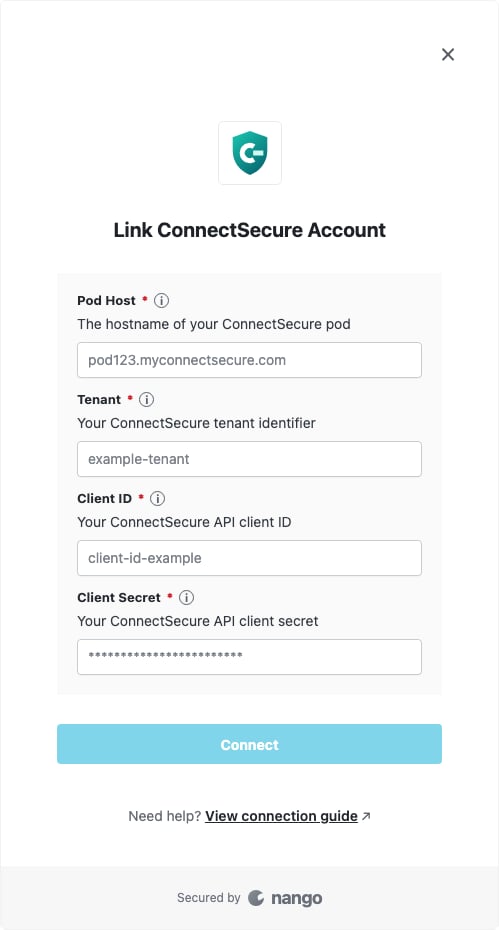
Overview
To authenticate with ConnectSecure, you need four values:- Pod Host — The hostname of your ConnectSecure pod, such as
pod123.myconnectsecure.com. - Tenant — Your ConnectSecure tenant identifier.
- Client ID — Your ConnectSecure API client ID.
- Client Secret — Your ConnectSecure API client secret.
Prerequisites
- An active ConnectSecure account.
- ConnectSecure API credentials for your tenant.
Step 1: Gather your connection details
- Sign in to ConnectSecure.
- Copy the hostname from your browser’s address bar as the Pod Host, with no scheme or path. For example, if the page URL begins with
https://pod123.myconnectsecure.com/, enterpod123.myconnectsecure.com. - Obtain your Tenant, Client ID, and Client Secret from your ConnectSecure administrator or API credential configuration. If API credentials have not been provisioned, contact ConnectSecure support.
Step 2: Enter the values in Nango
- Open the form where you need to authenticate with ConnectSecure.
- Enter the Pod Host, Tenant, Client ID, and Client Secret in their corresponding fields.
- Submit the form, and you should be successfully authenticated.