Overview
To authenticate with Everflow, you need:- API Key — A key that grants Nango access to the Everflow API on your behalf.
- Subdomain —
apifor standard accounts, orapi-euif your account is EU-hosted.
Prerequisites
- An active Everflow account with administrator access.
Step 1: Generate your API key
- Log in to your Everflow account.
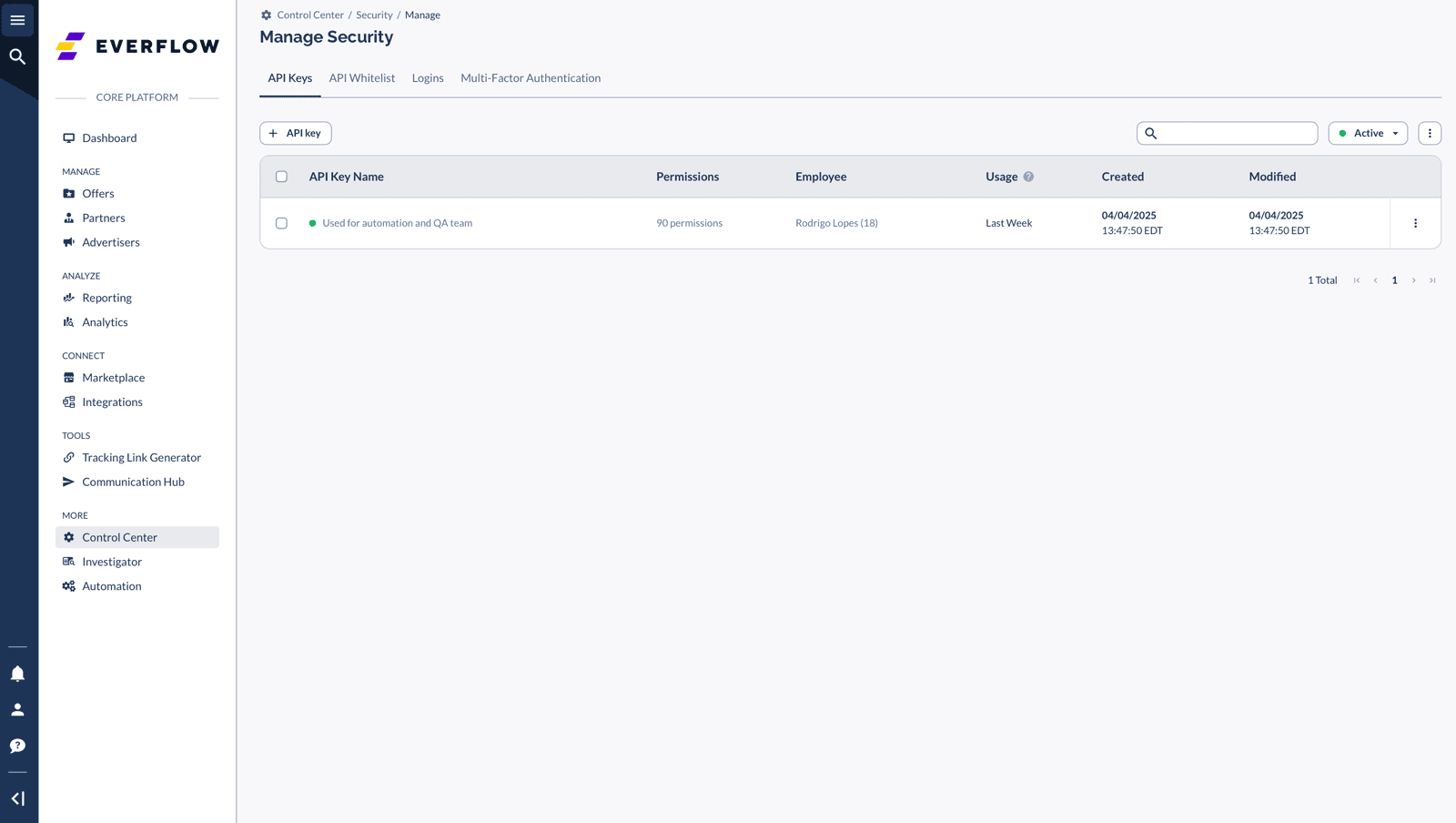
- Navigate to Control Center in the top menu, then select Security.
- Click the API Keys tab.
- Click + API Key.
- Fill in the required details:
- Key name — a descriptive label (e.g. “Nango integration”)
- Who will use it — the employee or service that owns this key
- What it can access — select the API permissions this key needs
- Copy the generated API key immediately — it is only shown once and cannot be retrieved later.
Step 2: Find your subdomain
Your subdomain isapi for standard accounts. If your Everflow account is EU-hosted, use api-eu instead.
Step 3: Enter credentials in the Connect UI
Once you have your API key and subdomain:- Open the form where you need to authenticate with Everflow.
- Enter your Subdomain and API Key in their designated fields.
- Submit the form, and you should be successfully authenticated.