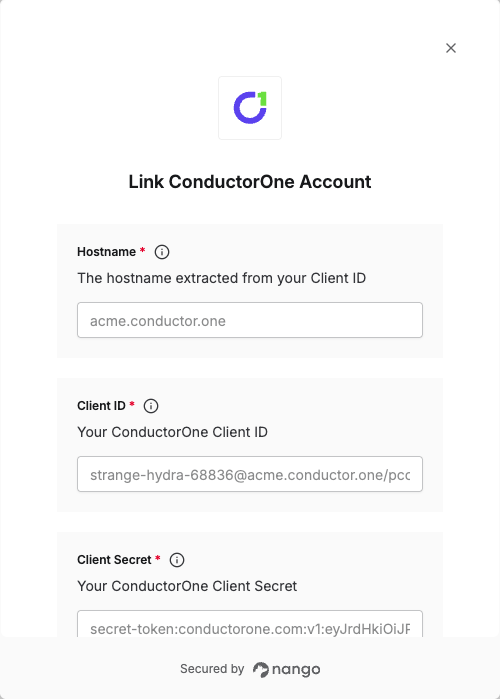
Overview
To authenticate with ConductorOne, you will need:- Hostname - The hostname extracted from your Client ID (the portion between the @ and / symbols).
- Client ID - Your ConductorOne API client identifier in the format
<random-id>@<hostname>/<use-case>. - Client Secret - A secret token used in conjunction with your Client ID to generate an access token for API authentication.
Prerequisites:
- You must have a ConductorOne account.
Instructions:
Step 1: Obtaining Your Client Credentials
- In the ConductorOne app, navigate to the User API Settings page by clicking your username at the bottom of the screen and selecting API Keys.
- Click Create credential.
- Enter a descriptive name for your API key and submit the form.
- Your new key is created, and its Client ID and Client Secret are generated and displayed.
<random-id>@<hostname>/<use-case>. For example: strange-hydra-68836@acme.conductor.one/pcc.
The Client Secret follows the format: secret-token:conductorone.com:${base64url encoded JWK}. It contains an ed25519 private key that you may parse to extract the private key.
Step 2: Obtaining Your Hostname
Your Client ID is in the format<random-id>@<hostname>/<use-case>. The hostname for your API client is the portion of your Client ID immediately following the @ symbol and preceding the / symbol.
For instance, for the Client ID strange-hydra-68836@acme.conductor.one/pcc, the hostname is acme.conductor.one.
Step 3: Enter credentials in the Connect UI
Once you have your Hostname, Client ID, and Client Secret:- Open the form where you need to authenticate with ConductorOne.
- Enter your Hostname, Client ID, and Client Secret in their respective fields.
- Submit the form, and you should be successfully authenticated.