
TL;DR
Paragon is an embedded iPaaS organized around a visual workflow engine, with a separate tool-calling catalog (ActionKit) for AI agents. Integrations stay inside Paragon’s workflow runtime and its pre-built catalog. Most production controls are gated to the Enterprise plan.
Nango is the agentic API integrations platform where coding agents build API integrations. Engineers, or coding agents like Claude Code, Cursor, and Codex, write integrations as TypeScript functions in your repo. Nango’s cloud runs them securely across 1,000+ APIs, with auth, tool calls, syncs, webhooks, and custom unified APIs on a single runtime.
Quick verdict:
- Pick Nango if integrations are core to your product, or if you want coding agents to build and ship new integrations on demand.
- Pick Paragon if a visual workflow builder for non-technical users is a hard requirement, and your roadmap fits inside its pre-built catalog.
What is the difference between Paragon and Nango?
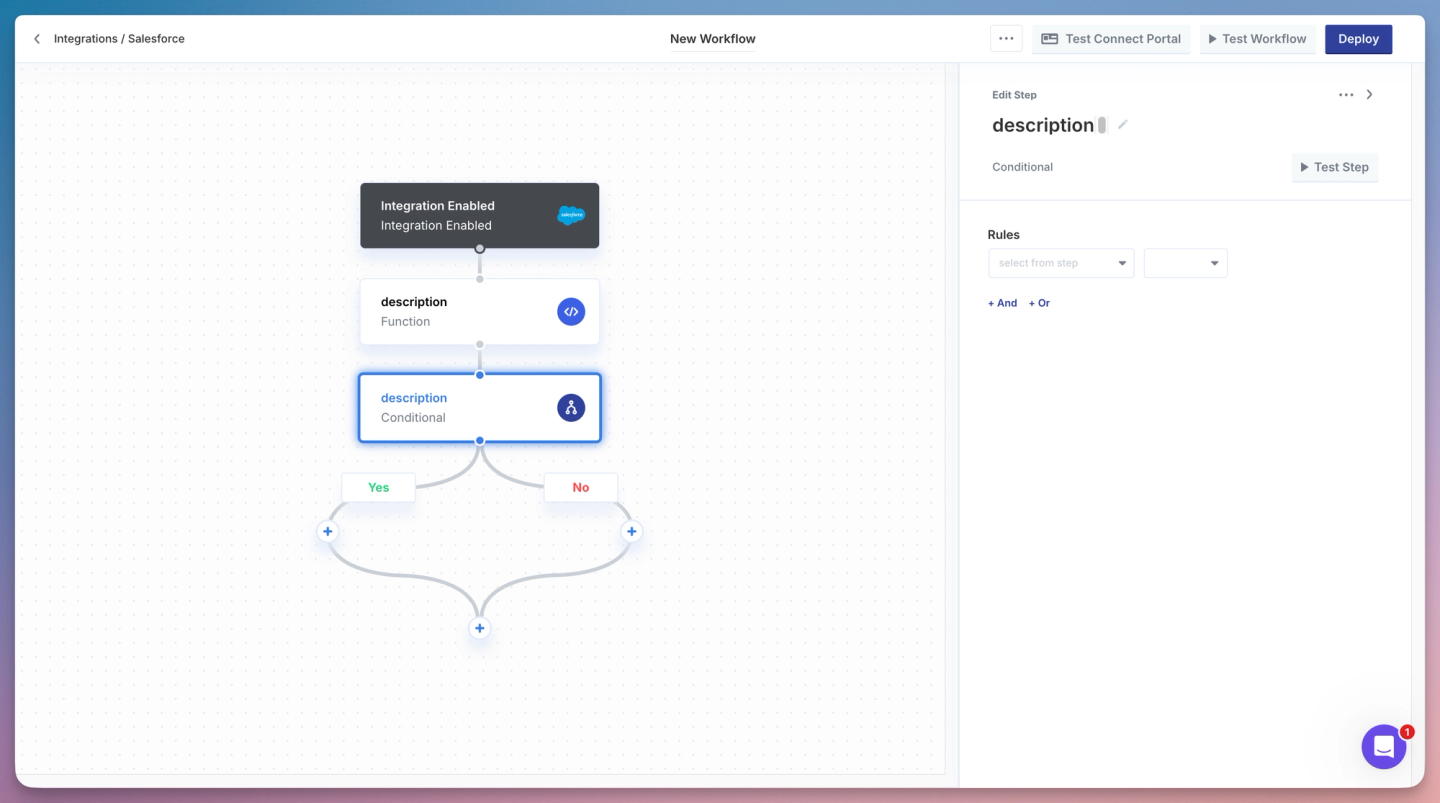
Paragon is an embedded iPaaS built around a low-code workflow engine, with a separate ActionKit catalog for AI agent tool calling. Integrations are workflows you compose from pre-built blocks, either visually or using the TypeScript SDK.
Nango is an agentic API integrations platform. Integrations are TypeScript functions in your repo, written by engineers or by coding agents using the Nango builder skill. Nango also handles API auth, tool calls, syncs, webhooks, polling triggers, and custom unified APIs.
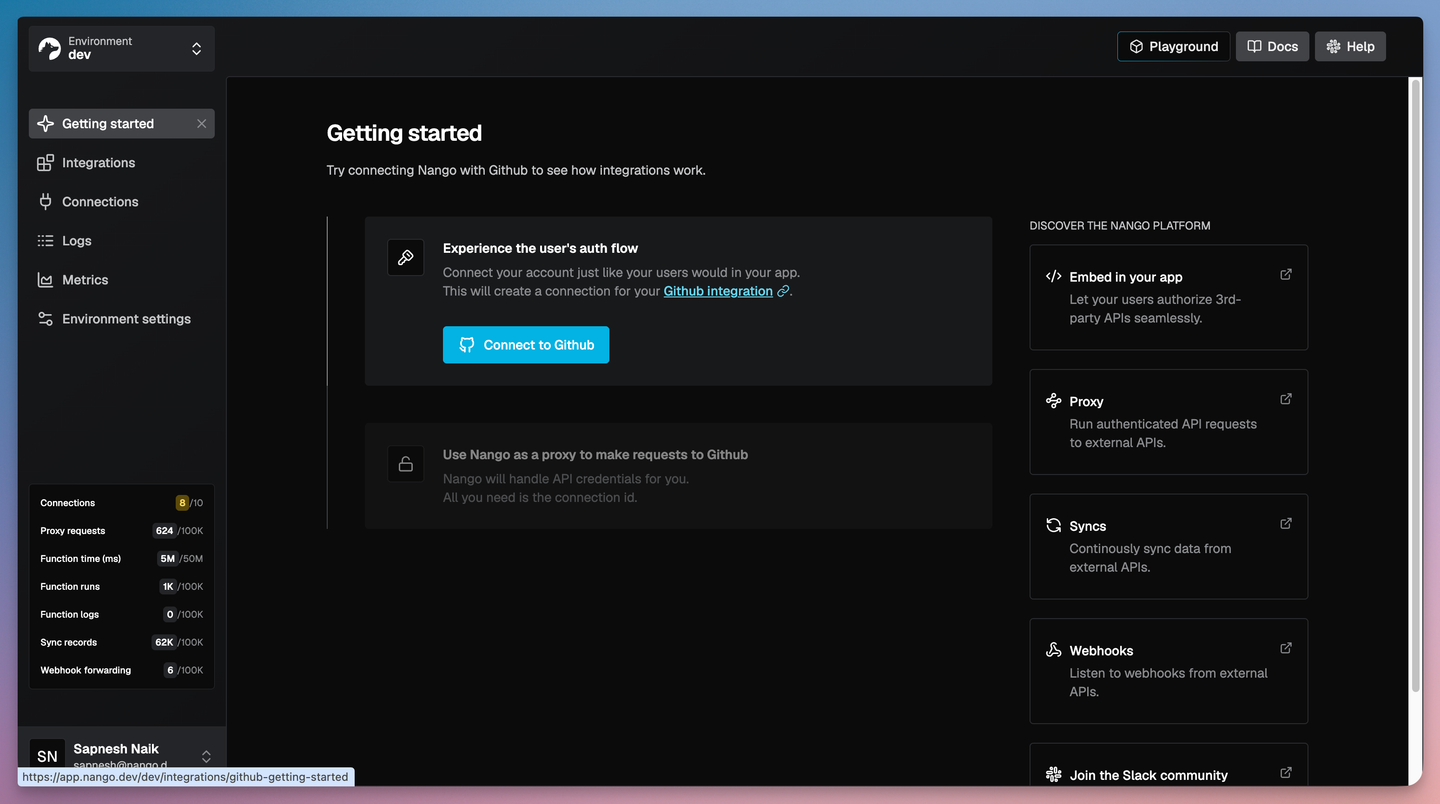
The practical difference shows up in three places: who can build new integrations, what those integrations can do, and how each platform handles AI agents.
Paragon: a workflow engine and a tool-calling layer for AI agents
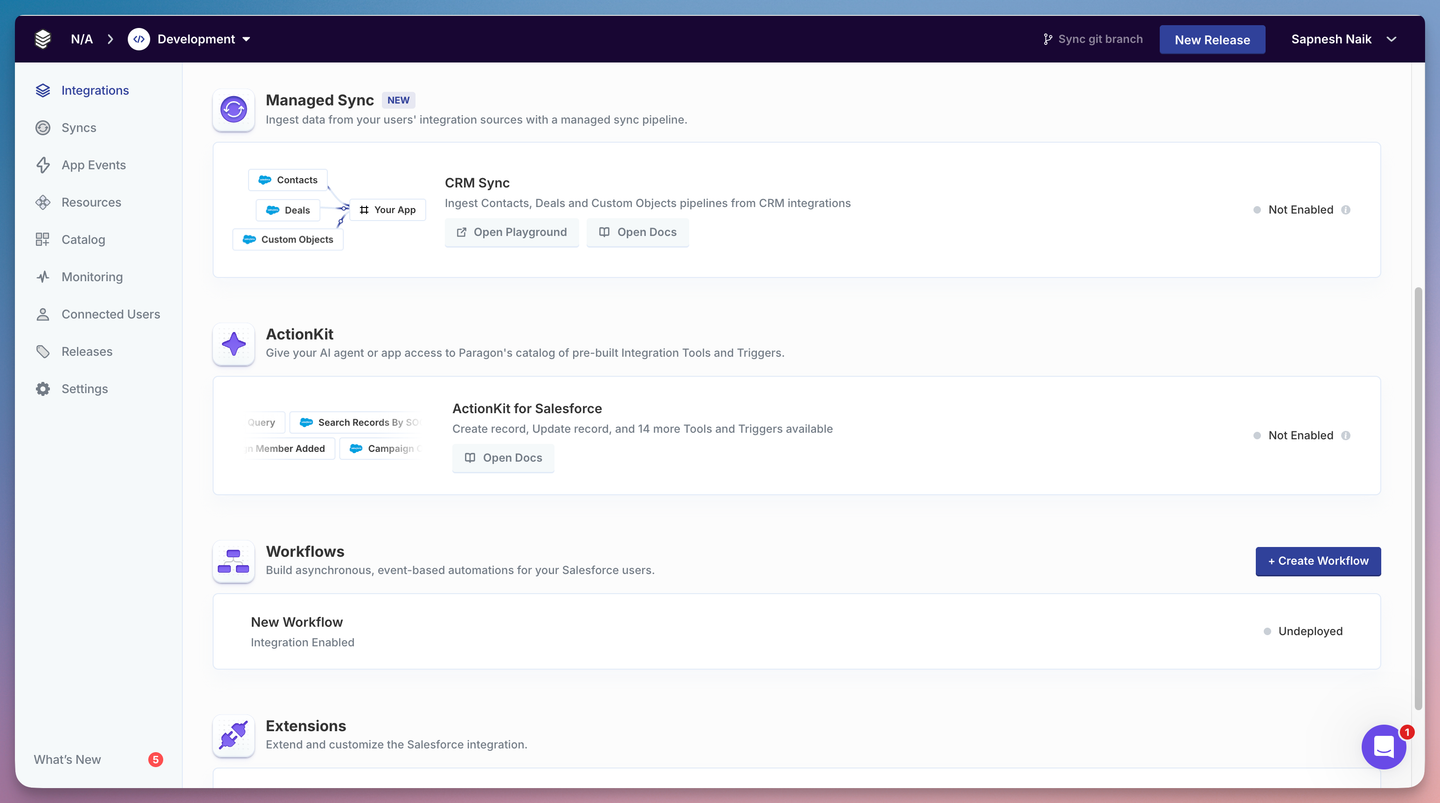
Paragon began as a visual workflow builder for embedded integrations. Their lineup contains:
- Workflows: the original product. A drag-and-drop builder that composes pre-built steps into if-this-then-that automations on Paragon’s serverless engine.
- Paragraph: a TypeScript SDK and CLI for expressing Paragon workflows in code. The code is parsed back into the visual builder blocks. Third-party npm package usage is restrictive.
- Connect Portal: an embeddable, white-label UI that handles auth and lets your customers configure each integration.
- Managed Sync: a separate product for ingesting external data, typically for RAG. Syncs are polling-based, with a configurable cadence as low as one minute.
- ActionKit: a separate, AI-agent-focused product. It exposes around 1,000 pre-built actions through a single API and a hosted MCP server. ActionKit Triggers launched in public beta in May 2026, letting AI agents react to external events.
Custom logic lives inside workflow steps. Custom tool calls cannot be deployed to the ActionKit runtime. There is no coding-agent skill that lets Claude Code, Cursor, or Codex build a new integration end-to-end on Paragon and ship it to production.
Nango: build integrations with AI
Nango helps you build integrations with AI, in code, for your product. The platform is a three-part system:
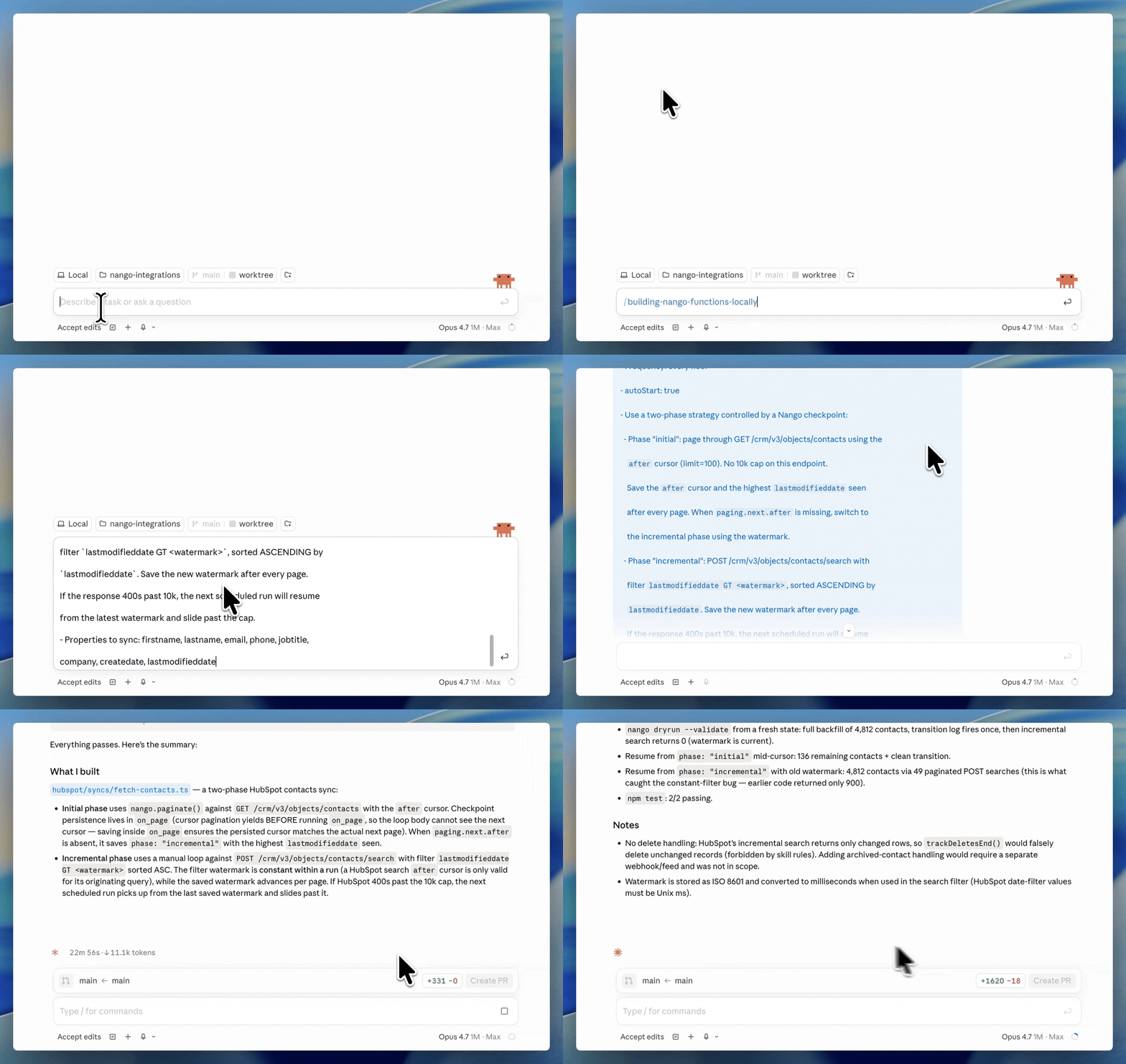
- Integrations as code, written by your coding agent. Install the universal Nango builder skill once in your repo. The skill works with Claude Code, Cursor, Codex, Gemini CLI, OpenCode, and any other coding agent. The agent reads API docs, writes the integration, tests it against a real connection with
nango dryrun, and iterates on real errors. - A secure and scalable runtime. Functions run on Nango’s cloud with tenant isolation, durable execution, and per-customer resource limits. A heavy enterprise sync from one customer cannot starve another’s.
- A single interface for every integration use case. Supports API auth, tool calls, data syncs, webhooks, polling triggers, and custom unified APIs as functions in your repo.
Nango is open source, supports 1,000+ APIs, and is used in production by hundreds of fast-growing SaaS and AI companies.
Nango also supports the new just-in-time integrations use case: instead of pre-building every integration by hand, a coding agent generates them on demand when a customer asks for one.
Six limits you hit with Paragon
Paragon may be a good fit if you specifically want a low-code, UI-based workflow engine and a pre-built catalog. But there are disadvantages for flexibility and AI use cases:
No coding-agent skill that ships a new integration end-to-end
Paragon’s Paragraph gives you a CLI and TypeScript editor. It does not ship a Claude Code or Cursor skill that researches an API, generates the integration, tests it against a real connection, and iterates on real errors. The build is still authored by a human, even if it lives in your repo.
That gap matters because coding agents now build integrations autonomously when the platform gives them the right context. We built 200+ integrations in 15 minutes using the universal Nango builder skill.
Custom logic still parses back to workflow blocks
Paragon’s TypeScript support (through Paragraph) is complementary to their visual workflow builder. Code built with their SDK parses back to the visual workflow builder. In other words, the SDK is an alternative, code-based UX for what is already supported in the visual builder. It does not enable the same unlimited flexibility that pure code-based integration platforms like Nango provide.
Custom tool calls cannot be deployed to ActionKit
ActionKit ships a fixed catalog of around 1,000 pre-built actions. AI agents call those actions through ActionKit’s API or its hosted MCP server. You cannot write a custom tool in code and deploy it to the runtime.
Example: You can’t build a single onboard-customer tool-call that creates a Slack channel, invites users, and posts a welcome message. On ActionKit you have to chain several pre-built tools instead. That inflates the agent’s context and hurts reliability. See how to build reliable tool calls for AI agents.
Managed Sync is polling-based
Managed Sync runs on a polling model with a one-minute minimum cadence. Real-time use cases are not a good fit. An AI agent that needs the freshest CRM record mid-conversation will see stale data.
There is also no first-class way to drive a Managed Sync from an inbound webhook. Paragon also does not document durable, resumable checkpoints for syncs, which makes long-running enterprise backfills harder to recover when a run fails partway through.
When several customers schedule heavy syncs in the same window, work backs up for everyone. A sync that took seconds in a proof of concept can stretch into the tens of minutes. Teams running Paragon at scale flag this noisy-neighbor pattern often.
In contrast, Nango syncs run on a tenant-isolated runtime, use durable checkpoints so a backfill resumes where it stopped, and can be driven by real-time webhooks when the provider supports them.
Key production features sit behind the Enterprise plan
Several capabilities most teams need in production are Enterprise-only on Paragon:
- Dynamic field mapping (per-customer field mappings)
- SAML-based SSO and advanced access control
- Self-hosting or forward-deployed installs
- Unlimited task history retention (Pro caps at 90 days)
- Priority support, SLAs, and professional services
Pricing is gated to a sales conversation. There is no free tier, only a 14-day trial. The full breakdown is in Paragon’s pricing.
You buy four products to build a complete integration
Workflows, Connect Portal, Managed Sync, and ActionKit are separate products that you combine to build a complete integration stack. ActionKit is sold and priced separately from Workflows and Managed Sync. Teams running all three end up with multiple billing line items, three sets of dashboards, and three places to debug a problem.
Nango covers the same surface on one runtime, with one billing model, one observability stack, and one set of credentials.
What engineers like about Nango
Nango covers the Workflows, Managed Sync, and ActionKit use cases on a single stack. Code-level access and an AI coding agent build loop come built in.
Coding agents build the integrations
Install the Nango builder skill once. Your coding agent reads API docs, writes the integration, tests it against a real connection with nango dryrun, and iterates on real errors before deploying. The skill works the same way for any of the 1,000+ APIs Nango supports.
Every integration use case on one platform
API auth, data syncs, webhook processing, polling triggers, tool calls, and an MCP server all run on Nango. A Nango sync is the same kind of function as a Nango tool call. Both share the same runtime, observability, and build loop. Paragon needs four products to cover the same surface.
Build a custom unified API in your data model
If you want the single-interface benefit of a unified API, build it on Nango in your own schema. Your coding agent can write one sync per provider that maps each provider’s native fields into your model, including custom fields.
White-label auth, deep observability, open source
A drop-in Connect UI handles OAuth, API keys, basic auth, JWT, and the MCP Auth standard. End users authorize against your brand, not Nango’s. Headless auth is available if you want to ship your own UI.
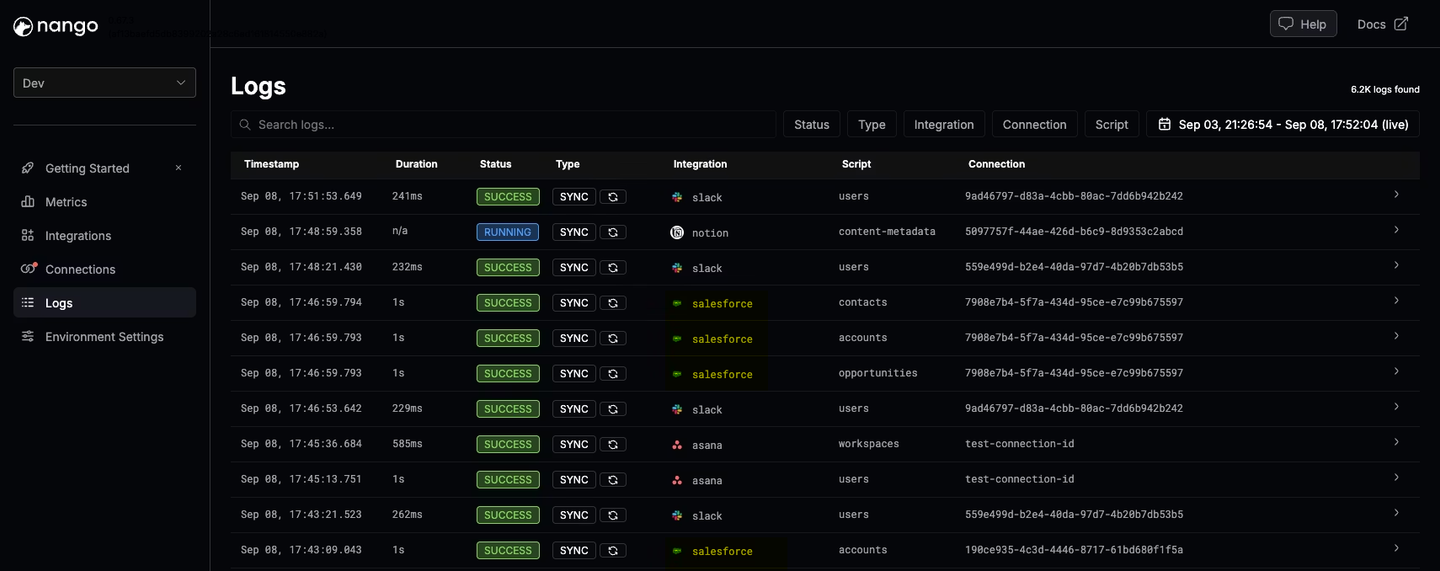
Every operation generates structured logs with full request and response details, exports via OpenTelemetry, and supports custom log messages on every plan.
Tip: Nango also allows self-hosting without an Enterprise contract.
Paragon vs Nango for AI agents and LLM tool calling
If you are building AI agents that call third-party APIs in production, three things matter: how new tools get built, whether they can be customized to your product’s intent, and whether the rest of the integration stack (auth, syncs, webhooks) lives on the same runtime.
Paragon has ActionKit. ActionKit ships around 1,000 pre-built actions and a hosted MCP server, listed on the Anthropic MCP registry and framework-agnostic. ActionKit Triggers, launched in public beta in May 2026, lets agents react to external events. The constraint is that you build with the catalog Paragon ships. You cannot deploy a custom, intent-shaped tool to ActionKit’s runtime, and there is no coding-agent skill that authors new tools on the platform.
Nango has custom tool calls, an MCP server, and AI coding agent support. Your coding agent writes tool calls as TypeScript functions. The function is deployed to Nango and exposed through the Nango MCP server with strict input and output schemas. Per-user and per-customer permissions are enforced by the same runtime that runs auth and syncs. When the agent needs the freshest data, it queries a Nango sync, not a polling cycle that runs every minute.
For the full pattern, see best agentic API integrations platform in 2026.
Paragon vs Nango: feature comparison
| Feature | Nango | Paragon |
|---|---|---|
| Supported APIs / connectors | 1,000+ across 30 categories | ~130 pre-built connectors; ~1,000 pre-built actions in ActionKit |
| Build model | Code-first TypeScript functions | Visual workflow builder, or TypeScript via Paragraph that parses back to workflow blocks |
| AI coding agent skill (Claude Code, Cursor, Codex) | Yes (universal builder skill, dry-run against real APIs) | No |
| Custom tool calls for AI agents deployed to runtime | Yes | No (ActionKit catalog is pre-built) |
| MCP server | Built-in, exposes custom tools and managed APIs | ActionKit hosted MCP, pre-built catalog only |
| Data syncs and webhook ingestion | Durable syncs, real-time webhook ingestion, and polling triggers on one runtime | Managed Sync (polling, ~1-minute minimum) and Workflows webhook triggers, sold as separate products |
| Per-customer field mappings | Yes, in code, every plan | Enterprise-only |
| White-label auth | Yes | Yes |
| Observability with full request/response logs + OpenTelemetry export | Yes, every plan | Event logs all plans; advanced exports on higher tiers |
| SSO | Yes | SAML SSO is Enterprise-only |
| Open source and self-hosting | Open source on GitHub; self-hosting available | Closed source; self-hosting is Enterprise-only |
| Pricing | Transparent usage-based, free tier, monthly terms | No public pricing. Requires Sales calls. |
When Paragon is the right pick
Paragon is a good fit when a visual workflow builder is a hard requirement. Non-technical builders compose integrations alongside engineers, and that workflow paradigm is the center of how your product handles integrations.
When Nango is the right pick
Nango is the right pick when integrations are a core product feature, and you want coding agents to build and ship new ones on demand. Claude Code, Cursor, Copilot, or Codex write each integration, test it against a real connection, and iterate on real errors. Nango exposes these integrations to AI agents in your product via typed API calls or an MCP server.
Nango is also a better fit when your AI agents need custom tool calls beyond a pre-built catalog, when you need real-time data instead of polling syncs, or when you want auth, syncs, webhooks, and tool calls on a single runtime with a single billing model. Transparent usage-based pricing, a free tier, and open source with self-hosting come built in.
How to migrate from Paragon to Nango
To migrate from Paragon to Nango:
- Build any new integrations on Nango first. Do not start new work on Paragon. This caps the scope of what eventually needs to be migrated.
- Install the Nango builder skill in your coding agent (supports all AI Coding Agents).
- Have the coding agent migrate existing workflows one by one. The skill reads API docs, drafts the function, tests against a Nango test connection, and iterates on real responses. Auth, retries, pagination, and observability are handled by the runtime.
- Re-platform Managed Sync to Nango syncs with durable checkpoints. Real-time and incremental options are available out of the box.
- Re-platform ActionKit calls to Nango tool calls. Author intent-shaped tools as functions and expose them through the Nango MCP server.
- Migrate customer connections. Use Nango’s white-label Connect UI to re-authorize customers under your brand.
- Decommission Paragon at each product’s renewal boundary.
FAQ
Paragon vs Nango embedded iPaaS, which one is better for my team?
Nango is the better fit if integrations are core to your product, you want coding agents to build new integrations, or your AI agents need custom tool calls. Paragon is the better fit if you specifically need a visual workflow builder for non-technical users and your integration plan fits inside its pre-built connectors and actions.
What is the difference between Paragon and Nango for API integrations?
Paragon is a workflow-engine embedded iPaaS with a separate tool-calling product (ActionKit) for AI agents. Integrations are workflows you compose from pre-built blocks, either visually or in TypeScript via Paragraph. Nango is an agentic API integrations platform where coding agents write integrations as plain TypeScript functions. Auth, tool calls, data syncs, webhooks, and unified APIs all run on the same runtime.
Nango vs Paragon for building native integrations in SaaS products?
Nango is the most flexible fit. It supports 1,000+ APIs versus Paragon’s roughly 130 pre-built connectors. It ships a coding-agent skill that builds new integrations end-to-end. Auth, tool calls, syncs, webhooks, and unified APIs run on one runtime, with transparent usage-based pricing and a free tier. Paragon is a fit when a visual workflow builder is a requirement and your roadmap fits inside its catalog.
Is there a code-first alternative to Paragon for embedded integrations?
Yes. Nango is the code-first alternative to Paragon. Integrations are plain TypeScript functions in your repo, with no workflow engine in the middle and no approved-package list. Paragon’s Paragraph SDK gives you a TypeScript editor and a CLI, but the underlying integrations are still workflows composed from @useparagon/core blocks.
Nango alternatives for production-grade API integrations at scale?
Nango is the most flexible option for production-grade API integrations across 1,000+ APIs, AI agent tool calls, data syncs, webhook ingestion, and custom unified APIs on one runtime. Narrower alternatives exist for specific niches: Paragon and other embedded iPaaS platforms for visual workflow building, Merge.dev for a fixed unified API across nine categories, and pure tool-calling runtimes for AI agents that only need a pre-built MCP catalog.
Can I self-host Paragon?
Self-hosting is available only on Paragon’s Enterprise plan. Nango is open source and self-hosting is available for teams with data residency, compliance, or risk-management requirements that rule out a third-party hosted platform.
Conclusion
Paragon is a good fit when a visual workflow builder is a requirement and your integration plan fits inside its pre-built catalog. Nango is the most flexible platform across the surface area covered in this comparison. Coding agents build new integrations across 1,000+ APIs. Durable syncs and webhook processing run on the same runtime. A built-in MCP server exposes custom tool calls authored by your coding agent. White-label auth ships by default. Open source and self-hosting are available on day one.
Related reading
- The 4 most popular Paragon alternatives
- Paragon’s pricing: what you should know before signing up
- What is an embedded iPaaS?
- Best embedded iPaaS platforms for product integrations in 2026
- How is Nango different from embedded iPaaS or unified APIs?
- Merge.dev vs Nango: which API integration platform should you choose in 2026?
- Best agentic API integrations platform in 2026
- How to build reliable tool calls for AI agents
- Using AI coding agents for building API integrations
- How to build a custom unified API for your product integrations


