
TL;DR
- AI coding agents like Claude Code, Cursor, and Codex can now build API integrations in hours instead of weeks.
- The specific agent matters less than the integration platform and skills backing it.
- Agents need more than coding ability: managed auth, testing against real APIs, deployment infrastructure, and observability.
- Nango’s AI builder skill gives any compatible coding agent the context to generate, test, and deploy production-ready API integrations end-to-end.
If you’re building a SaaS product or AI application that connects to external APIs like Salesforce, Slack, HubSpot, or Gmail, each integration follows the same cycle: read the API docs, implement OAuth, handle pagination, test edge cases, and maintain over time. Most teams treat each integration as a multi-week engineering project, shipping only a handful of API integrations per quarter.
AI coding agents like Claude Code, Cursor, Codex, and Gemini CLI have changed the economics of building software. They can research documentation, write code, and iterate on failures with minimal manual intervention. We’ve seen features that used to take a developer a week ship in an afternoon.
However, using AI coding agents for building API integrations is not straightforward. Writing the right prompt is difficult if you’re not an integrations expert, and the requirements change from API to API.
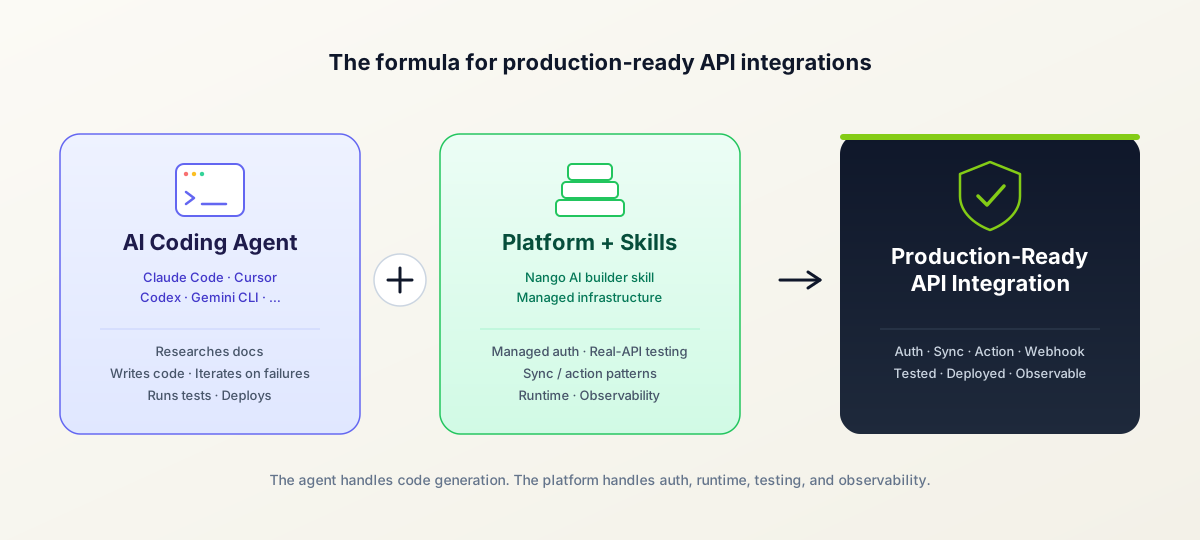
Additionally, API integrations require more than just code: managed OAuth with automatic token refresh, durable execution runtimes for long-running syncs, webhook ingestion, rate limit handling, and observability. An integration platform with purpose-built coding-agent skills bridges this gap by providing both the infrastructure and the domain expertise agents need to deliver integrations that work in production.
What does a typical API integration involve?
When building an API integration for your product, you typically need to handle these pieces:
Authentication and API access
- Create an OAuth app or API key with the provider.
- Implement token storage, encryption, and automatic refresh before tokens expire.
- Handle provider-specific auth quirks (PKCE requirements, scope differences, token expiry rules)
Your application frontend
- Build an auth flow where end users connect their own Salesforce, Slack, or HubSpot account to your product.
Your application backend
- Invoke provider actions (send a Slack message, create a Salesforce contact, update a HubSpot deal)
- Sync data from the provider on a schedule or in real time
- Process incoming webhooks from the provider
If your app includes AI agents
- Expose custom tool calls so in-product AI agents can perform actions with external APIs
- Support MCP or just-in-time integrations generated on demand.
Each of these is a separate engineering problem. AI coding agents need the right scaffolding and infrastructure to deliver end-to-end integrations.
Why use AI coding agents for API integrations?
AI coding agents can now handle most of the mechanical work of building an API integration, compressing what used to take weeks into hours.
For API integrations specifically, agents excel at:
- Researching API documentation: Given a link to API docs, agents identify the right endpoints, required parameters, and response formats.
- Generating boilerplate: Auth headers, request payloads, response handling, and pagination logic.
- Data mapping: Transforming between provider schemas and your application’s data model.
- Iterating on failures: When a test fails, agents read the error, adjust the implementation, and retry.
What makes this even more effective is the emergence of skills: reusable instruction sets that give coding agents domain-specific expertise. For API integrations, a good skill encodes patterns for authentication, data syncing, error handling, and testing, so the agent does not start from scratch every time.
This is fundamentally different from low-code or non-agentic integration platforms. Low-code platforms offer visual builders with pre-built connectors that constrain what you can build to what the platform supports. These are not compatible with AI coding agents. By using a code-first agentic integrations platform (like Nango), you get full programmatic control with the speed of AI-assisted development.
| Agentic integration platform | Traditional integration platforms | |
|---|---|---|
| Flexibility | Full programmatic control over every API call | Limited to platform connectors and visual builder |
| Custom logic | Any logic the agent can write and test | Constrained by builder capabilities |
| AI agent tool calls | Custom, typed functions your AI agents can invoke | Pre-built MCP packs or no support |
| Triggers | Webhook and polling triggers that invoke tool calls on provider changes | Limited or no support for agent-triggered workflows |
| Complex syncs | Custom checkpoint strategies, pagination, delete detection | Pre-built sync patterns (if available) |
| Maintenance | Version controlled, testable, CI/CD deployable | Platform-dependent, often opaque |
For a detailed comparison, see our evaluation of top embedded iPaaS alternatives and best embedded integrations platforms.
What do AI coding agents need to build API integrations?
Beyond coding ability, agents need managed auth (OAuth, JWT, Basic, etc), real API testing (dry runs), integration-specific patterns (syncs, webhooks, actions), deployment infrastructure, and observability (logging).
Nango’s AI integration builder skill, for example, provides all of the below capabilities to your coding agent, enabling it to generate production-ready, fully working API integrations.
Managed authentication
OAuth alone has dozens of provider-specific quirks, token refresh race conditions, and undocumented behaviors. You do not want your coding agent writing custom auth logic for every API. An integration platform handles token storage, encryption, refresh, and scope management so that the agent can focus on business logic.
Testing against real APIs
An agent that generates code without testing it against the real API will produce code that looks correct but fails in production. Subtle errors such as incorrect field names, incorrect data types, or missing required parameters are common.
The fix is giving the agent a way to validate its implementation against live API responses. Nango’s CLI provides a dryrun command that lets the agent execute its code against a real connection and iterate until tests pass.
Integration-specific patterns
API integrations have patterns that are not obvious from general programming knowledge. Most AI products want these capabilities first:
- Actions (tool calls): Real-time operations to read or write data, like creating a contact, sending a message, or fetching a record. Your AI agents invoke these as typed tool calls on demand.
- Triggers: Polling-based or webhook-based triggers that let your product react to changes in the provider. Triggers often chain into tool calls that update the agent’s state.
- Webhooks: For providers that support them, webhooks deliver real-time events. Handling them requires signature verification, retry and deduplication logic, and a runtime that routes events back to the right tenant.
Syncs come next and are harder than they look once datasets grow. Large-scale data synchronization requires:
- Checkpoint strategies: Incremental syncs need to track where they left off (timestamps, cursors, page tokens) to avoid re-fetching the entire dataset on every run.
- Delete detection: Knowing when a record was deleted at the provider requires strategies that depend on what the API supports (deleted-records endpoints, tombstones, full-refresh fallback).
- Pagination: Different APIs paginate differently (cursor-based, offset-based, link-header). Each requires its own handling.
These patterns are encoded in integration platform skills, so the agent considers them up front instead of stumbling into them later.
Security for agent-written code
Agent-written integrations introduce a new security concern: the code running in production was generated by an LLM, not reviewed by a human. This matters most for just-in-time integrations, where agents build and deploy integrations on demand.
Run agent-generated code in an isolated runtime with tenant sandboxing, restricted network access, and audit logs for every execution. Treat every agent-authored function as untrusted by default.
Deployment and runtime infrastructure
Once the code works locally, it needs to run in production. That means a runtime with tenant isolation, automatic retries, rate limit handling, and durable execution for syncs that process millions of records.
Observability
When an integration fails, someone (or something) needs to diagnose what went wrong. Structured logs of every API interaction, execution metrics per integration and per customer, and detailed error traces are essential. With good observability, the coding agent itself can inspect failures and iterate on fixes.
How to build API integrations using a coding agent
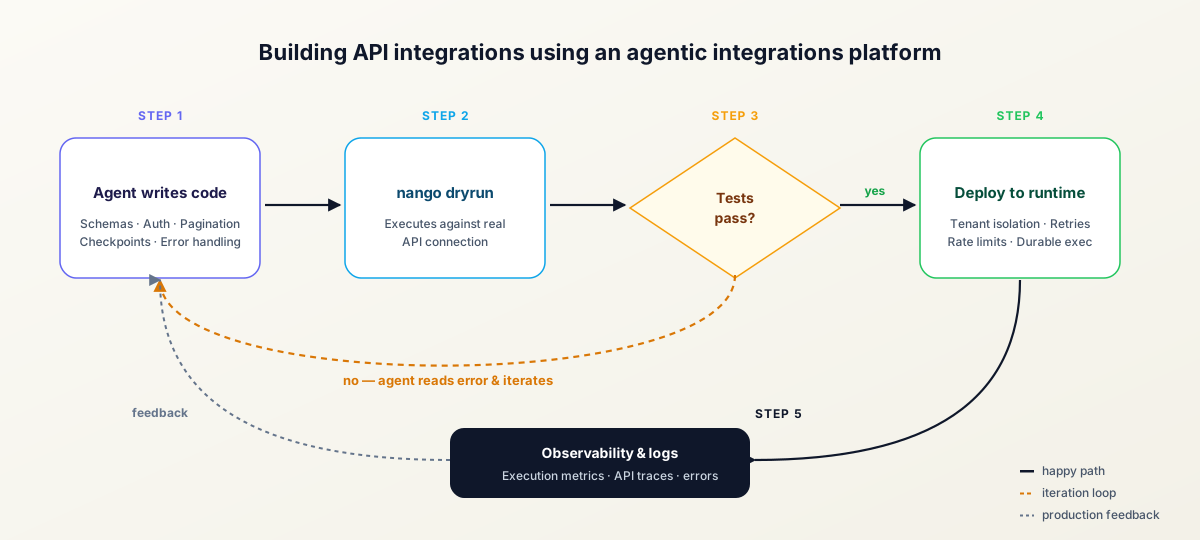
Here is a quick step-by-step walkthrough using Nango and any compatible AI coding agent, such as Claude Code, Cursor, GitHub Copilot, Gemini CLI, Codex, OpenCode, and more.
1. Set up Nango
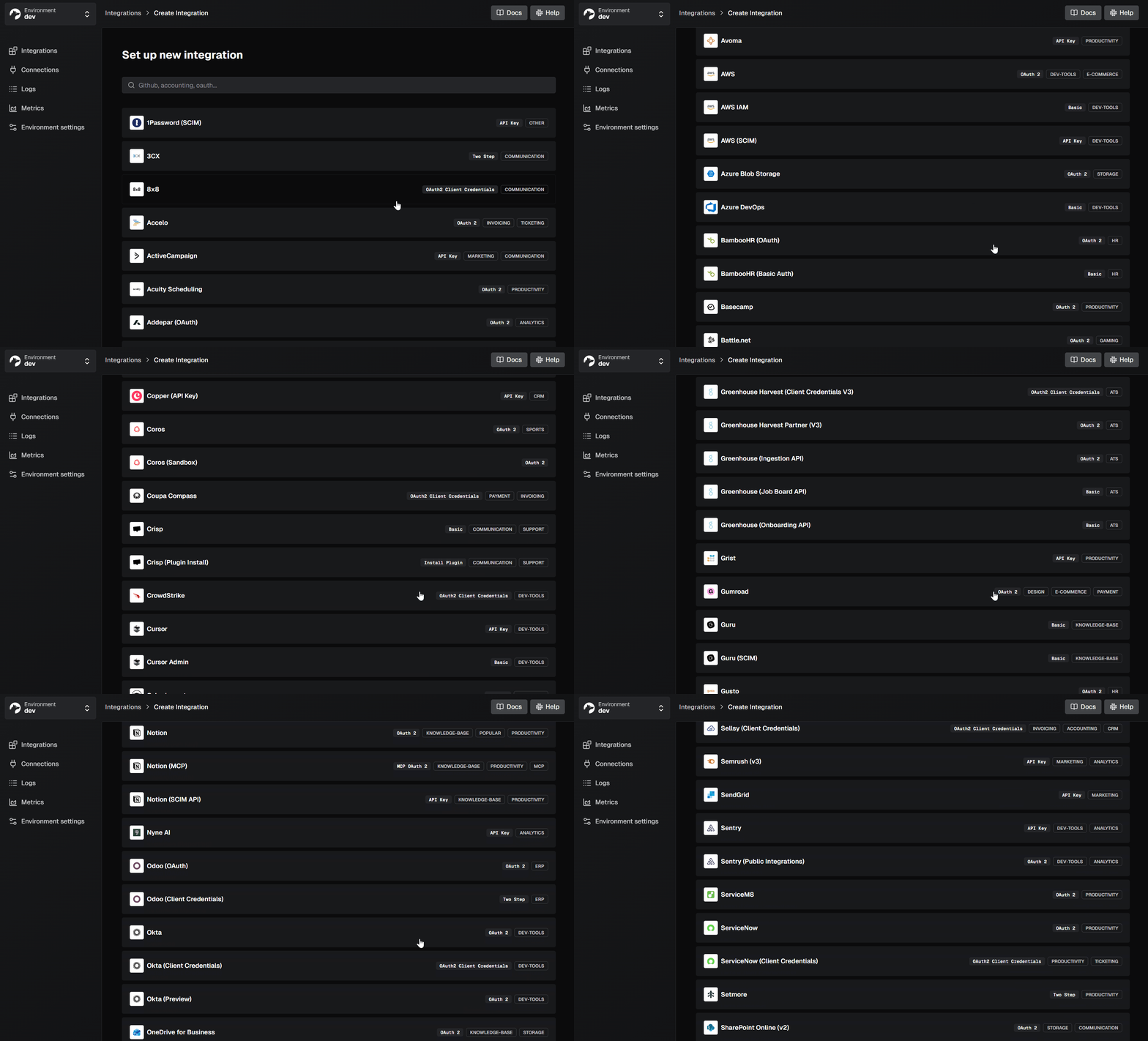
Sign up at nango.dev and create a new integration in the Nango dashboard. Add your OAuth credentials or API keys for the provider you want to integrate with (e.g., Salesforce, Slack, HubSpot).
2. Install the Nango CLI and initialize your project
Follow the functions setup guide to install the Nango CLI and initialize your integrations folder.
3. Install Nango AI skills
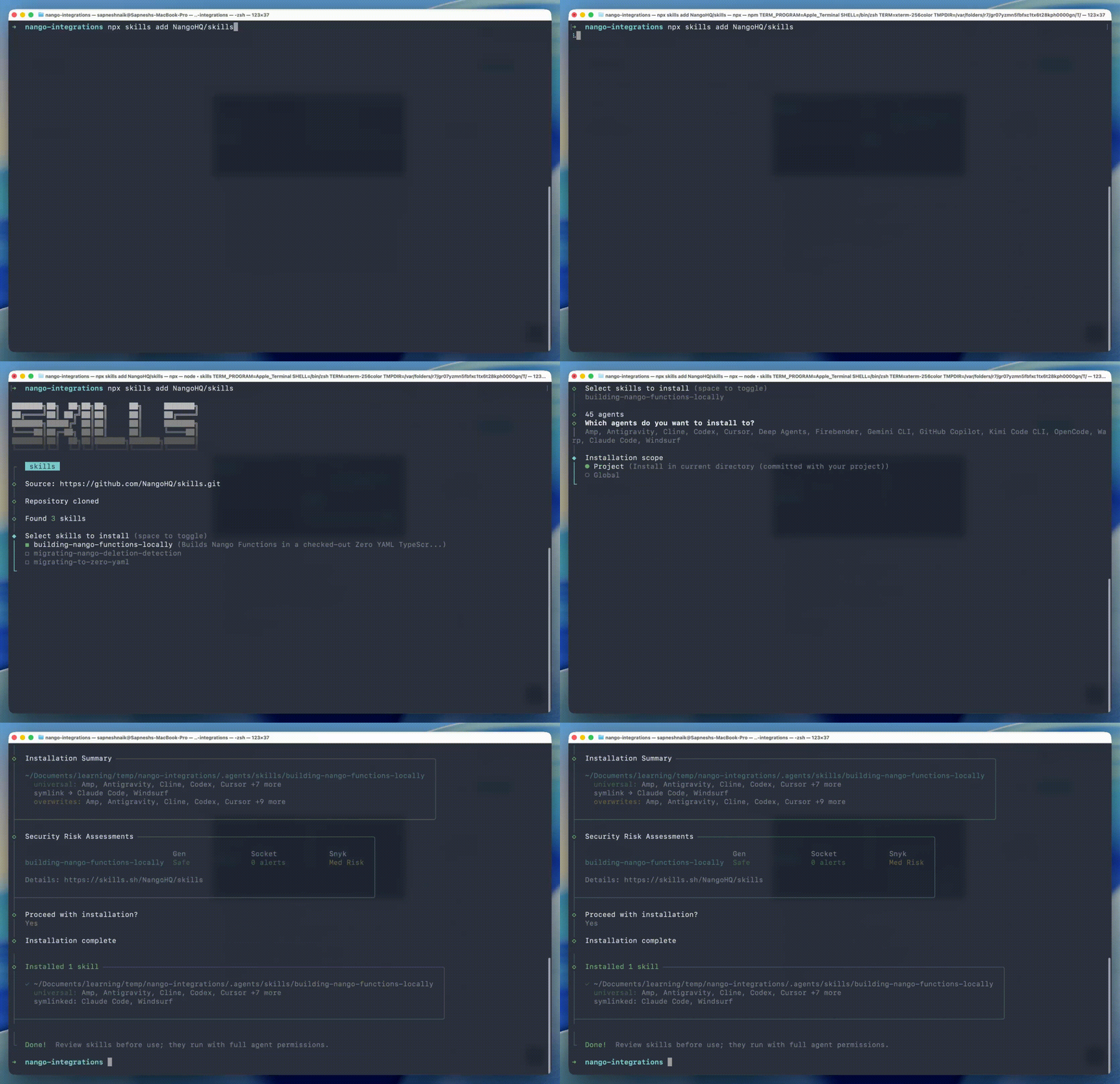
Follow the AI integration builder guide to install the Nango skill for your coding agent:
npx skills add NangoHQ/skillsThis adds the integration builder skill to your project. Restart your coding agent to load the new instructions.
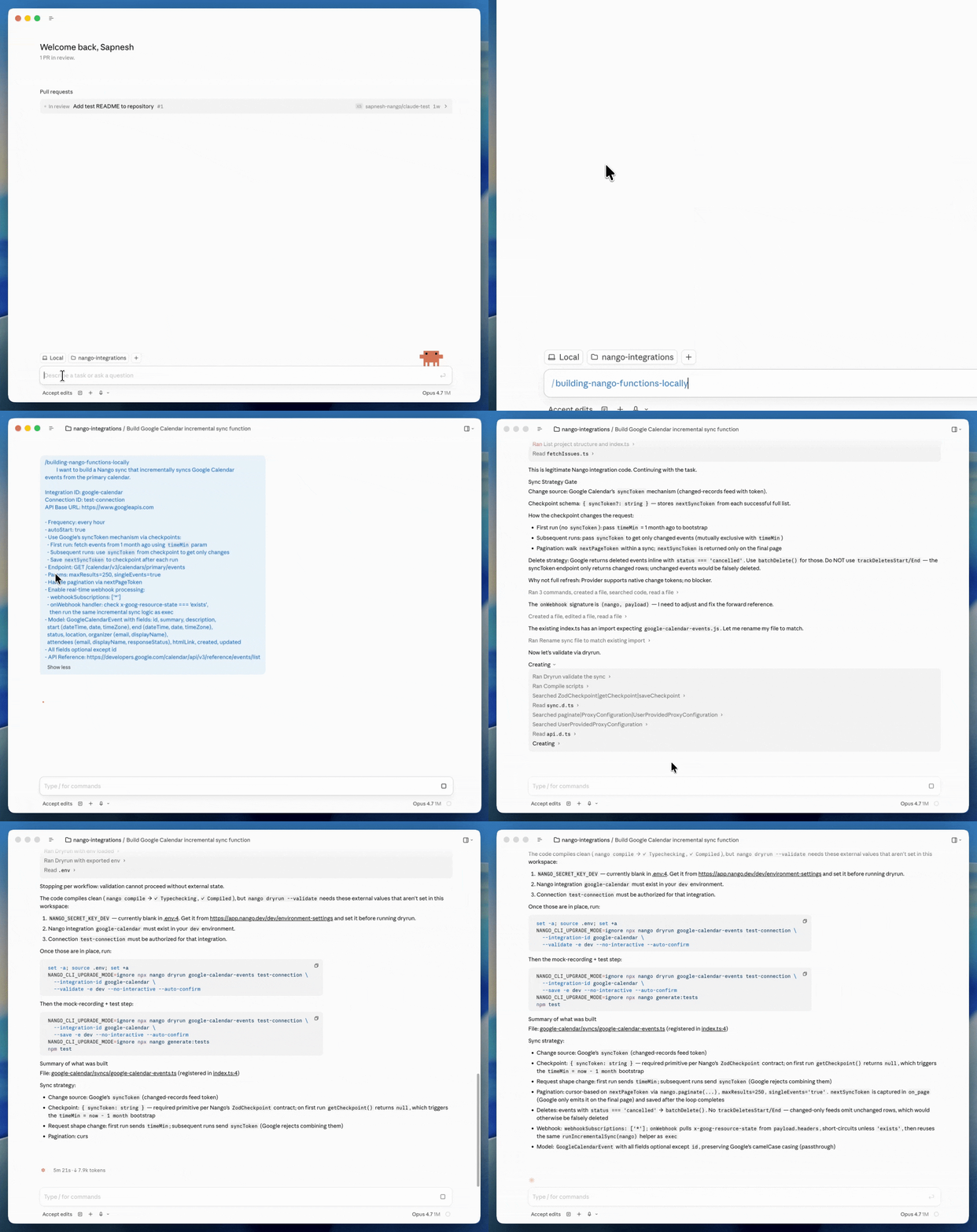
4. Prompt your coding agent
Open your coding agent (Claude Code, Cursor, Codex, or any of the 18+ supported agents) in the nango-integrations folder and describe what you want to build:
Build a Nango sync that fetches events from the primary Google Calendar.

Should run hourly, backfill on initial sync for the last 30 days and
all future events. After the first run, only fetch future events
incrementally.

Return at least:
- Event title
- Start and end date
- Location
- RSVP status
- Attendees list (email, display name, response status)
The skill handles the details. You describe what you want at a high level, and the agent figures out the right endpoints, pagination, checkpoint strategy, and schema.
5. The agent builds, tests, and iterates
Using the skill’s instructions, the agent will:
- Research the API documentation to find the correct endpoint and parameters.
- Write the integration code with proper schemas, error handling, and types.
- Run
nango dryrunto validate the code against your real connection. - If the test fails, read the error, fix the code, and retry.
- Once passing, generate unit tests with recorded API responses.
6. Deploy and verify
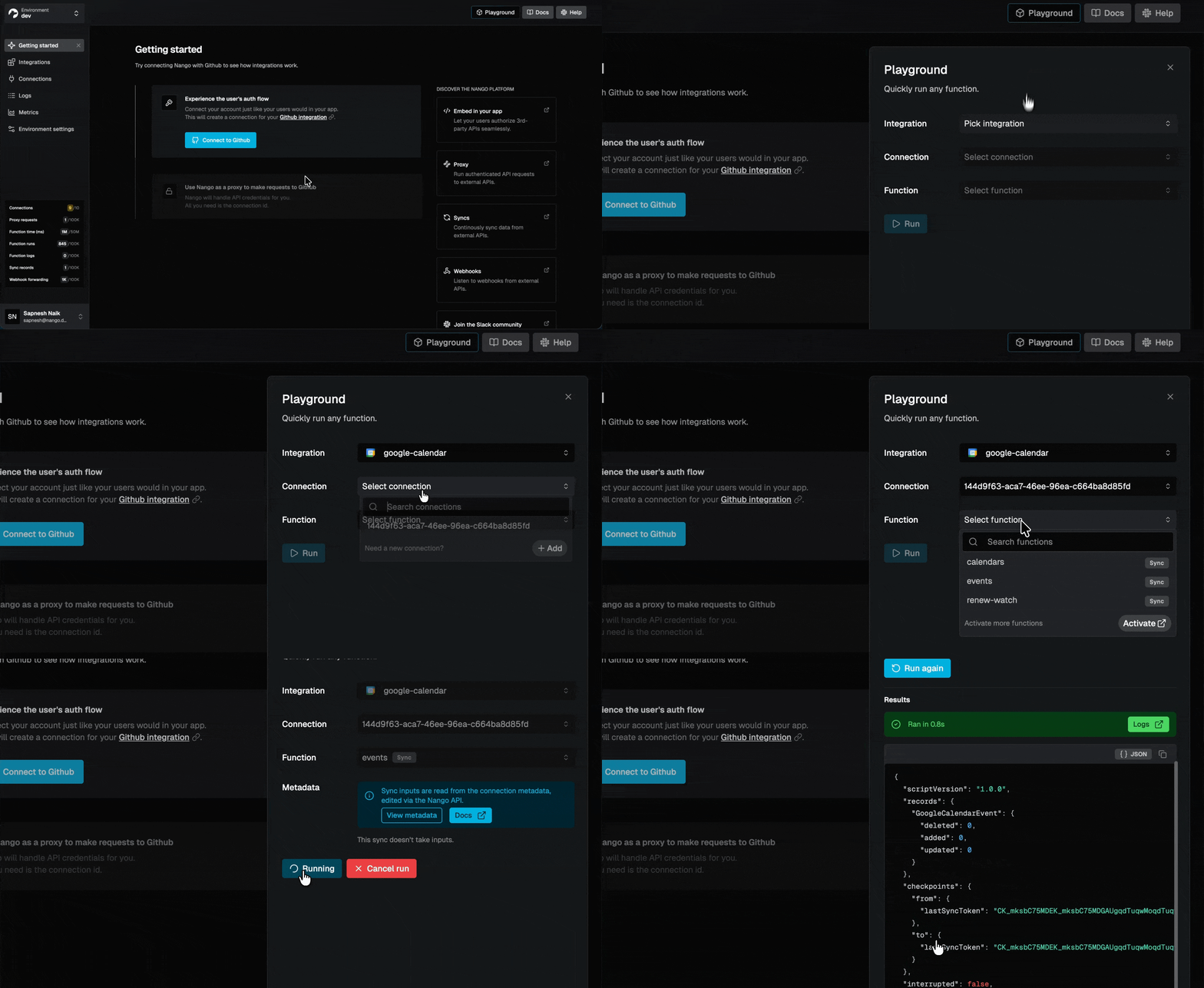
Deploy your integration to your Nango environment:
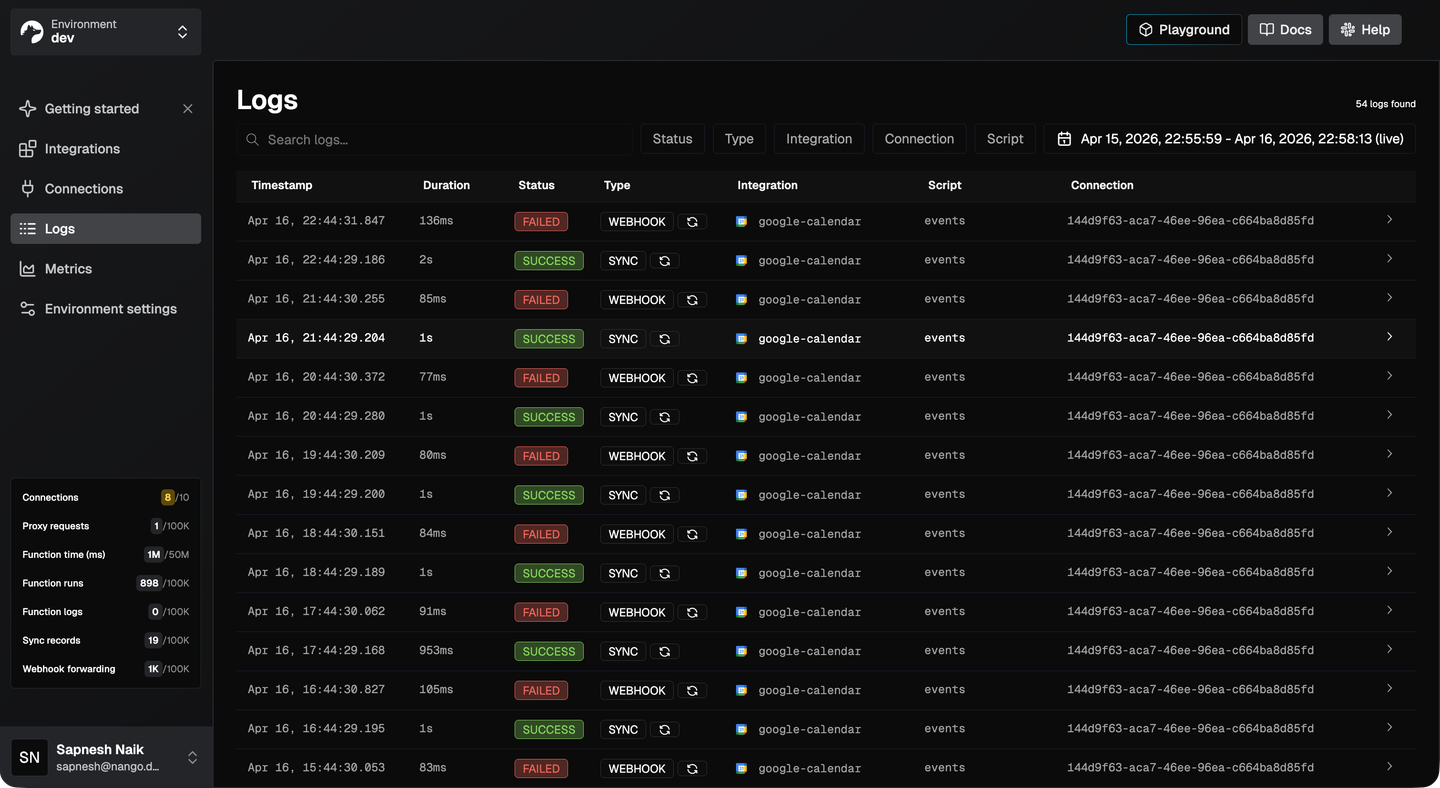
nango deploy devThen use the Nango Playground to trigger the action or sync manually and check the detailed logs in the observability dashboard to verify everything works as expected.
7. Build your application-side code
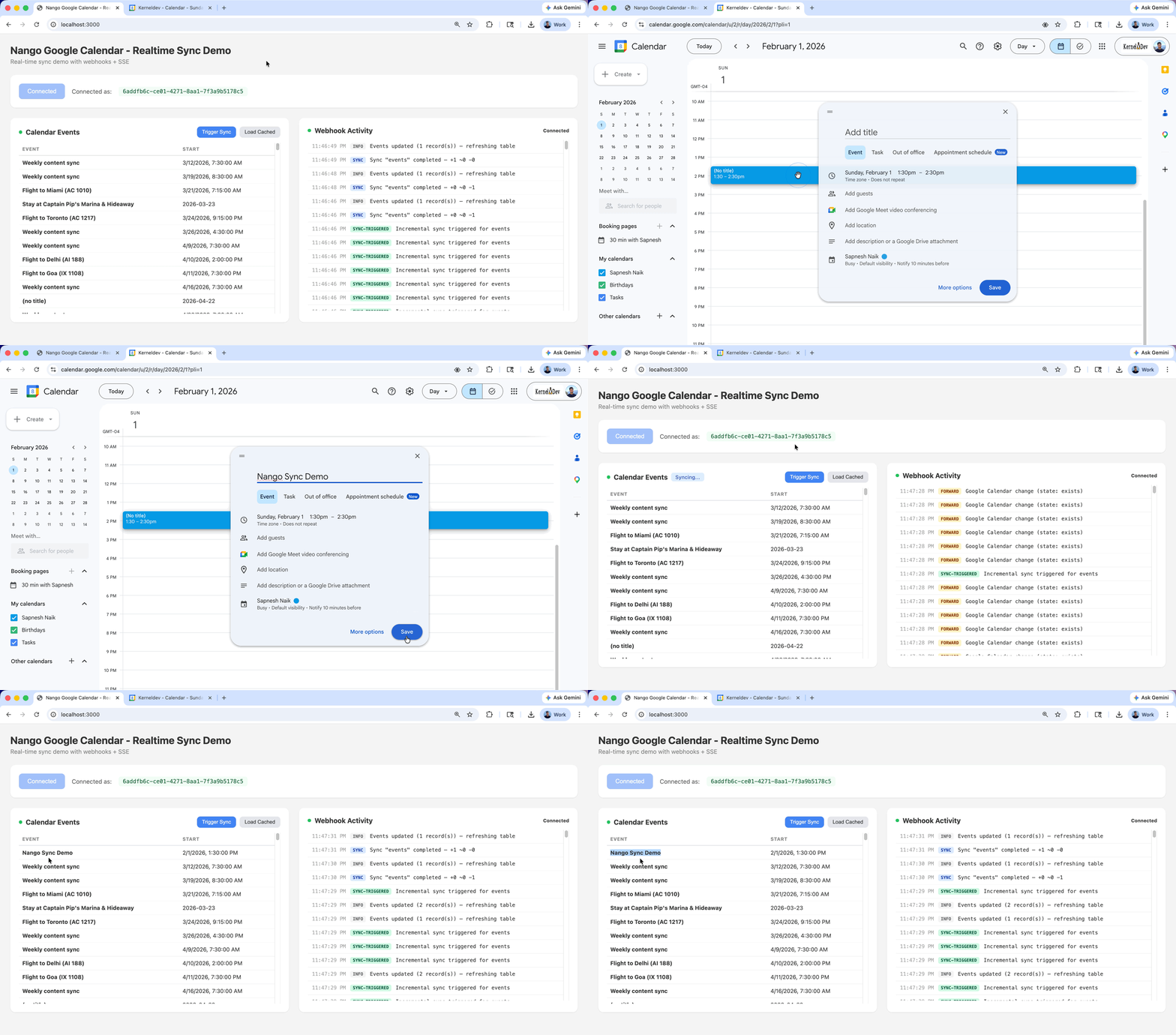
Use the coding agent again to build the frontend auth UI (using Nango’s frontend SDK) and backend logic that triggers (syncs/actions) from your application.
Which AI coding agents work best for API integrations?
At Nango, we recently built 200+ API integrations with autonomous agents across five APIs (Google Calendar, Drive, Sheets, HubSpot, and Slack). The pipeline generated approximately 200 integrations in 15 minutes for under $20 in token costs. Here is what we learned.
The agent matters less than the platform
All major coding agents in April 2026 (Claude Code, Cursor, Codex, Gemini CLI, Kimi Code, OpenCode) are capable of building API integrations when given the right skills and tooling. The real differentiators are:
- Can the agent test against real APIs? Dry runs with live connections catch errors that static analysis misses.
- Does the agent have integration-specific skills? Skills encode patterns (checkpoints, pagination, error handling) that generic coding ability does not cover.
- Can the agent access logs and iterate? When something fails, the agent should be able to read observability data and fix the issue autonomously.
Actions are easier than syncs
One-time actions (create a contact, send a message, fetch a record) are straightforward for any capable coding agent. Syncs (scheduled data synchronization with incremental updates, checkpoint handling, and delete detection) are more complex.
For complex syncs, we found that asking the agent to handle everything in a single prompt was often too much. Breaking the task into smaller steps produced better results.
What we observed across models
From testing across hundreds of integration generations:
- Claude Opus and Kimi K2.5 both performed well for actions and simpler syncs. Kimi K2.5 had a slight edge in our tests, particularly given its cost efficiency ($0.60 per million input tokens, compared to significantly higher costs for comparable models).
- Codex excels at longer, more complex tasks, such as Syncs that require sustained context across many iterations. Its background execution model is well-suited to batch integration generation.
- For most teams, the best agent is whichever one your team is already comfortable with. Nango’s AI builder skill is compatible with all of them.
These observations reflect the landscape as of April 2026. AI models improve rapidly, and the relative strengths will shift. What remains constant is the need for a code-first agentic integration platform with managed auth, testing infrastructure, and skills that encode integration expertise.
Conclusion
AI coding agents have compressed the timeline for building API integrations from weeks to hours. Any major coding agent can produce working integration code when paired with the right platform and skills.
The specific agent you choose matters less than the infrastructure supporting it. Managed authentication, testing against real APIs, integration-specific patterns, deployment, and observability are what turn generated code into production-ready integrations.
Nango’s AI builder skill works with 18+ coding agents and guides them through the full lifecycle: research the API, write the integration, test with real connections, generate unit tests, and deploy. It encodes the patterns learned from building 200+ integrations autonomously.
If your product needs API integrations, pairing your favorite coding agent with a purpose-built integration platform is the fastest path to production.
Related posts
- What we learned building 200+ API integrations with OpenCode
- How to build a Google Sheets API integration with Nango and Codex
- Introducing the Nango API integrations builder skill
- Nango Clone: customize integration templates with AI
- Best practices for building API integrations with AI agents
- The emergence of just-in-time integrations
- Best embedded iPaaS for just-in-time API integrations
- Why AI agents need an integrations platform
- Build reliable tool calls for AI agents integrating with external APIs


