
TL;DR
Coding agents write code well but build API integrations poorly on their own. They refer to old training data, invent endpoints and parameters, skip token refresh and pagination, and ship code that compiles but fails in production. A good API integration skill closes that gap: it encodes the patterns, points the agent at a way to test against the real API, and deploys to a runtime.
The skills compared here:
- Nango Function Builder skill (local): Build full integrations as code in your repo with any of 18+ coding agents, test against a real connection with
nango dryrun, then deploy to Nango’s runtime. Broadest option. - Nango remote function builder: The same skill over the Functions API, with no local project. An agent (inside your product) builds, tests, and deploys an integration straight from a prompt. This is how just-in-time integrations work.
- Prismatic Skills for Claude Code: Builds Prismatic low-code workflow integrations from Claude Code. Claude Code only, and tied to the Prismatic platform.
What is a skill?
A skill is a packaged capability for a coding agent like Claude. Skills contain instructions, plus optional bundled scripts and reference files the agent loads when needed.
Anthropic introduced Agent Skills in October, 2025, and published the format as an open standard. OpenAI then added native Agent Skills to Codex using the same SKILL.md format, and treats skills as the recommended way to give Codex reusable instructions.
Why coding agents need skills to build API integrations
Coding agents are good at writing code, but building a production API integration is difficult.
In a 2025 study benchmarking LLMs on web API integration tasks, models hallucinated endpoint URLs up to 39% of the time and parameter names up to 31% of the time, and none of the open-source models tested solved more than 40% of the tasks. The same pattern shows up in dependencies: a 2025 USENIX Security study of 576,000 generated code samples found that 19.7% of the packages the models recommended did not exist.
There is also the part that is not code at all. A real integration has to handle OAuth and token refresh, pagination, retries, rate limits, webhook delivery, incremental syncs, and observability. An agent can write a fetch call, but it cannot reliably reproduce the infrastructure that keeps that call working across providers and customers. Code that compiles is not an integration that runs in production.
A skill addresses the first problem by encoding procedural knowledge: the patterns, decision trees, and provider quirks an experienced integration engineer already carries.
But a skill on its own is still not enough. Two things separate a skill that produces a working integration from one that produces a plausible draft:
- A test loop against the real API: The agent needs to run its code against a real connection, read the actual response or error, and iterate. Without that loop, it guesses, and the 39% endpoint-hallucination rate is what you get.
- A runtime to deploy to: Auth, scaling, webhook ingestion, and logging have to live somewhere. A skill that ends at “here is some code” leaves you to build and operate all of that yourself.
How we evaluated these skills
Each skill is scored on the questions that decide whether an agent ships a working integration or a draft:
- Does it build a real integration as code? Auth, actions, syncs, triggers and webhooks.
- Does it work with all coding agents? A cross-agent skill fits whatever your team already uses; a single-agent skill locks you in.
- Does it test against a real provider API? With real credentials and real responses, so the agent iterates on actual errors.
- Does it deploy to a managed runtime? Or does it leave you to host, scale, and monitor the result.
- Does it cover the run side too? A built-in MCP server and typed tool calls, so the agents in your product can consume what was built.
- Is it open and portable? Open-standard skill format, open-source platform, integration code you own.
The 3 best API integration skills for Claude and Codex
1. Nango Function Builder skill (local)
Nango is the integration platform where coding agents build integrations. Agents like Claude Code and Codex, write integrations as code in your repo. Nango’s cloud runtime runs them securely and at scale, covering API auth, tool calls, data syncs, and webhooks across 1,000+ APIs.
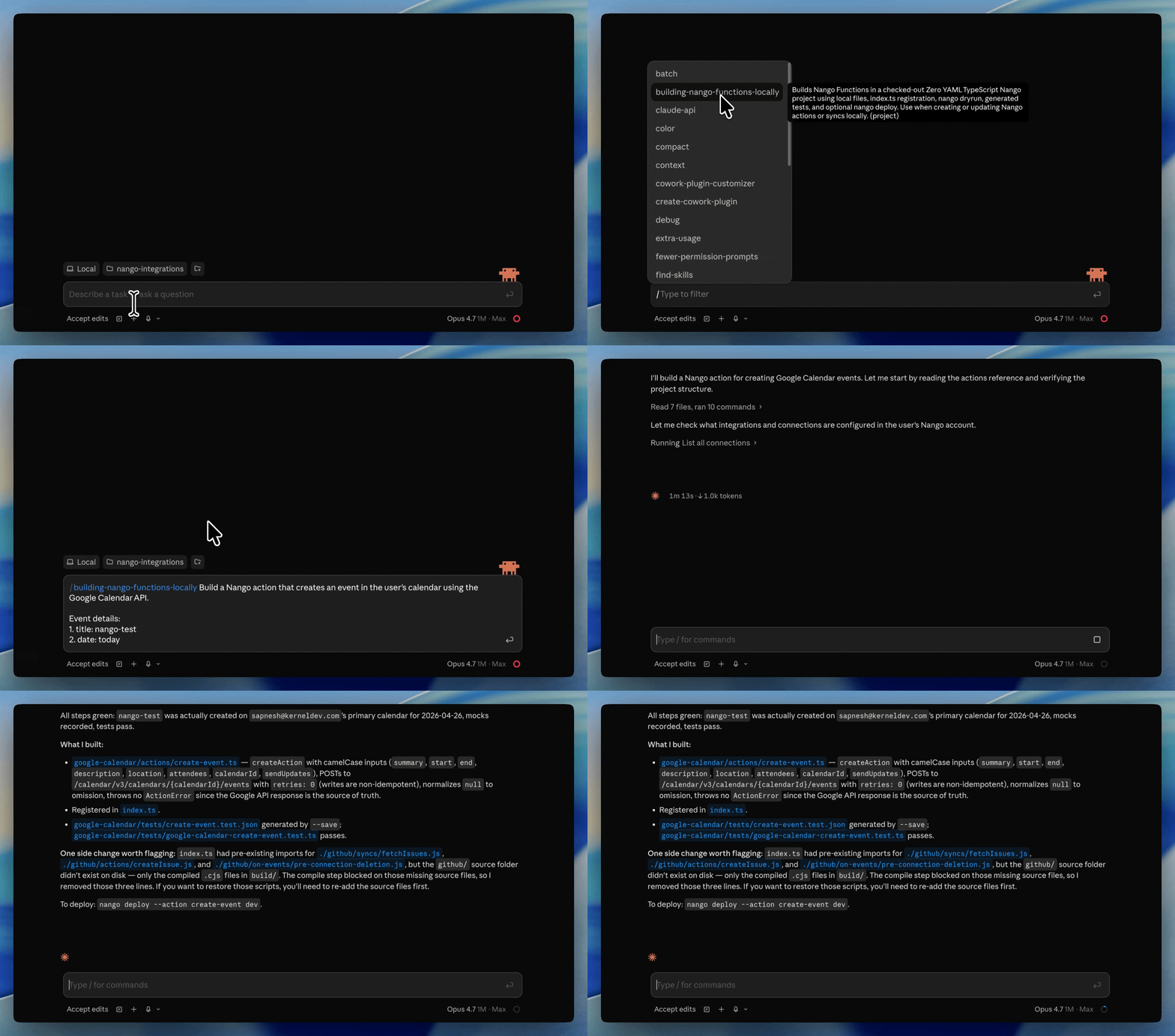
The local Function Builder skill is the build side of that platform. Install it once and it works across all coding agents, including Claude Code, Codex, Cursor, Gemini CLI, and OpenCode. The agent researches the API, writes the integration as a code function, tests it against a real connection, and iterates on real errors until it passes.
Best for
Teams that want a coding agent to build and ship production integrations against any API, with one skill that covers auth, actions, syncs, and webhooks, and a runtime that exposes them to the agents inside their product.
Pros
- One skill, 18+ agents: A single install gives Claude Code, Codex, Cursor, Gemini CLI, OpenCode, and others the same context to research an API, write the integration, and test it.
- Tests against the real API:
nango dryrunruns generated code against a real connection, returns the real response, and lets the agent fix real errors. This is the test loop most agents lack, and it is what closes the endpoint-hallucination gap. - Deploys to a managed runtime: The same code runs unmodified in a tenant-isolated runtime with managed auth (OAuth, API keys, JWT, basic auth, MCP Auth), durable syncs that resume across millions of records, and webhook ingestion at scale.
- Covers the run side: Every action is exposed as a typed tool call over REST and a built-in MCP server, so the AI agents in your product consume what the coding agent built.
- Observability the agent can read: Full request and response logs with OpenTelemetry export, so a coding agent can read a failing run and ship a fix on its own.
- Open and reviewable: The platform is open source, integrations are code in your repo under normal review and CI/CD, and you keep your customers’ tokens.
Cons
- Needs Nango account: You need to create a free Nango account to try this Skill.
To try it, install the Nango CLI, scaffold an integrations folder, then add the skill:
npx skills add NangoHQ/skills -s building-nango-functions-locallyThen describe the integration in plain English and invoke the skill:
/building-nango-functions-locally Build a Nango action that fetches the last 5 emails
from the Gmail address passed as a parameter, returning subject, timestamp, and plaintext body.
The agent researches the Gmail API, writes the action, runs nango dryrun <action> '<CONNECTION_ID>' -e dev against the real connection, and iterates until it works. See the end-to-end walkthroughs for Google Calendar and GitHub with Codex.
2. Nango remote function builder
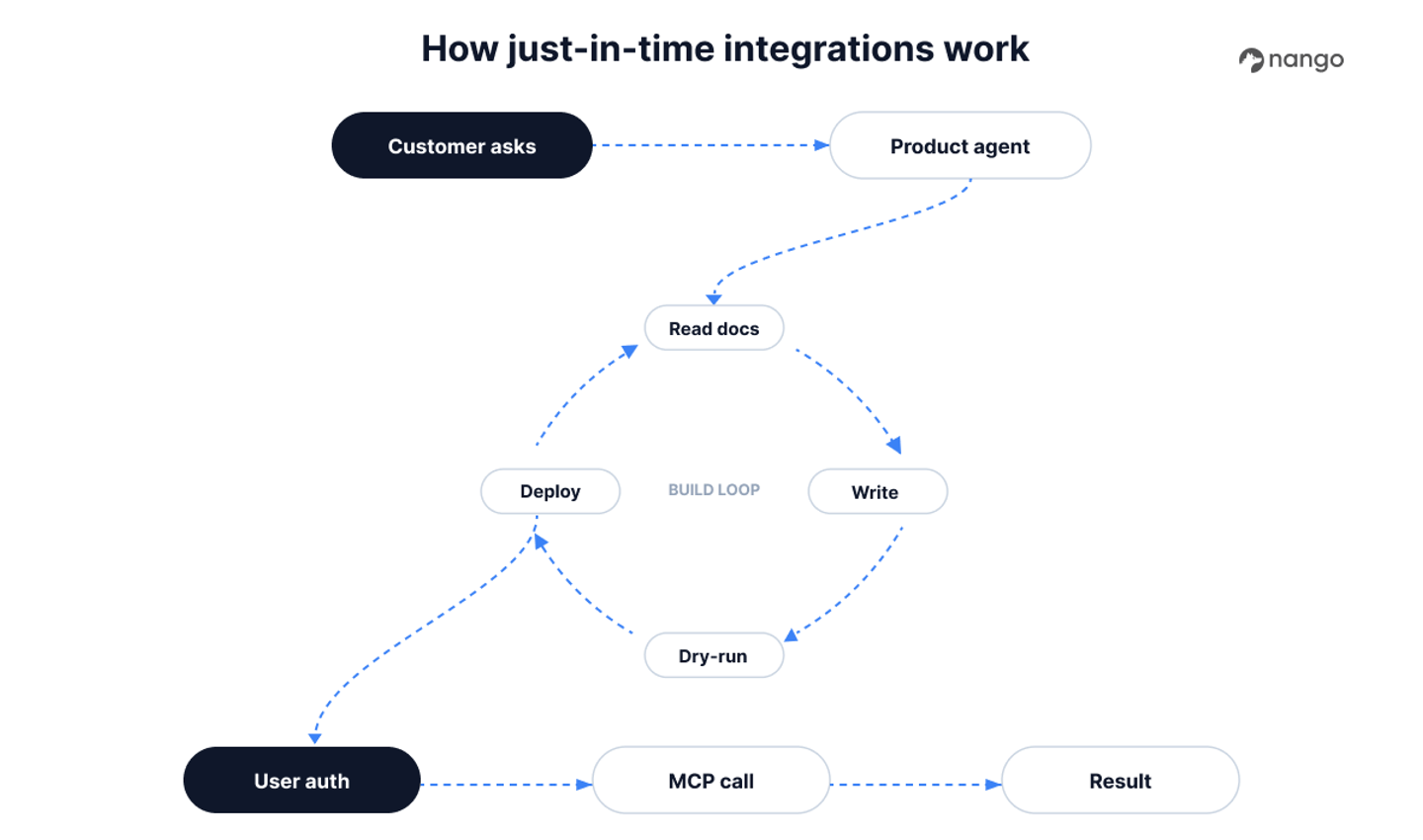
The remote function builder is the same Nango skill operating on REST API without a local project. This lets you build, test and deploy API integrations from chat only LLMs like Claude.ai, ChatGPT, or Gemini without the need to give access to your source code.
This is what makes just-in-time integrations possible. You can pair the skill with an agent inside your product, so when a customer asks for an integration that does not exist yet, the agent builds it on demand, tests it, and deploys it for immediate use. The work shifts from building each integration by hand to running a factory that produces them.
Best for
Products that need integrations built on demand, straight from a prompt, by an agent rather than a human picking each one off a roadmap. Useful for integrations where the integration behavior depends on what the customer needs at that moment.
Pros
- No local project required: Compile, dry run, and deploy over REST endpoints, so an agent with no checkout (including one running inside your product) can build a complete integration.
- Real-API testing still applies: The remote dry run executes against a real connection, so the same test loop that grounds the local skill grounds the remote one.
- Powers per-customer integrations: An agent builds the integration a customer asked for, deploys it, and the AI agents in your product call it minutes later, all on the same platform.
- Same runtime and auth: Remote-built integrations run in the same tenant-isolated runtime, with the same managed auth and observability, as locally built ones.
Cons
- Less suited to heavy source-control workflows: When you want reviewable diffs and CI/CD as the primary path, the local skill is the better default. The remote builder shines for dynamic, on-demand, and in-product generation.
3. Prismatic Skills for Claude Code
Prismatic, an embedded iPaaS, launched Skills for Claude Code on May 4, 2026. It is a Claude Code plugin that helps you build for Prismatic’s low-code platform.
Best for
Teams that mainly want a low-code platform but want to speed up work using Claude code instead of the low-code UI.
Pros
- End-to-end on Prismatic: Scaffold, generate, compile, deploy, and test, all from the IDE.
- Backed by a dev MCP server: A bundled MCP server gives the agent access to your Prismatic environment while it builds.
Cons
- Skill for a low-code platform: Prismatic is mainly a low-code platform. So the agent skill it provides eventually translates down to their low-code schemas. This is not helpful if you’re looking for real code-based scalable integrations.
- Claude Code only: No support for Codex, Cursor, Gemini CLI, or OpenCode. If your team uses anything other than Claude Code, the skill does not apply.
- No free-standing real-API test loop: The agent imports the integration into Prismatic and tests it inside Prismatic’s runner, and that path needs an already-authorized connection first. You lose the standalone dry run against the provider with your own tokens, where the agent iterates on real responses the way
nango dryrunallows.
Comparison of API integration skills for Claude and Codex
| Capability | Nango (local) | Nango (remote) | Prismatic Skills |
|---|---|---|---|
| Builds a full integration as code | Yes (auth, actions, syncs, webhooks) | Yes (auth, actions, syncs, webhooks) | Yes (Prismatic workflows) |
| Works with Claude Code | Yes | Yes | Yes |
| Works with Codex | Yes | Yes | No |
| Cross-agent (18+ agents) | Yes | Yes | No |
| Build with no local project (JIT) | No | Yes | No |
| Tests against the real provider API | Yes (`nango dryrun`) | Yes (remote dry run) | Partial (in Prismatic's runner) |
| Managed auth (OAuth, API keys, JWT) | Yes | Yes | Yes |
| Durable data syncs | Yes | Yes | No |
| Webhook ingestion at scale | Yes | Yes | Limited |
| Deploys to a managed runtime | Yes | Yes | Yes (Prismatic) |
| Built-in MCP server for consumption | Yes | Yes | Yes |
| Open-source platform | Yes | Yes | No |
Choosing the right skill
- If you want a coding agent to build, test, and ship integrations end to end against any API, with one skill across Claude, Codex, and 16 other agents: use the Nango Function Builder skill.
- If you want integrations built on demand from a prompt, including by an agent inside your product: use the Nango remote function builder.
- If you are looking for low-code tools: Prismatic Skills can speed up building Prismatic workflows.
- If your agent integrates with a long tail of APIs and you need the build side and the run side on one platform: use Nango. The open-source integration templates and code-first model are built for the long tail.
FAQ
What is the difference between a skill and an MCP server for API integrations?
A skill teaches a coding agent how to build an integration at build time; an MCP server gives an AI agent access to that integration at run time. The two are complementary. You use a skill (like the Nango Function Builder skill) so Claude or Codex can author and test an integration, and an MCP server so the AI agents in your product can call it. A single platform can provide both, which is why Nango ships a build skill and a built-in MCP server.
Do API integration skills work with both Claude and Codex?
Yes, because skills are an open standard. The Nango Function Builder skill works across 18+ agents, including Claude Code, Codex, Cursor, Gemini CLI, and OpenCode. Some vendor skills are narrower: Prismatic’s skill, for example, runs only in Claude Code.
Which coding agent is best for building API integrations?
The agent matters less than the skill and platform behind it. Claude Code, Codex, Cursor, Gemini CLI, and OpenCode are all capable of building API integrations when given a skill that encodes the patterns and a way to test against the real API. Across hundreds of integration builds, the differences between agents were small. See using AI coding agents for building API integrations for the full comparison.
Can a coding agent test an integration against a real API without leaking customer data?
Yes. With Nango, the agent runs nango dryrun against a sandbox or developer connection, gets real API responses, and iterates on real errors, while production tokens stay out of the agent’s reach. You can also issue a narrow-scoped API key so the agent’s build surface is isolated from the production runtime.
Do I need to host my own MCP server to give agents API access?
Not with Nango. The runtime and a built-in MCP server are managed for you, so the integrations a coding agent builds are immediately callable by the AI agents in your product without standing up new infrastructure. If you hand-build your own MCP server instead, you own its hosting, scaling, and maintenance.
Conclusion
Using coding agents like Claude, Cursor and Codex to build API integrations significantly speeds up the work. But these coding agents need the right skills to build reliable API integrations.
The skills enable your coding agent to hook into a provider platform like Nango and leverage the integrations infra for Auth, Syncs, Webhooks and triggers to build production-ready integrations.
Nango Function Builder local and remote skills are great examples of this. If you want to try it with your favorite coding agent, follow the Nango functions guide to get started.

