
If you’re building API integrations with Google Calendar in your product, you’ll eventually need event data from Google that reflects changes as they happen. A meeting gets rescheduled, an attendee declines, or an event gets deleted. Your users expect your product to keep up.
The Google Calendar API supports two mechanisms for keeping data in sync: push notifications for instant change detection and incremental sync for reliable data retrieval. You’ll need both to get proper real-time Google Calendar updates in your app. This guide covers how both mechanisms work, why building them from scratch is harder than it looks, and how to implement a complete real-time sync for your Google Calendar API integration using Nango.
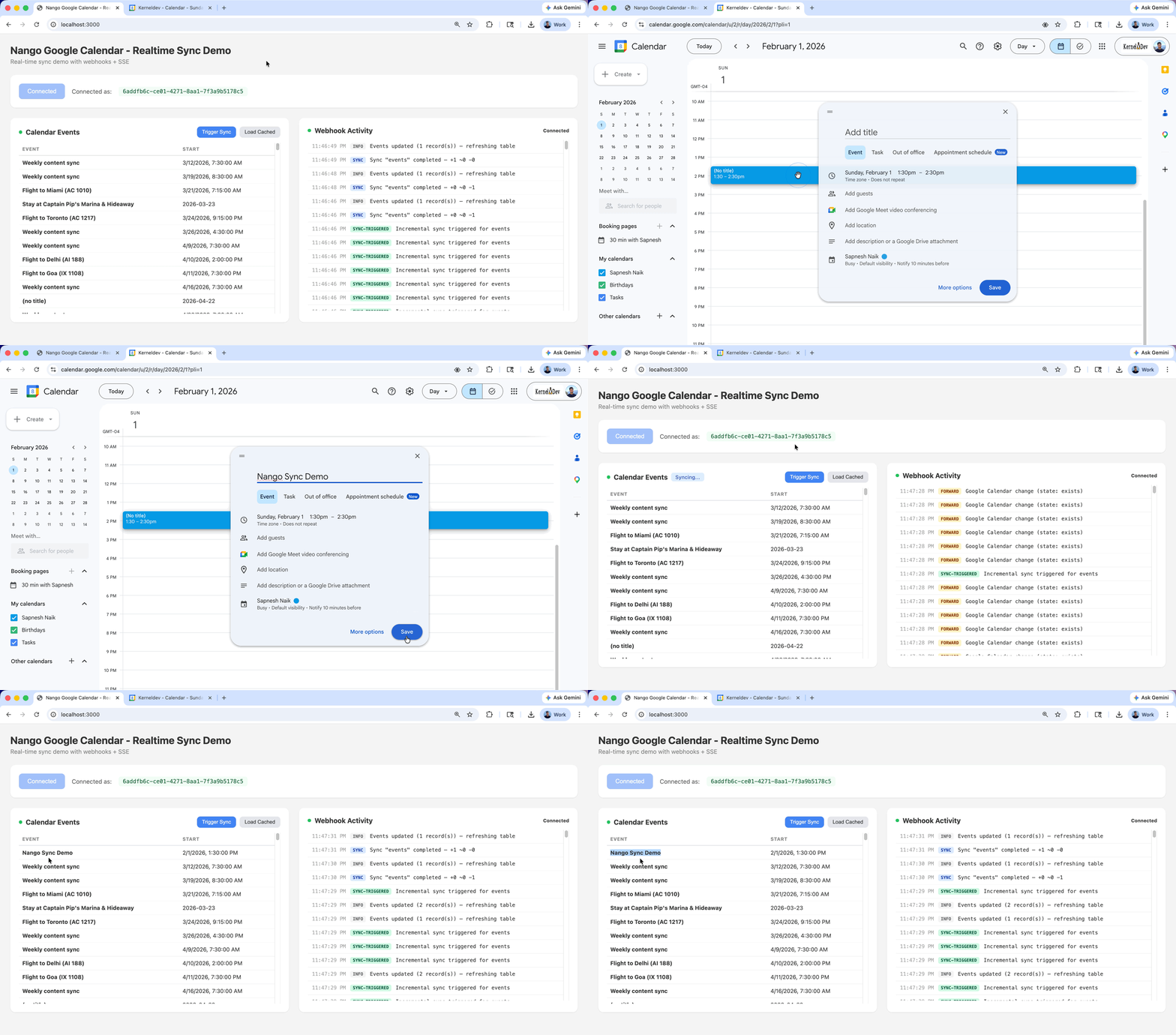
How Google Calendar real-time sync works
Google Calendar doesn’t offer a simple “subscribe and get events” mechanism. Instead, real-time sync requires a two-part system:
- Push notifications tell you something has changed on a calendar. They arrive as HTTP POST requests to your webhook endpoint within seconds of a change. But they carry no event data; they just include headers indicating which calendar resource changed. To receive these, you call Google’s
events/watchendpoint with your HTTPS webhook URL, which creates a “notification channel” that Google sends change signals to.
// Sample push notification data from Google Calendar. Not very useful on its own!
{
  "x-goog-channel-id": "c56d71a2-fa1e-2312-a39f-cc46cca4d5a0",
  "x-goog-channel-expiration": "Wed, 15 Apr 2026 23:54:21 GMT",
  "x-goog-message-number": "5708732",
  "x-goog-resource-id": "jjHHPSu-BYJOWSQMXiSASs8Pqo",
  "x-goog-resource-state": "exists",
  "x-goog-resource-uri": "https://www.googleapis.com/calendar/v3/calendars/primary/events?alt=json",
  "content-length": "0"
}- Incremental sync lets you fetch only the events that changed since your last request, using a sync token. This is how you get the actual event data. You call
events.listwith a storedsyncToken, and Google returns only the events that were created, updated, or deleted since that token was issued.
The end-to-end pattern combines both:
Google Calendar change
  → Google sends push notification (headers only, no event data)
  → Your app triggers an incremental sync
  → API returns only changed events via sync token
  → Your app processes the delta
Why you need both mechanisms, not just one: Push notifications give you speed (near-instant change detection), but Google’s own docs state that notifications are “not 100% reliable” and a small percentage will be dropped under normal conditions. To catch anything webhooks miss, you also run a periodic incremental sync (polling) on a schedule (e.g., every hour). This polling uses the same sync token mechanism, so it only fetches changes since the last successful sync. Webhooks handle the real-time part. Polling is the safety net that keeps your data consistent.
Why building Google Calendar from scratch is harder than it looks
The Google Calendar API provides the building blocks, but assembling them into a production-grade sync requires solving several infrastructure problems simultaneously.
- OAuth token lifecycle. Access tokens expire hourly. Refresh tokens can be revoked when users remove access, tokens sit unused, or apps are in testing mode. Token refresh must handle concurrency to avoid race conditions.
- Webhook channel renewals. Channels expire after 7 days with no auto-renewal endpoint. For 1,000 connected users, that’s 1,000 channels to recreate weekly, each requiring metadata tracking and error handling.
- Domain verification. Google requires your webhook domain to be verified in Cloud Console. No localhost, no tunneling services in production.
- Sync token management. Durable storage for sync tokens, recovery logic for
410 Goneresponses (full re-sync required), and pagination handling for both initial and incremental syncs. - Rate limits. The Calendar API enforces per-project and per-user quotas. Triggering syncs for many users simultaneously can quickly exceed them.
- Sync concurrency. Webhook-triggered and scheduled syncs can overlap, requiring a merging strategy to prevent stale data from overwriting recent updates.
Implementing real-time Google Calendar sync with Nango
A code-first integration platform like Nango handles all of this out of the box: OAuth for 1,000+ APIs, durable sync infrastructure with checkpoints, webhook routing and matching, automatic retries and rate-limit handling, and a merging strategy for concurrent syncs.
Let’s see how to sync Google Calendar events in real time with Nango. We’ll use Nango’s AI Function Builder to generate the integration code, so you can quickly build the entire implementation with your favorite AI coding agent (Claude Code, Cursor, Codex, etc.).
By the end, you’ll have:
- An incremental sync that fetches only changed Google Calendar events
- Push notifications that trigger syncs within seconds of a calendar change
- Automatic webhook channel renewal and cleanup
- A backend that receives sync completion webhooks and updates your app
Prerequisites
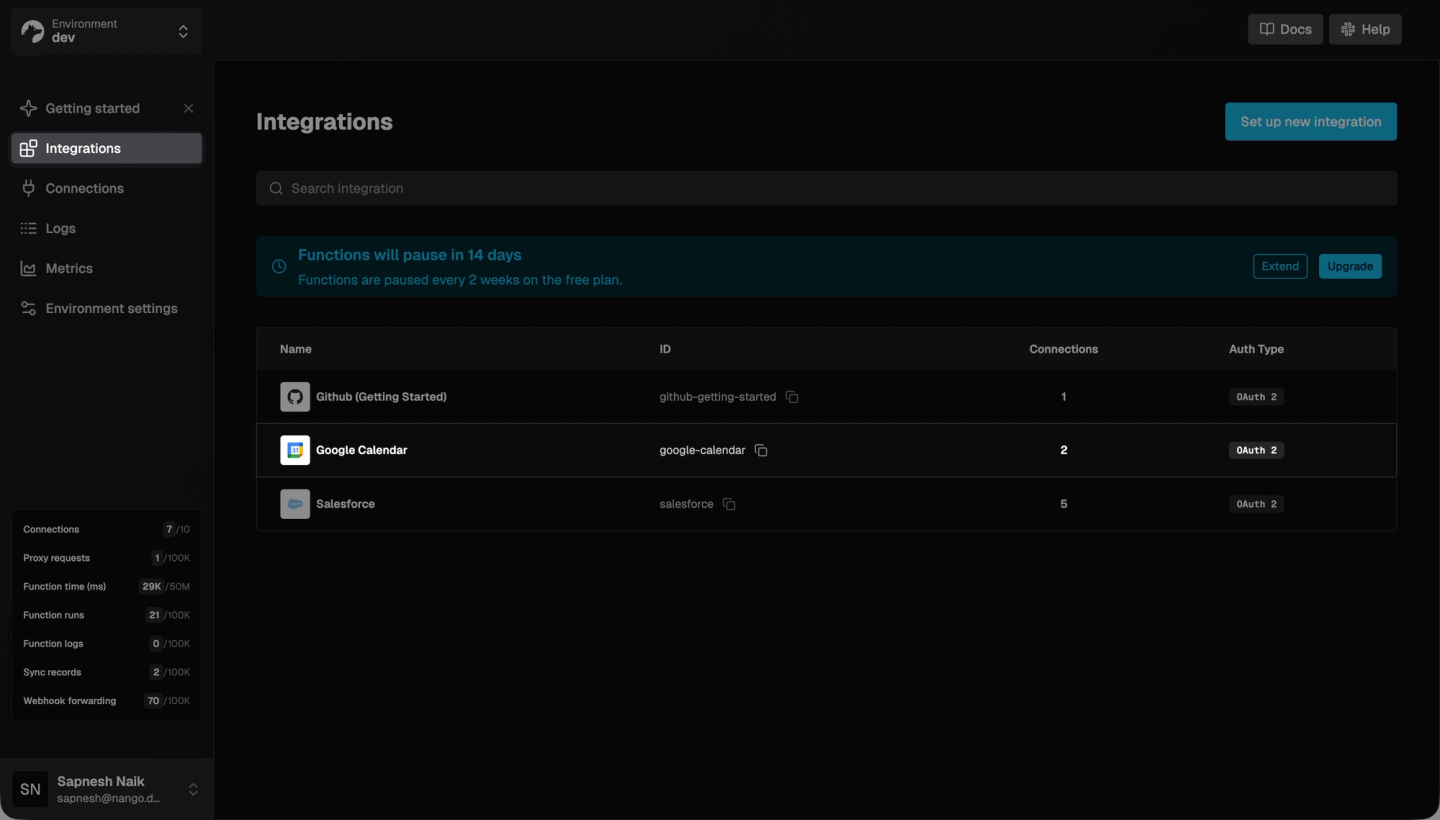
You’ll need a Nango account (free tier works), then follow Nango’s guide to register your own Google Calendar OAuth app with the Calendar API enabled, and finally configure Google Calendar as an integration in the Nango dashboard.
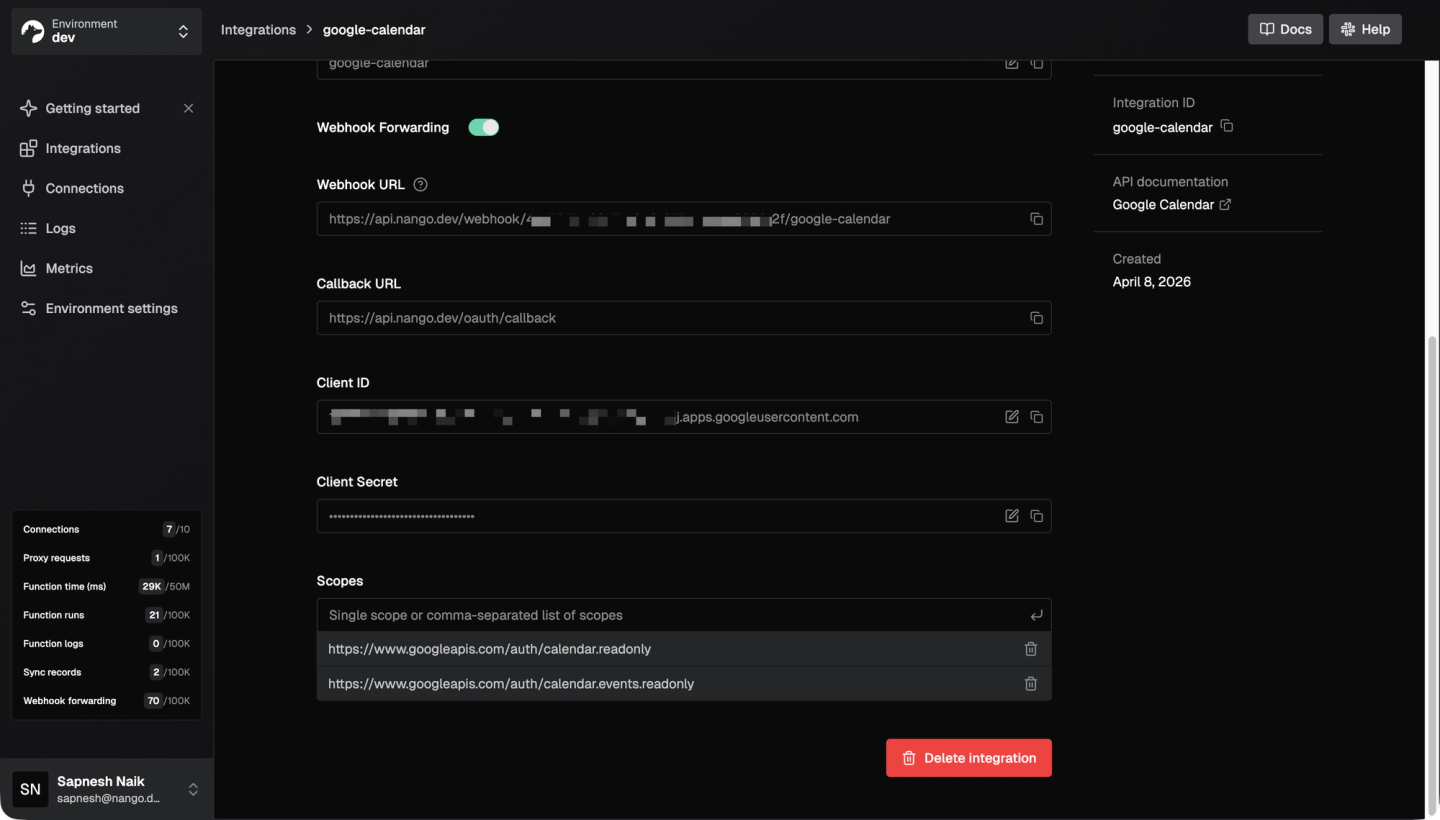
Note: When setting OAuth scopes in Nango, specify at least https://www.googleapis.com/auth/calendar.readonly and https://www.googleapis.com/auth/calendar.events.readonly. The calendar.readonly scope is required for the events/watch endpoint.
Next, install the Nango CLI and initialize a project:
npm install -g nango
nango init
Then install the AI Function Builder skill, so your coding agent has the context it needs to generate Nango integration code:
npx skills add NangoHQ/skillsThis gives your AI agent access to Nango’s interface patterns, best coding practices, and testing patterns.
Tip: LLMs may have stale Nango training data. Install the Nango docs MCP server (https://nango.dev/docs/mcp) alongside the AI Function Builder skill, so your agent can reference current documentation during code generation.
Once installed, open your project in your preferred AI coding agent, and you’re ready to build.
Step 1: Write the events sync
The events sync is the core of the integration. It uses Google’s syncToken mechanism via Nango checkpoints: the first run fetches events from the past month, and subsequent runs fetch only what changed.
Invoke the Nango function builder skill in your AI coding agent and supply a prompt like this:
Note: Integration ID can be found on the Nango integrations page.
I want to build a Nango sync that incrementally syncs Google Calendar
events from the primary calendar.

Integration ID: google-calendar
Connection ID: test-connection
API Base URL: https://www.googleapis.com

- Frequency: every hour
- autoStart: true
- Use Google's syncToken mechanism via checkpoints:
  - First run: fetch events from 1 month ago using `timeMin` param
  - Subsequent runs: use `syncToken` from checkpoint to get only changes
  - Save `nextSyncToken` to checkpoint after each run
- Endpoint: GET /calendar/v3/calendars/primary/events
- Params: maxResults=250, singleEvents=true
- Handle pagination via nextPageToken
- Enable real-time webhook processing:
  - webhookSubscriptions: ['*']
  - onWebhook handler: check x-goog-resource-state === 'exists',
    then run the same incremental sync logic as exec
- Model: GoogleCalendarEvent with fields: id, summary, description,
  start (dateTime, date, timeZone), end (dateTime, date, timeZone),
  status, location, organizer (email, displayName),
  attendees (email, displayName, responseStatus), htmlLink, created, updated
- All fields optional except id
- API Reference: https://developers.google.com/calendar/api/v3/reference/events/list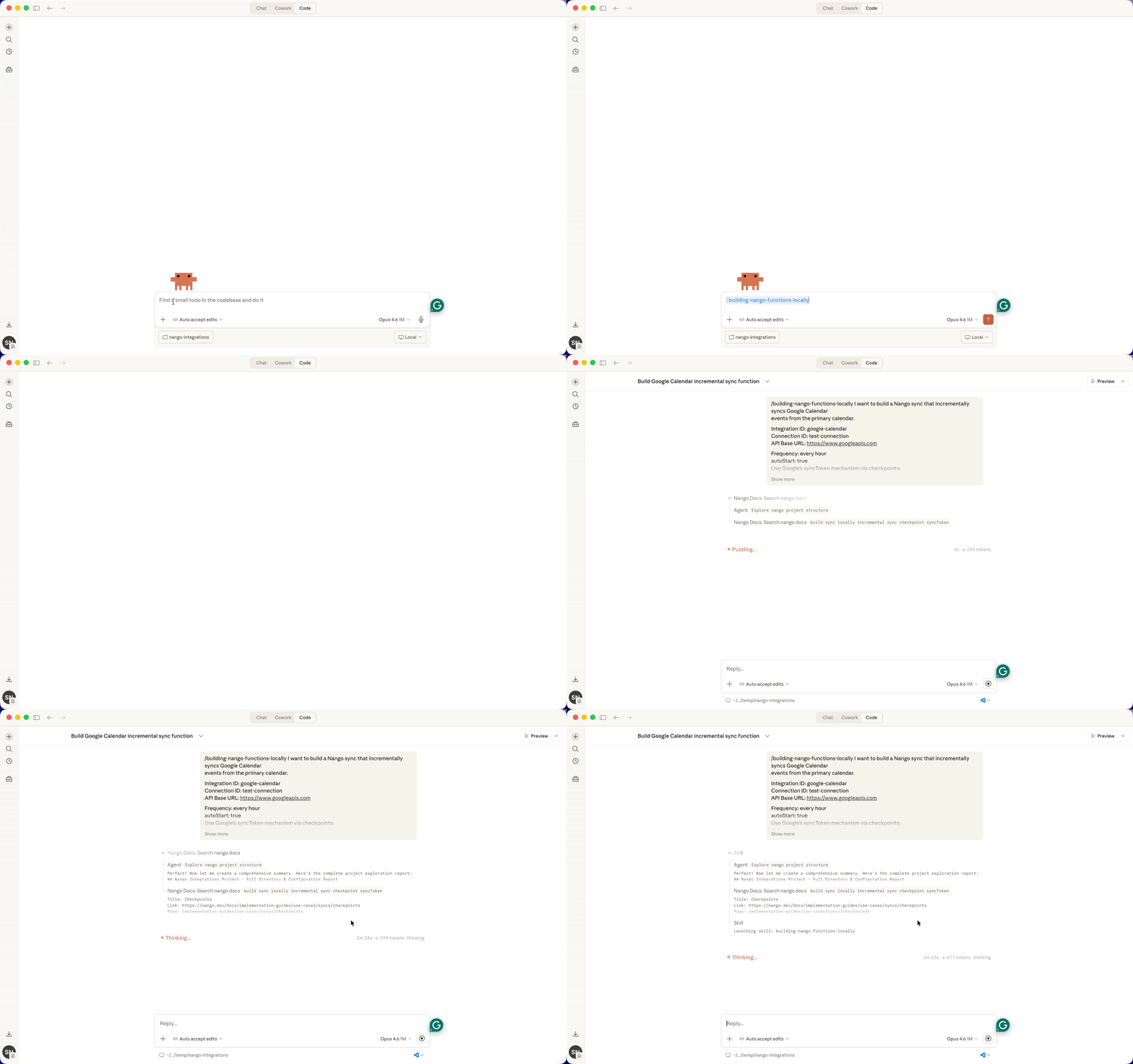
The AI agent will generate the function code, create a test suite, run nango dryrun to validate against your connection, and automatically iterate on any failures. Here’s what the agent does behind the scenes. The resulting sync function looks like this:
nango-integrations/google-calendar/syncs/events.ts:
import { createSync } from 'nango';
import * as z from 'zod';

const GoogleCalendarEvent = z.object({
    id: z.string(),
    ...
});

export default createSync({
    description: 'Incrementally sync Google Calendar events',
    version: '1.0.0',
    frequency: 'every hour',
    autoStart: true,
    trackDeletes: true,
    webhookSubscriptions: ['*'],
    checkpoint: z.object({
        lastSyncToken: z.string(),
    }),
    models: {
        GoogleCalendarEvent,
    },
    exec: async (nango) => {
        await syncEvents(nango);
    },
    onWebhook: async (nango, payload) => {
        const headers = payload as Record<string, string>;
        if (headers['x-goog-resource-state'] === 'exists') {
            await syncEvents(nango);
        }
    },
});

async function syncEvents(nango) {
    const checkpoint = await nango.getCheckpoint();
    const params: Record<string, string> = {
        maxResults: '250',
        singleEvents: 'true',
    };

    if (checkpoint) {
        params['syncToken'] = checkpoint['lastSyncToken'];
    } else {
        const oneMonthAgo = new Date();
        oneMonthAgo.setMonth(oneMonthAgo.getMonth() - 1);
        params['timeMin'] = oneMonthAgo.toISOString();
    }

    let nextPageToken: string | undefined;
    let nextSyncToken: string | undefined;

    do {
        if (nextPageToken) {
            params['pageToken'] = nextPageToken;
        }

        const response = await nango.get({
            baseUrlOverride: 'https://www.googleapis.com',
            endpoint: '/calendar/v3/calendars/primary/events',
            params,
        });

        const events = response.data.items || [];
        if (events.length > 0) {
            await nango.batchSave(events, 'GoogleCalendarEvent');
        }

        nextPageToken = response.data.nextPageToken;
        nextSyncToken = response.data.nextSyncToken;
    } while (nextPageToken);

    if (nextSyncToken) {
        await nango.saveCheckpoint({ lastSyncToken: nextSyncToken });
    }
}
A few design decisions to note:
singleEvents: 'true'expands recurring events into individual instances, which is what most product integrations need.webhookSubscriptions: ['*']tells Nango to route all incoming Google Calendar webhooks to this sync’sonWebhookhandler. The handler checks for theexistsstate (actual changes) and ignores the initialsynchandshake.410 Gonerecovery: if Google invalidates the sync token, trigger a sync withreset: truevia the Nango API to clear the checkpoint and re-fetch all events.frequency: 'every hour'sets the polling cadence. This serves as the safety net for missed push notifications. With webhooks triggering on-demand syncs viaonWebhook, most updates arrive in seconds. The hourly poll catches anything that slips through.
Step 2: Automate the webhook lifecycle
Real-time sync requires three lifecycle functions:
- Post-connection creation: register a Google Calendar watch channel when a user connects their Google Calendar in your app.
AI Coding Agent Prompt:
Build a Nango on-event function for post-connection-creation that registers
a Google Calendar push notification channel for events on the primary calendar.

Integration ID: google-calendar
API Base URL: https://www.googleapis.com

- Use randomUUID() for channel ID
- Set 7-day expiration: Date.now() + 7 * 24 * 60 * 60 * 1000
- Get Nango webhook URL via nango.getWebhookURL()
- POST to /calendar/v3/calendars/primary/events/watch
- Store channelId and response.data.resourceId in connection metadata
- API Reference: https://developers.google.com/calendar/api/v3/reference/events/watch
Output from the Nango AI Functions builder Skill: (on-events/post-connection-creation.ts):
export default createOnEvent({
    event: 'post-connection-creation',
    description: 'Register Google Calendar webhook on new connection',
    metadata: z.object({
        googleCalendarChannelId: z.string().optional(),
        googleCalendarResourceId: z.string().optional(),
    }),
    exec: async (nango) => {
        const channelId = randomUUID();
        const expiration = Date.now() + 7 * 24 * 60 * 60 * 1000;
        const webhookUrl = await nango.getWebhookURL();

        const response = await nango.post({
            baseUrlOverride: 'https://www.googleapis.com',
            endpoint: '/calendar/v3/calendars/primary/events/watch',
            data: {
                id: channelId,
                type: 'webhook',
                address: webhookUrl,
                expiration: String(expiration),
            },
        });

        await nango.updateMetadata({
            googleCalendarChannelId: channelId,
            googleCalendarResourceId: response.data.resourceId,
        });
    },
});
Note: nango.getWebhookURL() returns Nango’s managed webhook endpoint. Google sends notifications there, and Nango matches them to the correct connection and triggers the sync’s onWebhook handler (see Step 1). No domain verification is required on your end for Nango’s URL.
- Daily renewal: renew the channel before its 7-day expiry. Prompt your AI coding agent to build a daily sync that creates a new channel before stopping the old one (so there’s no gap in notification coverage), reads and updates channel metadata, and gracefully handles failures when stopping an already-expired channel.
Output from the Nango AI Functions builder Skill (syncs/renew-watch.ts):
export default createSync({
    description: 'Renew Google Calendar watch channel before expiry',
    version: '1.0.0',
    frequency: 'every day',
    autoStart: true,
    models: {},
    metadata: z.object({
        googleCalendarChannelId: z.string(),
        googleCalendarResourceId: z.string(),
    }),
    exec: async (nango) => {
        const metadata = await nango.getMetadata();
        const oldChannelId = metadata?.['googleCalendarChannelId'];
        const oldResourceId = metadata?.['googleCalendarResourceId'];

        // Create new channel BEFORE stopping old one (no gap in coverage)
        const newChannelId = randomUUID();
        const expiration = Date.now() + 7 * 24 * 60 * 60 * 1000;
        const webhookUrl = await nango.getWebhookURL();

        const response = await nango.post({
            baseUrlOverride: 'https://www.googleapis.com',
            endpoint: '/calendar/v3/calendars/primary/events/watch',
            data: {
                id: newChannelId,
                type: 'webhook',
                address: webhookUrl,
                expiration: String(expiration),
            },
        });

        await nango.updateMetadata({
            googleCalendarChannelId: newChannelId,
            googleCalendarResourceId: response.data.resourceId,
        });

        // Stop old channel after new one is active
        if (oldChannelId && oldResourceId) {
            try {
                await nango.post({
                    baseUrlOverride: 'https://www.googleapis.com',
                    endpoint: '/calendar/v3/channels/stop',
                    data: { id: oldChannelId, resourceId: oldResourceId },
                });
            } catch (e) {
                await nango.log('Failed to stop old channel (may have expired)', {
                    oldChannelId,
                });
            }
        }
    },
});- Pre-connection deletion: clean up the channel when a user disconnects. Prompt your agent to build a pre-connection-deletion on-event that reads channel metadata and calls
channels/stop. Without this, deleted connections leave orphaned watch channels that continue sending notifications until they expire.
Output from the Nango AI Functions builder Skill (on-events/pre-connection-deletion.ts):
export default createOnEvent({
    event: 'pre-connection-deletion',
    description: 'Stop Google Calendar webhook on disconnect',
    metadata: z.object({
        googleCalendarChannelId: z.string().optional(),
        googleCalendarResourceId: z.string().optional(),
    }),
    exec: async (nango) => {
        const metadata = await nango.getMetadata();
        const channelId = metadata?.['googleCalendarChannelId'];
        const resourceId = metadata?.['googleCalendarResourceId'];

        if (channelId && resourceId) {
            await nango.post({
                baseUrlOverride: 'https://www.googleapis.com',
                endpoint: '/calendar/v3/channels/stop',
                data: { id: channelId, resourceId },
            });
        }
    },
});
Step 3: Deploy
Deploy all functions to Nango:
cd nango-integrations
nango deploy dev
This compiles, packages, and deploys all functions in one command.

Note: On-event functions (post-connection-creation, pre-connection-deletion) only fire for connections created after deployment. If you already have a test connection, delete it in the Nango dashboard and reconnect after deploying.
Step 4: Handle sync webhooks in your backend
With webhookSubscriptions configured in Step 1, Nango automatically routes incoming Google Calendar push notifications to the sync’s onWebhook handler. No forward webhooks to process in your backend.
Your backend only needs to handle sync completion webhooks, which Nango sends after a sync finishes with new data. Set your backend’s webhook URL in the Nango Dashboard under Environment Settings > Webhooks.
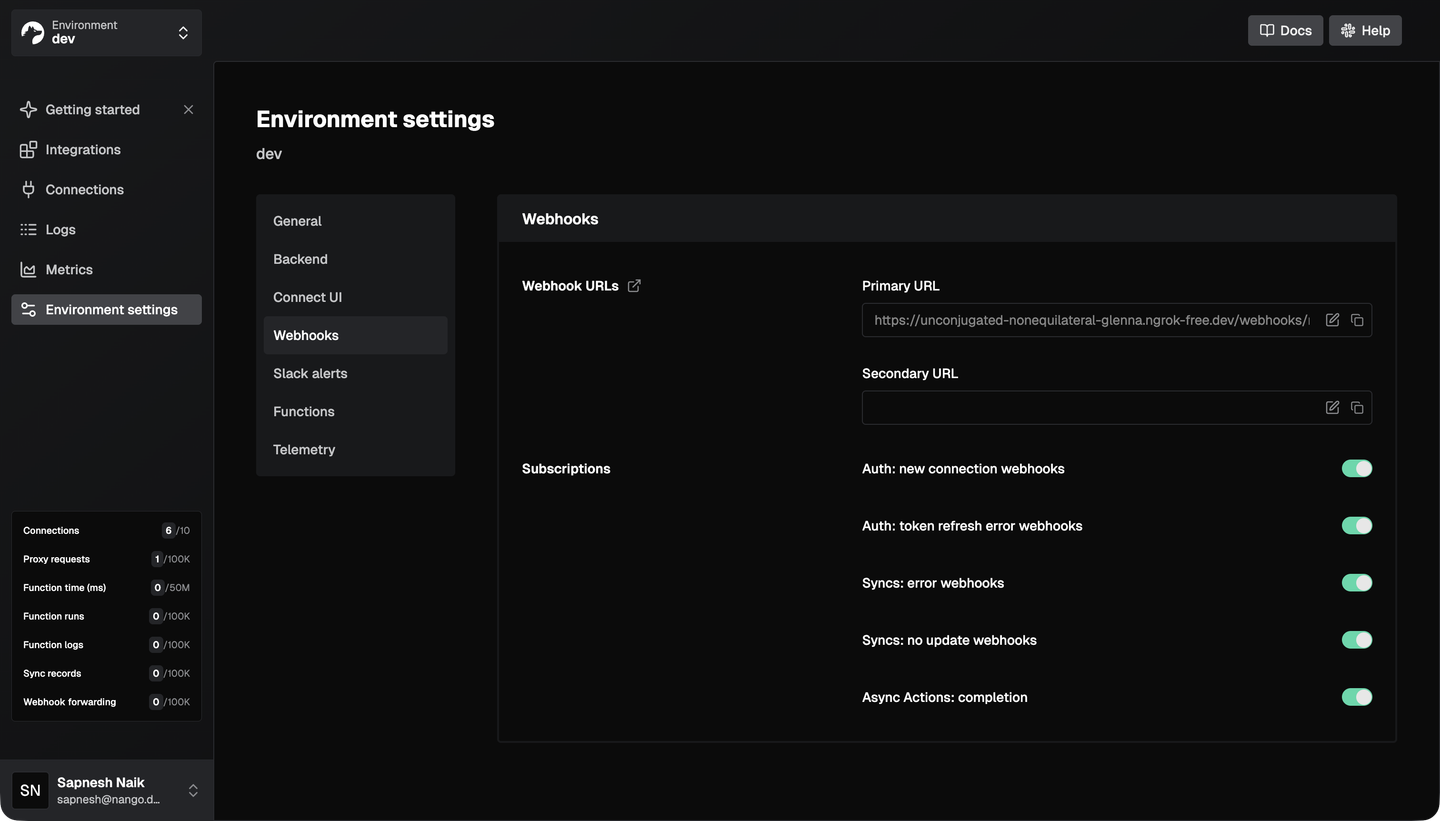
When a sync completes, Nango sends a webhook containing the counts of added, updated, and deleted records, along with a modifiedAfter timestamp. Fetch only the changed records:
const records = await nango.listRecords({
    providerConfigKey: 'google-calendar',
    connectionId,
    model: 'GoogleCalendarEvent',
    modifiedAfter: webhookPayload.modifiedAfter,
});
Always verify webhook signatures before processing. Nango signs payloads with HMAC-SHA256. Signature verification requires the raw request body (before JSON parsing), not the parsed object:
const isValid = nango.verifyIncomingWebhookRequest(rawBody, req.headers);
if (!isValid) {
    res.status(401).json({ error: 'Invalid signature' });
    return;
}
Note: nango.listRecords is paginated. Loop through all pages using next_cursor to avoid missing records. When Google deletes an event, it sets status: "cancelled" rather than removing it. Filter these out when displaying events to users.
Step 5: Connect and test
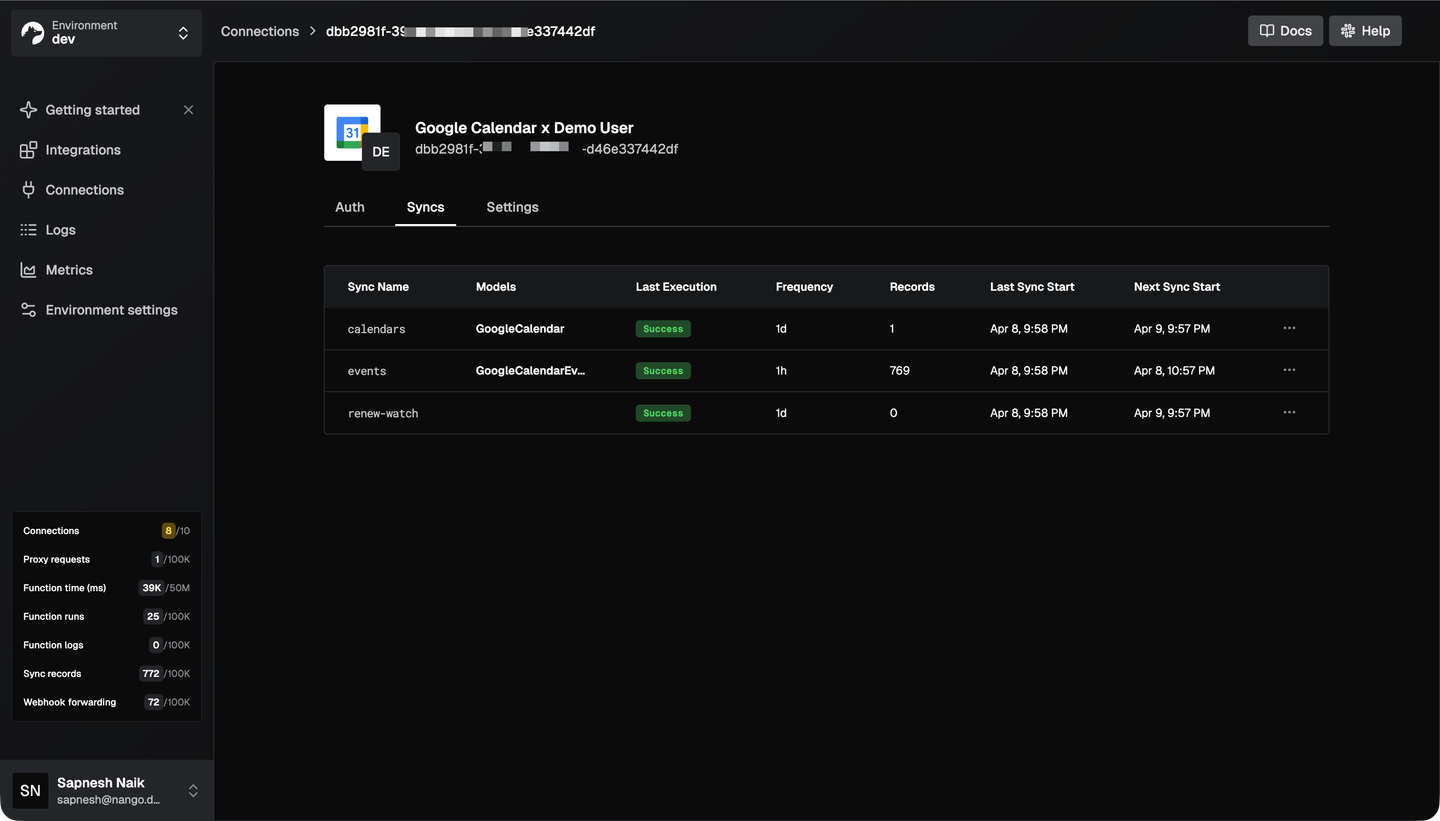
With everything deployed, connect a Google Calendar account through Nango’s auth UI. The post-connection-creation function fires automatically, registering a watch channel. The hourly events sync starts automatically (autoStart: true), and the daily renew-watch sync keeps the notification channel alive.
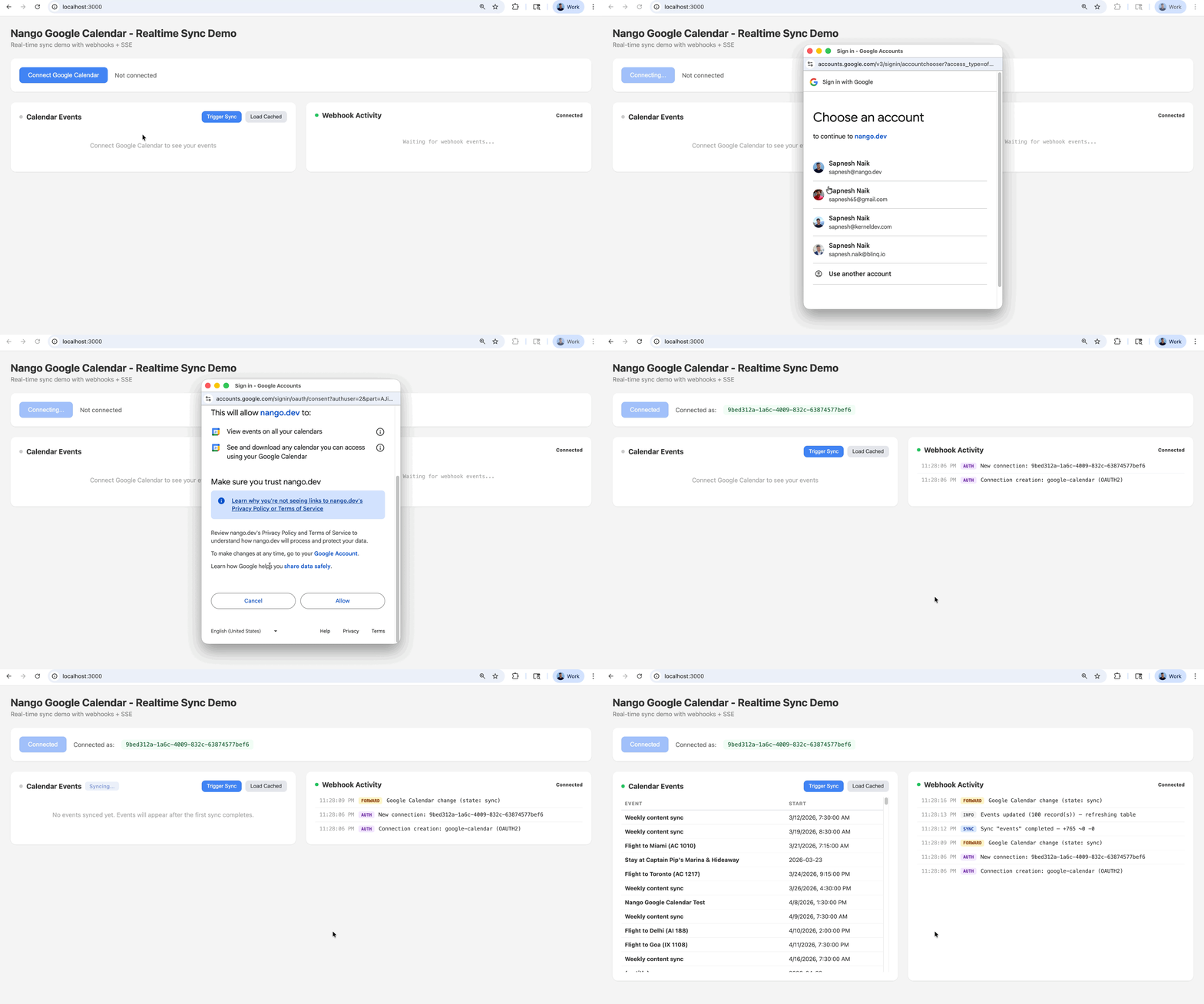
To verify the integration is working:
- Check the Nango dashboard for sync logs. The initial events sync should complete within seconds and show the number of records fetched. Nango providers complete observability here with OpenTelemetry export options.
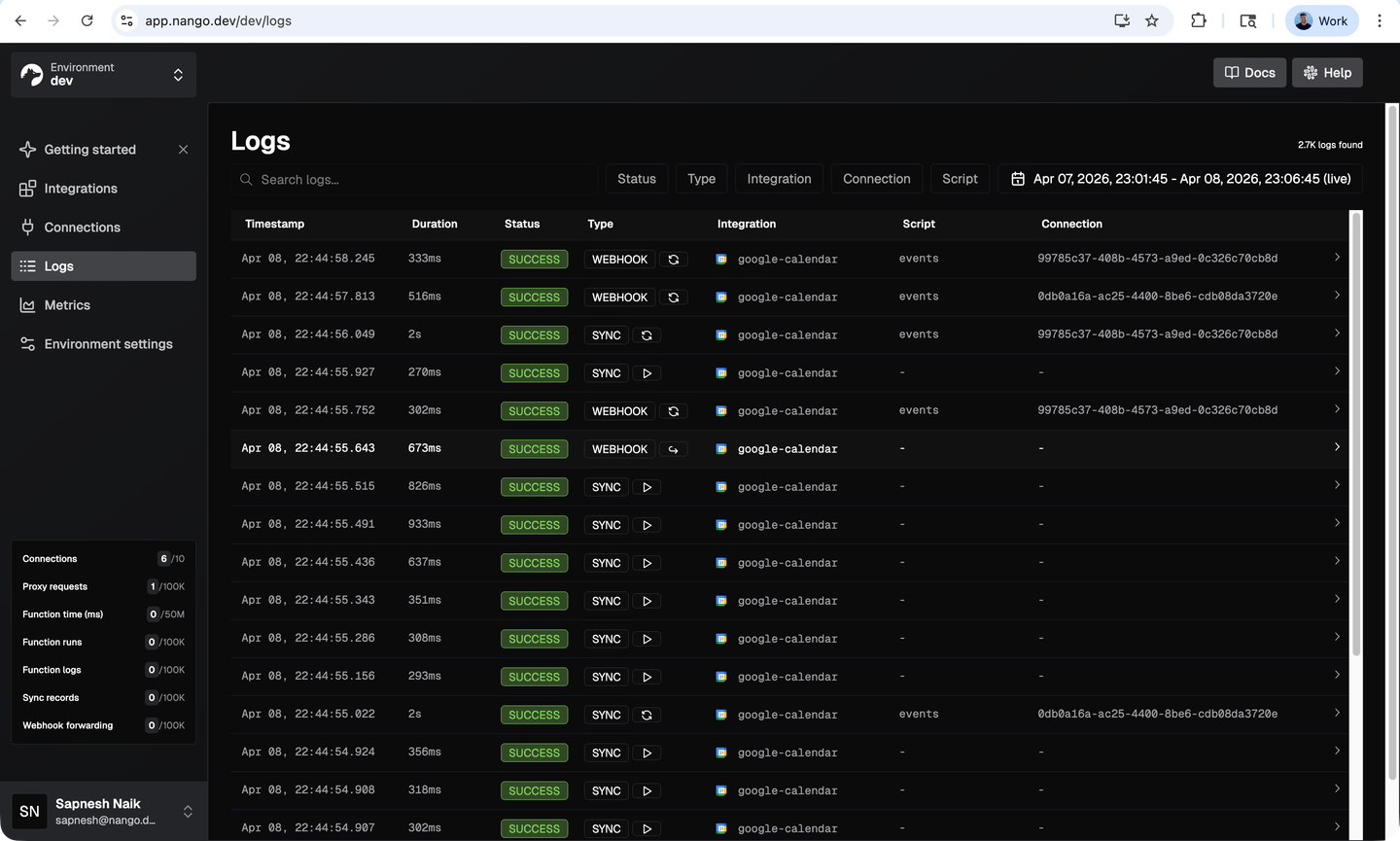
- Make a change in Google Calendar (create, edit, or delete an event). Within a few seconds, Nango’s
onWebhookhandler triggers an incremental sync, and you should see a sync completion webhook arrive in your backend with the updated record count. - Inspect synced records via Nango’s API or dashboard to confirm the event data matches what you see in Google Calendar.
Local testing tip: If you want to test webhooks locally, use ngrok to expose your local server and set the ngrok URL as the webhook endpoint in Nango Dashboard > Environment Settings > Webhook URL.
Common issues
| Issue | Solution |
|---|---|
| "Access blocked: nango.dev has not completed the Google verification process" (403 `access_denied`) | This appears when your Google Cloud OAuth app is in testing mode. Add your test user's email under OAuth Consent Screen > Test Users in the Google Cloud Console. For production, submit the app for Google verification. |
| On-event functions don't fire | They only run for connections created after deployment. Delete and reconnect. |
| Webhook signature verification fails | `verifyIncomingWebhookRequest` needs the raw body string, not the parsed JSON object. Store the raw body before your JSON middleware parses it. |
| Deleted events still appear | Google sets `status: "cancelled"` instead of removing events. Filter them in your app. |
| Missing events from `listRecords` | Results are paginated. Loop with `next_cursor` until it returns `null`. |
Conclusion
Real-time Google Calendar sync requires push notifications for speed and incremental sync for reliability. Google’s APIs provide the building blocks, but production-grade implementations need channel lifecycle management, OAuth token handling, quota management, and fallback polling.
With Nango, the sync logic is a code function you control, while the infrastructure (auth, webhook routing, sync scheduling, concurrency handling) is managed for you. The same approach works for any of Nango’s 1,000+ supported APIs.
Related reading:
- How to build integrations you and your customers love
- How to sync large amounts of contacts from the HubSpot API
- How to build a Notion API integration with Nango and Claude
- How to build a Google Sheets API integration with Nango and Codex
- Google OAuth invalid_grant: what it means and how to fix it
- Why is OAuth still hard in 2026?
- How to handle concurrency with OAuth token refreshes
