
This guide shows how to build a custom, customer-facing Notion API integration with an AI coding agent (Claude Code, Cursor, Codex, or any other) and Nango.
By the end of this guide, you will have:
- A Notion auth UI in your product so your customers can connect their Notion workspaces to your app.
- A durable sync that imports a customer’s Notion pages and keeps them up to date as pages are created and edited.
- The ability to create pages and database entries in a customer’s Notion, from your UI or from an AI agent in your product (via an MCP tool call).
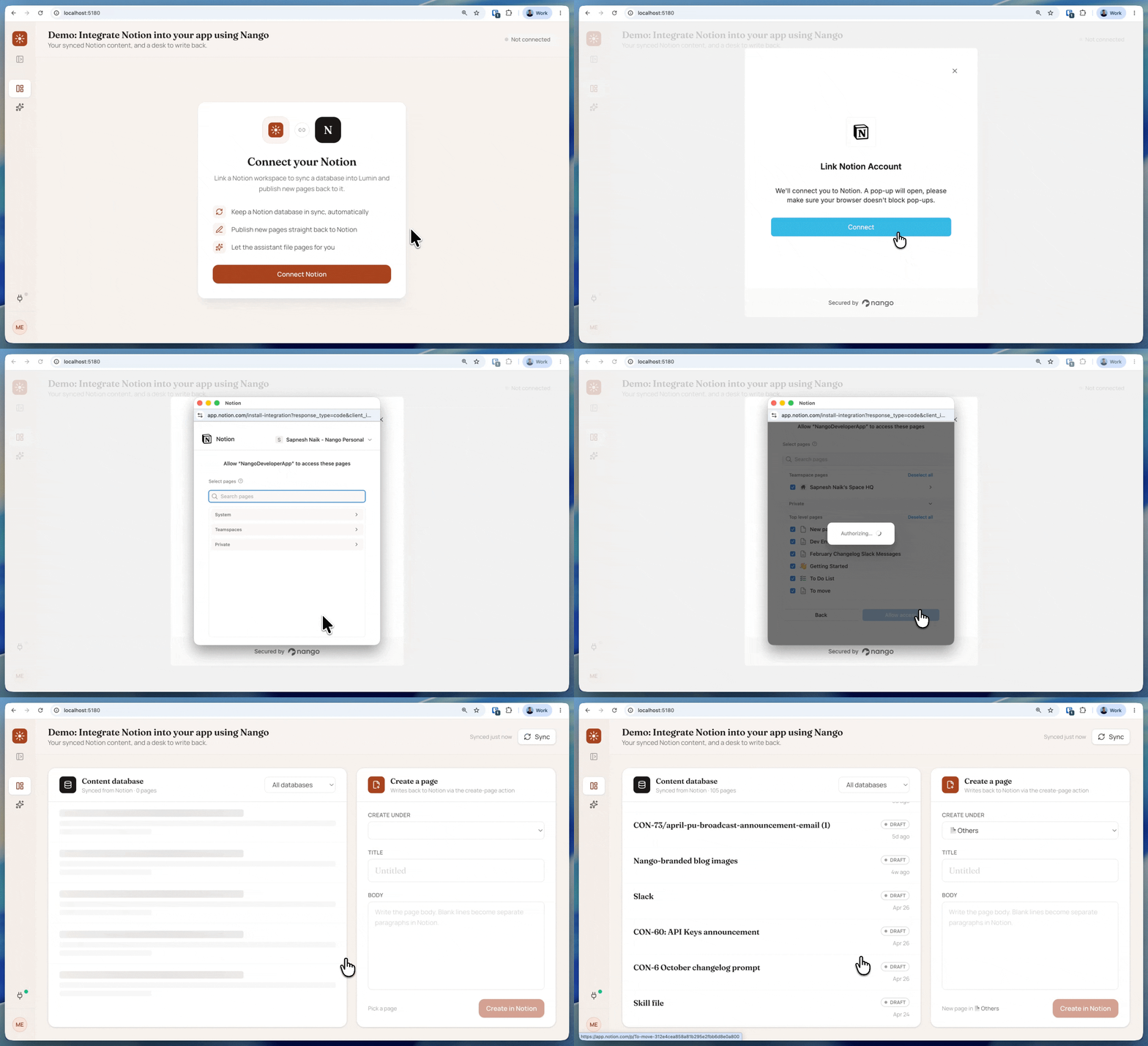
Get the working example: the complete demo (frontend, backend, nango-integrations) is on GitHub at NangoHQ/blog-demos/how-to-build-a-notion-api-integration-using-nango-and-claude. Clone it to run the whole thing end to end, or follow the guide below and let Claude generate the same functions in your own project.
Why is it hard to integrate the Notion API into your app?
The list below is useful context for why a Notion API integration is more than a few REST calls:
- Page content is a tree of blocks, not a document: text, headings, lists, and tables are separate block objects, so you walk the tree to read a full page (Notion docs).
- Databases are becoming “data sources”: since the
2025-09-03API version, one database can hold several data sources, so reads and writes target adatabase_idor adata_source_id(upgrade guide). - Max page size is 100: the maximum
page_sizeis 100, so pages, query results, and search all come back a page at a time (Notion docs). - The integration only sees what a user grants it: during the OAuth connect flow, the customer picks which pages and databases to share; anything they do not pick returns
object_not_found(Notion docs). - Rate and size limits apply: about three requests per second per connection (
429with aRetry-Afterheader), plus per-request caps on blocks, payload size, and rich-text length (request limits). - OAuth tokens rotate: with token rotation on, each refresh issues a new refresh token and invalidates the old one, a common source of
invalid_grant(how to fix it).
Building all of this by hand takes weeks. With Nango and a coding agent like Claude, the same Notion API integration can ship in about an hour.
Why use Nango for Notion API integration
Nango is a code-first integration platform where coding agents build API integrations. Use an agent like Claude, Cursor, or Codex to write the integration as code in your repo, and Nango’s runtime runs it with managed auth, retries, and observability across 1,000+ APIs.
For a Notion integration, we will use these Nango features:
- Managed auth for Notion: pre-built Notion OAuth with token storage, refresh, rotation, and encryption handled for you. You connect the workspace, and Nango runs the flow.
- A coding-agent skill that builds the functions: the universal Nango AI Function Builder skill gives your agent the context to research the Notion API, write a Nango action or sync, test it against a real connection with real data, and iterate until the whole integration works end to end.
- Integrations infrastructure for every use case: Nango provides auth, actions, durable syncs, webhooks, and a built-in MCP server, so your product and the AI agents inside it can call the integration.
Nango also ships pre-built Notion templates (a pages sync, plus create-page, query-database, search, and comment actions) you can enable and customize. Start from a template or generate your own with the skill, as below.
Prerequisites
- Sign up for Nango (the free tier is enough for development).
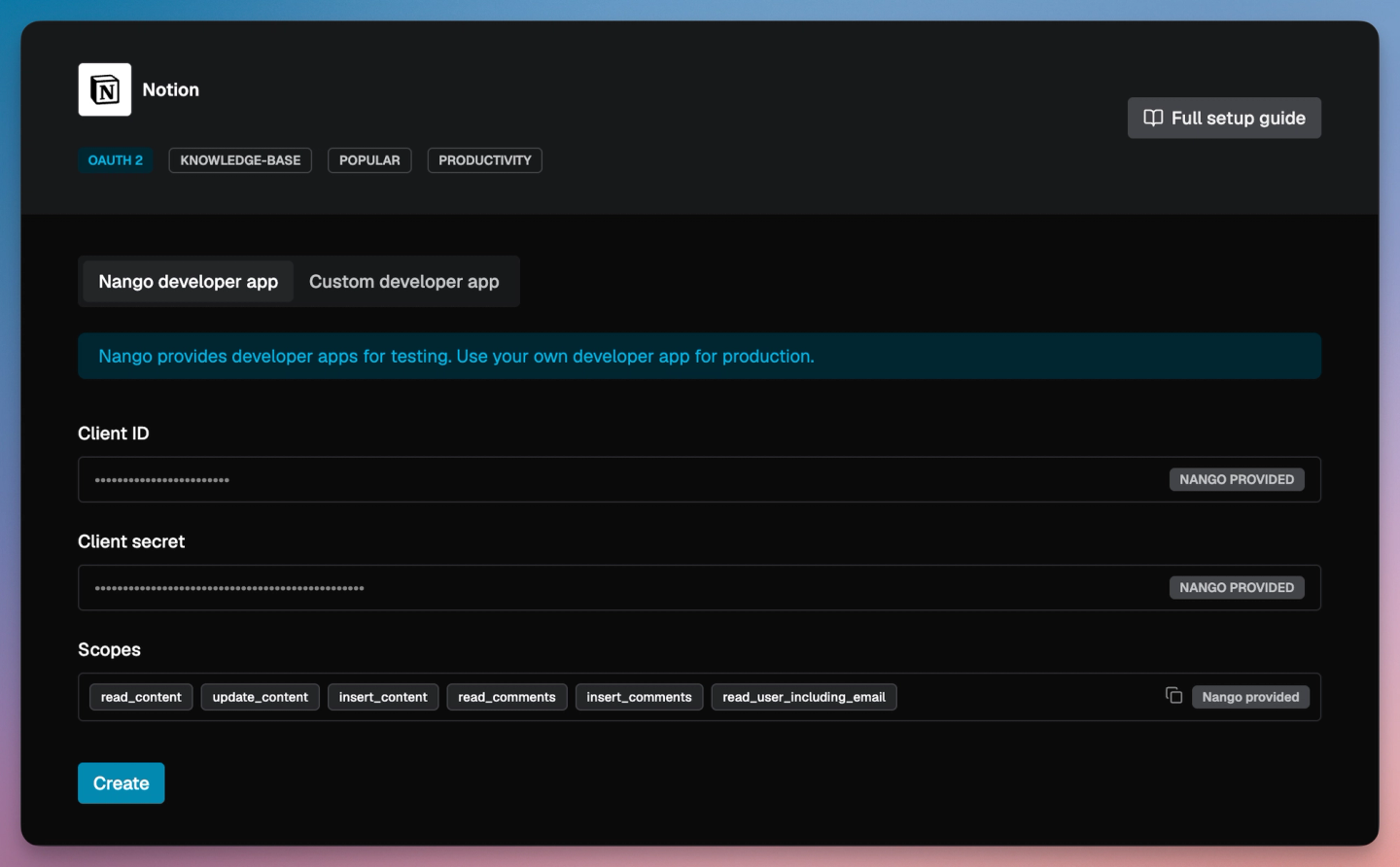
- Add Notion as an integration, using Nango’s developer credentials for local testing or your own Notion OAuth app.
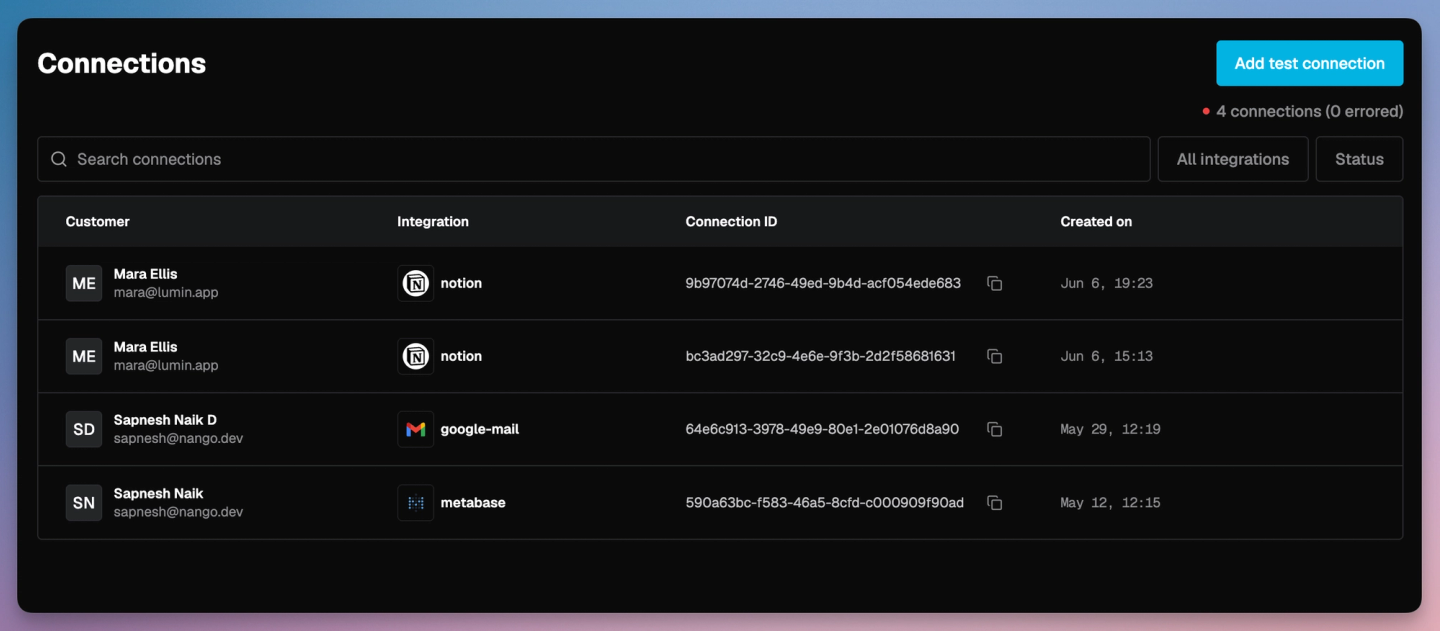
- Add a test connection (Connections > Add Test Connection) and authorize Notion, selecting a few pages in the picker. Claude uses this real workspace to test the integration as it builds, so you know the generated code actually works.
- Install the Nango CLI and run
nango init. This creates anango-integrationsfolder, where Claude writes your integration code (syncs and actions). SetNANGO_SECRET_KEY_DEVinnango-integrations/.envso Claude can deploy to Nango on your behalf. - Install the Nango skill:
npx skills add NangoHQ/skills -s building-nango-functions-locally. This example uses Claude, but the same skill works with Cursor, Codex, and other coding agents.
Tip: LLM training data on Nango is often stale. Add the Nango docs MCP server alongside the skill so your agent pulls current API references while it generates code.
Sync customer Notion pages to your app
A sync keeps a fresh copy of the customer’s Notion content in your app. Here it imports every page they shared when they connect, then refreshes on a schedule so edits show up without anyone clicking refresh. You build it by prompting Claude with the Nango skill loaded:
/building-nango-functions-locally Build a Nango sync for the notion integration that syncs every page shared with the connection and keeps it up to date. Integrate it with my frontend.With the skill loaded, Claude:
- Researches the Notion API and the endpoints it needs.
- Writes the sync and a typed model for your pages.
- Tests it against your real connection with real data.
- Iterates on any errors until the sync works end to end.
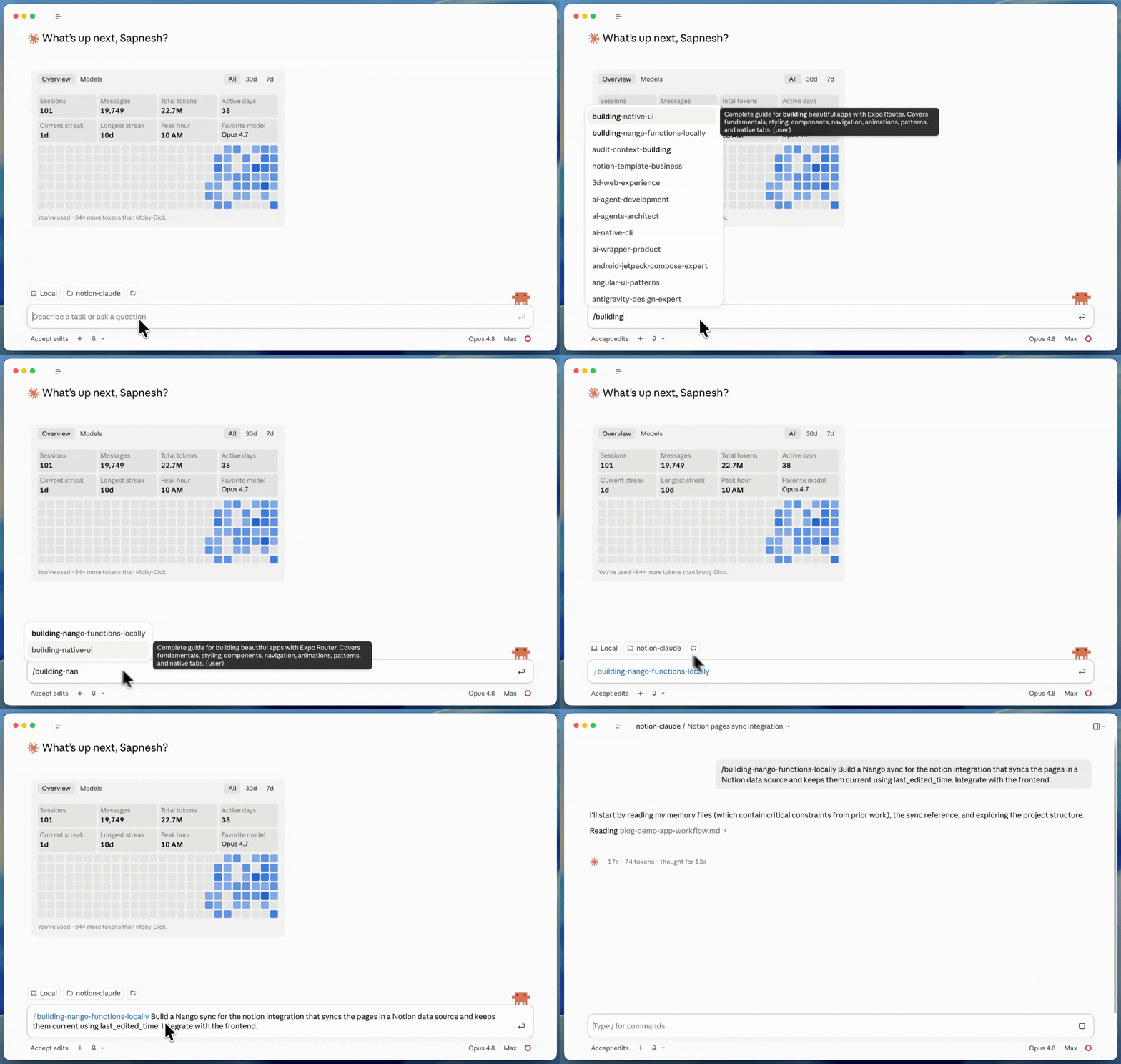
Claude generates the sync and a typed page model. On the first connection it imports every shared page; after that it refreshes on a schedule and pulls only what changed, so your app stays up to date. Your frontend reads the synced pages from Nango, or subscribes to Nango webhooks for live updates.
// Claude generates this sync. You do not write it by hand.
export default createSync({
    description: 'Sync the Notion pages shared with the connection',
    frequency: 'every 5 minutes',
    autoStart: true,
    models: { NotionPage },
    exec: async (nango) => {
        const pages = await nango.post({ endpoint: '/v1/search' }); // pages, newest first
        await nango.batchSave(pages, 'NotionPage');
    },
});
The full sync, with the page model, the last_edited_time checkpoint, and the descending-search pagination, is in the demo repo: data-source-entries.ts.
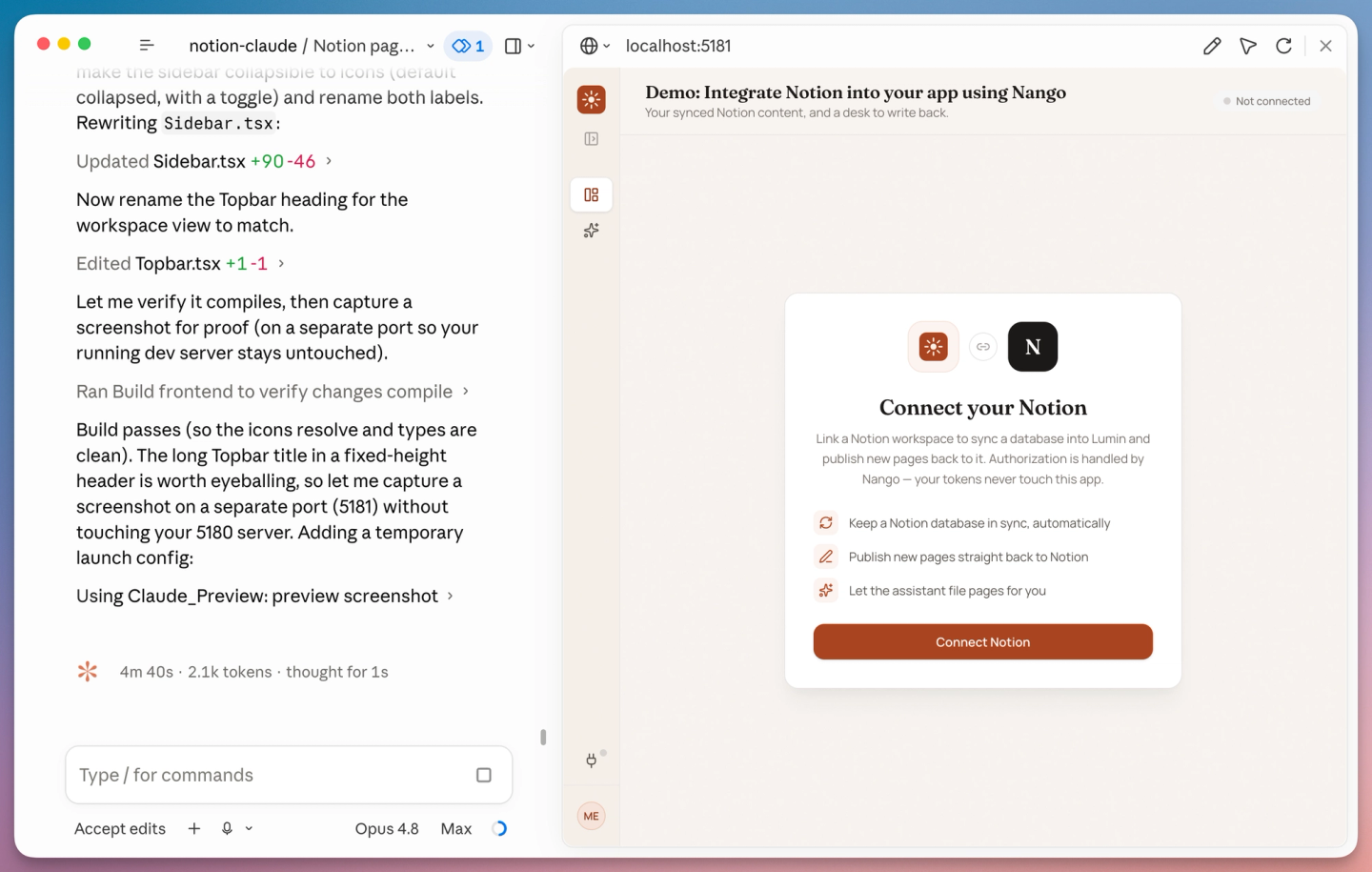
When Claude finishes, it deploys the sync for you (approve the deploy when it asks). Because the prompt said to integrate the frontend, Claude also wires Nango Connect into your app, so customers can link their workspace and the sync starts on its own.
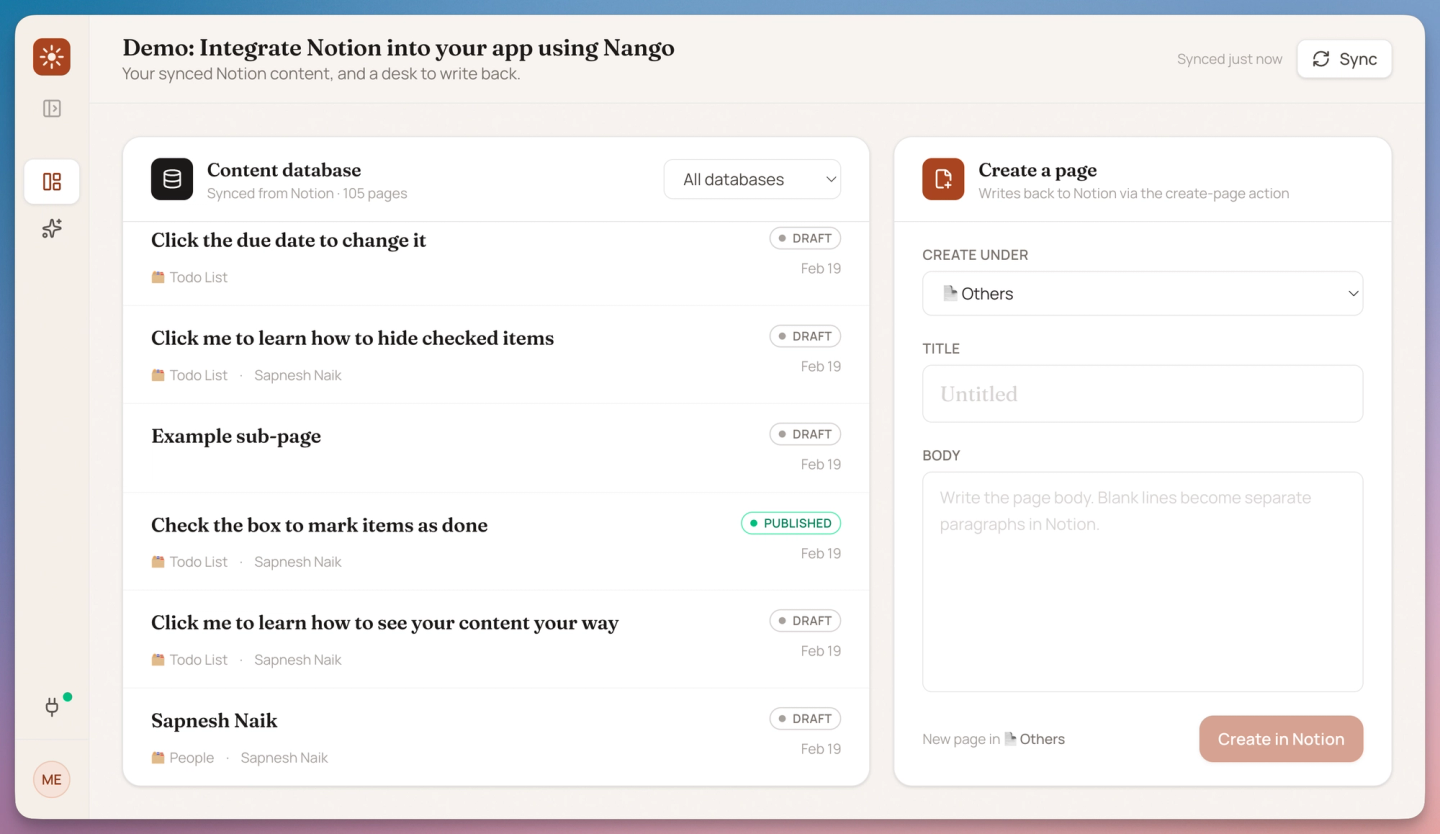
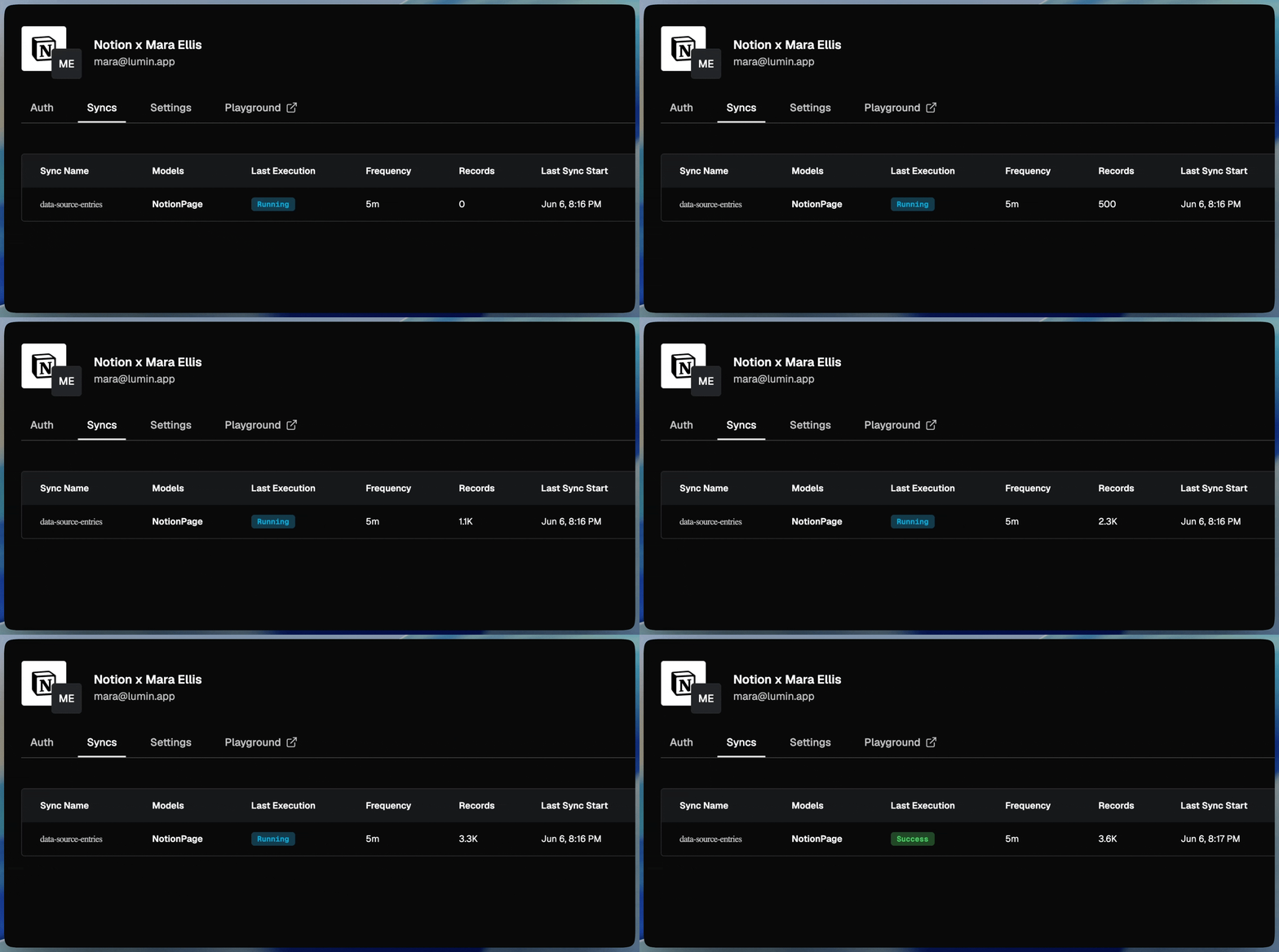
You can see the sync in progress on the Nango dashboard right after a user authorizes Notion in your app.
Do a quick check to confirm everything works: open your app, click connect, authorize Notion, and watch the pages appear. The first sync runs in the background and finishes within a few seconds, so the list fills in shortly after you connect. Claude has already tested the integration; this is just your own sanity check.
Want changes to show up instantly? Ask Claude to add Notion webhooks to the sync. Nango routes Notion’s events to your integration, so an edit in Notion syncs within seconds instead of waiting for the next scheduled run.
Create pages in customer’s Notion from your app
An action is a one-off operation your product or an agent triggers on demand. Here we use one to write back to Notion: let a customer (or an agent) create a page or a database row in their workspace. Prompt Claude to build it with the Nango skill:
/building-nango-functions-locally Add an action to the notion integration that creates a page in the customer's Notion from a title and body.Claude writes the action, tests it by creating a real page in your connected workspace, and deploys it when you approve.
// Claude generates this action; approve the deploy when it asks.
export default createAction({
    description: 'Create a Notion page',
    retries: 0, // creating is not idempotent, so a retry must not make a duplicate
    exec: async (nango, input) => {
        const res = await nango.post({ endpoint: '/v1/pages', data: buildPage(input) });
        return { id: res.data.id, url: res.data.url };
    },
});
The full action, with input validation and the body-to-blocks conversion, is in the demo repo: create-page.ts.
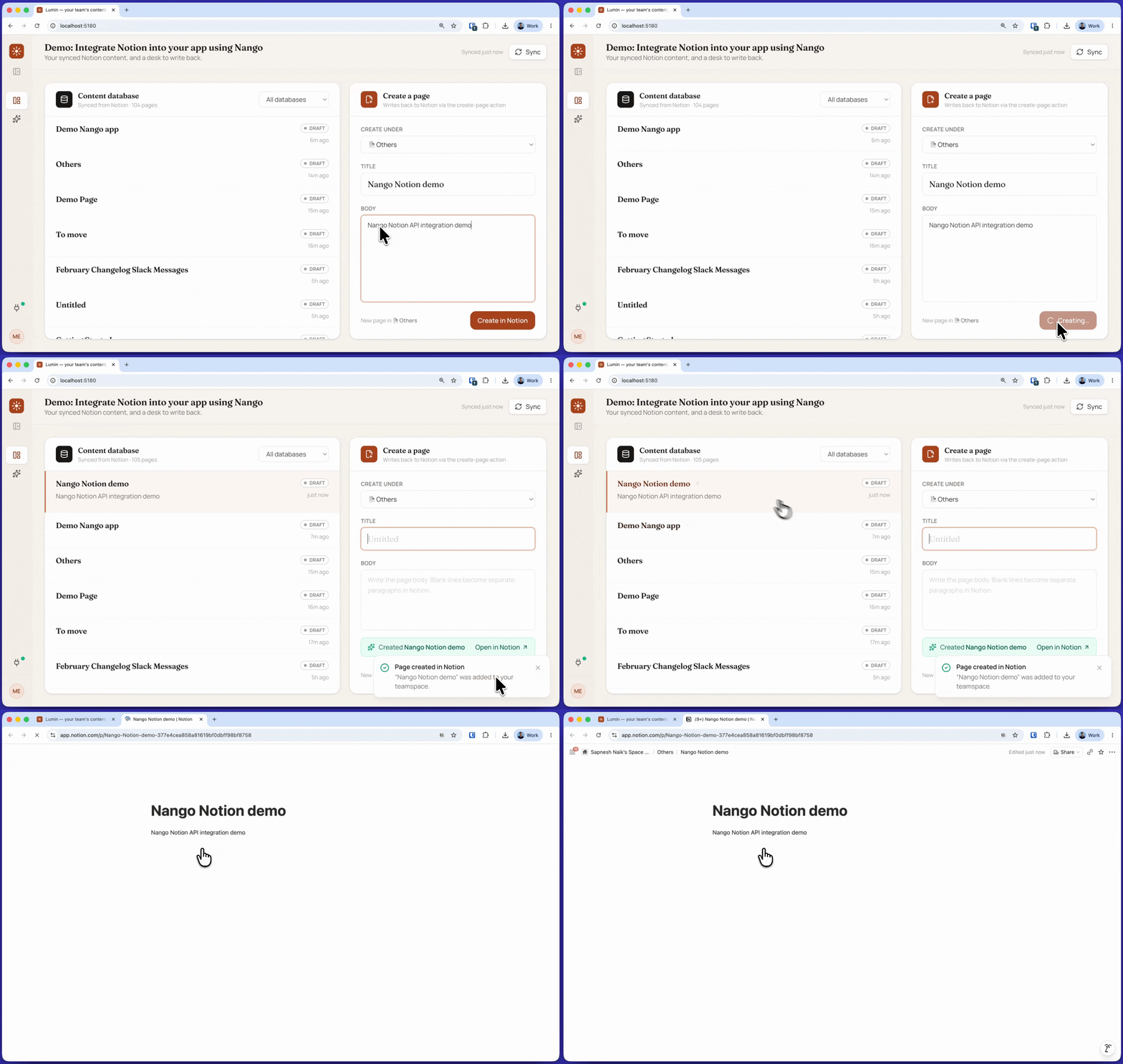
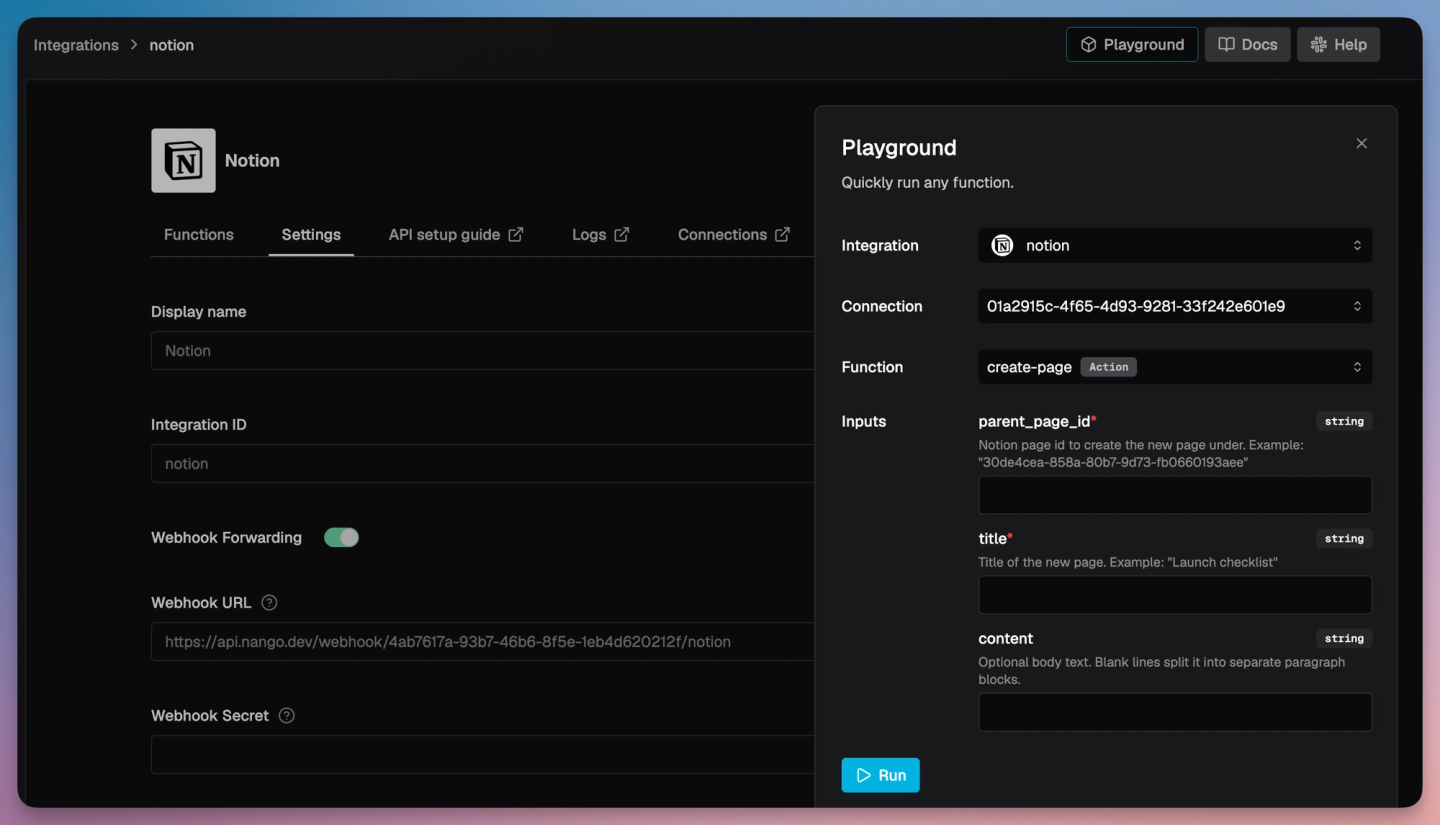
You can test the action straight from your app, or run it from the Nango dashboard with the Playground against your connection.
Give AI Agents in your app access to customer’s Notion
You can also enable the AI agents inside your products to list, create, and read Notion content on a customer’s behalf. Your agent can reuse the same Nango sync/actions using the Nango MCP server.
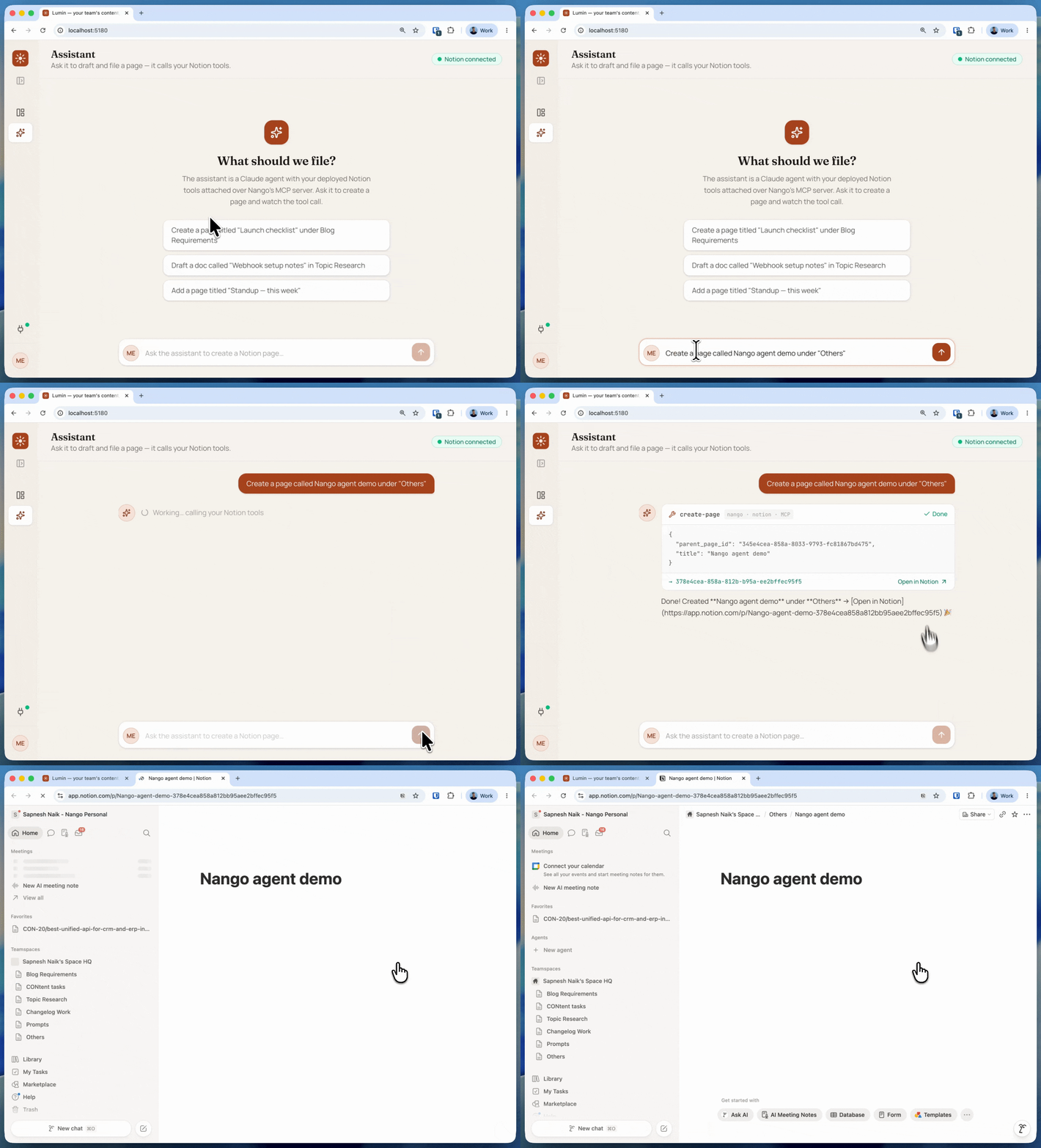
In this demo, the product’s assistant takes a prompt like “create a page called Nango agent demo under Others.” The agent calls the create-page tool through Nango, and returns a link you can open in Notion to verify. The demo orchestrates this from its Express backend, which holds the Nango secret and calls Nango’s MCP server.
Point your MCP client at Nango’s server and pass three values:
Authorization:        Bearer <YOUR-NANGO-SECRET-KEY>
provider-config-key:  notion
connection-id: <CONNECTION-ID>- Authorization: your Nango secret key.
- provider-config-key: your Notion integration’s id (the
notionkey shown on its integration page). - connection-id: the connection for the current user. Fetch it per logged-in user rather than hardcoding it, so each user’s agent acts on their own workspace.
Claude can wire this into your agent for you. Prompt it:
/building-nango-functions-locally Wire my product's AI agent to Nango's MCP server for the notion integration,
passing the logged-in user's connection id, so it can create and read Notion pages.
To give the agent more abilities (querying databases, appending blocks, searching), enable the matching pre-built actions on the Notion integration page in Nango. Each enabled action becomes another tool.
If you do not have an agent interface in your product yet but want to try this in your own coding agent, add Nango’s MCP server to Claude Code directly:
claude mcp add nango-notion https://api.nango.dev/mcp \
  --transport http \
  --header "Authorization: Bearer $NANGO_SECRET_KEY" \
  --header "connection-id: <CONNECTION-ID>" \
  --header "provider-config-key: notion"
Then ask Claude: “Create a page titled ‘Launch checklist’ under my Notion project page using the nango notion mcp.”
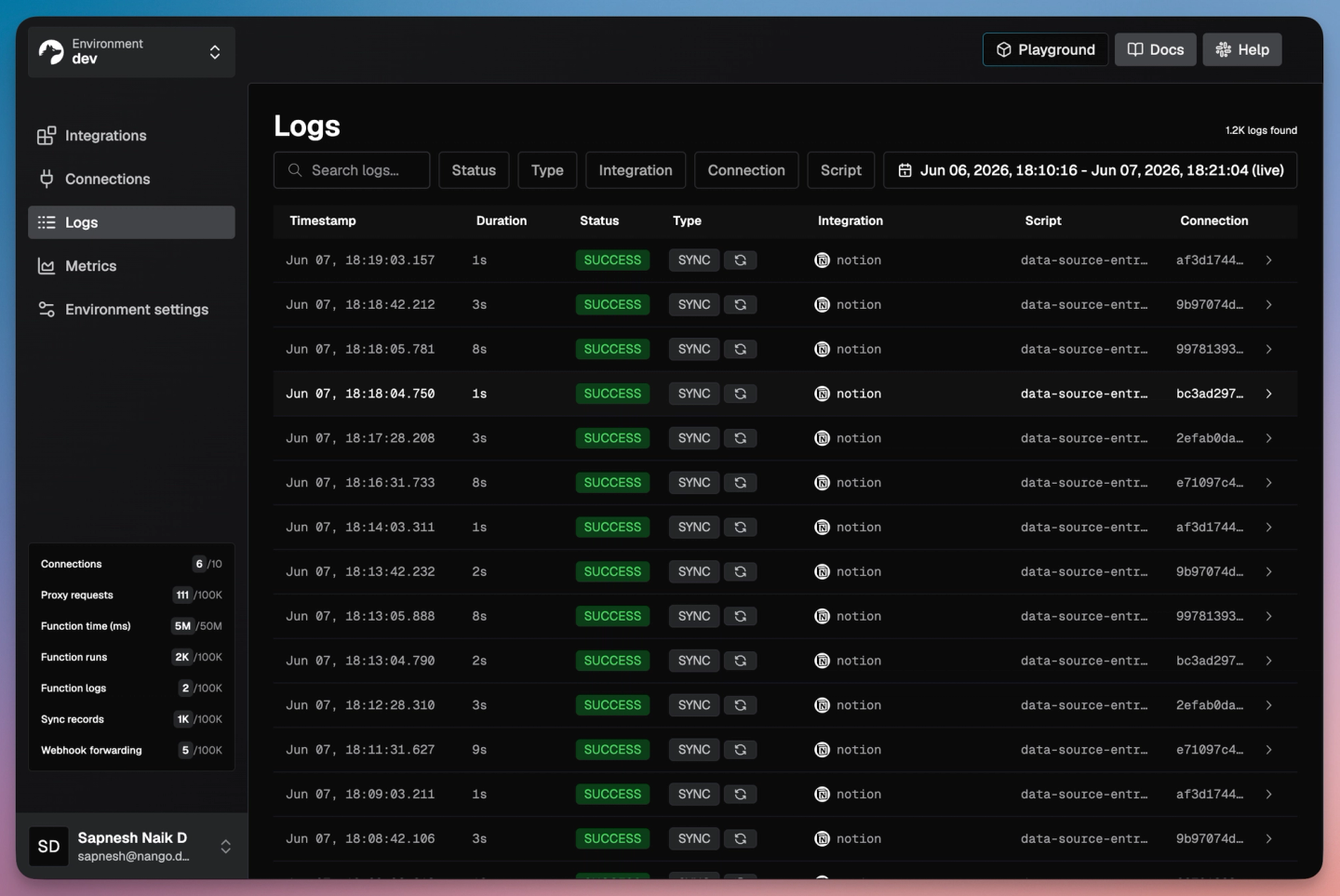
Tip: you can view detailed action and sync logs on the Nango dashboard.
Common issues
| Issue | Cause and fix |
|---|---|
| object_not_found on a page or database | The customer did not grant it to your connection. Reconnect and select it in Notion's page picker. The integration only sees what was shared. |
| listRecords is empty right after connecting | The first sync run is asynchronous. Read records once a run has completed (Claude wires this into your app). |
| Query or create fails on a multi-source database | A database with more than one data source must be addressed by its `data_source_id` (`2025-09-03`+). Single-source databases still work by `database_id`. |
| Duplicate pages on a retried create | A create is not idempotent. The action uses `retries: 0` so a retry never re-creates a page. |
| 429 rate_limited | Notion allows about three requests per second per connection. Nango respects the `Retry-After` header and backs off for you. |
| invalid_grant on token refresh | With token rotation enabled, the newest refresh token must be persisted after every refresh. Nango handles this; see the fix guide. |
| Synced pages have no body content | A page record carries its properties, not body text. Fetch the page's blocks with `GET /v1/blocks/{page_id}/children` to read the body. |
Conclusion
Building a production-grade, end-to-end Notion API integration (customer auth, a live sync of their pages, creating and reading content, real-time updates, and access for the AI agents in your product) used to take weeks. With Nango and a coding agent like Claude (or Cursor or Codex), you can ship it in about an hour and put it in front of your customers.
It works because Nango is code-first and coding agents are good at writing code. Nango brings the rest: white-label auth with token refresh and rotation, durable syncs, webhooks, retries, observability, and a secure runtime, across 1,000+ APIs.
Clone the demo project on GitHub to run it end to end, or build your first integration from the quickstart.
Related reading:
- How to build a Gmail API integration with Nango and Claude
- How to build a Google Sheets API integration with Nango and Codex
- How to build a real-time Google Calendar API integration
- How to sync large amounts of contacts from the HubSpot API
- Notion OAuth invalid_grant: what it means and how to fix it
- Introducing the Nango API integrations builder skill
- Using AI coding agents for building API integrations in 2026

