
TL;DR
Choose Nango for customer-facing agents that need prebuilt tools and managed authentication across 1,200+ APIs and MCPs, with custom behavior, triggers, and fresh context on the same runtime. Scalekit AgentKit fits per-user catalog tool calling through Virtual MCP when your team already operates custom logic and context pipelines. Nango lets your team extend those API integrations with customer-specific tools and background ingestion without building a separate runtime for them.
| Feature | Nango | Scalekit AgentKit |
|---|---|---|
| API/MCP coverage | 1,200+ APIs and MCPs | 600+ connectors |
| Prebuilt agent tools | 10,000+, customizable | 37,000+ |
| Managed execution of your custom integration code | Yes, deploy functions to Nango | REST wrappers run in your app; MCP code runs on your server |
| Managed context syncs for RAG | Yes, incremental syncs, checkpoints, change delivery | Application-owned ingestion around tools/events |
| MCP access | Yes, Agent Sessions, including third-party MCP tools | Yes, Virtual MCP and connection MCP servers |
| Tool search | Yes, within Agent Sessions | Yes, Search Tools API |
| Customizable tools | Yes, inputs, outputs, and TypeScript logic | Yes, REST wrappers and remote MCP connectors |
| Production-ready managed OAuth apps | Yes, 80+ APIs | Supported on selected connectors; own app recommended for launch |
| Managed CASA-verified Google OAuth apps | Yes, Gmail, Drive, Calendar | Gmail/Drive require own app; Calendar supports managed credentials, CASA status undocumented |
| Own OAuth app / branded consent | Yes | Yes |
| Provider webhooks and polling triggers | Yes, including custom event processing | Yes, beta; enablement on request |
| Per-customer connections and tool restrictions | Yes, scoped Agent Sessions | Yes, per-user tokens and scoped Virtual MCP tools |
| Control-plane audit trail | Yes, Enterprise; immutable, one-year default retention | Yes, Enterprise dashboard audit trail |
| Integration logs and export | Execution/request logs; plan-dependent OpenTelemetry export | Tool-call metadata; Enterprise SIEM streaming |
| Platform source and license | Source available, Elastic License 2.0 | Proprietary platform; public SDKs |
| Enterprise deployment in your cloud | Managed BYOC on AWS, GCP, Azure; self-managed option | VPC/private-cloud/on-prem; confirm operating responsibilities |
| Free self-hosting | Yes, Auth and Proxy only; excludes tools, syncs, triggers, MCP | No free offering documented; Enterprise license required |
| SOC 2 Type II | Yes | Yes |
| Starting paid plan / billing units | $50/month minimum with credits; connections, compute, transfer | $99/month Growth; tool calls, trigger events |
| Public security disclosure record | GitHub vulnerability advisories | Coordinated-disclosure policy |
Nango and Scalekit at a glance
Nango
Nango connects AI agents in your products to 1,000+ apps through its 10,000+ prebuilt tools. It handles authentication, execution and provides managed OAuth apps, so you don’t have to create your own. Tools are customizable using coding agents and the Nango MCP.
Nango is also open-source, so you can self-host it or deploy a Nango-managed version in your own cloud (BYOC). Used in production by companies like Replit, Mastra, and ServiceNow.
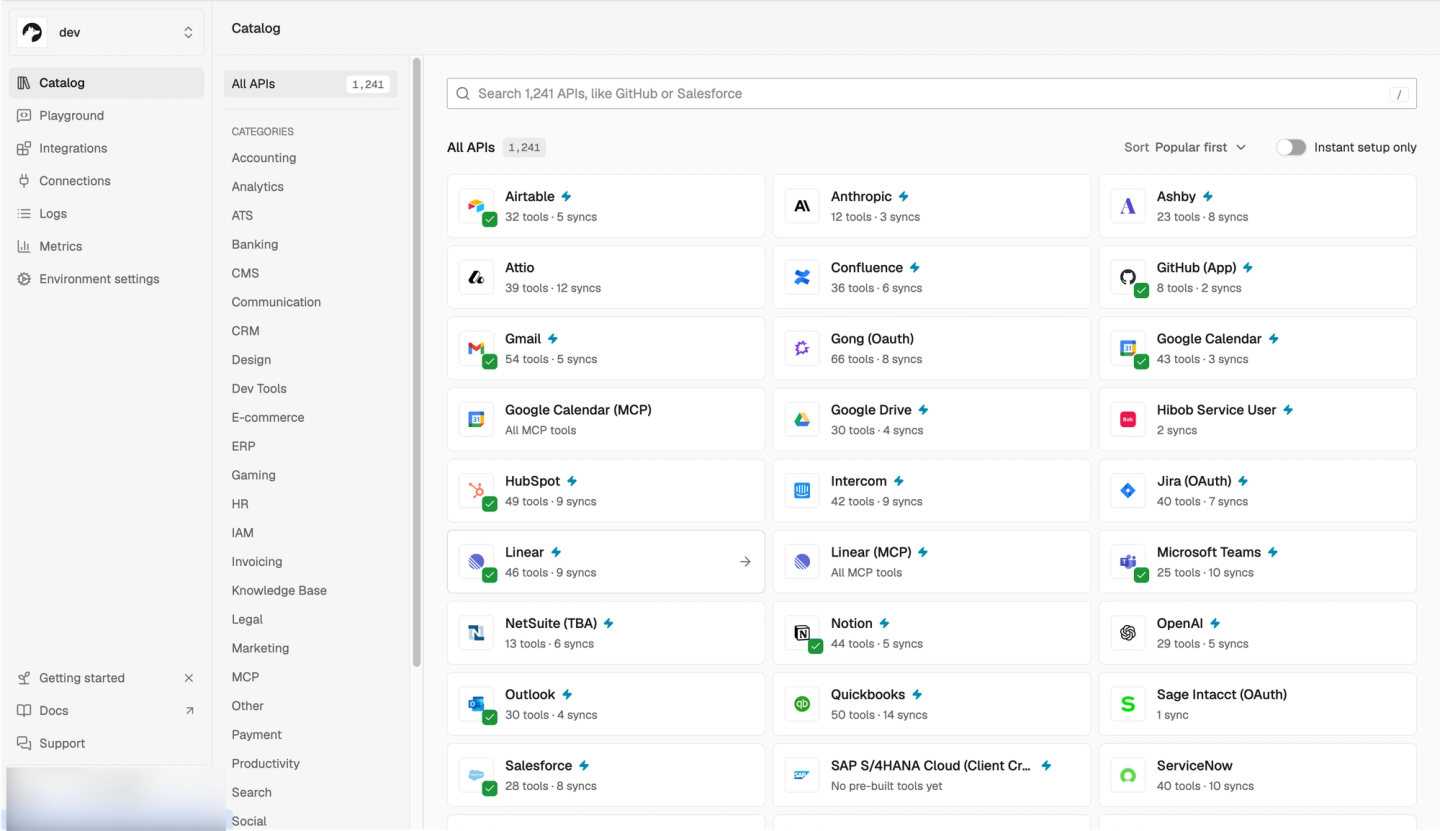
Best for: Customer-facing agents that need ready-made tools and a managed runtime for customer-specific behavior, events, and context.
Pros: Ready-made tools with managed auth; custom functions on the same runtime; tools, events, and background context operated together.
Cons: Custom behavior requires engineering judgment and testing. Templates and coding-agent Skills help implement and validate it; your team owns the behavior and reviews the code.
Scalekit AgentKit
Scalekit provides managed per-user API access and tool execution through SDKs and MCP. Virtual MCP servers group selected tools into reusable bundles for an agent role.
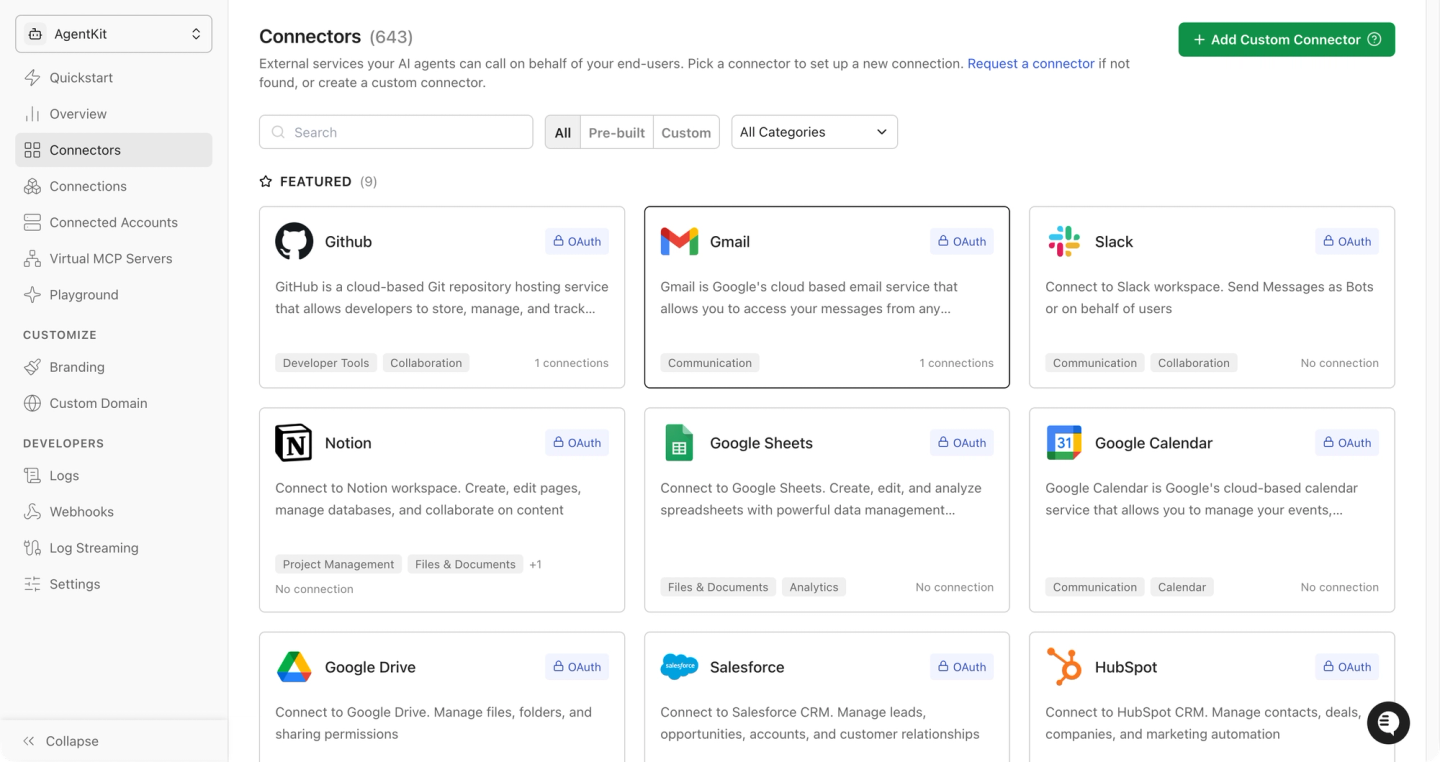
Best for: Teams covered by the catalog and Virtual MCP bundles, with existing infrastructure for custom logic and context ingestion.
Pros: Managed authorization, scoped MCP access, prebuilt tools, custom connectors, and API proxy.
Cons: The documented REST customization path puts wrappers in your application. Historical context ingestion requires additional implementation, and triggers need beta enablement.
Start with Nango’s prebuilt tools
To evaluate either platform, start with the operations your agent needs. A sales assistant might update a deal, create an engineering follow-up, and notify the account team. Nango provides these through HubSpot update-deal, Linear create-issue, and Slack post-message.
To use those tools, connect the customer’s accounts and create a scoped Agent Session. The agent can then discover and invoke operations, including for APIs without their own MCP server. On Nango Cloud and BYOC, catalog tools are available automatically and receive Nango’s fixes without manual deployments.
Before adding them to your application, use the Agent Playground to try tasks and inspect tool calls in the dashboard. It uses an ordinary Agent Session, so you can evaluate the inputs, returned fields, and provider scopes with connected accounts.
Both platforms support tool discovery without loading the full catalog into context; Scalekit’s Search Tools API also checks connection readiness. Nango’s advantage becomes clearer when the discovered tool needs different inputs, validation, or returned fields: the customized function can run on Nango too.
Check OAuth readiness for each provider
Using those tools requires customer authorization. Nango provides production-ready managed OAuth apps for 84 APIs, including the CASA-verified Gmail, Google Drive, and Google Calendar apps. These let teams launch with supported scopes without registering and verifying a separate Google OAuth app.
That managed setup comes with fixed scopes and Nango consent branding. Use your own app when you need different scopes or your own brand on the consent screen, as explained in the authentication guide.
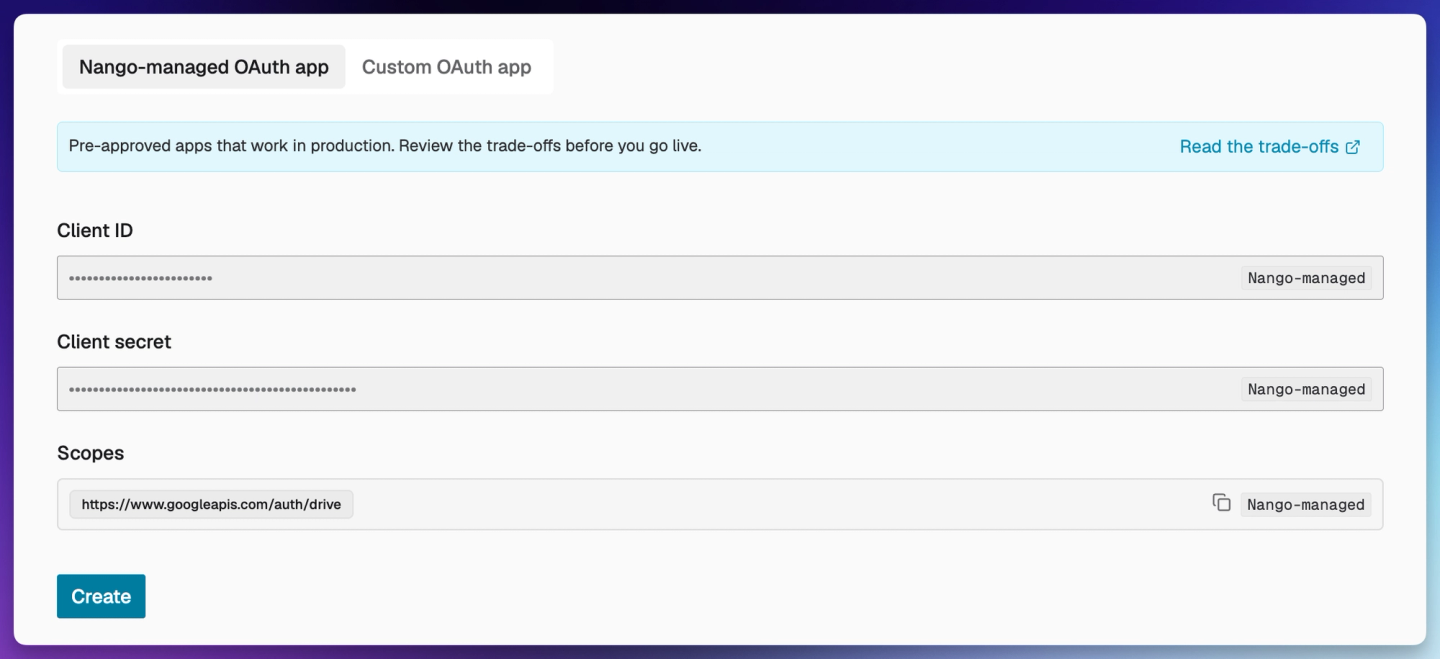
Scalekit permits managed credentials in production but recommends your own OAuth app before real users connect. Its Gmail and Google Drive guides require your own Google OAuth app, while Google Calendar supports managed credentials with undocumented CASA status. For Gmail and Drive workflows covered by the managed scopes, Nango removes that OAuth app setup and verification work before customers can connect.
Run customer-specific tools on Nango’s managed runtime
Once accounts are connected, the next question is how closely each tool matches the customer’s workflow. The sales assistant’s HubSpot tool, for example, may need to accept familiar sales-stage names, map them to that customer’s pipeline, reject invalid transitions, and return only the fields the agent needs.
With Nango, pull an existing function, change its TypeScript logic and input/output schemas, test it, and deploy it to the managed runtime. The customized tool remains available through Agent Sessions, using Nango’s connection infrastructure, provider access, logs, and retry and rate-limit handling. Your application continues to own orchestration and approval rules.
Nango’s Skills help Claude Code, Cursor, or Codex generate, test, and deploy that behavior. For HubSpot, a focused request could be:
Customize HubSpot’s update-deal tool to accept our sales-stage names. Resolve each customer’s pipeline mapping, reject unmapped stages, and return only the deal ID and resulting stage. Test valid and invalid mappings before deployment.
Your team reviews and maintains the custom mapping and failure behavior; custom versions do not automatically inherit catalog updates. Nango continues to operate the function’s runtime and provider access.
Scalekit supports custom wrappers, with execution in your application or MCP server. Its custom connector documentation shows actions.request() inside application code for authenticated REST requests. For MCP, it exposes tools on a server you provide. Scalekit handles connector access; your team hosts and maintains the code for validation, mappings, and response shaping.
With Nango, your team owns the HubSpot mapping while the platform runs it with authentication, retries, and logs. The practical advantage is extending a catalog tool into a customer-specific tool without operating a separate service for that function.
Maintain agent context alongside tool execution
Custom tools may also need historical context and incoming events. A support agent might retrieve a current balance during a conversation, search months of tickets, and start work when a ticket arrives. These require on-demand tools, background ingestion, and event delivery respectively.
Nango supports these workflows through context syncs and webhook or polling triggers. After loading historical records, a sync can fetch incremental changes and resume using checkpoints. Per-connection metadata adapts that process to customer-specific fields or configuration. When Nango signals changes, your backend reads the records and writes them into its chosen database or retrieval index. The sync documentation explains checkpoints and record consumption.
For larger datasets, checkpointing helps ingestion continue across execution limits. If a sync saves a checkpoint during a run and then reaches its time limit, Nango reschedules it immediately instead of waiting for the next scheduled run.
For the support workflow, this covers historical ingestion, context updates, and event-triggered runs. Your application still decides how to index records and when the agent may respond.
Scalekit’s triggers support signed events from provider webhooks or polling. They are in beta and require enablement. Its polling documentation states that older records are not sent when a subscription starts. An event subscription therefore needs a separate historical ingestion path if the agent must search earlier tickets.
Nango covers both the support agent’s ticket backfill and ongoing updates on the same runtime as its tools. Your team can focus on indexing and agent behavior, with sync scheduling, checkpoints, and change delivery handled by the platform. With Scalekit, those ingestion responsibilities remain in your application’s pipeline.
Control customer access and operate integrations
As the agent combines tools, context, and events, each run must stay tied to the right customer. Both platforms let you restrict access to that customer’s connections and permitted tools.
In Nango, the backend creates an Agent Session using user or organization connection selection and tool allow/deny rules. Keep nango_proxy disabled for tool-restricted sessions: general API proxy access bypasses tool allow/deny restrictions.
Those session controls also cover connected third-party MCP tools. They can join Nango tools with search, pinning, and the same allow/deny rules, while their implementation runs on the upstream server. Use Agent Sessions for new implementations: Nango’s legacy Connection MCP is scheduled for deprecation on December 14, 2026.
To handle missing or failed authorization, enable nango_create_connection when creating the session. It returns a connection or reconnect link. If credentials cannot refresh or configured scopes are missing, the user reauthorizes the existing connection and the agent continues in the same session.
Scalekit’s Virtual MCP also provides per-user tokens, tool restrictions, read-only access, and connection links. Both platforms require your backend to establish the customer’s identity. Nango applies session controls to catalog tools and your deployed custom tools, so extending a tool keeps it within the same access model.
Trace tool calls and background work
When a permitted tool fails, your support team needs to trace what happened. Nango’s observability tools cover function and sync execution, provider requests, and custom log messages, with plan-dependent OpenTelemetry export. Its Enterprise control-plane audit trail records platform changes separately from tool-call debugging.
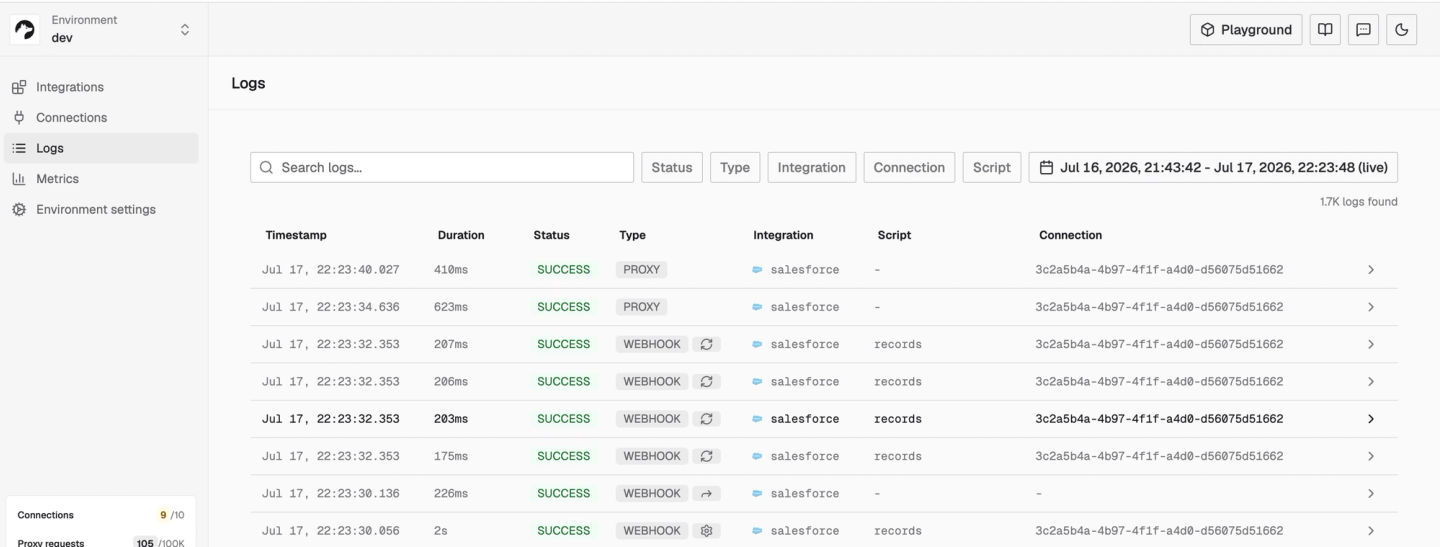
Scalekit logs tool-call metadata, including the tool, account, status, and duration. It does not store normal inputs and outputs; Enterprise adds audit logs and SIEM streaming. For debugging a custom mapping or failed sync, Nango brings the function and provider-request evidence into the same platform.
Choose who operates the deployment
If deployment requirements also call for running in your own infrastructure, both vendors offer that option. Nango provides vendor-operated BYOC and self-managed deployment. Its ELv2 source-available runtime lets teams inspect the platform alongside version-controlled integration changes. Free self-hosting covers Auth and Proxy only; the full self-hosted agent runtime requires a paid offering.
Paid self-managed instances can install the catalog in their own object storage. Nango manages this for BYOC.
Scalekit’s self-hosted offering requires an Enterprise license and supports Kubernetes or Docker. Cloud-managed OAuth credentials are unavailable there; plan to supply your own provider apps. For teams that need their own cloud with vendor-operated infrastructure, Nango’s managed BYOC is the relevant option to evaluate.
Review security disclosures and patch scope
Security disclosures help operators plan upgrades. Nango’s September 23, 2026 advisory describes Checkr Partner webhooks accepting invalid signatures before commit 1a6b595, with versions after it patched. This does not establish a production breach. Scalekit publishes a coordinated-disclosure policy; neither that policy nor missing search results proves an absence of incidents. Assess availability outages separately.
Compare the workload and engineering costs
These operational responsibilities belong in the cost comparison alongside usage fees. Nango paid pricing starts at a $50 monthly minimum with $50 in usage credits, billing for connections, compute, and data transfer. Scalekit Growth starts at $99 per month with 100,000 tool calls and 50,000 trigger events. Custom connectors and API proxy require Growth or Enterprise.
To compare those billing models, use the same connected accounts, call volume, execution time, transferred data, and events. Include hosting custom wrappers, backfilling context, and maintaining ingestion jobs. Nango covers custom-function execution and sync infrastructure within its platform; that operating scope is its cost argument. The actual workload determines the bill.
When to choose Nango or Scalekit
For a Nango vs Scalekit evaluation, compare the work needed to ship and maintain the complete agent integration. Choose Nango when the roadmap includes customer-specific tools, fresh context, and event-driven work. Its catalog gets you started; managed execution, syncs, and provider access support the requirements that follow.
Choose Scalekit when its catalog and Virtual MCP model cover the required operations and your team prefers to operate custom logic and context pipelines in existing infrastructure.
If you need a Scalekit alternative for AI agents that covers those evolving requirements, find your first operation in Nango’s catalog and try it with a connected test account.
FAQs
Does Nango provide prebuilt AI tools, or do I need to write them?
Yes. Nango provides 10,000+ ready-made tools. You can use catalog tools without writing an implementation, then customize a function when its behavior needs to change.
Can I customize tools in Nango and Scalekit?
Yes. Nango runs deployed TypeScript functions on its managed runtime. Scalekit’s documented REST path uses wrappers in your application; remote MCP connectors use tools on a server you supply.
How do Nango and Scalekit handle triggers and agent context?
Nango provides triggers and recurring context syncs. Scalekit provides beta webhook and polling triggers; historical ingestion and context-store updates require an application-owned pipeline.
How do they scope each customer’s accounts to its agent?
Nango Agent Sessions select connections and permitted tools. Scalekit uses per-user tokens and scoped MCP bundles. Both depend on your backend assigning the correct customer’s connections before granting access.

