
API authentication is usually built for deterministic software. Your code chooses an endpoint, constructs the request, and sends it with a credential.
However, a customer-facing AI agent changes the first two steps. It chooses the tool and arguments at runtime, sometimes based on text from support tickets, emails, or shared documents. The credential can be valid even when the resulting request should not be allowed.
Securing the integration means deciding what the agent may do outside the model. Teams enforce that decision through scoped credentials, provider permissions, checks at the tool boundary, and runtime containment.
Prompt instructions are not access controls
Prompt instructions influence model behavior. They do not restrict what a credential or tool can do. A system prompt can say “Only use the get_contact tool” or “Never call delete endpoints,” but the model can still invoke any tool exposed to it.
A May 2026 study of governed tool access measured how often models invoke a tool they were told not to use. With the tools still visible in context, the unauthorized invocation rate ran from 48.5% to 68.5% across three models. Adding a prompt-level allowlist brought it down, but had failure rates between 4.0% and 37.0%. Removing the tools from context and verifying each call in a proxy outside the model brought it to 0%, with a median overhead of 1.72ms (Uppala, arXiv:2605.18414).
A 4% failure rate does not make a security boundary.
flowchart LR
    A["Untrusted content<br/>Email, ticket, or document"] -->|Injected instruction| B["AI agent"]
    C["Sensitive data<br/>Access through API credentials"] --> B
    B --> D["External communication<br/>Tool, URL, or message"]
Learning failure modes from real-world incidents
None of these incidents required a model jailbreak. In each case, the agent exercised access already granted by the surrounding system.
Supabase: over-privileged credentials
General Analysis demonstrated an attack against Supabase’s MCP server when it ran with a service_role key, which bypasses row-level security. Instructions in a support ticket told the agent to read the integration_tokens table and paste the values into the thread. The database accepted the query because the credential had permission to make it (General Analysis).
Asana: broken tenant isolation
In June 2025, Asana found a logic flaw in its MCP server that exposed task data, project metadata, comments, and files across organizations. Around 1,000 customers were affected (BleepingComputer). The API authenticated the requests, but the MCP layer did not preserve the tenant boundary.
Salesloft Drift: stolen customer tokens
In August 2025, the group tracked as UNC6395 used OAuth tokens stolen from Salesloft Drift to export Salesforce data from more than 700 organizations. The group then searched the exports for AWS keys, Snowflake tokens, and VPN credentials (Anomali). A product that stores customer credentials is operating a token vault and needs to secure it accordingly.
Composio: credential cache compromise
In May 2026, an attacker used a compromised Gmail OAuth token belonging to a Composio employee to intercept magic-link emails, access an internal monitoring tool, and register malicious tool definitions. From the execution sandbox, the attacker reached a credential cache. About 5,001 GitHub OAuth tokens were compromised, and 5,241 API keys were treated as potentially exposed (Material Security).
Five controls for agent API access
Each control below addresses a different failure mode.
1. Keep credentials out of the model context
Risk:
The agent receives an API key, access token, or refresh token directly. A prompt injection or model mistake can then expose that credential in output or logs.
Control:
Pass the agent a connection identifier, not the provider’s access token. When the agent calls a tool, the execution layer loads the correct customer credential, refreshes it if needed, and constructs the API request. It returns the API response without exposing the Authorization header to the model.
sequenceDiagram
    participant Agent as Agent (model + orchestration)
    participant Tool as Tool executor
    participant Auth as Credential store
    participant API as External API

    Agent->>Tool: Tool name, arguments, connection ID
    Tool->>Auth: Resolve connection
    Auth-->>Tool: Refreshed provider credential
    Tool->>API: Authenticated API request
    API-->>Tool: API response
    Tool-->>Agent: Result only
    Note over Agent,Auth: The provider credential never enters the model context
How to implement it:
Create one connection record per user or tenant and pass only its opaque identifier to the tool. Resolve and refresh the credential inside the server-side executor. With Nango, your application triggers the action with a connectionId, and Nango attaches the provider credential after the model has produced the tool arguments.
Nango’s tool-calling flow uses this pattern by resolving the connection identifier at execution time.
2. Scope the credential, not the instruction
Risk:
The access token has broader permissions than the agent needs. A prompt injection or model mistake can then turn an unintended tool call into a valid API request.
Control:
Scope the credentials to their expected actions so that models cannot execute unintended actions, even if they try.
sequenceDiagram
    participant Agent as Agent
    participant Tool as Tool executor
    participant API as External API

    Agent->>Tool: Read messages
    Tool->>API: Request with read-only token
    API-->>Tool: Messages
    Tool-->>Agent: Result
    Agent->>Tool: Send a message
    Tool->>API: Request with the same token
    API-->>Tool: Denied: missing write scope
    Tool-->>Agent: Tool call failed
How to implement it: Configure the scopes on the provider app and request only those scopes during the connection flow. If one agent has both read and write tools, expose only the tools supported by the granted scopes.
Popular APIs expose different forms of scoped access:
- Gmail: Request
gmail.readonlyto read mail, and addgmail.sendonly if the agent must send messages. - Microsoft Outlook: Use
Mail.Readfor inbox access and requestMail.Sendonly for tools that send email. - Salesforce: Request
apiandrefresh_tokeninstead offull; the authenticated user’s Salesforce profile still limits which records and fields the token can access. - Slack: Use
channels:historyto read public channel messages and addchat:writeonly if the agent must post. - GitHub App: Grant repository Contents read access and Issues write access, then limit the installation to selected repositories.
- HubSpot: Use
crm.objects.contacts.readfor lookup tools and addcrm.objects.contacts.writeonly for create or update tools. - Shopify: Request
read_ordersfor order lookup and addwrite_ordersonly when the agent must modify orders. - Jira: Use
read:jira-workfor issue retrieval and addwrite:jira-workfor creating or editing issues. - Linear: Request
readfor lookup tools; useissues:createorcomments:createinstead of the broaderwritescope when those are the only mutations required. - Stripe: Create a restricted key and set each resource to Read, Write, or None. A reporting agent can read balances and charges while every write permission remains disabled.
For providers that cannot narrow a token per tool, use separate read-only and write connections when the added consent and operational cost are justified.
With Nango, you set the provider scopes when you configure the integration, before users connect. You can also override scopes for a specific connection when the provider supports it (Nango auth guide).
3. Let the external API enforce permissions
Risk:
Your tool authenticates successfully, but returns records that the current user should not be able to access.
Control:
When a provider supports per-user OAuth, call the API with a token for the user on whose behalf the agent is acting. Salesforce then applies that user’s record and field permissions to every request. This keeps authorization in the provider, rather than duplicating its permission model in your tool layer.
Per-user OAuth adds a consent step for each user. In managed organizations, delegated access from Google and Microsoft can reduce that friction while keeping downstream calls user-scoped. MCP’s enterprise-managed authorization uses ID-JAG to let an organization’s identity provider issue a scoped token for a target app without a per-user consent screen.
sequenceDiagram
    participant App as Your application
    participant Agent as Agent
    participant Tool as Tool executor
    participant API as External API

    App->>Agent: User request and trusted session context
    Agent->>Tool: Tool name, arguments, connection ID
    Tool->>API: Request with that user's OAuth token
    API->>API: Apply the user's record and field permissions
    API-->>Tool: Authorized records only
    Tool-->>Agent: Result
    Agent-->>App: Response
If a provider only offers an org-level credential, enforce the user’s permissions in your tool layer before each request. Tenant and record filtering then become code you own. User-level vs org-level auth in API integrations covers the tradeoffs.
How to implement it: Map each internal user to the connection they authorized, then invoke the tool with that connection ID. If the integration uses an org-level token, derive tenant and record filters from the authenticated application session rather than from model-supplied arguments, and add them inside the tool before making the provider request.
With Nango, save the connectionId returned by the auth flow against the user or tenant in your application. The tool-calling flow uses that ID to run each action with the right user’s credentials.
4. Check the policy at the tool boundary
Risk:
A tool is allowed in general but not for this caller, tenant, record, or set of arguments.
Control:
Evaluate authorization after the model selects a tool but before the tool runs. The decision can include the caller, tenant, connection, tool name, and exact arguments.
Amazon Bedrock AgentCore Policy is one implementation of this pattern. Its gateway evaluates Cedar policies against the caller, tool, and arguments before execution. AWS-managed MCP servers also add the aws:CalledViaAWSMCP context key, so IAM policies can distinguish agent-originated requests from human ones.
AWS’s guidance is to size permissions by acceptable impact while assuming every granted permission may be used.
Tool design is the simplest version of this control. Functions such as get_open_leads_for_rep and log_call_note expose a small, auditable surface. A generic sql_query or raw HTTP tool exposes much more of the underlying system and pushes more work into the policy layer. See how to build reliable tool calls for AI agents.
How to implement it:
Define allow rules over the user, tenant, connection, tool name, and arguments, and deny the call when no rule matches. Evaluate the rule in the gateway or tool wrapper before loading the provider credential. Amazon Bedrock AgentCore Policy can express these rules in Cedar; a smaller system can use typed guard functions in each tool handler. Log the decision and policy version with the tool call.
5. Contain the runtime and reserve approvals for high-risk actions
Risk:
An authorized tool call can still run untrusted code, send data to an arbitrary host, or ask for approvals so often that reviewers stop checking them carefully.
Control:
Isolate the runtime, restrict outbound traffic, and ask for human approval only when the consequences justify it.
Anthropic reports that Claude Code users approved roughly 93% of prompts when the product asked before every write, command, and network call. Approval quality fell as the number of prompts increased (Anthropic’s containment architecture). An approval is useful only when the person reviewing it has enough context to judge the action. Reserve approvals for a small set of high-impact operations, such as issuing a refund or deleting a record.
Runtime controls cover failures that tool authorization misses. If an agent runs untrusted code or fetches arbitrary URLs, a deny-by-default egress allowlist limits where it can send data. Anthropic’s ordering is useful here: contain the environment first, then use model instructions to improve behavior inside that boundary.
How to implement it: Run agent-generated code in an isolated process or container with CPU, memory, and execution-time limits. Block outbound traffic by default, then allow only the provider hosts required by the enabled tools through a network policy or egress proxy. Require human approval only for a named set of high-impact tools, not for every tool call.
How the controls map to failure modes
| Pattern | What it stops | Enforced by | Works when |
|---|---|---|---|
| Credentials outside the model | Token leaking through model output or logs | Your tool layer or integration platform | Baseline for every integration |
| Scoped credentials | The agent performing actions the token cannot | The external API | The provider offers scoped keys or fine-grained tokens |
| Per-user or delegated tokens | The agent seeing records the user cannot | The external API | The provider supports per-user OAuth or delegated access |
| Policy at the tool boundary | Disallowed tools and disallowed arguments | Your gateway or tool code | Any agent tool, especially when one credential covers many users |
| Runtime containment | Exfiltration after a successful injection | Sandbox and egress allowlist | The agent runs code or fetches arbitrary URLs |
The enforcement point changes by control, but none relies on the model choosing to comply.
What MCP cannot secure
MCP standardizes how a client authenticates to a server, not what an authenticated agent can do. Its OAuth flow binds tokens to the intended server, and its security guidance covers common attacks during authorization and metadata discovery. Nango supports this flow through MCP Auth.
The tool server must still enforce tenant, tool, and argument-level authorization. Asana’s flaw let an authenticated user reach another tenant’s data. Supabase accepted an authenticated key that bypassed row-level security. Both requests could pass MCP’s authentication checks.
Choosing an approach for your agent
Choose these controls per integration. A Salesforce connection carrying a user’s identity has different constraints from an org-wide analytics key.
Whose identity should the call carry? If the data is user-scoped and the API supports per-user OAuth, call it with the user’s token. For key-only APIs, including SendGrid, Stripe platform operations, and many analytics tools, enforce user access in the tool layer.
Can the credential be narrowed? Request only the scopes the tool needs. Use a read-only key when the agent does not need to write. Provider-enforced limits reduce the number of cases your policy layer must handle.
How broad is the tool? Avoid tools that accept free-form SQL, arbitrary URLs, or raw request bodies unless the use case requires them. Prefer functions with a fixed endpoint and a small, validated input schema.
Which actions need approval? Gate a small set of irreversible or high-impact actions, such as sending an email, issuing a refund, or deleting a record. Do not prompt for routine reads, because frequent approvals reduce reviewer attention.
Can you reconstruct a tool call? Log the policy decision and exact outbound request and response, tied to the tool, user, tenant, and connection. If the integration layer transforms a request, preserve the provider-specific payload in the log.
Together, these controls put a trusted execution layer between the agent and each external API:
flowchart TD
    subgraph App["Your SaaS application"]
        A["Agent<br/>LLM + orchestration<br/>Untrusted execution path"]
    end

    subgraph Guard["Trusted execution layer"]
        B["1. Resolve tenant<br/>and connection"] --> C["2. Check tool<br/>and arguments"]
        C --> D["3. Load credential<br/>outside the model"]
        D --> E["4. Send provider request"]
        C -->|Deny| R["Reject call"]
        E -.->|Per call| G["5. Log request,<br/>response, and policy decision"]
    end

    subgraph APIs["External APIs"]
        P["Salesforce<br/>Slack<br/>Jira"]
    end

    A -->|Tool, arguments, connection ID| B
    E --> P
Implementing this pattern with Nango
Nango provides the execution layer between a customer-facing agent and external APIs. It manages authentication and runs provider-specific functions across 1,000+ API integrations, with 7,000+ pre-built tools.
Resolve credentials at execution time. Your application triggers an action with a connection ID. Nango loads the corresponding credential, refreshes it if needed, and authenticates the provider request. The model does not receive the credential. Nango supports OAuth, API keys, basic auth, custom flows, and MCP Auth, and encrypts credentials at rest with AES-256-GCM.
Constrain the provider request in code. A Nango action (tool) can fix the endpoint and map a validated input schema to the provider payload. In this example, the agent can supply three contact fields. It cannot choose the endpoint, add arbitrary properties, or access the credential.
import { createAction } from 'nango';
import * as z from 'zod';

export default createAction({
  description: 'Create a HubSpot contact',
  version: '1.0.0',
  input: z.object({
    email: z.string().email(),
    firstName: z.string().max(100),
    lastName: z.string().max(100),
  }),
  output: z.object({ id: z.string() }),
  exec: async (nango, input) => {
    const res = await nango.post({
      endpoint: '/crm/v3/objects/contacts',
      data: {
        properties: {
          email: input.email,
          firstname: input.firstName,
          lastname: input.lastName,
        },
      },
    });

    return { id: res.data.id };
  },
});
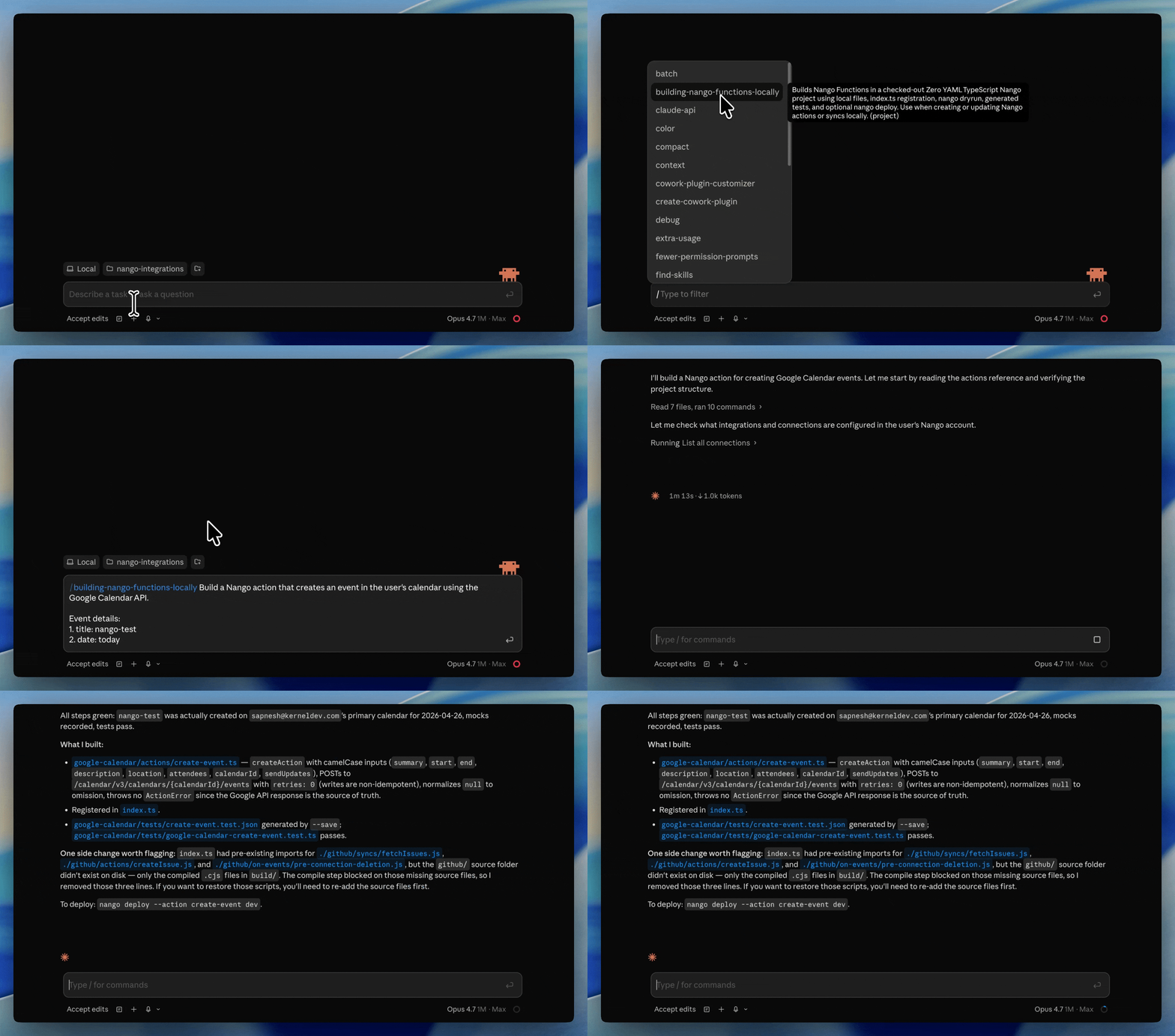
Build and test narrow tools with a coding agent. With the Nango function builder skill, Claude Code, Cursor, or Codex can customize a pre-built tool or write one for any API. The agent tests the function against a live connection before deployment, so you can review both the code and its input schema.
Call the same function over REST or MCP. Deployed actions are available through POST /action/trigger or Nango’s MCP server. The function’s input schema and provider request stay the same in both cases.
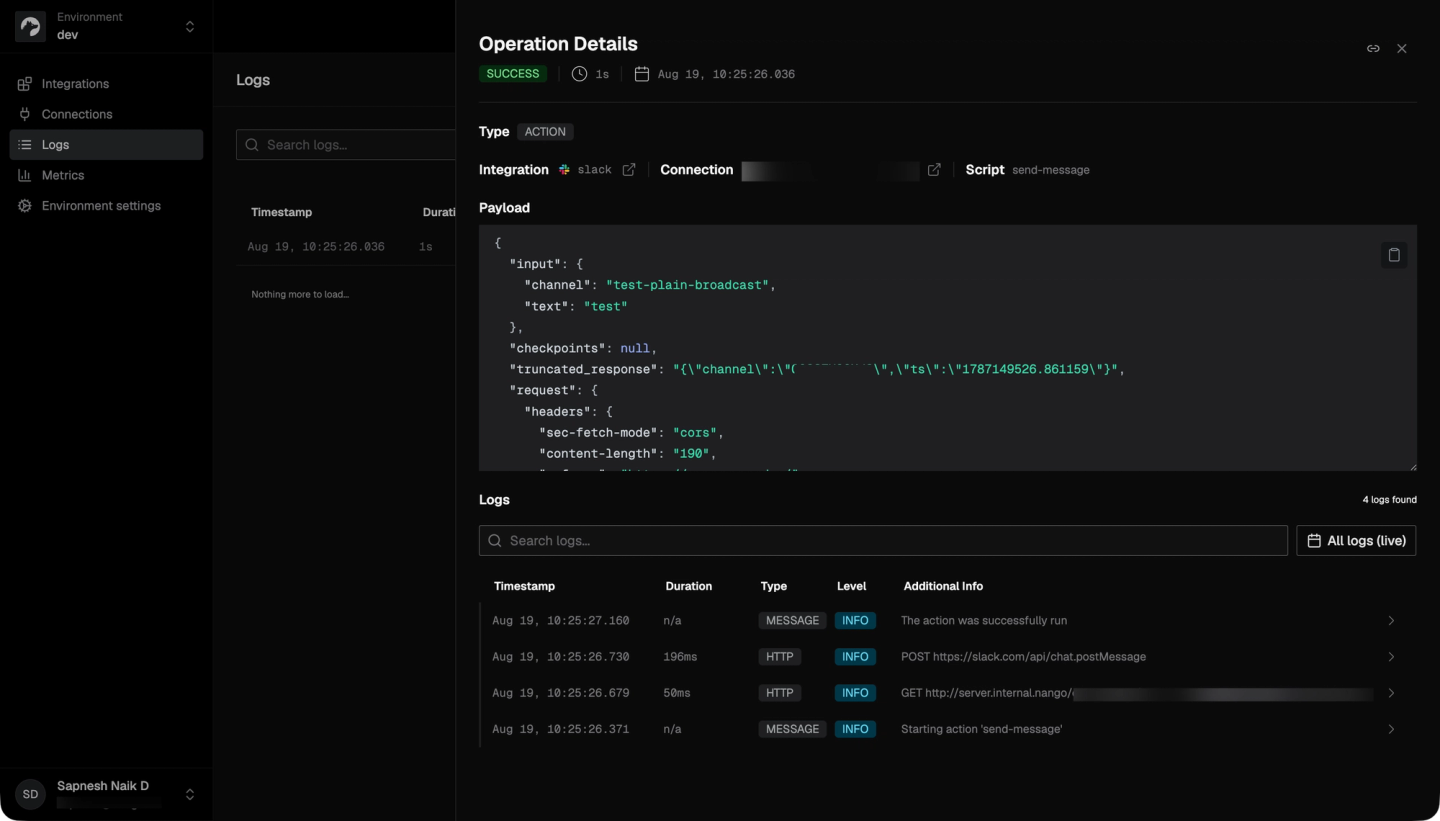
Keep a provider-level audit trail. Nango makes 1:1 API calls without normalizing the provider payload. Its logs retain each request and response with the connection and can be exported through OpenTelemetry. Scoped Nango API keys can let a service execute actions without granting it access to connection credentials.
Related reading:

