
If you’re building API integrations in your SaaS or AI product, for example, connecting to Salesforce so your AI agent can query CRM data, or integrating with Slack so your app can post messages on behalf of users, one of the first architectural decisions you’ll face is: whose credentials should the API call use?
You can have each user authenticate individually, providing the external API with a user-scoped OAuth access token for each request. Or a single admin can connect once and share one org-level token across all users. Some APIs even support a hybrid model where an admin grants access org-wide, but your app still gets per-user tokens behind the scenes.
This choice has real consequences. It determines which permissions apply, how actions appear in the external system’s audit logs, how complex your auth infrastructure becomes, and how much onboarding friction your customers face. We get asked about this a lot at Nango. This article walks through the five identity models we see in production API integrations, when each one makes sense, and the tradeoffs involved.
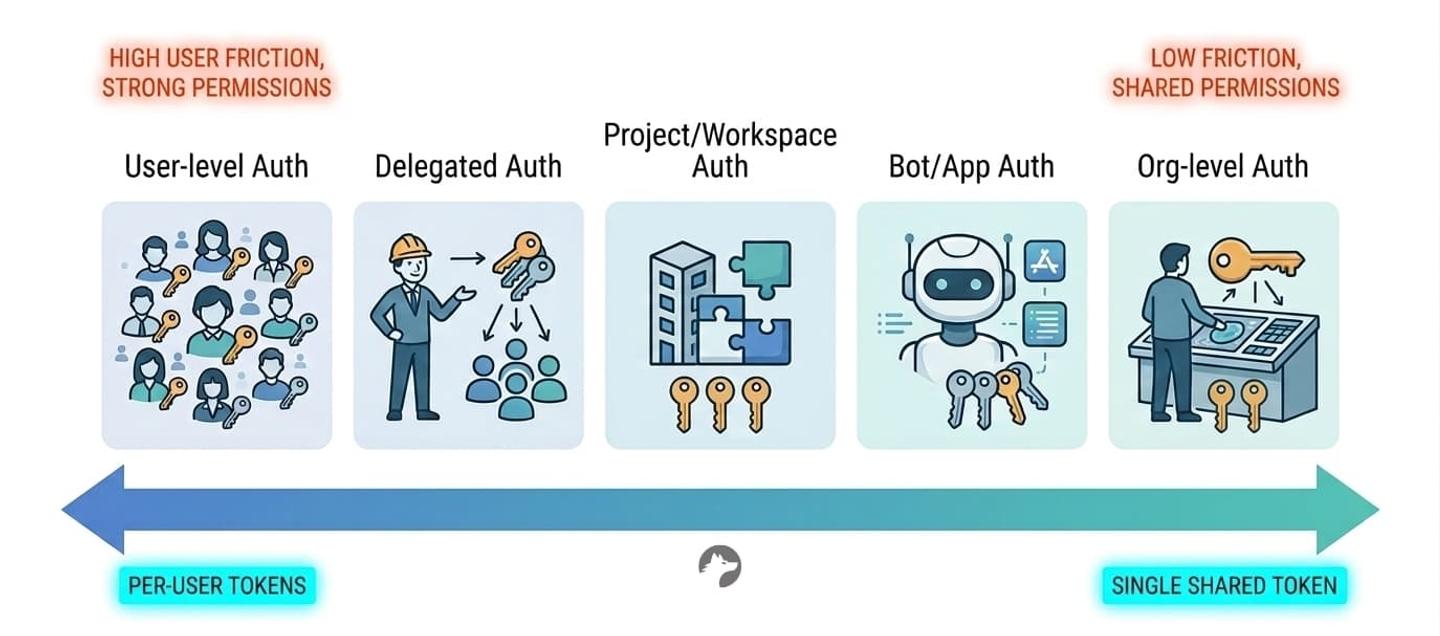
Which identity can your API call use?
Every time your product calls an external API, the request is tied to some identity (API credentials). That identity controls which data is returned, which actions are allowed, and who is credited in the external system’s audit logs.
There are five common models:
- User-level token: Each end-user authenticates via OAuth. API calls use that user’s access token.
- Org-level token: One admin connects once. All API calls share a single token.
- Delegated access: An admin approves your app org-wide. Your app generates per-user tokens without individual OAuth flows.
- Project or workspace-scoped token: The connection is tied to a project, team, or workspace rather than a user or org.
- Bot or app identity: Your application authenticates as itself (e.g., a Slack bot or GitHub App).
There is no universally correct model. The right choice depends on whether exact permission enforcement matters, whether actions need to appear under specific users, and how much onboarding friction your customers will tolerate.
User-level authentication
With user-level auth, each user authenticates individually via OAuth. Your application receives a user-scoped access token and makes API calls on behalf of that specific user.
Example: Consider a sales enablement tool that integrates with Salesforce. A sales rep asks the AI assistant: “Summarize my active leads and draft follow-up emails.” The app requires each rep to link their own Salesforce account via OAuth. When the agent queries the Salesforce API, it uses that rep’s unique access token.
Result: if the rep doesn’t have access to Enterprise-tier leads in Salesforce, the API won’t return them. The agent can only work with data that the rep is actually allowed to see.
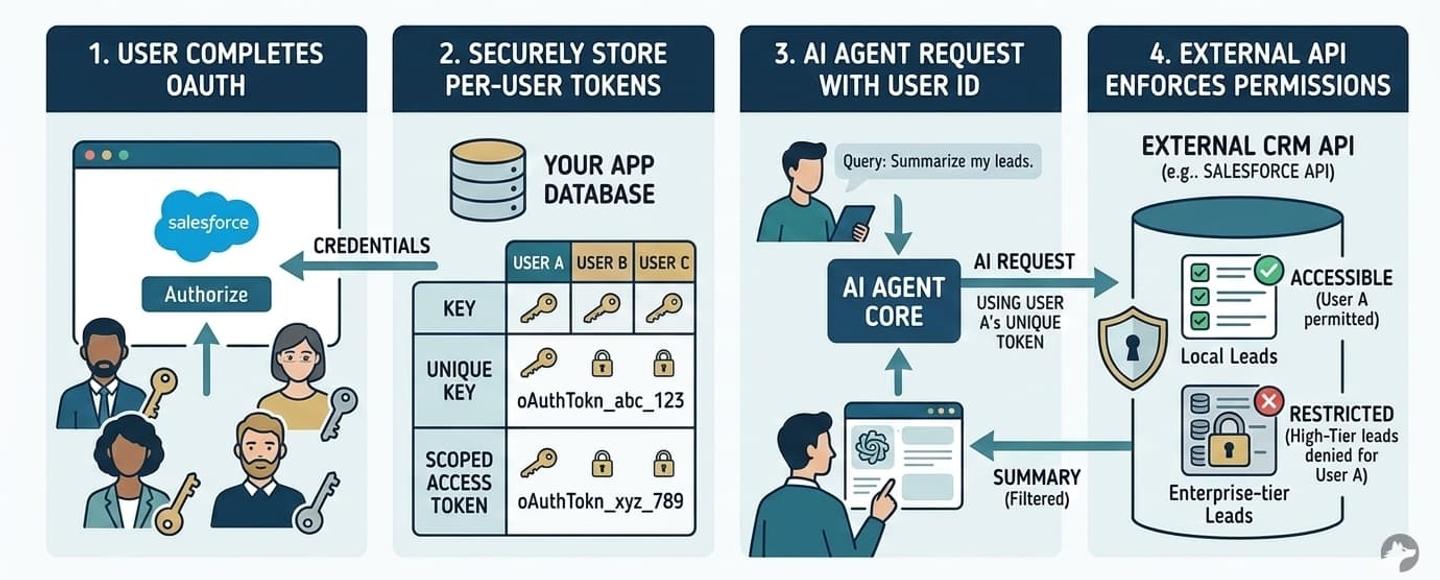
Advantages of user-level auth
- API provider enforces permissions: The external system serves as the source of truth for access control. You don’t need to replicate Salesforce’s record-level sharing rules or Google Drive’s folder inheritance. The API handles it.
- Actions appear as the actual user: Actions show up under that user’s name in the external system. This matters for CRM activity logging (a sales rep’s notes should appear as theirs), email sending via Gmail or Outlook, collaborative editing in tools like Notion or Confluence, and compliance audit trails.
- Incremental adoption is possible: Not every user needs to connect on day one. Individual users can opt in, and you can request narrower OAuth scopes to start.
Disadvantages of user-level auth
- Every user must complete an OAuth flow: For a 500-person enterprise customer, that means 500 individual authentications. This slows down onboarding significantly. If the API supports it, delegated access can eliminate this friction while preserving per-user enforcement. See why OAuth is still hard in 2026 for the full picture.
- More tokens, more things to manage: More tokens mean more refresh cycles, more edge cases around revoked or expired credentials, and more storage requirements. Every API handles token refresh differently: some APIs revoke the current access token the moment a refresh starts, others silently reuse old refresh tokens.
- API provider may not support user auth: APIs that only offer API key-based authentication (not OAuth) don’t support per-user tokens. Examples include SendGrid, Mixpanel, and Amplitude. In those cases, you’re limited to org-level or project-scoped credentials.
Org-level authentication
With org-level auth, a single admin connects once. Your application stores one access token or API key, and all users share that connection. Every API call goes through the same identity.
Example: The same sales enablement tool, but this time the Salesforce admin connects to the org using an org-wide API key. When any rep asks the AI assistant a question, the app queries Salesforce using the admin’s credentials. It pulls all leads the admin token has access to, then filters results in the app layer based on the rep’s assigned region.
In practice, org-level tokens are extremely common. Many products choose this approach because it makes onboarding simple for the end user: the admin connects once, and everyone is up and running. The tradeoff is that you take on the responsibility of implementing permissions in your own backend.
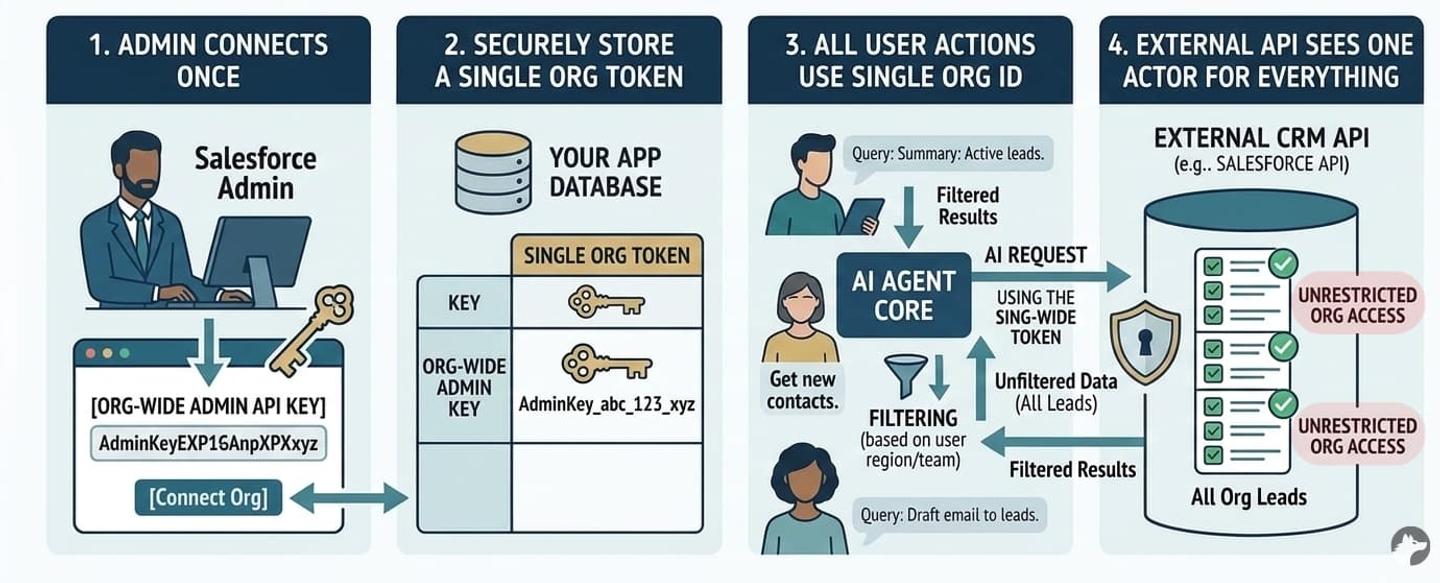
Advantages of org-level auth
- Simple setup: One connection, one admin, one token lifecycle. This is the fastest path to a working integration.
- Universal compatibility: Org-level auth works with every API regardless of auth method: API keys, OAuth, basic auth, or custom flows. Every API supports some form of org-level credential.
- Service accounts can control scope: The admin or end-user can set up a service account with exactly the permissions they want your tool to have, then authenticate with that account. This gives the customer direct control over what your integration can access.
Disadvantages of org-level auth
- Your app may need to enforce additional permissions: All users in your app share the same external permissions. If the admin token has access to all Salesforce records, every user can potentially access all records through your integration. In practice, most integrations don’t require additional permissions enforcement. But this has become increasingly relevant with AI agents and complex enterprise integrations where data isolation matters. If you do need it, there are two main approaches: Org-wide auth with permission syncing (which we generally don’t recommend) and Org-wide auth with custom internal permissions (a more practical compromise).
- All actions appear under the token owner’s name: By default, every API call shows up as the admin or service account in the external system’s audit trail.
- Higher exposure if the token leaks: If the org-level token is compromised, the attacker gains access to the full scope of the admin’s permissions across the entire organization, not just a single user’s data.
Delegated API access: a hybrid model
Some enterprise APIs support a middle ground. An administrator grants org-wide approval for your application, and your app can then generate user-scoped tokens without requiring each user to complete an individual OAuth flow.
Google (domain-wide delegation) and Microsoft (on-behalf-of flow) both support this pattern.
We really like this approach. It offers the best of both worlds: the security of per-user permission enforcement with the ease of org-level onboarding.
Example: The sales enablement tool integrates with Google Workspace. The customer’s IT admin grants domain-wide delegation to the app. Now, when a user asks the AI assistant to “find my recent emails about Project X,” the app generates a user-scoped token for that specific user and calls the Gmail API under their identity. The user never completed an OAuth flow, but the API still enforces their permissions.
Why delegated access is powerful
You get the benefits of both models:
- Per-user permission enforcement: The external API enforces each user’s actual access controls.
- Actions appear as the user: API provider’s audit trails correctly attribute actions to individuals.
- No per-user OAuth friction: Users don’t need to complete individual auth flows. The admin’s consent covers the entire org.
When available, this is often the strongest architectural choice for enterprise deployments.
Limitations of delegated access
- Not all APIs support it: Among those that do, the implementation details vary significantly.
- Your auth infrastructure must handle these flows natively: Many integration platforms assume connections are either user-scoped or org-scoped, and don’t support delegated patterns out of the box.
- Your customer must agree to it: Delegated access typically requires enterprise-level permissions on the external platform. Your customer’s IT team needs to grant domain-wide delegation or configure admin consent, which adds setup complexity.
Bot and App identity
Some APIs allow your application to act on its own behalf (Bot/App) rather than as a human user.
For example: Slack bot tokens (xoxb-) let your integration post messages as the bot. GitHub Apps authenticate as the app itself with their own set of permissions. Microsoft Teams supports dedicated bot tokens.
Bot identity is the right choice when automation should clearly appear as a bot (not impersonate a human), when you want a clean separation between automated and manual actions, or when the bot is the product itself, like a Slack assistant that responds to commands.
Project and workspace-level authentication
Sometimes the right boundary is neither user nor org.
Consider an AI workflow builder where each project has its own set of connected tools. Or a multi-tenant SaaS where different teams need isolated integration contexts. Or a shared workspace where all members collaborate through a single connection.
In these cases, the integration is scoped to a project, workspace, or team. All members of that scope share the same connection.
Key requirement: Your auth infrastructure must support flexible scoping. If your platform assumes connections are always tied to a user ID or an org ID, you’ll need workarounds for multi-tenant product designs. This becomes a recurring pain point as your product evolves.
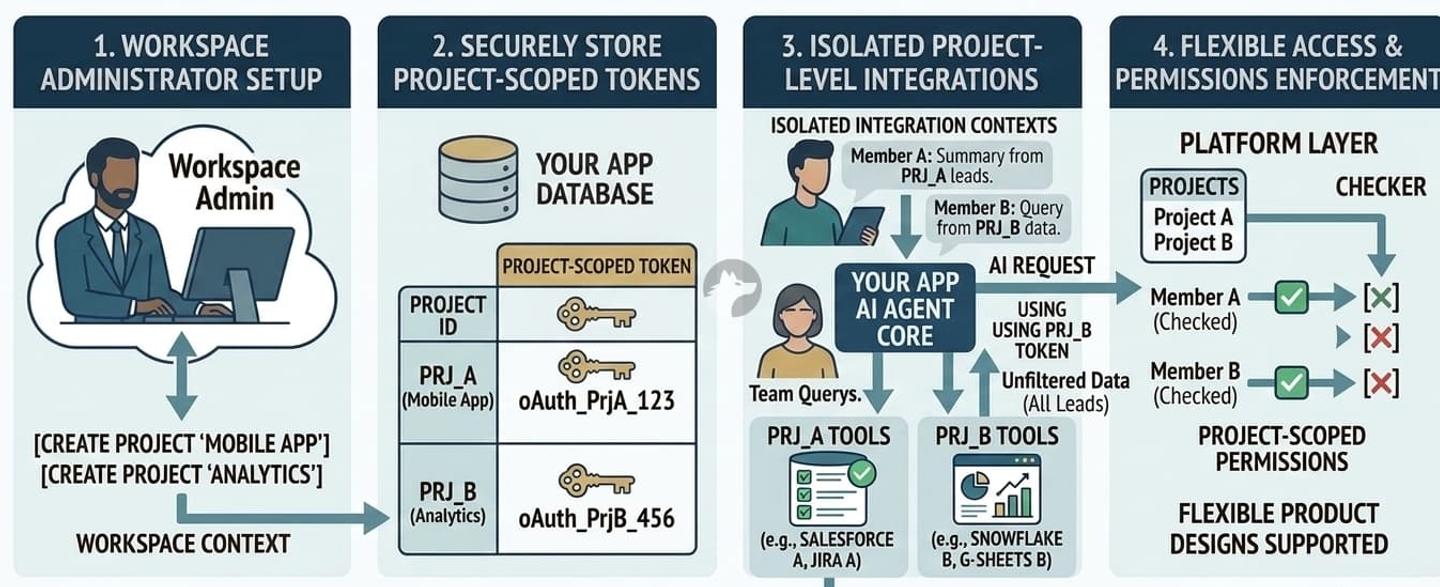
Comparison of identity models
| Identity model | Permission enforcement | Provider audit trail shows | Setup complexity | Best for | Primary risk |
|---|---|---|---|---|---|
| User-level | External API enforces per-user | The actual user | High (every user authenticates) | User-facing features, permission-sensitive data | Every user must complete OAuth |
| Org-level | Your app must enforce | Admin or service account | Low (one-time admin setup) | Systems where adding a custom permissions layer is straightforward | Over-privileged access, identity ambiguity |
| Delegated | External API enforces per-user | The actual user | Medium (admin consent + infra support) | Enterprise deployments with permission requirements | Limited API support, procurement complexity |
| Project/workspace | Your app + scoping | Workspace admin | Medium | Project-based tools | Requires flexible auth infra |
| Bot/app | Your app or API-defined bot permissions | The bot/app | Low | Automation, notifications, bot-driven features | No user-level attribution |
How Nango helps with API integrations
In the real world, most products don’t use a single auth model across all their integrations. You might need per-user OAuth for Salesforce (where record-level permissions matter), delegated access for Google Workspace (where you want per-user enforcement without the OAuth friction), an org-level API key for an analytics warehouse, and bot tokens for Slack. Each integration has different requirements, so the right approach is to evaluate each integration separately rather than apply a single global rule.
This means you need an integration platform that supports a wide range of APIs and every kind of auth model, so you can choose the most appropriate strategy for each integration without rebuilding infrastructure.
Nango is an open-source, developer-first integration platform built for exactly this. Here is how it maps to the identity models in this article.
Choose a token strategy per integration
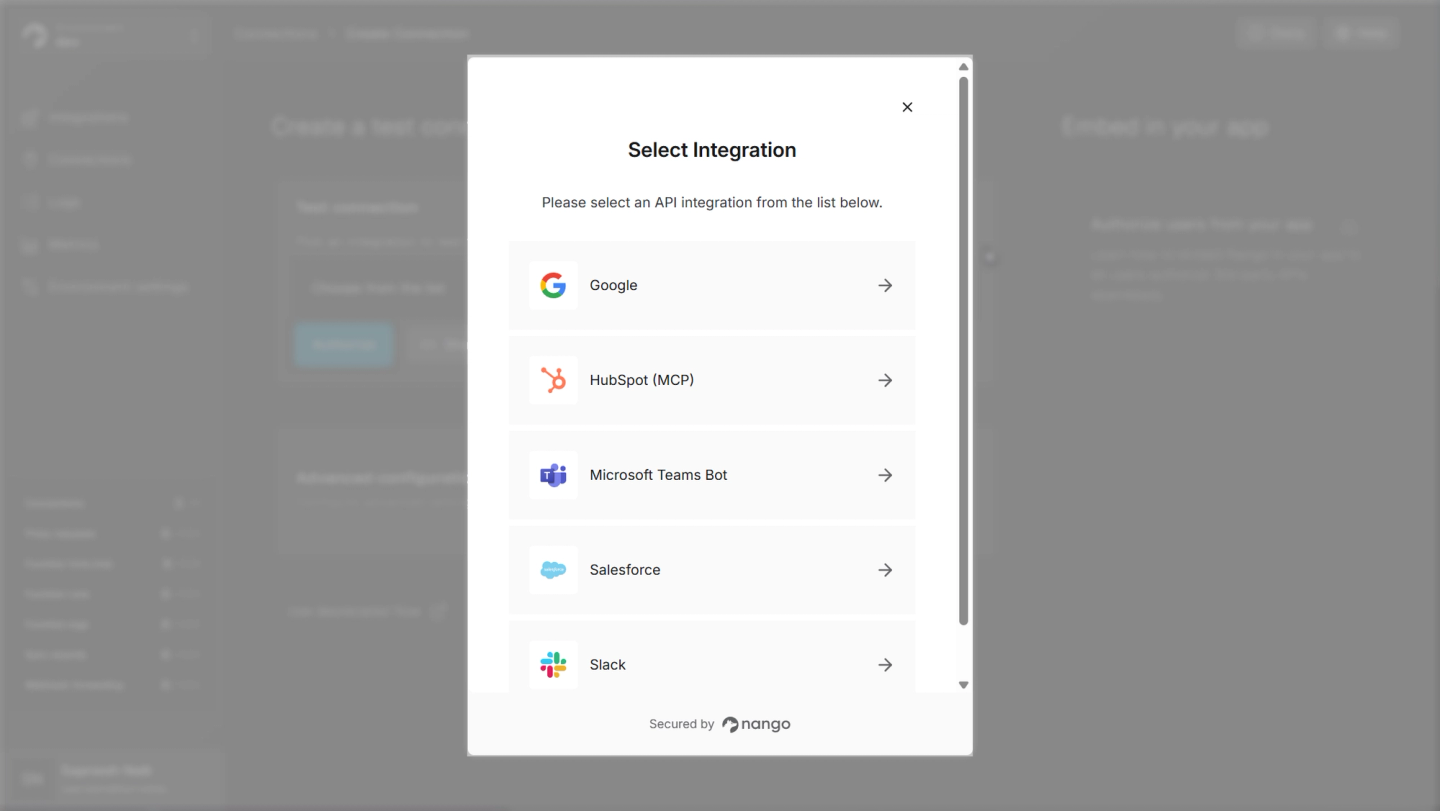
Nango has pre-built auth for 1,000+ APIs (OAuth, API keys, basic auth, custom flows, MCP Auth). You can use per-user tokens for one integration, org-level for another, and delegated access for a third. Your auth infrastructure doesn’t lock you into one pattern.
Token lifecycle management
Nango handles token refreshing, including concurrent refreshes, stale token detection, and re-authentication flows. Provider-specific quirks (such as Salesforce not returning token expiration times or Notion using “capabilities” instead of scopes) are handled out of the box.
Multiple integration patterns
Nango is not just an auth layer. It provides the full infrastructure for API integrations:
- Data syncs for keeping your vector databases and data stores current
- Custom tool calls for AI agents, with comprehensive input/output schemas
- Webhooks and triggers for real-time reactivity
- MCP server support for exposing integrations as authenticated tools
Code-first with AI coding agent skills
Integrations are defined in code and fit into existing CI/CD pipelines. You can use the Nango AI Integration builder with Claude, Cursor, or any AI coding agent to build custom tool calls:
// Install the Nango AI integration builder skills
npx skills add NangoHQ/skills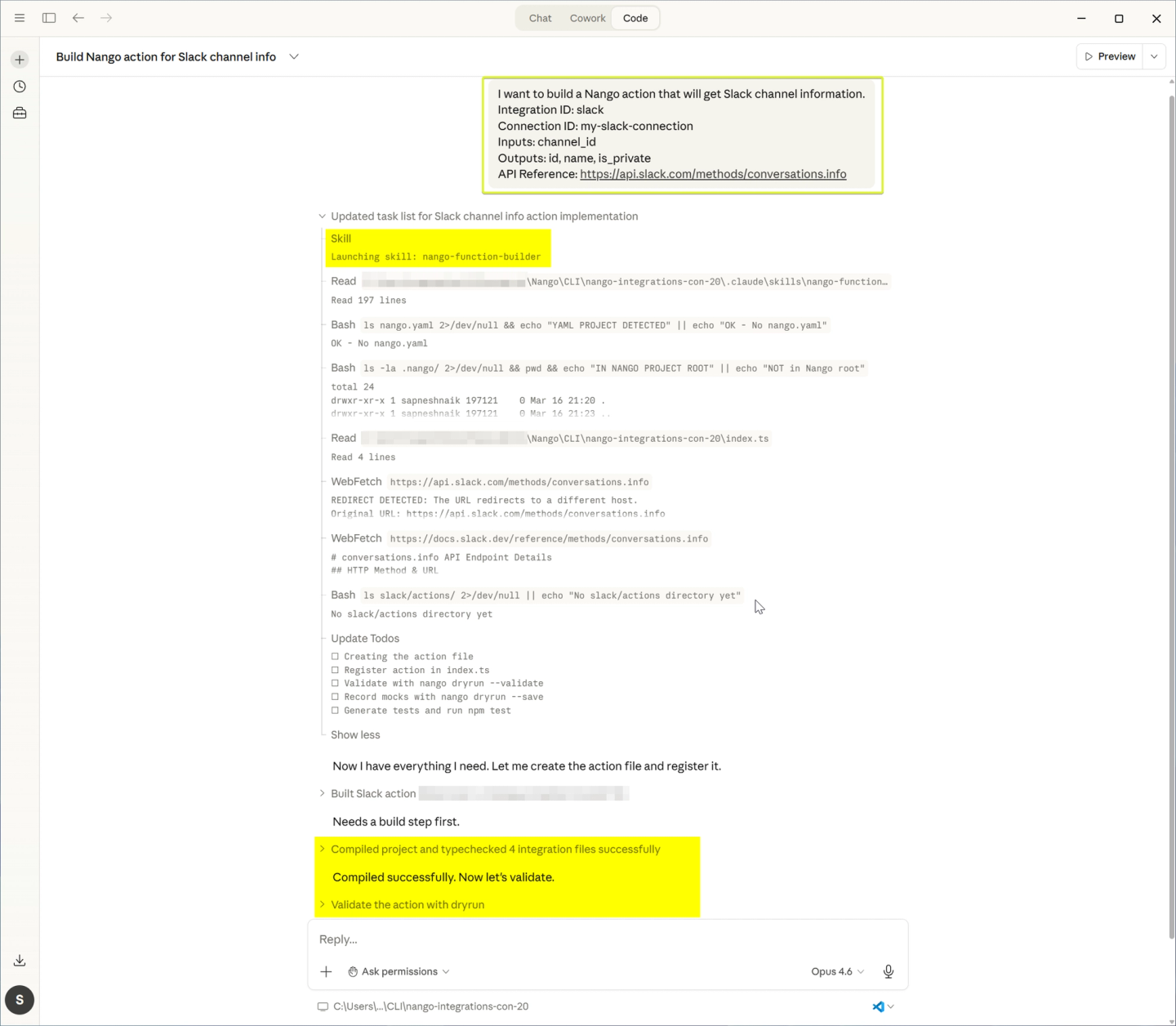
Full observability
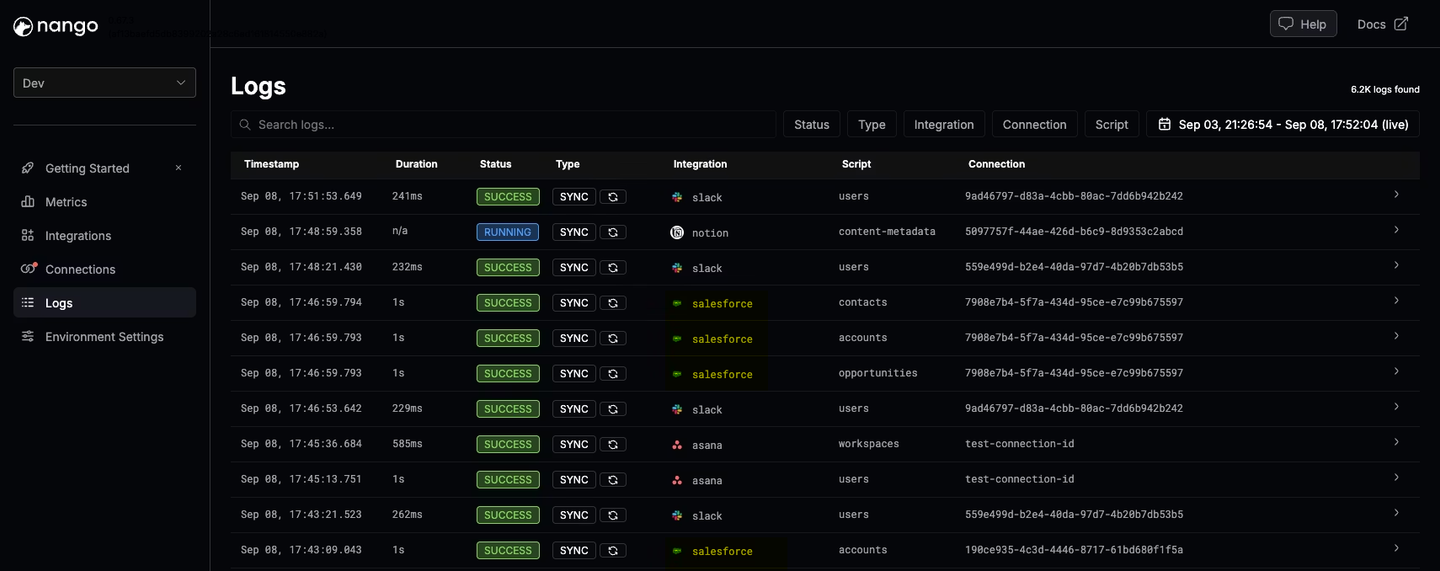
Every API request, header, and error message is logged in real time. Logs can be exported via OpenTelemetry into your existing observability stack.
Conclusion
Choosing between user-level and org-level authentication is an identity architecture decision that affects permissions, audit trails, onboarding, and security.
Most production systems end up using multiple identity models across different integrations. A typical setup might use per-user OAuth for Salesforce (where record-level permissions matter), delegated access for Google Workspace (where you want per-user enforcement without OAuth friction), and bot tokens for Slack (where automation should appear as a bot).
Your auth infrastructure must support this flexibility without requiring you to rebuild for each new API. Design this intentionally from day one.
Related reading
- How to preserve user permissions in API integrations for AI agents and RAG
- A complete guide to securing AI agent API authentication
- API auth is deeper than it looks
- Why is OAuth still hard in 2026?
- Best practices for building API integrations with AI agents
- How to handle concurrency with OAuth token refreshes

