
AI agents and RAGs often use API integrations to pull data from external systems such as Google Drive, SharePoint, Jira, Salesforce, and Notion in response to user queries and actions. This raises a critical question: when the agent retrieves data, whose permissions apply?
Failing to properly handle user permissions with your AI-enabled features/agents can create silent data leaks, introduce compliance risks, and allow the AI to bypass existing access controls.
We often get asked how to handle user permissions and roles in AI agent integrations. And we always say this is not something you could patch-fix at the end of your feature implementation; it is an architectural problem that needs to be thought through in the early stages of design.
This article outlines the options available for enforcing user permissions and roles in AI agent integrations.
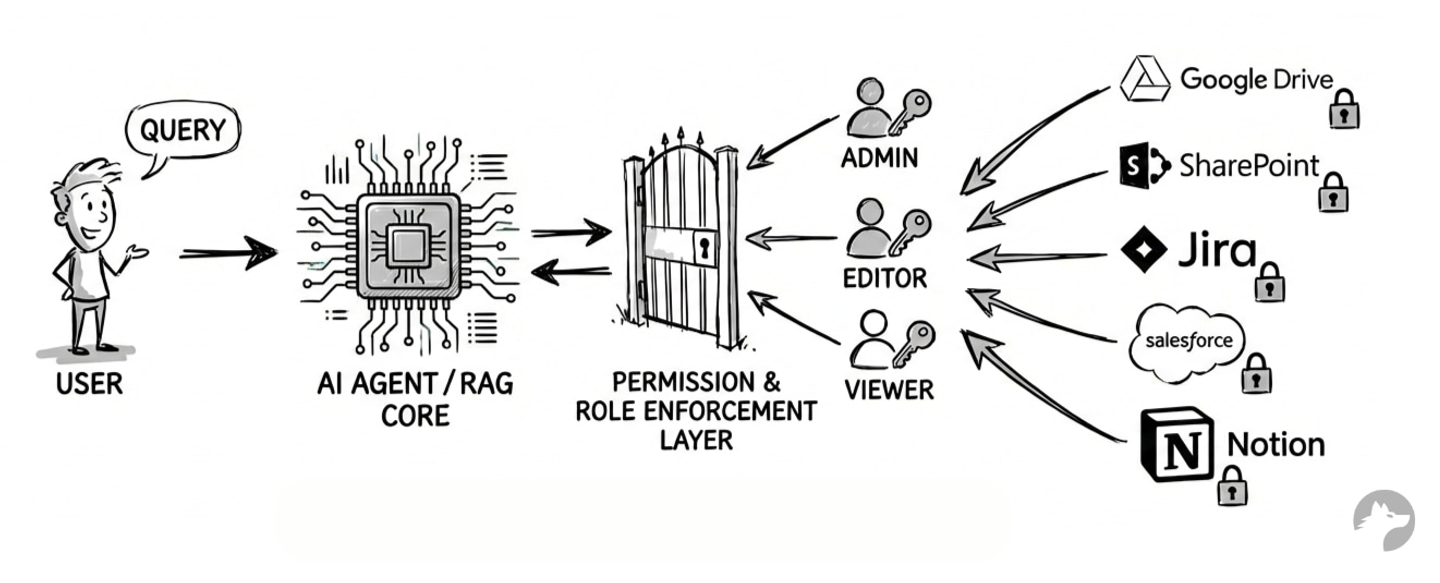
Challenges in standardizing API access for AI agents
Every API system implements permissions differently. For example, Google Drive has file-level sharing, folder inheritance, group membership, and exclusion rules. Salesforce has object-level and field-level access control. SharePoint has its own layered model. None of these is standardized.
APIs rarely expose their full permission logic. On top of that:
- Permission changes can happen continuously (users are added, removed, and groups change)
- Most systems don’t offer reliable real-time webhooks for permission changes.
- Field-level permissions make it impractical to store one universal copy of a record.
- Real-time per-user fetching at scale is expensive
Approach 1: Per-user authentication
In this model, each user authenticates individually via OAuth. Every user gets their own access token. Your AI agent makes API calls using that specific user’s token.
**Example:**Personal Sales Assistant
- AI-enabled Feature: A user of a Sales enablement app asks the AI agent, “Summarize my active leads and draft an email to the high-value ones.”
- Agent API Integrations: The SaaS application requires the rep to link their individual Salesforce account via OAuth. When the agent calls the Salesforce API, it uses that rep’s unique access token.
- Permissions behavior: The AI agent naturally inherits the rep’s permissions. If they aren’t allowed to see “Enterprise” leads, the API won’t return them, and the agent can’t summarize what it can’t find.
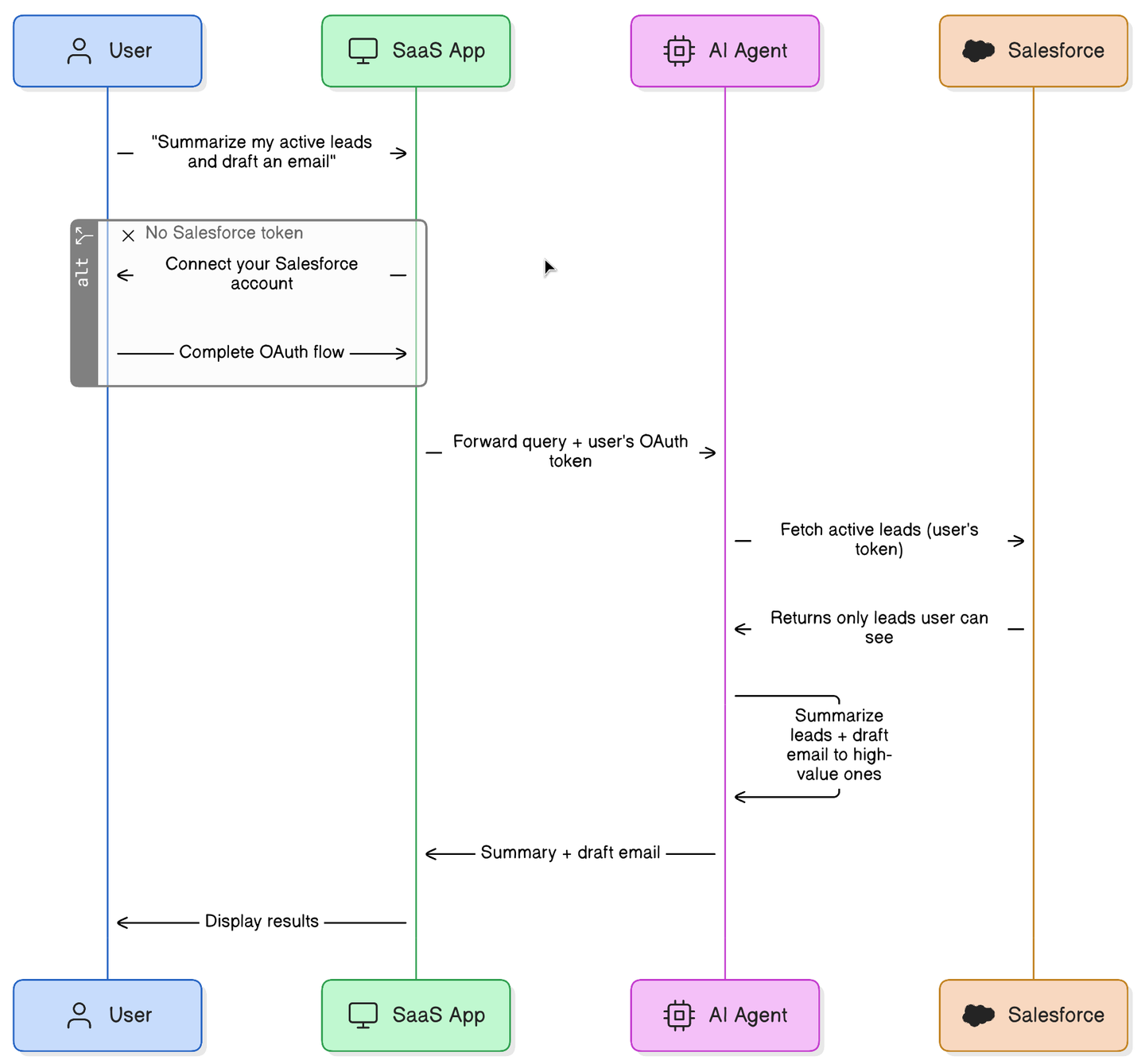
Advantages of per-user authentication
The external system remains the absolute source of truth. For example, Google enforces Google Drive permissions, Microsoft enforces SharePoint permissions, and Salesforce enforces its field-level rules.
You do not have to reimplement any security/permissions logic. This is the only architectural approach that guarantees exact permissions fidelity.
Disadvantages of per-user authentication
- Complicated Onboarding: Every user must authenticate for every integration. At scale, this creates significant onboarding friction. See why OAuth is still hard in 2026.
- Data duplication: If 5 users can each access the same document, you may fetch or store it 5 times (unless you deduplicate carefully, which adds complexity).
- Field-level permissions: Consider a Salesforce record where User A sees fields X, Y, and Z, while User B sees only X. You cannot safely store one version. You either fetch per user in real time (expensive) or store per-user copies (complex). Object-level permissions are manageable. Field-level permissions are more difficult.
Tip: Using a tool like Nango for API Auth can help manage the large number of access tokens
Approach 2: Org-wide authentication with permission syncing (not recommended)
In this model, a single user (Admin) grants access to the entire organization. You fetch data using a single admin access token. You also fetch the permission metadata (for all resources/users) from the API. You then attempt to rebuild the permission logic inside your own application so you can control the access on your end.
**Example:**Personal Sales Assistant
- AI-enabled Feature: A user of a Sales enablement app asks the AI agent, “Summarize my active leads and draft an email to the high-value ones.”
- Agent API Integrations: The SaaS uses a single Org-wide API Key (set up once by an admin) to pull all company leads into its own vector database. Crucially, a background job also continuously syncs the Salesforce access control lists (e.g., “Rep A owns Lead X, Rep B owns Lead Y”).
- Permissions behavior: When the rep asks the question, the SaaS doesn’t call Salesforce. Instead, it queries its own database, applying a strict filter based on the synced metadata (e.g.,
WHERE owner_id = 'Rep_A'). The agent only summarizes the records that the sync job says the rep is allowed to see.
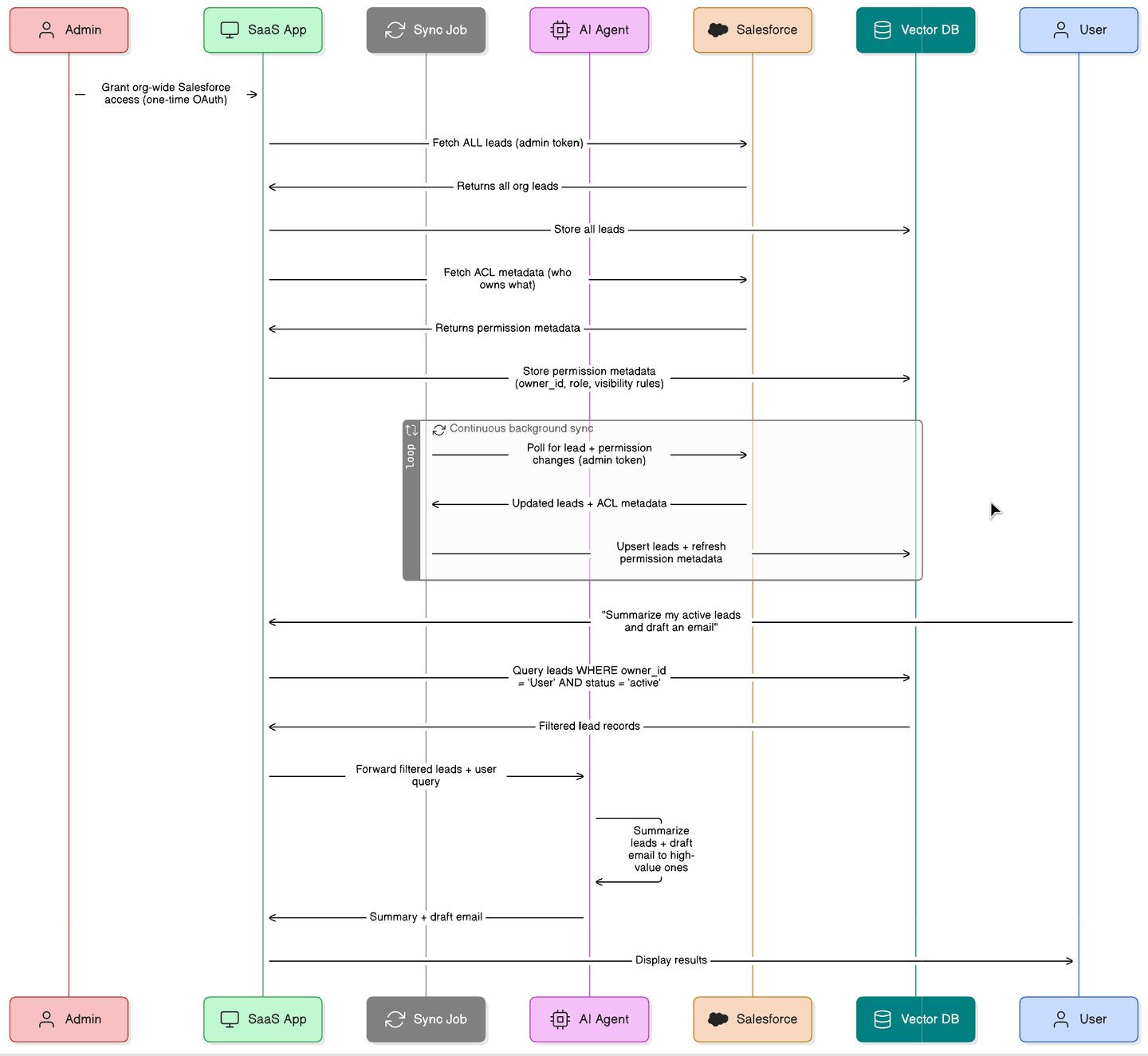
Advantages of permission syncing
This approach eliminates the per-user OAuth requirement. Only one access token per integration is required.
Disadvantages of permission syncing
- Sync issues cause data leakage: Permission changes may happen constantly in external systems. Because you usually poll for these changes, there is always a delay. For example, if a user’s access to a file in Google Drive is revoked, your system may still allow the AI agent to access it until the next sync completes.
- Highly complex permission structures: Enterprise permission systems are incredibly complex. For example, Google Drive features file-level sharing, folder inheritance, deep nesting, group membership, dynamic group changes, and exclusion rules. You may not fully know all the underlying rules. APIs rarely expose enough detail to reconstruct them accurately. You may miss edge cases, which leads directly to data leakage.
Approach 3: Org-wide authentication with custom internal permissions
In this approach, you use a single org-level connection again to import data into your system. Instead of mirroring the external system’s permissions as-is, implement your own (simplified) permission model in your application. You might fetch basic permission hints from the external system, but you do not attempt to recreate the complex logic. For the underlying tradeoffs, see user-level vs org-level auth in API integrations and the broader guide to securing AI agent API authentication.
**Example:**Personal Sales Assistant
- AI-enabled Feature: A user of a Sales enablement app asks the AI agent, “Summarize my active leads and draft an email to the high-value ones.”
- Agent API Integrations: The SaaS connects to Salesforce using a single Org-wide API Key to import all leads, but it makes no attempt to sync or mirror Salesforce’s complex ownership or field-level security rules.
- Permissions behavior: The SaaS relies entirely on its own simplified internal access model. For instance, it might check if the user has a “Sales Rep” role in the SaaS app and simply filter the imported leads by matching the rep’s assigned “Region,” completely ignoring how permissions were configured back in Salesforce.
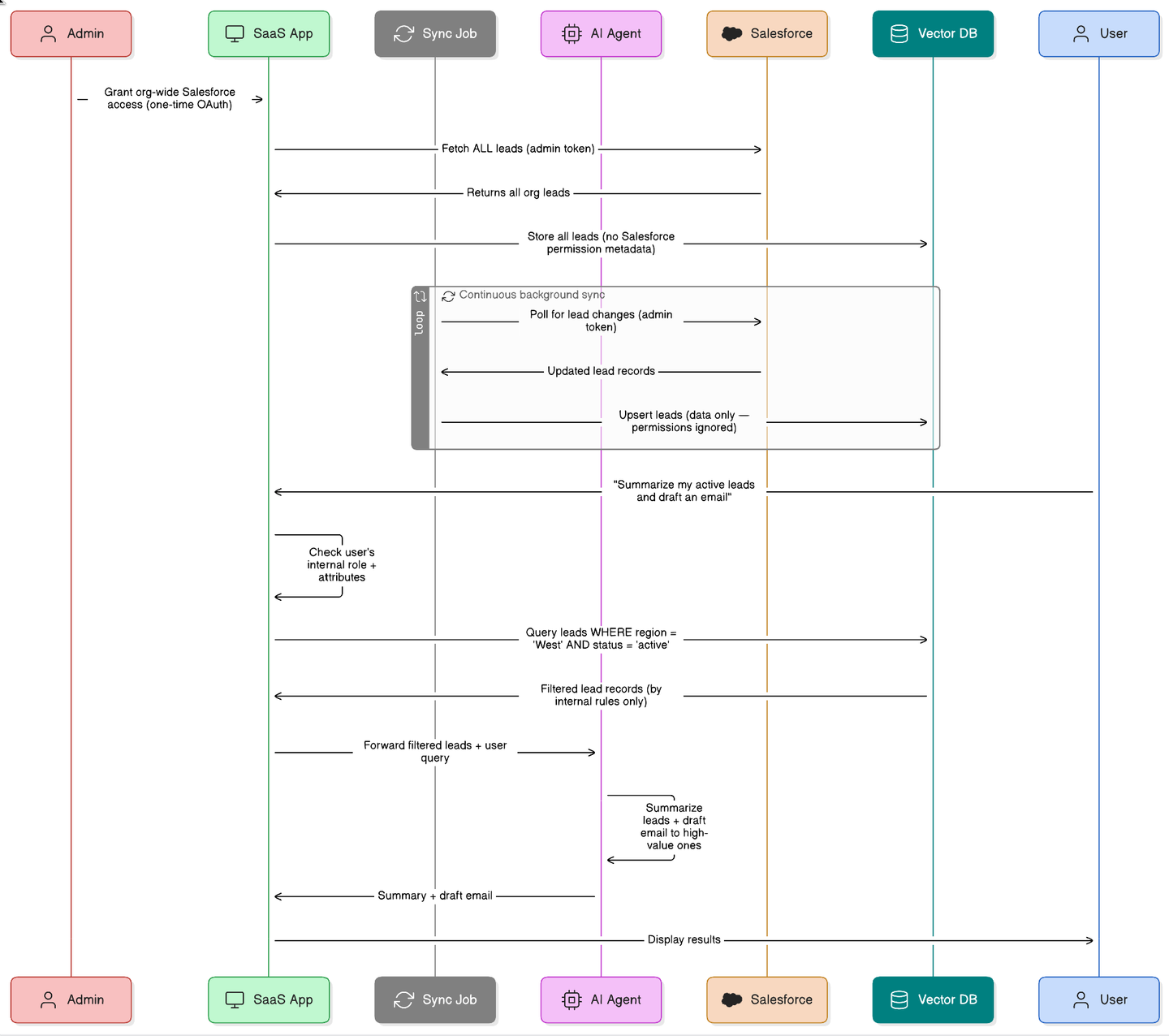
Advantages of custom internal permissions
You only need one integration connection. You have full control over your internal permissions model, which makes it much easier to reason about security. This works well when documents are broadly shared, exact mirroring is not required, and field-level permissions are not critical.
Disadvantages of custom internal permissions
Users must now manage permissions in two different systems. Changes made in the external system are not automatically mirrored to your AI agent. Field-level access remains difficult to handle. We think this approach is often a practical compromise, but it is not a perfect mirror of the source system.
A hybrid option: Delegated API access
Some platforms, such as Google and Microsoft, support delegated access. An administrator grants org-wide approval, allowing your application to generate user-scoped tokens on the fly.
Users do not have to complete individual OAuth flows. You get the strict security of per-user enforcement with significantly lower user friction.
The main limitation is that not all APIs support delegated access. Not all authentication platforms handle it well. However, when it is available, it is often the most effective architectural choice.
Best practices for AI agent & RAG API integrations
- Start simple: Avoid overengineering for hypothetical edge cases and validate real customer requirements first.
- Do not recreate external permission systems: Enterprise systems have complex permission rules that are difficult to mirror perfectly. Reimplementing these logic trees manually can lead to data leaks.
- Explore delegated access: Use delegated API access where possible.
- Design per integration, not globally: Design your architecture per API integration rather than applying one global rule. Use per-user auth for high-stakes data, such as Salesforce records, while using org-wide sync for broader knowledge bases, such as Google Drive. See best practices for building a unified API for when to unify vs. keep integrations separate.
- Don’t build auth infrastructure from scratch: Managing OAuth lifecycles, token refreshes, and multi-tenant security takes massive engineering effort. API auth is deeper than it looks.
How Nango helps
Whichever approach you choose, the auth infrastructure is a common need. Per-user OAuth, org-wide tokens, delegated access, token refresh, secure storage, multi-tenant handling; all of this has to work reliably across every API integration your agent supports.
Nango handles these things for you. Nango is an open-source integration platform that serves as an infrastructure layer between 1,000+ external APIs and your AI agent/RAG. It supports per-user auth, org-wide auth, and delegated access where APIs offer it. Token lifecycle and secure storage are handled for you. When a new source system comes in, you don’t have to rebuild auth from scratch.
Why Nango:
- Implement any architecture: Seamlessly switch between per-user auth, org-wide connections, or delegated access depending on the specific API’s requirements.
- Access 1,000+ APIs instantly: Nango offers 1,000+ pre-built integrations. You can also use the Nango AI Integration builder with LLMs like Gemini, Claude, or OpenAI to build custom tool calls on the platform without manual user input.
import Nango from '@nangohq/frontend';
const nango = new Nango();
// Open Nango UI that walks the user through connecting the API
const connect = nango.openConnectUI({
  onEvent: (event) => {
    if (event.type === 'close') {
        // Handle modal closed.
    } else if (event.type === 'connect') {
        // Handle auth flow successful.
    }
  },
});
// Set config for this auth flow (loaded from Nango API)
connect.setSessionToken(this.sessionToken);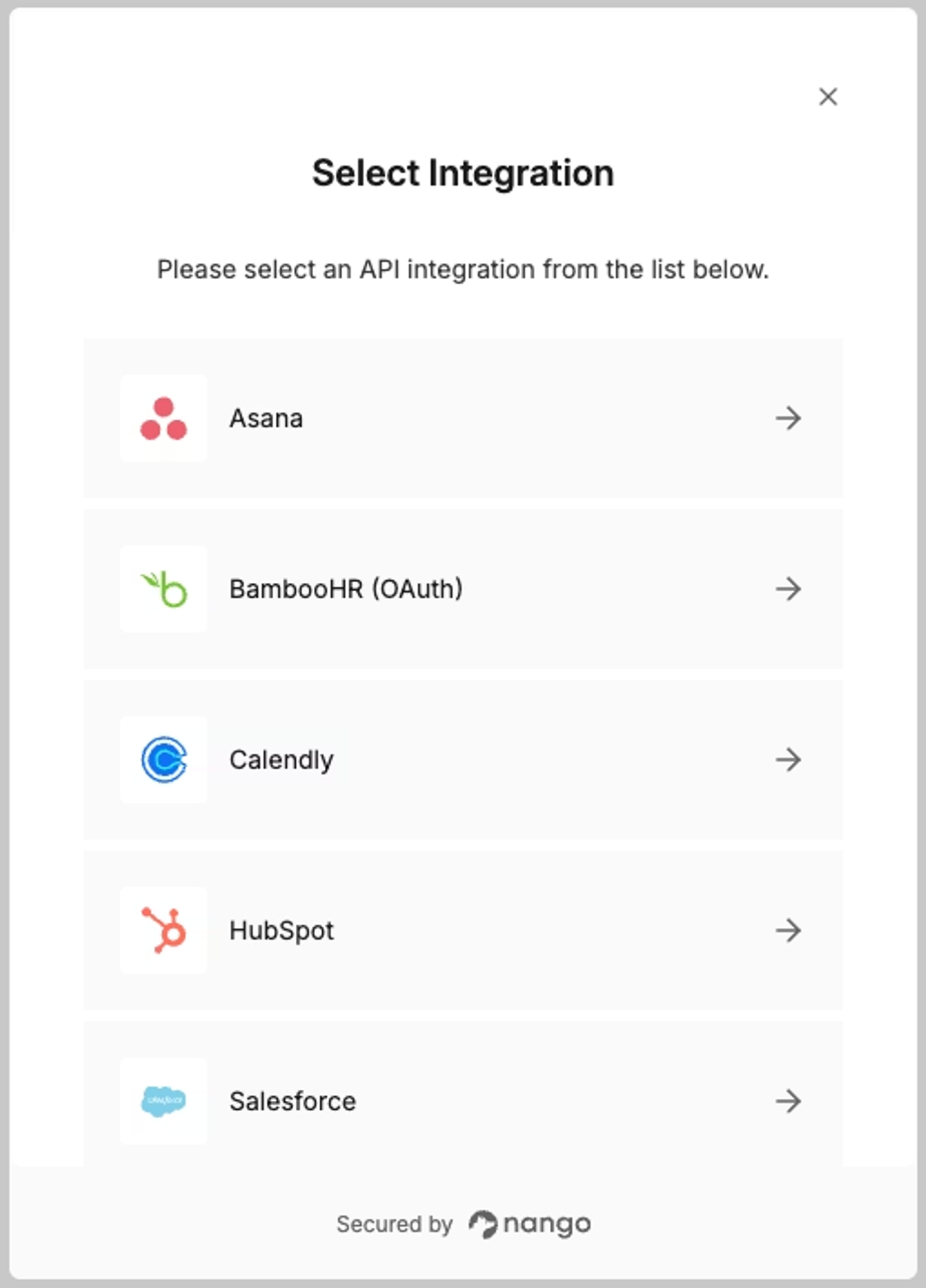
- Deploy an AI-ready stack: Use Nango’s Model Context Protocol (MCP) server to instantly expose your integrations as secure, authenticated tools for your AI agents.
- Maintain deep observability: Track every API request, header, and error message in real time, giving you the visibility needed to debug complex issues.
Conclusion
There is no perfect solution to preserving user API permissions in your AI Agent tool calls and RAGs. Every approach involves tradeoffs between security, complexity, performance, and end-user experience.
The safest path:
- Let the source system enforce permissions whenever possible (per-user auth or delegated access)
- Avoid reimplementing complex enterprise permission logic.
- Design the approach per integration, not globally.
- Use a robust auth infrastructure rather than building it yourself
If you’re thinking through this for your own agent integrations, these articles may also be useful:

