
A complete guide on implementing Slack user access tokens (OAuth) covering authorization flow, token rotation, refresh handling, common errors, and API usage.
Most Slack integrations use a “Bot access token” (xoxb-). They are easy to set up and cover 90% of use cases. However, if your application needs to read a user’s private DMs, search their personal files, or post messages that appear to come directly from them, a Bot token won’t work. You need a Slack OAuth user access token.
This guide walks you through implementing Slack user access tokens (OAuth), managing token lifecycles, and avoiding common OAuth errors for your Slack application.
User access token vs. Bot access token
Slack issues two main OAuth access token types:
Bot tokens
Bot tokens use the xoxb- prefix. These tokens represent your application itself. You can use them to update public channels. They are also used for standard bot-based messaging.
User tokens
User tokens use the xoxp- prefix. These tokens represent the individual authorized user. They allow access to private channels that the user has joined. Messages sent with these tokens appear under the user’s name. These tokens provide the specific context of the user’s identity.
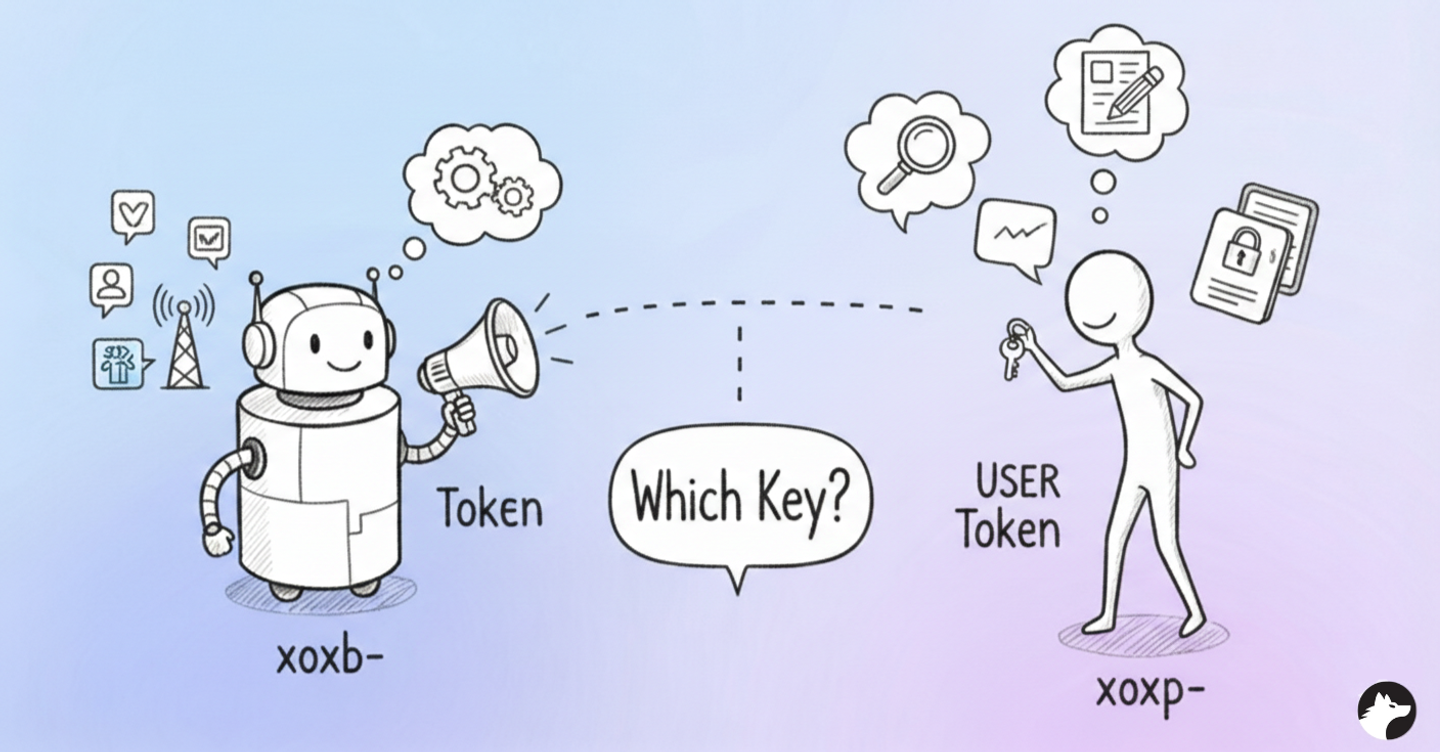
Tip: Use a user token only when bot permissions are insufficient. This follows standard security protocols. Consult the Slack documentation for a full scope comparison.
How to get a Slack user access token
1. Build the Authorization URL
Construct the authorization URL for your “Add to Slack” button. This URL directs users to Slack’s consent screen.
https://slack.com/oauth/v2/authorize?
client_id=YOUR_CLIENT_ID&
scope=channels:read&
user_scope=chat:write,users:read&
redirect_uri=YOUR_REDIRECT_URI
The user_scope parameter defines user-level permissions. These permissions are separate from your bot’s scopes. Your redirect_uri must match your Slack app settings exactly.
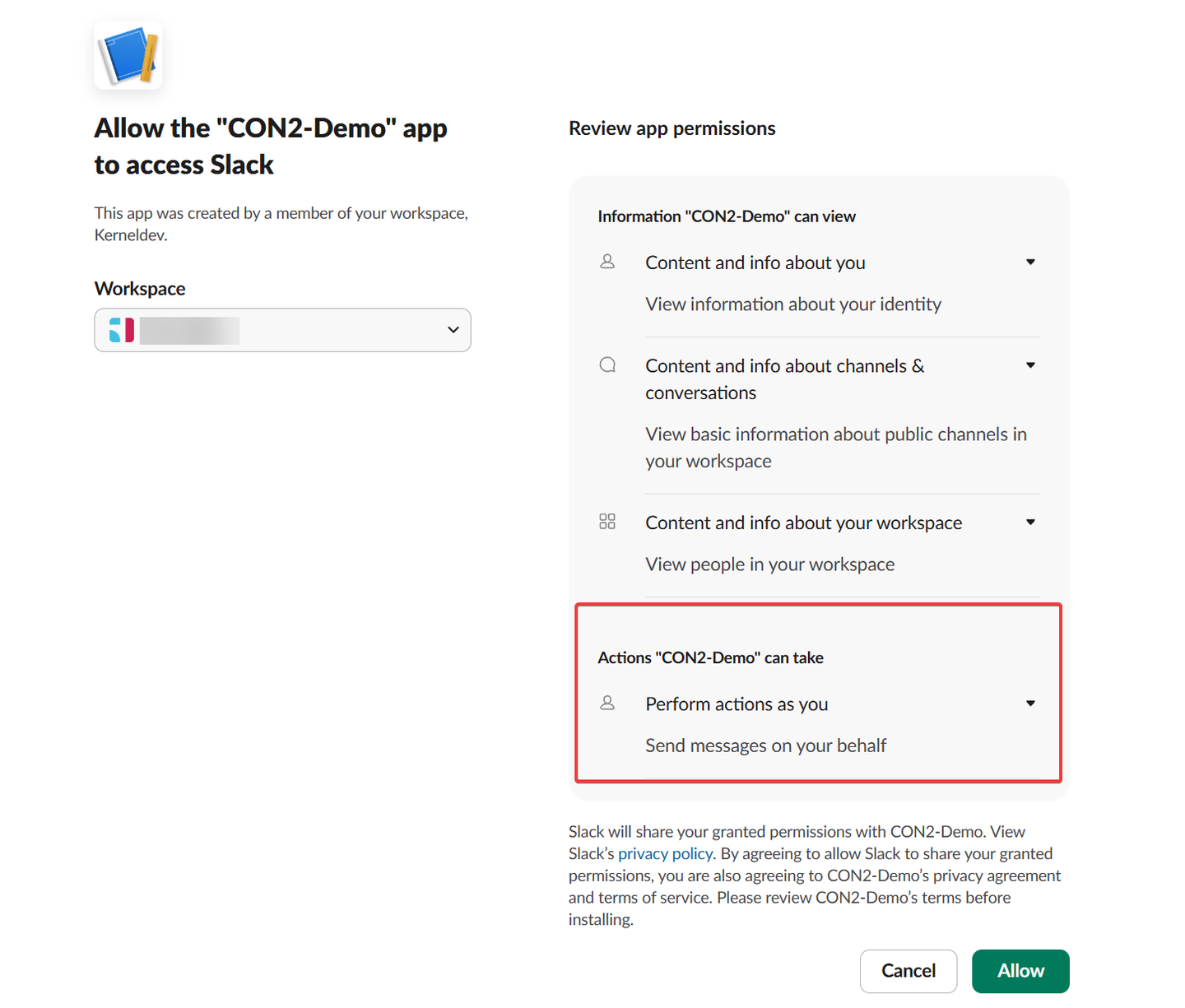
Once the user approves, Slack redirects to your URI with a temporary authorization code. Parse the code field from the HTTP request’s query parameters.
// Sample OAuth callback endpoint (NodeJS)
app.get('/oauth/callback', (req, res) => {
  const { code, error, state } = req.query;

  if (error) {
    console.error('OAuth Error:', error);
  }

  if (code) {
    console.log('Code:', code);
  }
});
Tip: Slack requires HTTPS for Redirect URIs. If you’re still in local development, check out 3 easy ways to do OAuth redirects on localhost (with HTTPS).
2. Exchange the code for a user access token
Next, exchange the temporary authorization code for a user access token by making a POST call to https://slack.com/api/oauth.v2.access. Make sure to pass in the client_id, client_secret, code, and redirect_uri as x-www-form-urlencoded properties to the request.
API request:POST: https://slack.com/api/oauth.v2.access
curl --location 'https://slack.com/api/oauth.v2.access' \
--header 'Content-Type: application/x-www-form-urlencoded' \
--data-urlencode 'client_id=YOUR_CLIENT_ID' \
--data-urlencode 'client_secret=YOUR_CLIENT_SECRET' \
--data-urlencode 'code=AUTHORIZATION_CODE' \
--data-urlencode 'redirect_uri=YOUR_REDIRECT_URI'
Note: The temporary authorization code is single-use only and is valid for 10 minutes.
API response:
The API response contains the xoxp- token. Look for this token inside the authed_user object. You can now store this access token for later usage.
{
    "ok": true,
    "app_id": "A0ADJD0SWPM",
    "authed_user": {
        "id": "U05288YHV8T",
        "scope": "users:read,chat:write",
        "access_token": "xoxp-xxxxxxxxxx-xxxxxxxxxx",
        "token_type": "user"
    },
    "scope": "channels:read",
    "token_type": "bot",
    "access_token": "xoxb-xxxxxxxxxx-xxxxxxxxxxxxx",
    "bot_user_id": "U0AE3R037UZ",
    "team": {
        "id": "T0528CP6K50",
        "name": "Your Workspace Name"
    },
    "enterprise": null,
    "is_enterprise_install": false
}
Tip: Always encrypt the user access token at rest. It grants full access to a user’s Slack account within the requested scopes.
How to refresh a Slack user access token
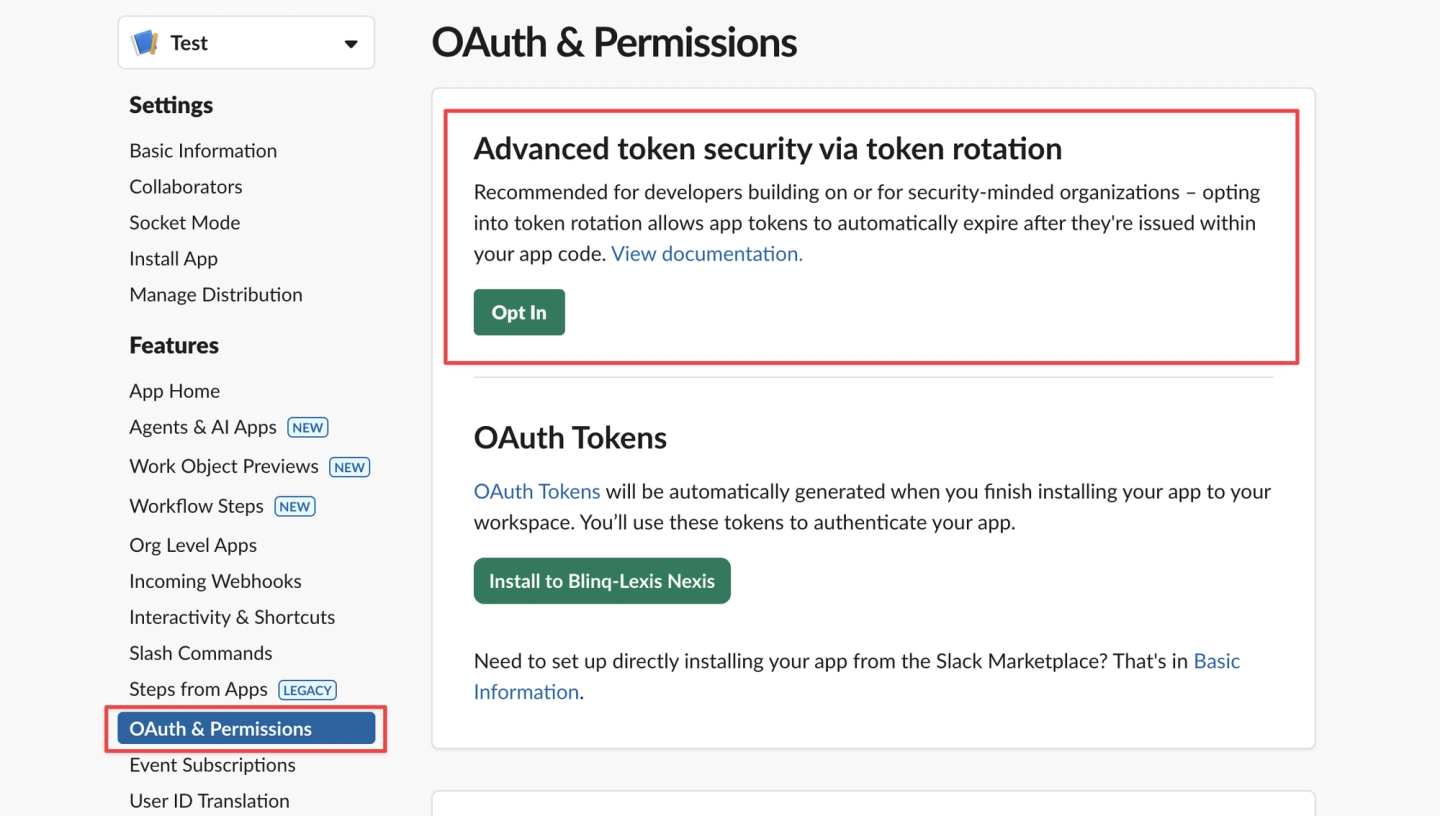
Slack user tokens do not expire by default. You should enable Token Rotation to improve your application security. Rotation limits the lifespan of an access token to 12 hours. This requires you to refresh user access tokens before they expire.
Enabling Token Rotation
Navigate to OAuth & Permissions in your Slack App Settings. Toggle the option to enable Token Rotation. Note that you cannot disable this feature once it is activated.
Implementing Token Rotation
You must exchange your existing long-lived tokens for expiring ones. Use the oauth.v2.exchange endpoint for this initial conversion.
**API request: **POST: https://slack.com/api/oauth.v2.exchange
curl --location 'https://slack.com/api/oauth.v2.exchange' \
--header 'Content-Type: application/x-www-form-urlencoded' \
--data-urlencode 'client_id=YOUR_CLIENT_ID' \
--data-urlencode 'client_secret=YOUR_CLIENT_SECRET' \
--data-urlencode 'token=xoxp-xxxxxxxxxx'
API response:
The response includes an access_token and a refresh_token. The expires_in field shows the remaining life of the token in seconds. Store both the new access token and the refresh token securely.
{
    "ok": true,
    "app_id": "A0ADJD0SWPM",
    "token_type": "user",
    "scope": "users:read,chat:write",
    "access_token": "xoxe.xoxp-1-xxxxxxxxxxxx",
    "expires_in": 43200,
    "refresh_token": "xoxe-1-xxxxxxxxxxxxxxx",
    "user_id": "U05288YHV8T",
    "team": {
        "id": "T0528CP6K50",
        "name": "Your Workspace Name"
    }
}
Renewing an expiring token
Schedule a task to renew tokens every ~10 hours. Use the oauth.v2.access endpoint with the refresh_token grant type.
API request: POST: https://slack.com/api/oauth.v2.access
curl --location 'https://slack.com/api/oauth.v2.access' \
--header 'Content-Type: application/x-www-form-urlencoded' \
--data-urlencode 'client_id=YOUR_CLIENT_ID' \
--data-urlencode 'client_secret=YOUR_CLIENT_SECRET' \
--data-urlencode 'grant_type=refresh_token' \
--data-urlencode 'refresh_token=xoxe-1-xxxxx'
API response:
Just like GitHub or Linear, Slack rotates refresh tokens. When you receive a new access_token, you also receive a new refresh_token. The old refresh token becomes invalid, and you must replace both in your database.
{
    "ok": true,
    "access_token": "xoxe.xoxp-1-xxxxxx",
    "expires_in": 43200,
    "refresh_token": "xoxe-1-xxxxxxx",
    "token_type": "user",
    "app_id": "A0ADJD0SWPM",
    "scope": "identify,users:read,chat:write",
    "user_id": "U05288YHV8T",
    "team": {
        "id": "T0528CP6K50",
        "name": "Your Workspace Name"
    },
    "enterprise": null,
    "is_enterprise_install": false
}
Tip: You can find more details on this topic in Slack’s official guide for using token rotation.
Refresh Token Concurrency
In distributed systems with multiple workers, you may encounter a race condition in which two workers attempt to refresh the same token simultaneously. The first succeeds, and the second fails with an invalid_grant error because the refresh token was already rotated.
Implement single-flight token refresh to ensure only one refresh logic executes per connection at a time. See our guide on handling concurrency during OAuth token refreshes for implementation details.
How to use a user access token
Include the user access token in the Authorization header of your API requests. Use the Bearer authentication scheme.
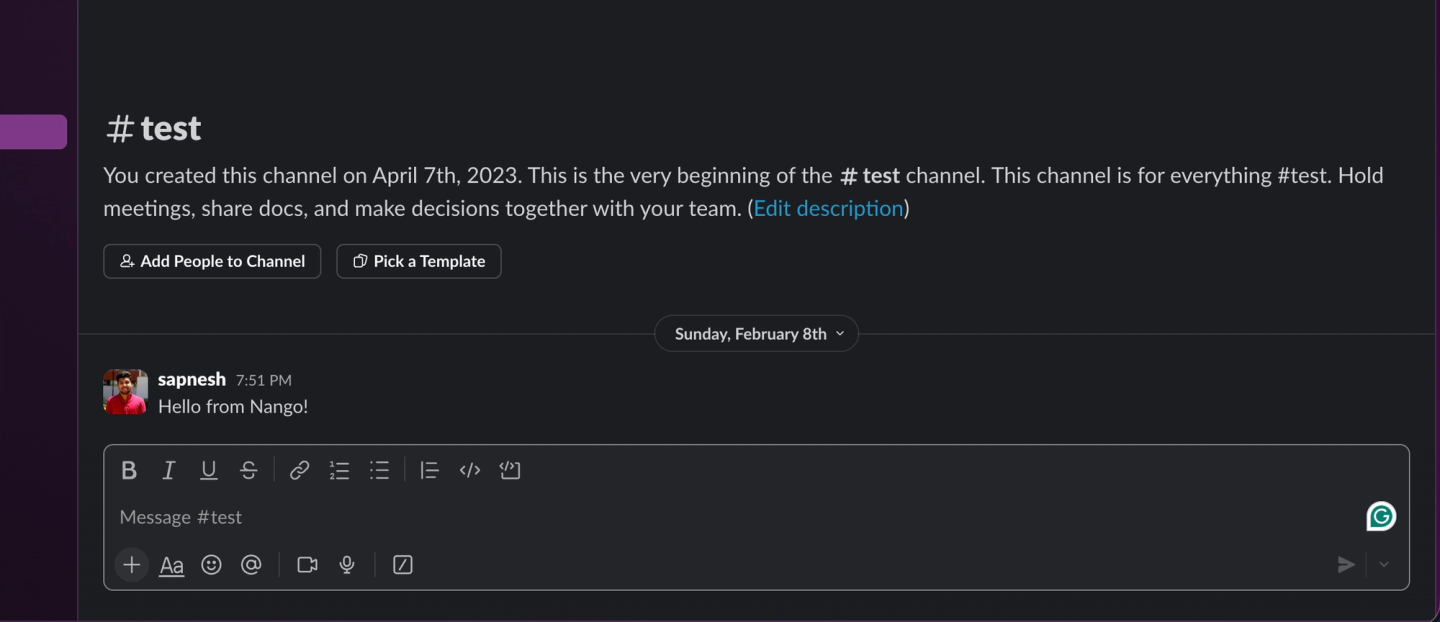
For example, you can post a message as the authorized user. Call the chat.postMessage endpoint with your user access token.
curl --location 'https://slack.com/api/chat.postMessage' \
--header 'Authorization: Bearer xoxe.xoxp-1-xxxx' \
--header 'Content-Type: application/json' \
--data '{
    "channel": "C0521QBUCH4",
    "text": "Hello from Nango!"
  }'
Common Slack OAuth errors
invalid_team_for_non_distributed_app: The app is being installed in a workspace other than the one where it was created. Fix: enable public distribution.missing_scope: You are calling an endpoint that requires a user scope you haven’t requested, or the user hasn’t approved. Slack is helpful in the API response with specific scopes you need:
{
    "ok": false,
    "error": "missing_scope",
    "needed": "channels:read,groups:read,mpim:read,im:read",
    "provided": "identify,users:read,chat:write"
}token_expired: The 12-hour window has passed (if rotation is enabled). Requires a refresh callaccount_inactive: The user who authorized the app has left the Slack workspaceinvalid_grant: The refresh token has been expired or revoked. This can also happen if you use a stale refresh token (common in race conditions with multiple workers)
Handling Slack user tokens with Nango
Managing Slack user OAuth access tokens manually is complex due to the 12-hour rotation and the risk of refresh races.
Nango is an open-source, developer-first platform that simplifies the management of API integrations for 1,000+ APIs. Instead of writing boilerplate code for every OAuth flow, you can use Nango’s pre-built primitives to handle the entire lifecycle of your Slack connection.
Nango Slack integration features:
- Pre-built OAuth Flow: Nango handles the OAuth handshake and correctly separates Bot vs. User scopes.
- Automatic Rotation: Nango handles the 12-hour rotation logic automatically in the background, securely persisting new access and refresh tokens.
- Concurrency Safety: Nango implements locking to prevent “double-refresh” race conditions, ensuring your integration doesn’t break when scaled.
- Pre-built syncs & actions: Nango provides over 50 pre-built actions for working with Slack channels, users, conversations, files, reactions, webhooks, and more.
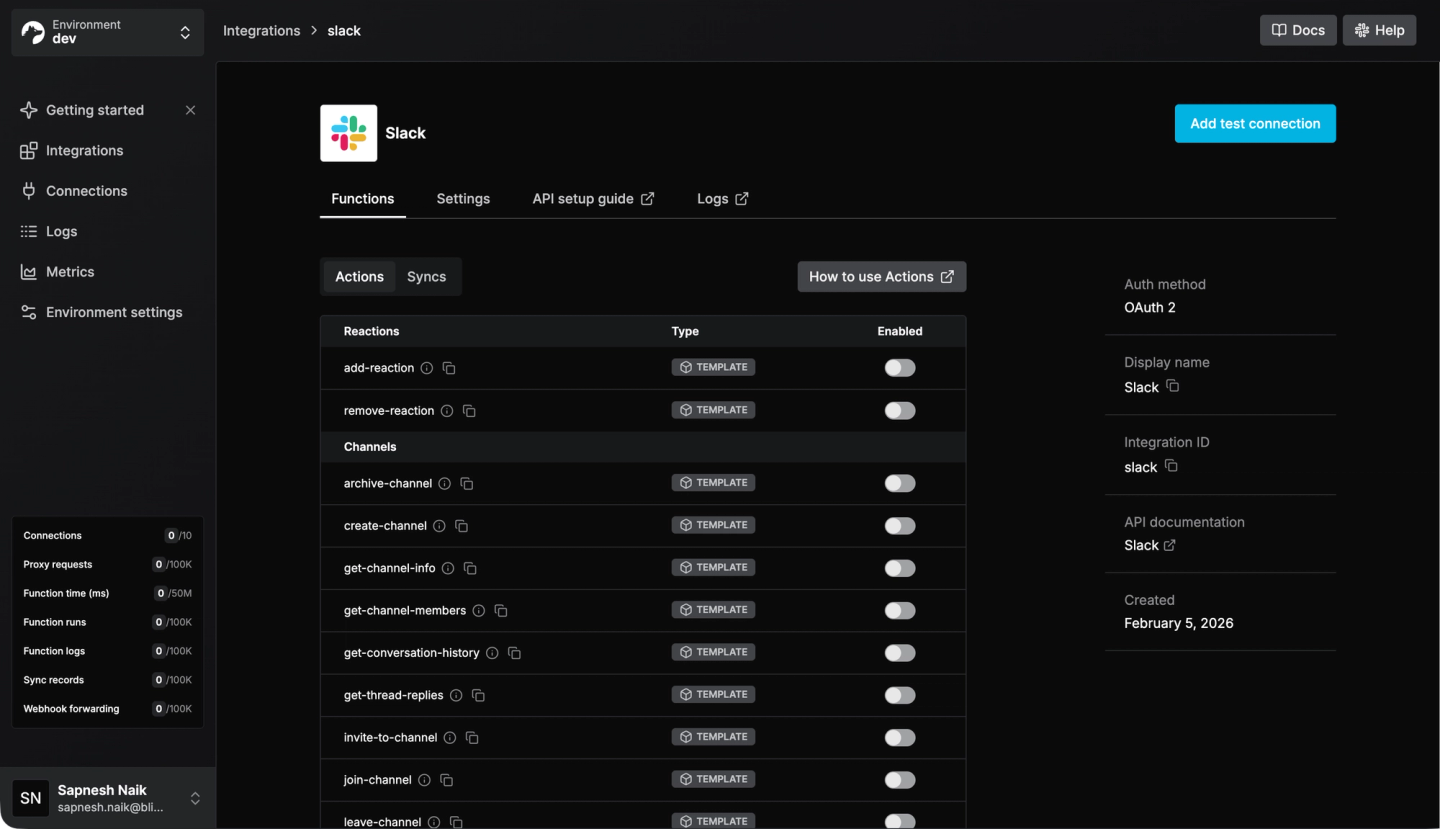
To get started, check out the Nango Slack documentation and our guide on using Slack user OAuth access tokens with Nango.

