
If you are building an AI agent in your product that needs third-party API integrations (fetch a customer from Salesforce, send a Slack message, update a deal in HubSpot), you have two ways to give it tools: connect it to MCP (Model Context Protocol) servers, or define custom tool calls (also called function calling).
The two are not alternatives at the protocol level: MCP is built on top of tool calling. This article explains both, how they differ, and which one to use in production.
TL;DR
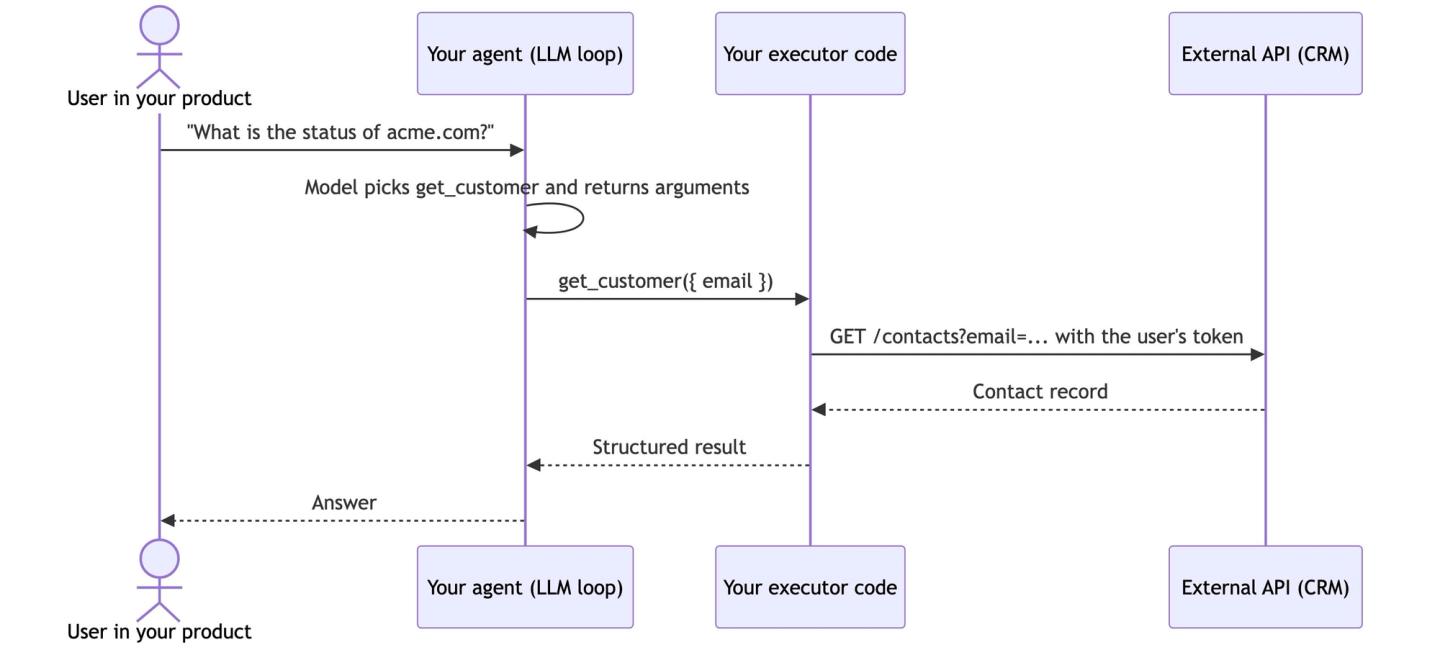
Tool calls (function calling) are the base mechanism: you pass tool schemas to the model, the model picks one and returns arguments, and your code executes the call. You control tool design, auth, and execution, and you build all of it.
MCP is an open protocol on top of tool calling. It standardizes how agents discover and call tools from servers, so the same server works with agents built on Anthropic, OpenAI, LangChain, or any other stack with an MCP client. Generic third-party MCP servers are fast to wire up, but they cost context, reduce tool-selection accuracy, and add an auth and security surface you do not control.
The short answer:
- Pick custom tool calls for the production agent inside your SaaS product. They win on reliability, token cost, and per-user auth. In our fall 2025 survey of several hundred teams building agent integrations, fewer than 10 kept MCP in production.
- Pick MCP servers for prototypes, internal agents, and developer tooling, where setup speed matters more than per-request cost and your own engineers supervise the agent.
- Use both by writing custom tools once and serving them over an MCP server. Nango supports this: use coding agents like Claude Code, Cursor, and Codex to build custom tool calls on the platform, and your agent consumes them via REST or Nango’s built-in MCP server.
What are tool calls?
Tool calling is an LLM feature. OpenAI shipped function calling on June 13, 2023, and Anthropic’s tool use reached general availability on May 30, 2024. The mechanics are the same everywhere:
- You pass tool definitions (name, description, JSON Schema input) with your request.
- Based on the user’s prompt, the model decides a tool is needed and returns the tool name plus arguments.
- Your code executes the actual API call and returns the result to the model.
- The model uses the result to continue or respond.
A tool has two halves. The first half is the schema the model sees. For a CRM lookup:
{
  "name": "get_customer",
  "description": "Fetch a customer record from the CRM by email address.",
  "input_schema": {
    "type": "object",
    "properties": {
      "email": { "type": "string", "description": "Customer email address" }
    },
    "required": ["email"]
  }
}
The second half is the function your code runs when the model calls the tool. The model only emits structured intent (the tool name and arguments as JSON). Nothing happens until your code matches that intent to real logic:
// Your agent loop routes the model's tool call to code you wrote
async function executeTool(name: string, args: any, user: User) {
  if (name === 'get_customer') {
    const token = await getAccessToken(user, 'salesforce'); // your auth layer
    return crm.searchContacts(args.email, token);           // the actual API call
  }
}
When you use Claude or ChatGPT and tools seem to run automatically, it is because this executor ships inside those apps. When you build an agent in your product, you own the executor. It is where authentication, retries, rate limits, and pagination live.
Schema adherence is largely solved: OpenAI’s structured outputs (August 6, 2024) guarantee arguments match your schema, and Anthropic offers the same with strict: true.
What is MCP?
MCP is an open protocol that Anthropic released on November 25, 2024. It standardizes how AI applications connect to external tools and data over JSON-RPC. Your agent (the MCP host) connects to MCP servers, which expose tools, resources, and prompts.
MCP does not replace tool calling. It rides on it. Your agent calls tools/list on each connected server, receives tool schemas, and passes them to the model as ordinary tool definitions. When the model returns a tool call, the agent forwards it to the server, and the server executes the API request.
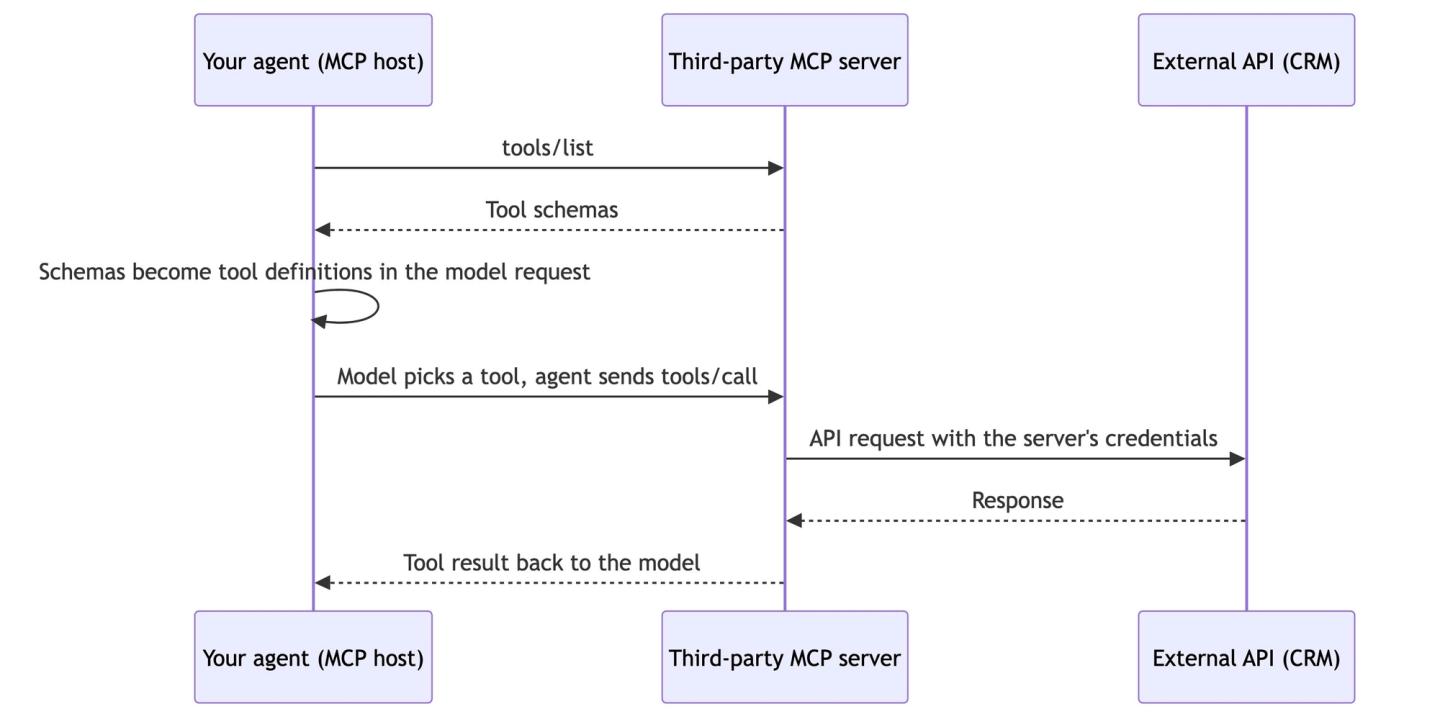
So the agent still decides which tool to run by emitting structured intent, exactly as with plain tool calls. What changes is who supplies the schemas and who executes the call: the MCP server does both. That makes the real decision one about tool supply: generic tools from a public server someone else operates, or custom tool calls you design for your product.
MCP vs API: what is the difference?
An API is the interface a service exposes for software to call it. MCP is a protocol that describes those capabilities to an AI agent in a form it can discover and invoke. An MCP server sits between the two: it wraps one or more APIs and presents them to agents as tools. In practice, most MCP servers are API wrappers: a July 2025 study of 116 official MCP servers found 88.6% are backed by REST APIs.
MCP does not replace APIs. Someone still registers the OAuth app, makes the API requests, and handles errors inside the server. When you compare MCP vs API access for your agent, you are really comparing who wrote and operates that wrapper: a third party (an MCP server) or you (custom tool calls).
Using third-party MCP servers in your product’s agent
Connecting a pre-built MCP server to your agent takes minutes. These are the problems you hit once the agent runs inside your product:
- Tool definitions consume context on every request: Every tool the agent can see adds its definition to every model request, and the model reads all of them before picking one. Generic MCP servers ship tools for every endpoint, so two or three connected servers add tens of thousands of tokens to each request before the agent does any work. You pay for that in tokens, and your customers feel it as latency.
- More tools mean worse tool selection: The more tools the model sees, the more likely it picks the wrong one or hallucinates arguments. OpenAI recommends keeping fewer than 20 tools available per turn, and Anthropic documents accuracy dropping beyond 30 to 50 tools. From working with several hundred teams that build agent integrations, we see most SaaS agents need around 20 tools, customized to their use case.
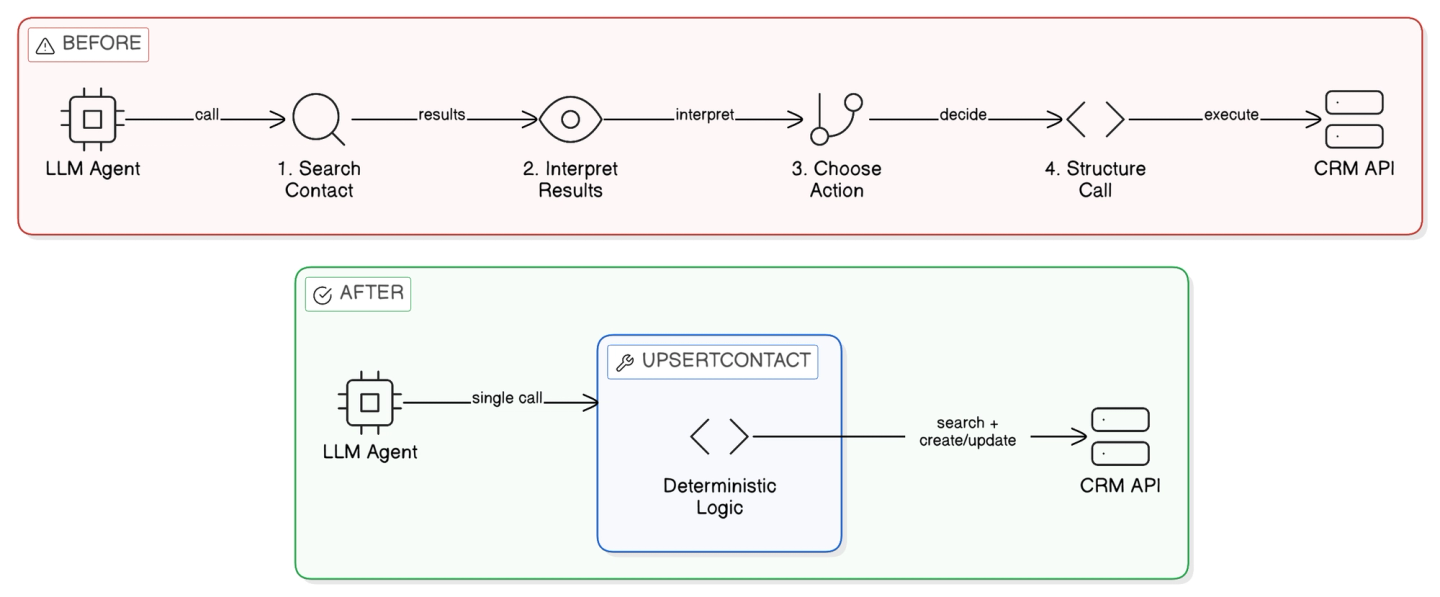
- Generic tools are not shaped to your product: Most public MCP servers wrap API endpoints one-to-one. Your product might need one tool like
onboard_user_to_slack. With a generic Slack server, the agent instead chainssearch_user,create_channel,invite_user, andsend_message, and every extra call is a chance to fail in front of a customer. We covered the fix in how to build reliable tool calls for AI agents.
- Per-user auth is rarely supported: In your product, each customer connects their own Salesforce or Slack, and every action the agent takes must run with that customer’s token. Public MCP servers are mostly built for one user connecting their own accounts. MCP’s OAuth flow authorizes your agent to the server, and auth to the underlying API is whatever the server operator built. Multi-tenant, per-user auth across your customer base is rarely part of it, so you end up building that layer yourself anyway.
- You do not control the code that touches customer data: The third party hosts the server and executes the tool calls. You cannot review, customize, or patch that code, and your customers’ tokens and records flow through it. In September 2025, the postmark-mcp npm package shipped an update that BCC’d every email it sent to an attacker’s address. If integrations are core to your product, you want to own the logic that executes tool calls.
- Server quality varies: Across the roughly 10,000 active MCP servers, maintenance and quality are uneven.
Using custom tool calls in your product’s agent
With custom tool calls, the agent gets a small set of tools shaped to your product (an upsert_contact instead of four chained CRM calls), your users authorize their own accounts through your app, and only your code touches their data.
What you own:
- The execution layer: OAuth apps, token refresh, retries, rate limits, and pagination for every API you integrate. Based on our experience implementing auth for 1,000+ APIs, this is deeper work than it looks.
- Tool maintenance: The underlying API changes, your product’s use cases change, and the tools have to keep up.
- The execution platform: Tool code needs hosting, scaling, secrets management, and logs, separate from your product’s core backend.
The build cost has dropped since coding agents became good at writing integration code. We built 200+ API integrations in 15 minutes with OpenCode and the Nango builder skill.
MCP vs custom tool calls: comparison
| Dimension | Custom tool calls | Third-party MCP servers |
|---|---|---|
| Time to first call | Hours with a coding agent | Minutes |
| Tool design | Shaped to your use cases | Generic, endpoint-shaped |
| Context cost | Low: only the tools you define | High: all connected servers' definitions |
| Tool-selection reliability | High: small, curated set | Degrades as the catalog grows |
| Auth to the external API | You implement it (or use a platform) | Server operator implements it, quality varies |
| Per-user auth (your customers authorize their accounts) | Yes, under your control | Rarely supported |
| Security surface | Smaller: your code | Larger: third-party code plus untrusted tool descriptions |
| Maintenance | You maintain the tools | You depend on the server maintainer |
| Works with your agent framework | Yes, via REST or SDK call | Yes, if the framework has an MCP client |
How to choose
Two questions decide it: who supervises the agent, and whose accounts does it act on?
- Developer tooling and internal agents: Public MCP servers are a good fit. Your own engineers supervise the calls, a flaky tool is an annoyance rather than a customer incident, and if the API you need already has an MCP server, it is quick to wire up. You can switch to custom tools later anyway.
- The production agent in your customer-facing product: Use custom tool calls. Your customers authorize their own accounts, the agent picks from a small set of tools that match your product, and requests stay fast and cheap because the context only carries tools you chose.
Custom tools can also be served over MCP. Write the tools once, then let your agent consume them over REST, or over an MCP server if your agent framework is MCP-native.
Build custom tool calls (and get an MCP server) with Nango
With Nango, you build custom tool calls against external APIs on infrastructure built for scale, and coding agents do most of the work. For your product’s agent, it works in three parts:
- Build tools with coding agents: Use Claude Code, Cursor, or Codex with the Nango builder skill to research the external API, write the tool call as a typed function, and test it against a real connection, within minutes.
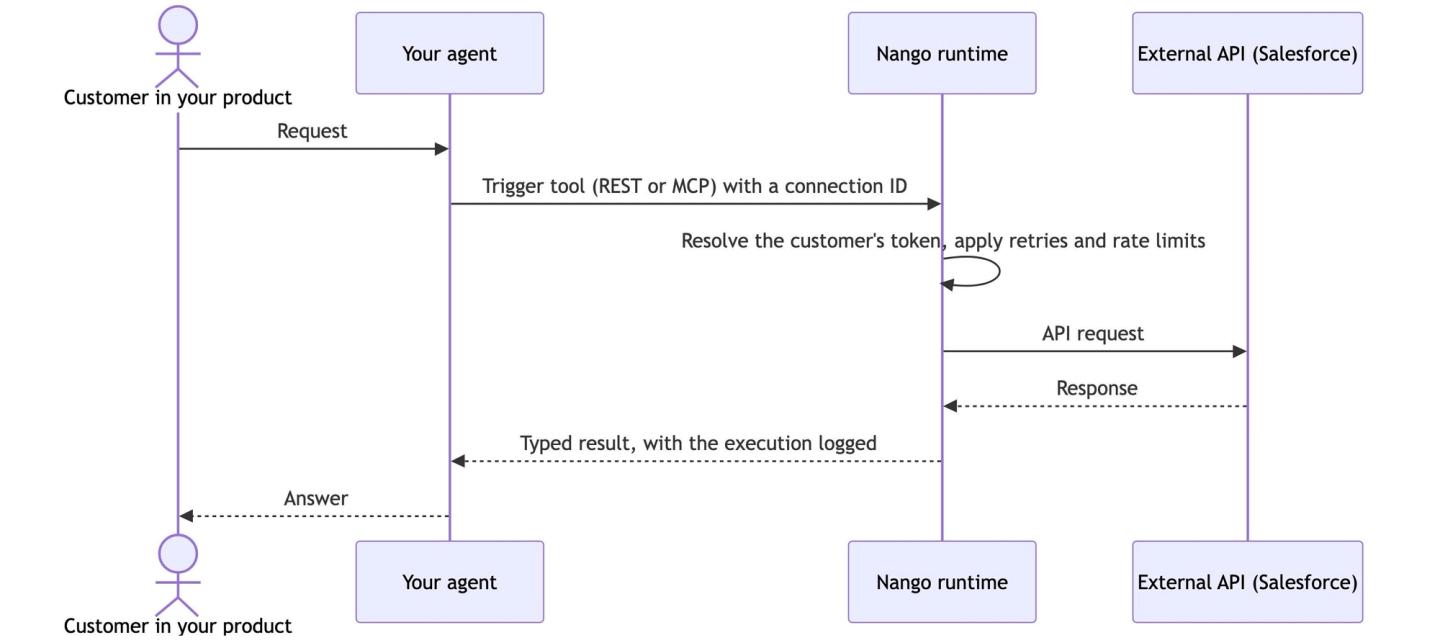
- Nango runs them: Auth (OAuth, API keys, token refresh), retries, rate limits, and per-execution logs across 1,000+ APIs. Your users authorize their accounts in your app, credentials stay server-side, and your agent only ever holds a connection ID.
- Your agent consumes them from any stack: Trigger tools over REST from OpenAI, Anthropic, the Vercel AI SDK, LangChain, or Mastra, or point an MCP-native agent at Nango’s built-in MCP server at
https://api.nango.dev/mcp, which serves the same custom tools with strict typed schemas.
Here is how the pieces fit together at runtime:
If part of your integration surface is a third-party MCP server, Nango covers that side too: the MCP Generic integration manages your users’ OAuth to external MCP servers (dynamic discovery, PKCE, client registration).
For real examples of building custom tool calls and exposing them to an agent, see how we built GitHub, Notion, and Gmail integrations for AI agents.
FAQ: MCP vs function calling
Should I use MCP or tool calls for the AI agent in my product?
Use custom tool calls if the agent ships to customers, and MCP servers for internal agents and developer tooling. Custom tools give you per-user auth, a small reliable toolset, and control over the code that touches customer data. MCP servers get you running fastest when your own engineers supervise the agent.
How is MCP different from function calling?
Function calling is the LLM mechanism where a model returns a structured request to run a function you defined. MCP is a protocol built on top of it that standardizes how tools are discovered and executed across clients and servers. Every MCP tool still reaches the model as an ordinary function definition.
How does authentication work with MCP vs custom tool calls?
With custom tool calls, your app runs the OAuth flow with each customer and your executor attaches that customer’s token to every API call (a platform like Nango manages this). With MCP, the OAuth flow authorizes your agent to the MCP server, and auth to the underlying API depends on what the server operator built. For a deeper look, see our guide to secure AI agent authentication and how ID-JAG helps AI agents authenticate.
How much context do MCP tool definitions consume?
Often tens of thousands of tokens per request, because every connected server’s tool definitions load into the model request whether the agent uses them or not. Anthropic documents a typical five-server setup at around 55,000 tokens of tool definitions.
When should you not use MCP?
Avoid third-party MCP servers when your agent runs unattended inside a customer-facing product: token overhead hits every request, generic tools reduce reliability, per-user auth is rarely supported, and you cannot review the code that handles customer data. Use custom tool calls there, and serve them over your own MCP server if your agent stack expects MCP.
Conclusion
MCP and tool calls sit at different layers. MCP standardizes tool discovery and execution on top of function calling, and public MCP servers are the fastest route for internal agents and developer tooling. For the agent inside your product, custom tool calls are the safer choice: your customers authorize their own accounts, the agent works from a small set of tools built for your use cases, and you own the code that touches customer data. Build them with a coding agent, run them on a platform that handles auth and execution, and serve them over REST or MCP.
Related reading:

