
A customer asks your agent to email an invoice to a buyer. Gmail accepts the message, but the tool client times out before it receives the result. The model tries again with a slightly different subject. The buyer gets two copies.
At Nango, teams have asked how to prevent duplicate invoices, contacts, and posts when agents retry after timeouts. The challenging aspect is recognizing the same intended action across calls.
A tool call is idempotent when repeating the same intended action produces no additional effect in the user’s system. Getting there takes more than a key. Start with the effect the user authorized. Decide what identifies it, protect the write at the provider, and give the model a result that tells it when to stop.
Where retries come from in agent systems
| Source | What happens | Can you reuse the call identity? |
|---|---|---|
| HTTP client retry | An SDK or proxy resends a POST after a timeout or a 5xx. | Yes. You control the key on the outbound request. |
| Client-side timeout | The MCP client stops waiting. The tool finishes, but the model sees an error and calls it again. | No. The model makes a fresh call. |
| Framework replay | A durable runtime resumes after a crash and runs a step again. | Yes, if you use the persisted tool call or the workflow run and step IDs. |
| Model re-issue | The model retries after an error, loses the result during context compaction, or emits two calls in one parallel batch. | No. The arguments can change, too. |
| User asks again | The user regenerates a response or says “Try sending that invoice again” in a new turn. | No. The new turn has its own calls. |
The invoice email from the introduction combines two of these: a client-side timeout followed by a model re-issue. Here is how the playbook below handles it.
sequenceDiagram
    participant M as Model
    participant W as Tool wrapper
    participant S as Operation store
    participant G as Gmail API

    M->>W: send_invoice (call 1)
    W->>S: Claim intent key<br/>(connection, invoice ID, recipient)
    S-->>W: Claimed, in_flight
    W->>G: Send message
    Note over M,W: Client times out. The model sees an error.
    G-->>W: 200, message ID
    W->>S: Save result, state done
    M->>W: send_invoice (call 2, reworded subject)
    W->>S: Look up intent key
    S-->>W: done, message ID, sent at 10:42
    W-->>M: already_done (sent at 10:42)
    Note over M,G: Two tool calls, one email
The second call has a new call ID and different arguments, so only the intent key ties it to the first. The wrapper returns the saved result and never calls Gmail again.
A playbook for idempotent tool calls
1. Reshape the write around the desired result
For each write tool, ask what the user would observe if it ran twice. Setting a ticket’s status to closed leaves it closed. Toggling the status twice reopens it. Prefer set_status, “ensure this contact exists,” or an upsert on a unique identifier wherever the user cares about the final state. Treat sends, appends, increments, and creates as unsafe by default: each run can have its own effect.
For a send, consider splitting preparation from delivery. Gmail documents that sending a draft deletes it and creates a message with the SENT label. Save the draft ID. Once Gmail has sent it, a later attempt has no draft left to send under that ID. Gmail drafts guide
2. Identify both the call and the intent
Use an infrastructure key to recognize a replay. Take a persisted tool_call_id or combine the workflow run ID with the step ID. Pass it from the runtime outside the model-facing input schema. MCP has no standard idempotency field for ordinary tool calls. A client and server you control can agree on a namespaced request _meta entry such as example.com/operation-id. MCP request metadata
Use an intent key inside the tool wrapper to recognize a fresh call for the same action. Scope it to the customer connection and tool. Prefer a business identifier if available. For “send the approved invoice reminder,” the invoice ID, approved reminder version, and recipient identify the send even if the model describes it differently on its second attempt.
Without a business identifier, hash the fields that define the action. For a meeting, you might use the calendar, start time, sorted attendees, and normalized title. This tolerates a reordered attendee list or extra whitespace. A paraphrased title can still miss. If two requests share a likely identity but disagree on an actual write field, surface the difference before making another write. Guessing that two different subjects mean the same thing can suppress a legitimate email.
Match fresh calls within a short window, usually minutes. When you find a match, bind the new call ID to the existing operation. All subsequent attempts for that operation use the same provider key and the original payload. A replay with a known call ID can still be identified even after the intent window closes.
3. Claim the operation before calling the provider
Store each operation’s key, canonical payload and hash, state, and confirmed result. In one transaction, lock the scoped intent key, find or create its operation, and bind the call ID. This serializes matching even when two workers arrive with different call IDs. A unique constraint lets just one worker claim the write.
INSERT INTO tool_operations (connection_id, tool, operation_key, input_hash, state)
VALUES ($1, $2, $3, $4, 'in_flight')
ON CONFLICT (connection_id, tool, operation_key) DO NOTHING
RETURNING operation_key;
Only the worker that inserted the row proceeds after commit. With check-then-insert, two workers can both see an empty result. On a conflict, read the existing claim.
- Different input hash. Reject the call. Report the conflicting fields and keep the original payload.
- In flight. Wait for the owner and return the same result. If the owner disappears after dispatch, reconcile with the provider before handing the write to another worker. An expired worker lease says nothing about whether an invoice was created.
- Done. Return the saved resource and timestamp.
Only confirmed success consumes the key. Allow a retry after a confirmed failure with no effect. Keep an ambiguous attempt pending verification, even after the intent window closes.
Keep operation records for the full replay horizon. A 24-hour record may cover late HTTP retries. A workflow that resumes next week needs longer. Neither requires widening the intent window.
Allow an intentional second effect. For example, the model can set confirm_duplicate: true when the user explicitly says “Yes, send a second reminder.” Bind that authorization to a fresh operation once. A replay of the confirmed call must still find that operation. “Did it send?” calls for a lookup.
4. Protect the write at the provider
A worker can crash between the provider accepting a write and your database recording success. Choose the first mechanism below that the specific endpoint supports.
- Pass through a native idempotency key. Send the saved operation key in Stripe’s
Idempotency-Keyheader, QuickBooks Online’srequestidquery parameter, or thePayPal-Request-Idheader on supported PayPal endpoints. Check the retention period. Stripe may prune a key once it is at least 24 hours old, after which the same key can initiate a new operation. Stripe, QuickBooks Online, and PayPal - Use a resource identity the provider enforces. Google Calendar accepts a client-chosen event ID. Encoding a hash of the operation key in base32hex (
0to9,atov) would give re-issues the same ID. A duplicate can return409, though Google cautions that collision detection at creation is not guaranteed. Calendar event IDsSalesforce can upsert against a unique External ID, but a repeat update can still fire triggers and flows. For a OneDrive upload by path, set@microsoft.graph.conflictBehaviortofailif an existing name should stop the upload. Verify what already occupies the path. Salesforce upsert and OneDrive upload sessions - Attach a marker and look it up. Slack’s
chat.postMessagehas no documented general-purpose idempotency key. Attach the operation ID as message metadata, then readconversations.historywithinclude_all_metadata: truebefore retrying. A match gives you the original channel and message timestamp. A miss in a paginated or inaccessible history leaves the outcome open. Calendar private extended properties can serve the same purpose. Slack message metadata and Calendar extended properties - If the API offers none of these, stop after an ambiguous failure. Return
outcome_unknownwith what to check, such as the recipient, destination account, and dispatch time. Let a read tool or a person verify the effect. Local deduplication alone cannot guarantee exactly-once execution across that crash boundary. Disable automatic retries for the write.
5. Give the model an outcome it can act on
A generic “request failed” invites another call. Anthropic recommends explaining what went wrong and what the agent should do next. Use four outcomes. Writing tools for agents
donemeans the provider confirmed the write. Return the resource so the model can report success.already_donemeans this intent succeeded earlier. Include the existing resource ID, link, and completion timestamp so the model can say when it happened.failed_safe_to_retrymeans you know the write had no effect. Explain what failed and how to retry safely.outcome_unknownmeans the write might have succeeded. Give an explicit instruction such as “Do not call this tool again. Tell the user the result is being verified.” Provide a read tool such aslist_events_created_todayto check the destination calendar.
6. Return a job ID before the client times out
A client deadline can expire while the worker is still running. For slow writes, claim the operation, enqueue the work durably, and return a job ID. Give the model a status tool to poll. If the initial acknowledgement gets lost, a repeated submission should return the existing job ID.
MCP introduced Tasks as experimental in the November 2025 specification and moved the design into an extension. Check which version both ends support. An application-level job and status tool work with clients that lack Tasks support. Enable HTTP retries on writes only when the provider operation is safe to repeat. Experimental MCP Tasks and Tasks extension
7. Track each write in a multi-step tool
Suppose a tool creates an invoice and then emails it. If delivery fails, deduplicating the outer call cannot undo the invoice. Give each step its own key derived from the operation ID. Save the invoice ID before attempting delivery, then resume at the unfinished step. If the business requires reversing a partial result, define a compensating action, such as voiding the invoice. Make that action safe to retry as well.
8. Test the failures that produce a second write
Inspect the effects in a provider test account. Two successful responses can still hide two invoices.
- Repeat a successful call sequentially. It should return the original resource and completion time.
- Race two workers on one key, then have the model emit two identical calls in one parallel batch. Both tests should produce one provider write.
- Drop the provider response after acceptance. Separately, crash the worker before it saves the result. Recovery should find the effect or report uncertainty.
- Change the amount or recipient under the same operation key. Assert rejection before dispatch.
- Have the model reword its arguments, then have the user ask again in a new turn. Verify that your business identity still matches, or that an ambiguous match prompts clarification.
- Request two legitimate identical actions. Confirm the second explicitly and verify that retrying either operation leaves exactly two effects.
A working example with Google Calendar
Expose only meeting details in create_event. The backend claims the operation and saves an event ID before dispatch. It supplies both IDs to the Calendar action and automatically calls events.get on recovery.
The private property ties the event at that ID to the operation that created it.
const path = `/calendar/v3/calendars/${encodeURIComponent(calendarId)}/events`;

try {
    const res = await nango.post<CalendarEvent>({
        endpoint: path,
        data: {
            ...meeting,
            id: eventId,
            extendedProperties: { private: { nango_operation_id: operationId } }
        }
    });
    return done(res.data);
} catch (error) {
    if (!isConflictOrAmbiguous(error)) throw error; // 409, timeout, 429, or 5xx
}

// Look the event up instead of inserting again. A failed lookup stays unresolved.
const event = await getEventOrNull(nango, `${path}/${encodeURIComponent(eventId)}`);
if (!event) return outcomeUnknown();
const marker = event.extendedProperties?.private?.nango_operation_id;
if (event.status === 'cancelled' || marker !== operationId) return conflict();
return alreadyDone(event);
In a nango dryrun against a real Calendar connection, the first insert returned 200 and the action reported created. A lookup returned 200 GET and reconciled. A repeat insert with the same ID returned 409 POST, followed by 200 GET. The action verified the marker and returned reconciled.
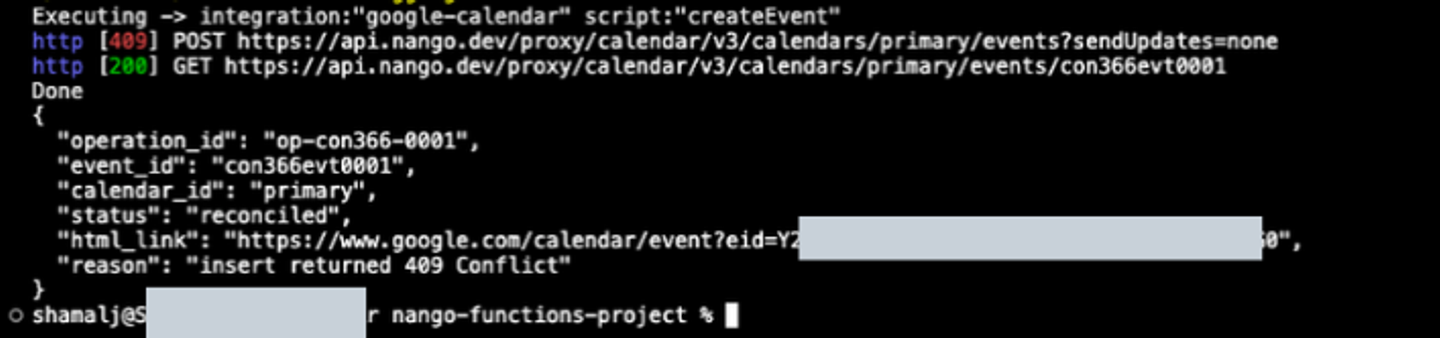
With the wrong operation ID, the lookup returned 200 GET and the action reported conflict. A missing event returned 404 GET and unresolved. Neither result authorizes another insert. The dry run exercised provider reconciliation with fixed IDs. Concurrent claims and recovery after a lost network response need separate tests in the application.
The tested action used its own labels, which map onto the outcomes from step 5: created is done, reconciled is already_done, and unresolved is outcome_unknown. A conflict means the event ID belongs to a different operation, so report it as a failure for a person to inspect, never as safe to retry.
Building idempotent tools with Nango
Nango is the tool calling layer for AI agents. Your app owns the intent keys and deduplication store. The provider-specific work in step 4 belongs in the integration. On Nango, a coding agent such as Claude Code, Cursor, or Codex can customize that part of a catalog tool. Nango provides managed authentication, execution, and logs across 1,500+ APIs and 10,000+ tools. Catalog tags such as read_only_hint, destructive_hint, and idempotent_hint help you classify the starting tool. Customizing Nango tools
Pull the tool into your functions project and install the coding-agent skill with npx skills add NangoHQ/skills -s building-nango-functions-locally. For Calendar, ask the coding agent to preserve the supplied event ID and verify the private marker after a conflict. Test with nango dryrun against a real test connection. After deployment, catalog updates no longer reach your customized tool. Expose it through the tool-call API or Agent Sessions over MCP. Nango tools and Agent Sessions
By default, a Nango action runs at most once per execution. For async triggers with X-Async: true, X-Max-Retries accepts 0 to 5 and defaults to 0. Opt in only for operations safe to repeat. The proxy and function HTTP helpers also default to zero retries. Setting retries: 0 documents that choice. Your wrapper still has to recognize a fresh call from the agent. Action execution and Functions SDK
Conclusion
Design the answer to “Did that send?” alongside the send tool. A saved receipt lets the agent answer immediately. A provider lookup can recover a missing receipt. When neither can establish what happened, the agent should tell the user what to verify before anyone authorizes another send.
FAQ
Does MCP’s idempotentHint make a tool idempotent?
No. The annotation describes behavior to clients. Set it only after you have implemented and tested what happens when the tool receives the same arguments twice. MCP tool annotations
Should the LLM generate the idempotency key?
No. A model can generate a fresh value on every call. Keep the replay key in the runtime. Derive the intent key inside the wrapper from the connection and the fields that identify the action.
What if the API has no idempotency key?
Use the next strongest mechanism it offers: a client-chosen resource ID, an upsert on a unique field, or a marker you can search for before retrying. If it offers none, don’t retry after an ambiguous failure. Return outcome_unknown and verify the effect with a read tool or a person.


