
Most AI agents only act when a user prompts them. They sit idle until someone types a message or calls them over an API. But a lot of real work happens in external systems: a deal moves to “closed won” in Salesforce, a customer sends a message in Slack, a payment fails in Stripe, or a new file lands in Google Drive.
To handle those cases, your agent has to react to events happening in external systems instead of waiting for a prompt. This post covers why event-driven AI agents matter and the main ways to make an agent react to external events, and what to do once an event arrives.
Why AI agents need to react to external events
An event-driven AI agent responds to changes in external systems in near real time, instead of waiting for a user to prompt it.
There are two ways to trigger an agent:
- Pull (request-response): the agent runs when a user or another service calls it. This fits chat and on-demand tasks.
- Push (event-driven): the agent runs when something happens in an external system. This fits automation that should not wait for a human.
The push model matters for three reasons. It reacts in seconds rather than on the next polling cycle. It avoids the wasted API calls and cost of checking for changes that did not happen. And it lets the agent do useful work in the background, with no human in the loop.
Common use cases for event-driven AI agents
Event-driven agents are useful anywhere a change in one system should trigger work in another. A few concrete examples:
- CRM updates: a deal changes stage in Salesforce. The agent drafts a follow-up email and updates the next step.
- Support tickets: a ticket arrives in Zendesk. The agent triages it, adds tags, and suggests a reply.
- Team messaging: a customer posts in a shared Slack channel. The agent answers from your docs and CRM data.
- Code review: a pull request opens in GitHub. A review agent reads the diff and comments.
- Payments: a charge fails in Stripe. The agent retries, notifies the customer, and flags the account.
- File processing: a file uploads to Google Drive. The agent extracts the text and syncs it to your RAG index.
They all share the same shape: an external event triggers the agent, the agent reads context, and the agent takes action through APIs.
Ways to make AI agents react to external events
There are three main mechanisms: polling on a schedule, webhooks from external APIs, and event streams. Most production systems combine at least two of them, depending on what the external API supports.
| Mechanism | Latency | Efficiency | Best for |
|---|---|---|---|
| Polling | Minutes | Low (runs even when nothing changed) | APIs with no webhooks, and as a reliability safety net |
| Webhooks | Seconds | High (fires only on a real change) | Most real-time reactions to SaaS events |
| Event streams | Milliseconds to seconds | High at large volume | High-throughput pipelines and agent-to-agent workflows |
Polling on a schedule
Polling means the agent, or a background job, checks an API on a fixed interval and reacts to anything new since the last check.
It is the simplest option and works with any API, even ones that offer no push mechanism. The tradeoffs are latency and waste: your reaction time is only as fast as the interval, and most requests return nothing new while still counting against rate limits.
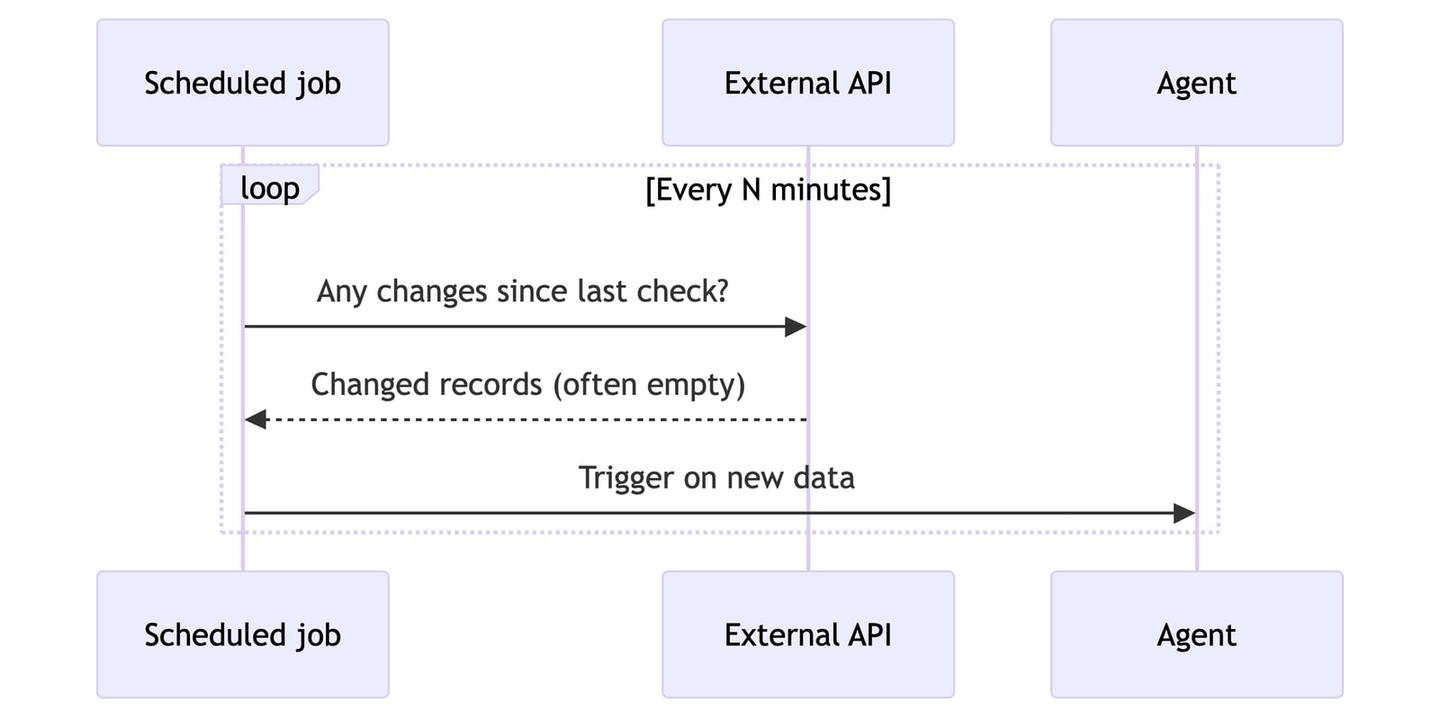
Use polling when an API has no webhooks, or as a safety net behind webhooks (more on that below).
Webhooks from external APIs
A webhook is an HTTP POST that a provider sends to your endpoint the moment something changes. This is the push model, and for most real-time use cases it is the right default: reactions arrive in seconds, and the provider only calls you when there is an actual change.
The catch is that every provider does webhooks differently. Each one has its own registration flow, payload shape, signature scheme, and retry behavior. On top of that, you have to map each incoming event back to the right customer in your system, and some subscriptions expire and need renewal. Google Calendar push channels expire after 7 days, and Gmail’s push watch expires on the same cadence, so you have to re-register both before they lapse.
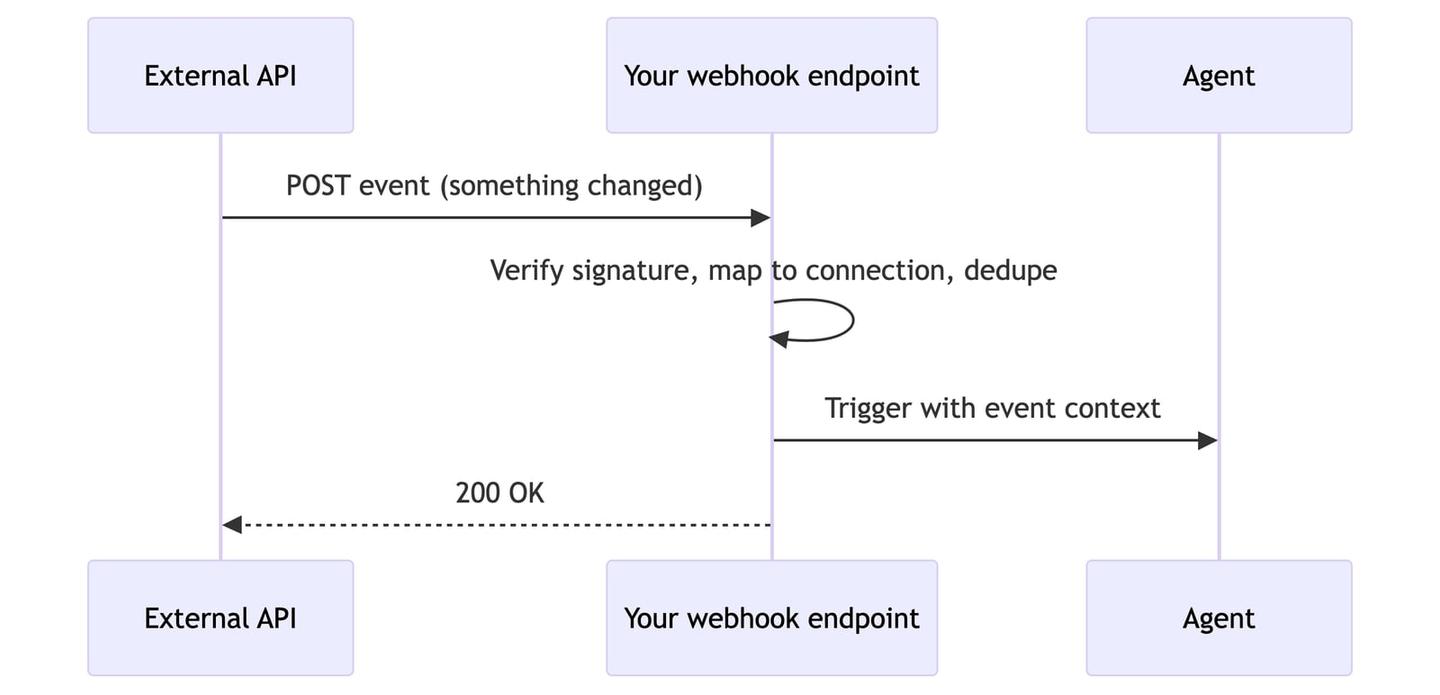
The mechanism is simple. The work is in the per-provider plumbing around it, which is where an integration platform helps (covered below).
Event streams and message queues
For high-throughput or multi-agent systems, events flow through a stream or message queue such as Kafka, Amazon SQS, or Google Pub/Sub. Agents subscribe to the stream and process events as they arrive.
This adds two capabilities that raw webhooks do not have. You can replay history, so an agent can reprocess past events after a bug fix. And agents can react to each other: agent A emits a task.completed event, agent B listens for it and continues the workflow. This is the choreography pattern, and it is how larger multi-agent systems stay decoupled.
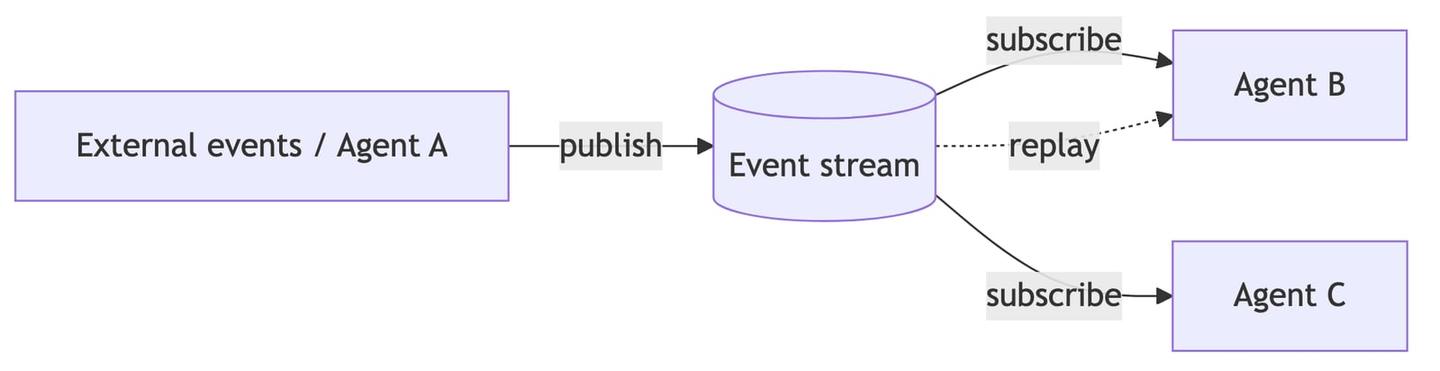
The tradeoff is that you run and scale the streaming infrastructure yourself. Reach for this when volume is high or when you have several agents coordinating. It is overkill for a single agent reacting to a handful of SaaS events.
What to do when an event arrives
Once the event reaches your system, the agent usually does one of four things:
- Execute a tool call: run a predefined, typed function like
upsert-contactorcreate-issuevia API or MCP. This keeps the action deterministic and safe, instead of letting the LLM build a raw HTTP request. - Trigger a data sync: refresh your local copy of the customer’s data (and your RAG index) for that connection, so the agent reasons over fresh context.
- Call an API directly: for a one-off read or write, send a single request to the provider without managing auth yourself.
- Start or resume an agent loop: hand the event and the right tools to the LLM and let it decide the next steps.
These are often chained. A common pattern is: event arrives, trigger a sync to pull the latest data, let the agent reason over it, then have the agent run a tool call to write something back.
Making event handling reliable
Reacting to events in production takes more than receiving an HTTP request:
- Verify signatures: most providers sign webhooks with an HMAC of the payload. Compute the HMAC with your shared secret and compare it to the header, using the raw request body before any JSON parsing.
- Deduplicate events: networks cause webhooks to arrive more than once. Track each event ID and skip anything you have already processed, so the agent does not act twice.
- Return fast, process async: acknowledge the webhook with a
200quickly, then do the real work in the background. Slow handlers cause providers to time out and retry. - Keep a polling safety net: webhooks get dropped. Google’s own docs note push notifications are “not 100% reliable”. A low-frequency poll catches anything the webhooks miss.
- Map events to the right connection: a webhook usually identifies an account, not your internal customer. You need a reliable way to resolve which customer and credentials each event belongs to.
Reacting to external events with Nango
Nango is the integration platform where coding agents build integrations. Engineers use agent skills with coding tools like Claude Code, Cursor, and Codex to build integrations as code in a git repo, and Nango’s cloud runtime runs them securely and at scale. Integrations cover API auth, tool calls, data syncs, and webhooks across 1,000+ APIs, and it is open source.
For the event side specifically, Nango removes most of the plumbing described above. It gives each integration one webhook URL, attributes every incoming event to the right connection, verifies the provider’s signature, retries, and logs each event. You then choose what happens next:
- Forward the event to your app: Nango sends you a normalized payload with the
connectionIdalready resolved, and your backend handles the logic. Use this when you already have webhook handling. See webhook forwarding. - Process the event inside Nango: a webhook function runs as soon as the event arrives. It can update your synced data or trigger an incremental sync so your app reads fresh records. See real-time syncs.
A forwarded event arrives at your endpoint in a consistent envelope, regardless of provider. Nango wraps the provider’s raw event in payload and adds the resolved connectionId, so you always know which customer it belongs to:
{
  "from": "hubspot",
  "providerConfigKey": "hubspot",
  "type": "forward",
  "connectionId": "connection-123",
  "payload": {
    "subscriptionType": "contact.propertyChange",
    "objectId": 1024,
    "propertyName": "lifecyclestage",
    "propertyValue": "customer"
  }
}
Processing an event inside a sync function looks like this. The onWebhook handler runs when the provider sends an event, and the scheduled frequency acts as the safety net for anything the webhooks miss:
import { createSync } from 'nango';

export default createSync({
    description: 'Sync CRM contacts, react to changes in real time',
    frequency: 'every hour', // safety net for missed webhooks
    webhookSubscriptions: ['*'], // route provider webhooks to onWebhook
    // ...models and checkpoint config
    exec: async (nango) => {
        await syncContacts(nango); // scheduled poll
    },
    onWebhook: async (nango, payload) => {
        await syncContacts(nango); // same logic, triggered by the event
    },
});
Once the data is fresh, the agent acts. With Nango you can run a typed tool call (also exposed over MCP), or make a one-off request to any endpoint through the proxy without touching tokens:
// Run a predefined tool call for the connection that emitted the event
await nango.triggerAction('salesforce', connectionId, 'create-note', {
    dealId,
    body: draftedNote,
});

// Or make a direct API call through Nango's proxy (auth handled for you)
const res = await nango.get({
    endpoint: '/crm/v3/objects/contacts',
    providerConfigKey: 'hubspot',
    connectionId,
});
You do not write this integration code by hand. Nango ships skills for AI coding agents so Claude Code, Cursor, or Codex can research the API, write the webhook and sync functions, and test them against a real connection. That makes just-in-time integrations practical: an agent can build a new event-driven integration on demand, prompted by an engineer or even a customer, instead of your team pre-building one per provider.
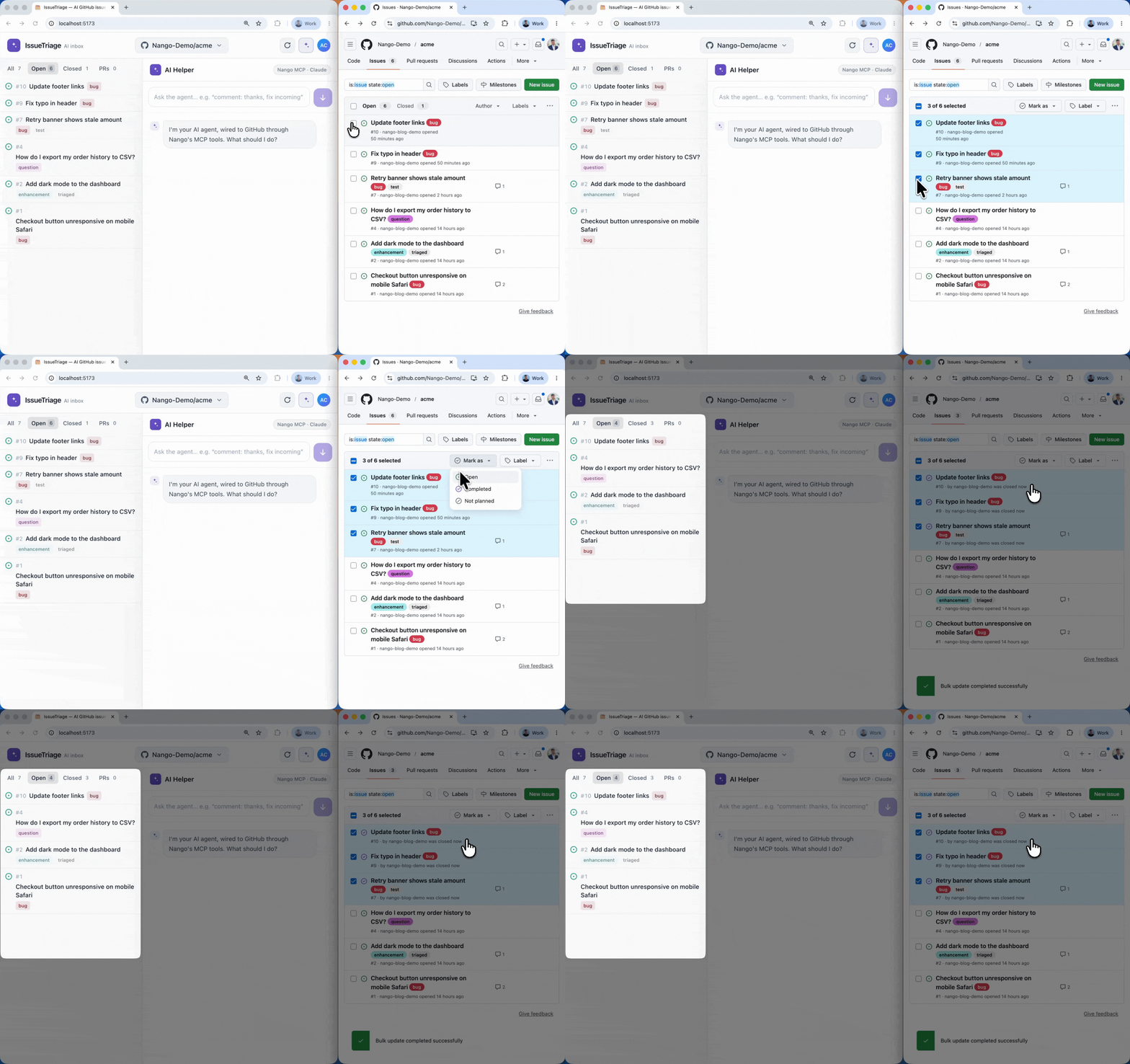
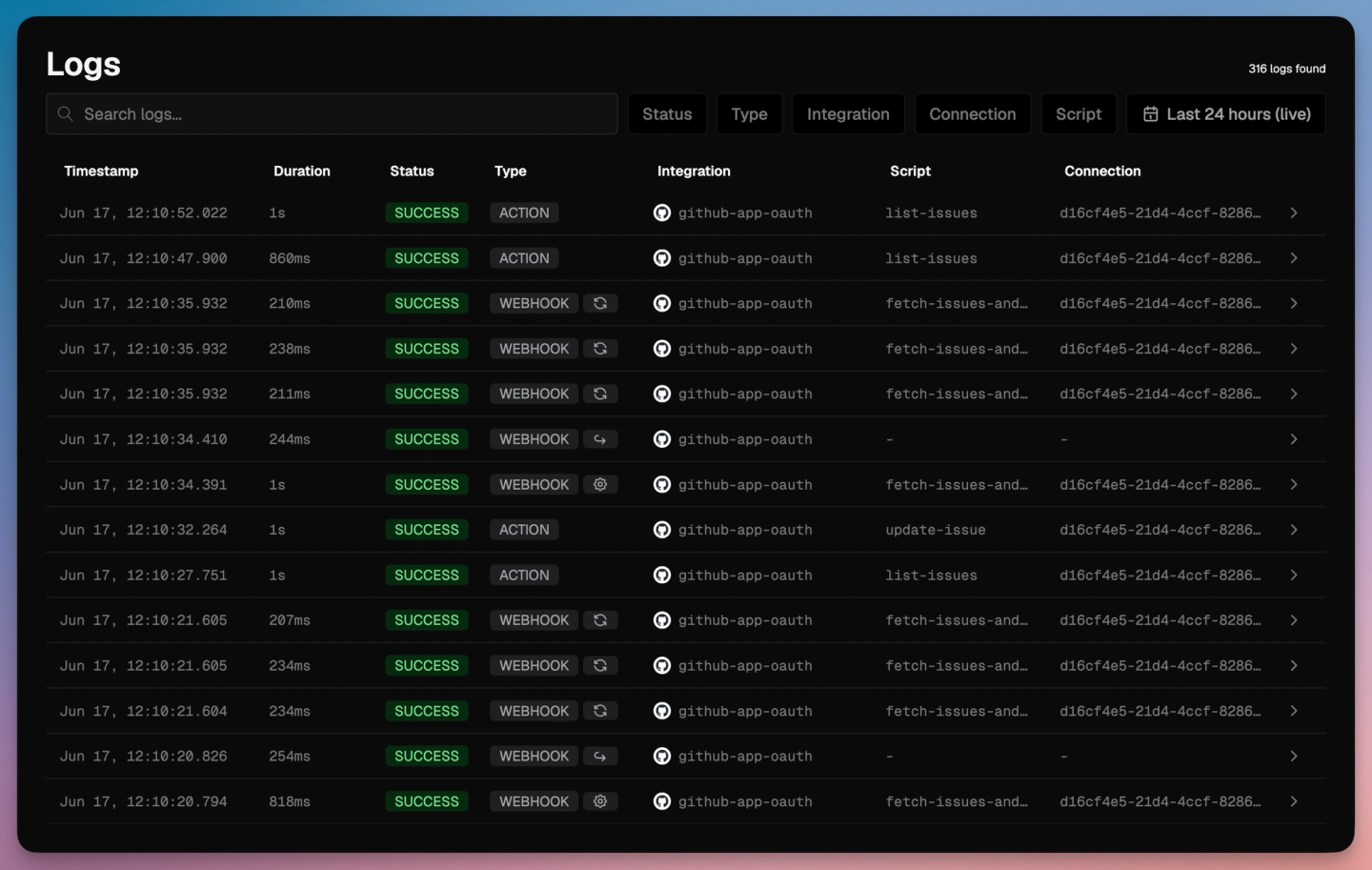
Once events are flowing, every run shows up in the Nango dashboard, attributed to the connection it belongs to, so you can see which action, sync, and webhook fired for each customer:
Conclusion
Getting an AI agent to react to external events comes down to two decisions. First, pick how the event reaches you: polling for APIs without push support, webhooks for most real-time cases, and event streams for high volume or multi-agent workflows. Second, decide what the agent does with the event: run a tool call, trigger a sync, call an API directly, or start an agent loop.
The event mechanism is simple. Signatures, deduplication, connection mapping, renewals, and a polling fallback are where most of the effort goes, and they repeat for every provider. A code-first integration platform like Nango handles that layer so your agent code stays focused on what to do when something happens, not on the plumbing that tells it something happened.
Related reading:
