
Claude Code, Cursor, and Codex make it easy to generate API integration code, whether you need API calls, tools for AI agents, data syncs, or webhook handlers.
Testing those integrations is harder. Customer accounts differ in permissions and data, so passing on one account does not guarantee success on another. Rate limits and repeated webhook deliveries are hard to reproduce on demand. Agent-generated mocks can also repeat the implementation’s assumptions, hiding bugs.
Nango and its integration-building skill give your coding agent a workflow from API research through deployment. The skill teaches patterns for pagination, retries, and schema validation, then guides live testing and regression test generation. You get reusable integration expertise without spelling out each step in a prompt.
Your tests also use Nango’s authentication and function SDK, so you validate the integration against the platform that will run it across thousands of customer accounts. This guide demonstrates the workflow with a HubSpot contacts integration, from catching missing records to verifying the deployed result.
The companion repo contains the seed data, implementation, and tests. The steps below focus on what to ask your coding agent and how to verify the result.
Step 1: Connect a test account and define the expected result
Choose a test account with data you can check independently of the generated code. For this example, we imported 250 HubSpot contacts with unique email addresses. Five contacts have no phone number or job title.
That gives us three expectations before the agent writes any code:
- The sync should return exactly 250 contacts, with no missing or duplicate records.
- Names, emails, and timestamps should match the source data.
- Contacts with missing optional fields should still sync successfully.
The companion repo records these expectations in expected.json. Defining them first gives the agent a target that does not depend on its own implementation.
Add HubSpot in the Nango dashboard and authorize the test account. Follow the coding agent setup to install the Nango skill and connect the Management MCP. The skill teaches your agent how to build, test, and deploy Nango functions. The Management MCP lets it inspect connections, trigger deployed functions, and read their logs.
Nango also provides a pre-built HubSpot contacts sync. If it fits your use case, start there and have your coding agent customize the fields or behavior you need. The same testing workflow applies to customized templates and functions generated from scratch.
Before testing, confirm that you connected the intended HubSpot account and that it contains the seeded 250 contacts. This prevents a correct sync against the wrong account from confusing the results.
Step 2: Run the integration against HubSpot and compare the output
Give your coding agent the use case, the test connection, and the expected result. A request can be as short as:
Build a HubSpot contacts sync for this test connection. Run it against the real API and compare the records with expected.json, including missing optional fields. Fetch contacts with a single GET request for now. Do not add pagination yet.
Nango’s dry runs let the agent execute the function against the live API before deployment. For this sync, the dry run shows which records would be saved without writing them to Nango’s records cache. Schema validation checks whether the returned records match the declared data model.
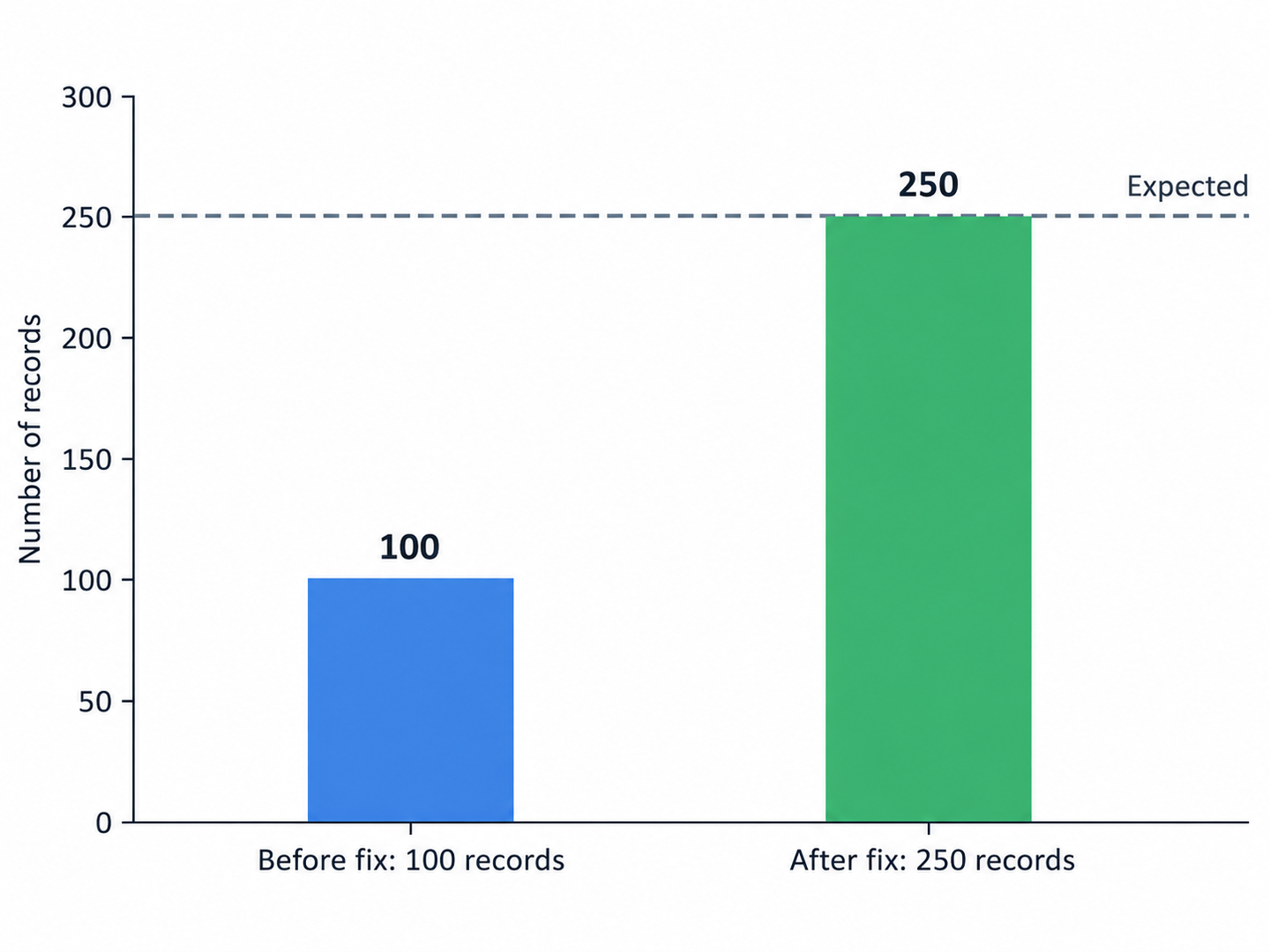
To demonstrate an incomplete result, we deliberately started this example with a sync that fetched only one page. The dry run returned 100 valid contacts from an account containing 250. The request succeeded, but the output was missing 150 records.
That discrepancy gives the agent a concrete problem to investigate:
The dry run returned 100 contacts, but the account contains 250. Inspect the API response, fix the missing records, and rerun the same test.
Claude Code found that the HubSpot response included a next-page cursor that the sync ignored. It updated the function to use Nango’s pagination helper, then reran it against the same account. The corrected sync fetched all 250 contacts across three requests.
The corrected function also uses checkpoints to save progress after each page. An interrupted run can resume from its saved position. This full-refresh example clears the checkpoint after completing the dataset, so the next run starts from the beginning.
The useful test here is the comparison with known data. A successful HTTP response and schema validation establish that the returned records are readable and correctly shaped. Comparing the record count and identities establishes whether the sync fetched the expected dataset.
Step 3: Check the account variations your customers will have
The pagination example covers one failure mode. Before shipping, extend the checks to the data and account differences your integration needs to support:
| Scenario | What to verify |
|---|---|
| Multiple pages | Compare both the total and record identities with the seed data. There should be no gaps or duplicates. |
| Missing optional fields | Confirm that the five contacts without phone numbers or job titles pass validation and remain in the output. |
| Field mappings | Compare known contacts with the source. Check names, email addresses, IDs, and timestamps. |
| Empty account | Run against an account with no contacts and confirm that the sync completes with an empty result. |
| A second customer account | Use a second connection with different known data and verify that the sync returns that account's records. |
Nango’s schema validation catches unexpected types and missing required fields. The comparisons with known records catch errors that a schema cannot, such as placing the last name in the first-name field.
Use controlled error tests for rate limits and temporary API failures. Ask the agent to verify that failures are surfaced and that the configured retry behavior works. A successful run against HubSpot does not exercise those failure paths.
Step 4: Save verified responses as regression tests
Once the live result matches your expectations, ask the agent to save the API responses and generate regression tests. Nango’s testing tools record provider responses and function output, then generate tests that replay those responses without calling HubSpot again.
That makes subsequent changes faster to check. If the agent changes a field mapping or breaks pagination, the saved responses provide a repeatable input for detecting the regression.
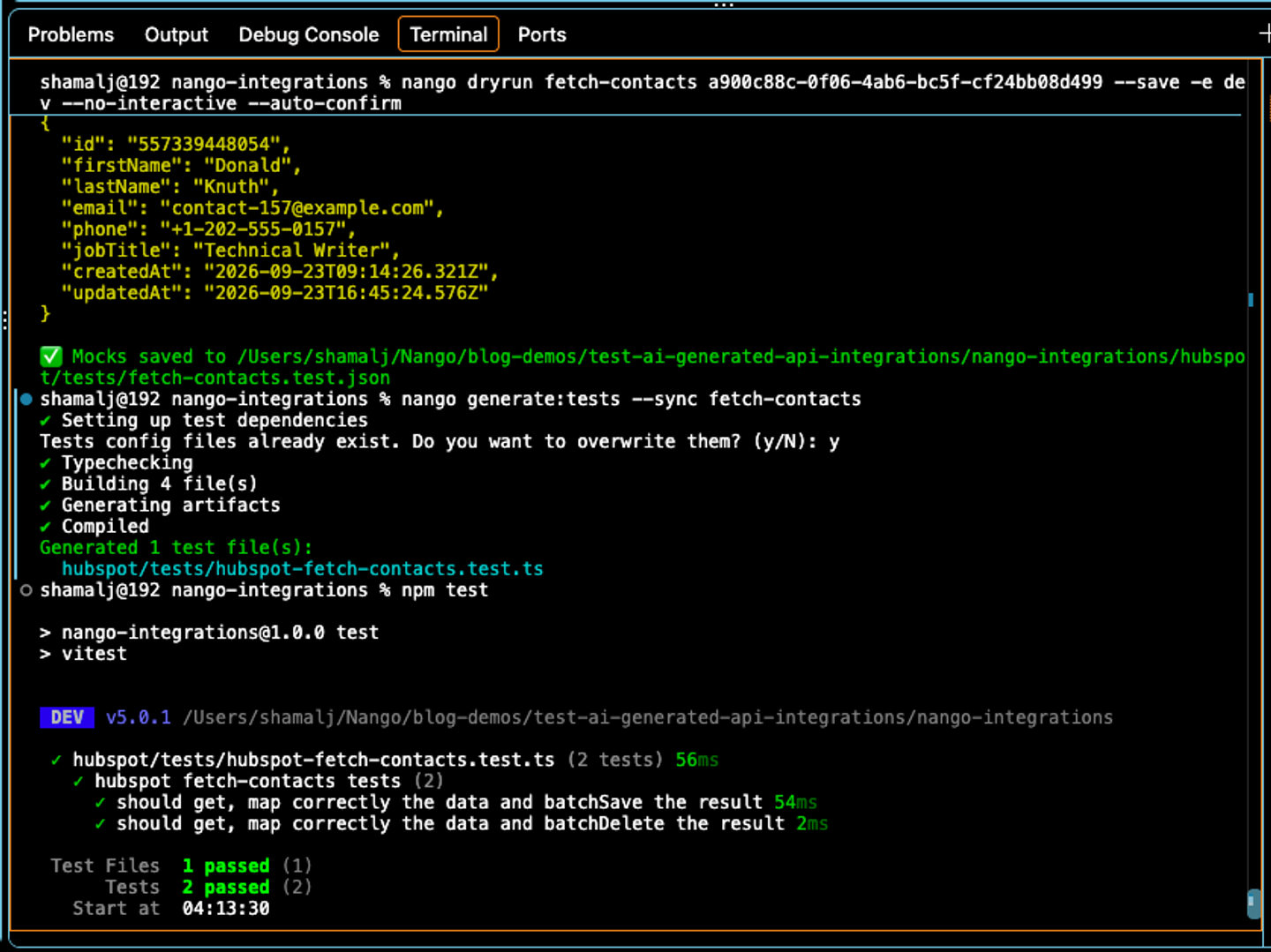
The recorded output must be correct before it becomes the expected result. Saving the first, incomplete run would preserve the 100-contact bug in the test. Keep explicit assertions alongside the generated tests for the expected total, unique records, known email addresses, and missing optional fields.
Run the regression tests whenever the agent changes the integration. Repeat the live test when the provider behavior needs checking, such as after a scope change, API version change, or customer report that the saved responses cannot reproduce.
In our work on 200+ agent-built integrations, we saw agents change test fixtures to make failing code pass. Keep the recorded responses off-limits during implementation changes. When the expected behavior changes, verify it against the real account and capture new responses.
Step 5: Deploy and verify what your customer sees
Ask the coding agent to deploy the tested function, run it for the test connection, and inspect its operation log through the Management MCP.
In this example, the deployed sync completed three HubSpot requests and processed batches of 100, 100, and 50 contacts. The operation log lets you check the requests, processed records, and completion status after deployment.
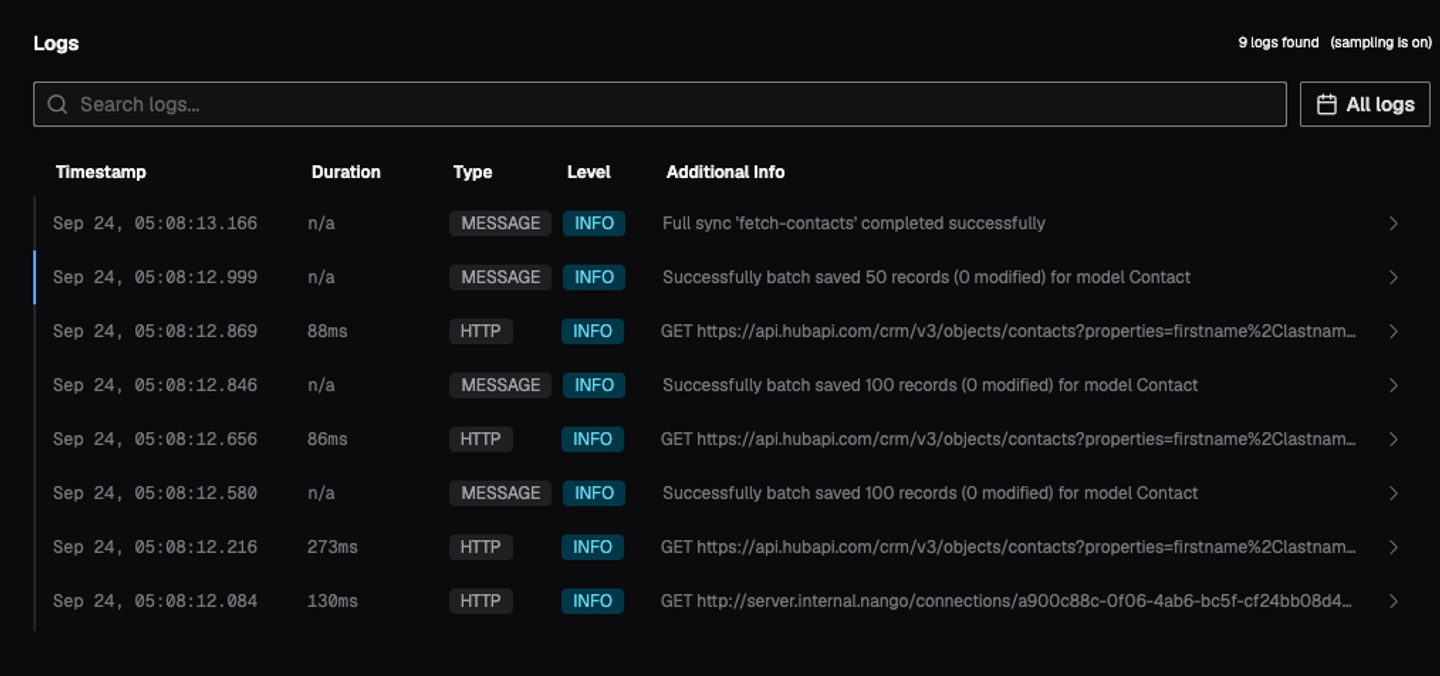
Finally, read the synced records from your application and check the feature that depends on them. The demo app displays all 250 contacts. This verifies that the data reaches the customer-facing view as expected.
The workflow also applies to API actions used as tools by customer-facing AI agents. Test the action with representative inputs, verify its output and any changes in the provider account, and save the verified responses for regression tests. A dry run still makes real API requests, so test write actions against data intended for that purpose.
Conclusion
The HubSpot example produces a sync checked against 250 known contacts, regression tests based on verified API responses, and a deployed result confirmed in the application.
For your next AI-generated integration, define the expected result before asking the agent to build it. Use Nango’s live testing to check the implementation, save the verified responses, and review the deployed behavior. Start with the coding agent setup and use the testing guide for the implementation details.
Related reading
- How to build AI agent integrations using the Nango Management MCP
- How to sync large amounts of contacts from the HubSpot API
- What we learned building 200+ API integrations with OpenCode
- Best practices for building API integrations with AI agents
- How to build API integrations without a sandbox or test account

