
When building customer-facing AI products, you’ll likely come across two protocols: MCP (Model Context Protocol) and A2A (Agent2Agent). MCP connects AI applications to tools and data, while A2A enables communication and task delegation between independent AI agents. They solve different problems, but can work together in an AI agent architecture.
In this article, we’ll explore MCP vs A2A in detail, including how each protocol works, when to use one, both, or neither, real-world production examples, and the integration challenges developers still need to address.
MCP vs A2A: what’s the difference?
One way to understand the difference between MCP and A2A is through the direction they connect. MCP works vertically, connecting an AI application to tools, data, and other resources. A2A works horizontally, enabling independent AI agents to communicate and delegate tasks across systems or organizational boundaries.
In practice, MCP standardizes how agents access capabilities, such as querying a database or calling an API. A2A standardizes how agents collaborate, allowing one agent to delegate a task to another agent that independently decides how to complete it.
Eon’s engineering team, which uses both protocols in production, explains the distinction through who interprets the results. With MCP, the calling agent receives data and decides what it means. With A2A, the remote agent handles the investigation and returns its own answer.
| MCP | A2A | |
|---|---|---|
| Purpose | Connect an agent to tools, resources, and prompts | Connect an agent to another agent |
| Current spec | 2026-07-28 (stateless core) | v1.0 (March 2026) |
| Discovery | tools/list, resources/list, prompts/list on a server you configured | Agent Card at /.well-known/agent-card.json listing skills, endpoints, and auth |
| Interaction model | Client calls a named tool with typed arguments and gets a result | Client sends a message; the remote agent plans, uses its own tools, and replies |
| Task handling | Optional Tasks extension; client and server support required | Built-in task lifecycle; optional streaming and push notifications |
| Who interprets the result | The caller | The remote agent |
| Authentication and authorization | Optional OAuth-based authorization for HTTP; access tokens must target the MCP server | Agent Cards can declare authentication schemes; tasks can request additional authorization |
How do MCP and A2A work?
Let’s explore how each of these protocols work.
MCP connects AI applications to tools and context
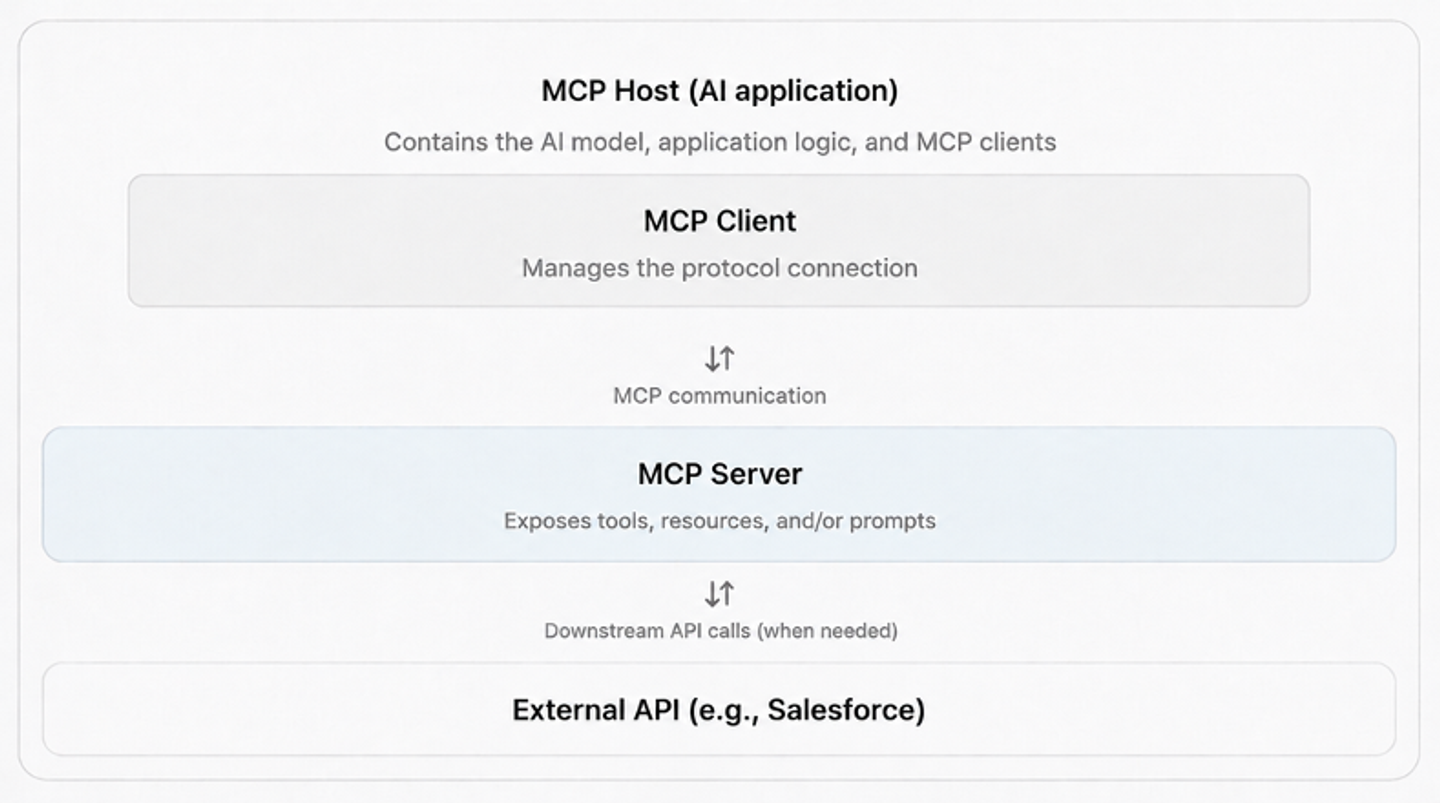
MCP follows a client-server architecture in which an AI application (the MCP host) connects to MCP servers through dedicated MCP clients. Each server can expose three core primitives:
- Tools: Functions the AI model can invoke to perform actions, such as
get_sync_statusorcreate_ticket. Clients discover available tools usingtools/listand invoke them usingtools/call. - Resources: Data and context, such as documentation, runbooks, or database schemas, that clients can access using
resources/read. - Prompts: Reusable prompt templates that help structure interactions with AI models, retrieved using
prompts/get.
When an AI model needs to perform an action, it can select an available tool based on its description and input schema. The MCP client sends the tool call to the appropriate server, which executes it, often by making a request to an external API, and returns the result.
MCP standardizes how tools are discovered and invoked, while the AI application remains responsible for deciding which tools to use and how to interpret their results. For a closer look at the distinction, see MCP vs tool calls for AI agents.
A2A lets independent agents discover each other and delegate work
A2A enables independent AI agents to communicate and delegate tasks without exposing their internal tools, prompts, or implementation details. Each agent publishes an Agent Card, a JSON document describing its capabilities, supported communication methods, and authentication requirements.
For example, a sync diagnostics agent that investigates failed customer data syncs could publish the following Agent Card:
{
  "name": "Sync diagnostics agent",
  "description": "Investigates failed customer data syncs and reports the root cause.",
  "version": "1.4.0",
  "supportedInterfaces": [
    {
      "url": "https://diagnostics.example.com/a2a",
      "protocolBinding": "JSONRPC",
      "protocolVersion": "1.0"
    }
  ],
  "capabilities": {
    "streaming": true,
    "pushNotifications": true
  },
  "defaultInputModes": ["text/plain"],
  "defaultOutputModes": ["text/plain"],
  "skills": [
    {
      "id": "diagnose-sync",
      "name": "Diagnose a failed sync",
      "description": "Investigates sync failures using run history, connection state, and provider APIs.",
      "tags": ["sync", "diagnostics"],
      "examples": [
        "Why did a customer's Salesforce contacts sync fail last night?"
      ]
    }
  ]
}
An A2A client discovers the agent through its Agent Card, determines whether it can handle the requested work, and sends a message using SendMessage or SendStreamingMessage if streaming is supported. The Agent Card can also specify authentication methods through securitySchemes and securityRequirements.
Four core concepts define how agents exchange information and manage work:
- Messages: Communication between agents containing text, files, or structured data.
- Tasks: Units of work with unique IDs and lifecycle states. A task can pause in
TASK_STATE_INPUT_REQUIREDorTASK_STATE_AUTH_REQUIREDwhile waiting for additional information or authentication. - Artifacts: Outputs produced during a task, such as a diagnostic report or analysis results.
- Context ID: A
contextIdgroups related messages and tasks into the same conversation.
For long-running tasks, clients can retrieve progress using GetTask. And clients will receive streaming updates through SubscribeToTask, or configure webhook notifications using CreateTaskPushNotificationConfig when the remote agent supports these capabilities.
Where their capabilities overlap
Agents exposed as tools: An AI agent can also be exposed through an MCP tool. The calling agent invokes it like any other tool, without needing to know how it works internally. For example, Eon generates an ask_<agent> tool from each remote agent’s Agent Card, allowing its orchestrator to decide when to delegate work. The official A2A documentation also describes how an agent’s capabilities can be exposed through MCP when they fit a well-defined, tool-like interaction.
Long-running work in MCP: MCP also supports asynchronous operations through its optional Tasks extension. Instead of keeping a request open until the work finishes, an MCP server can return a task ID that the client uses to check progress with tasks/get. Tasks became an official extension in the July 28, 2026 specification. Both the client and server must support the extension, and client support varies.
Both protocols can therefore support agents and long-running operations. The main difference is how they manage interactions. MCP provides a standard interface for invoking capabilities. A2A is designed for communication between independent agents, including multi-turn conversations, task management, and exchanging results.
When should you use MCP, A2A, or both?
Choosing between MCP and A2A depends on:
- How your agents interact with other systems
- Who manages those systems
- Whether agents need to operate independently
You don’t necessarily need A2A just because your application uses multiple agents.
Use MCP when you need a standard interface to tools and data
MCP is a good choice when your AI agent needs to access external tools or data, such as querying a database, retrieving CRM records, or creating a support ticket.
It’s particularly useful when multiple AI applications, such as Claude, Cursor, or your own AI agent, need access to the same tools. Instead of building separate integrations for each application, you can expose those capabilities through an MCP server.
Use A2A when you need to delegate to an independently operated agent
A2A is useful when your application needs to delegate work to an agent managed or deployed independently. The remote agent handles the task using its own logic and tools, then returns the results.
For example, a customer might connect an AI agent built using a different framework to your SaaS application. A2A provides a standard way to discover that agent’s capabilities, communicate with it, and manage delegated tasks without requiring access to its underlying code.
Use both when delegated agents also need access to external systems
MCP and A2A can work together when multiple agents need to collaborate and access external services.
For example, a support agent might use A2A to delegate a customer issue to a specialist agent. That specialist can then use MCP tools to retrieve CRM records, check logs, or update a support ticket.
In this setup, A2A handles communication between agents, while MCP provides access to the tools and data they need.
When ordinary function calls or APIs are enough
You don’t always need MCP or A2A. If your agents run within the same application and you control their deployment, ordinary function calls may be sufficient.
For example, Eon runs around 20 specialist agents within the same service using function calls. It uses A2A for three remotely deployed specialists that need to operate independently. This avoids adding protocol complexity where it isn’t necessary.
The same principle applies to tool integrations. If your AI agent only needs a few specific API operations, custom function calls or direct API integrations may be simpler than setting up an MCP server.
You can also expose an agent as an MCP tool if it only needs to perform a well-defined task. A2A becomes more useful when you need independent agent discovery, multi-turn interactions, or a standardized task lifecycle across deployment boundaries.
How MCP and A2A Work Together: A Practical Example
Consider a SaaS customer whose Salesforce contacts stopped syncing overnight. Here’s how MCP and A2A could work together to investigate the issue.
A support agent delegates an investigation to a specialist
The customer asks your product’s support agent why their contacts are no longer syncing. Rather than investigating the issue itself, the support agent delegates the task to a separately deployed sync diagnostics agent managed by your integrations team.
The support agent retrieves the diagnostics agent’s Agent Card, authenticates using the configured authentication method, and sends a request through A2A:
{
  "jsonrpc": "2.0",
  "id": "req-1",
  "method": "SendStreamingMessage",
  "params": {
    "message": {
      "messageId": "msg-7f3a",
      "role": "ROLE_USER",
      "parts": [
        { "text": "Salesforce contacts sync failed overnight. Find the cause." },
        { "data": { "tenantId": "acme-42", "sync": "salesforce-contacts" } }
      ]
    }
  }
}
The request uses SendStreamingMessage, allowing the diagnostics agent to send progress updates while investigating the failure. Streaming is useful for longer investigations, although the application still needs to handle connection timeouts and interruptions.
The specialist uses MCP tools to investigate and returns a result
The diagnostics agent checks recent sync runs, the customer’s connection status, and any errors returned by Salesforce. It uses tools exposed by an MCP server to access this information. Where necessary, the MCP server makes requests to Salesforce using credentials associated with the customer’s authorized connection.
In this example, the investigation finds that Salesforce rejected a token refresh request with invalid_grant. Further checks confirm that the customer’s Salesforce administrator revoked the application’s access.
The diagnostics agent completes the A2A task and returns an artifact containing the root cause, affected sync runs, and supporting evidence. The support agent uses this information to explain the issue to the customer and provide a link to reconnect Salesforce.
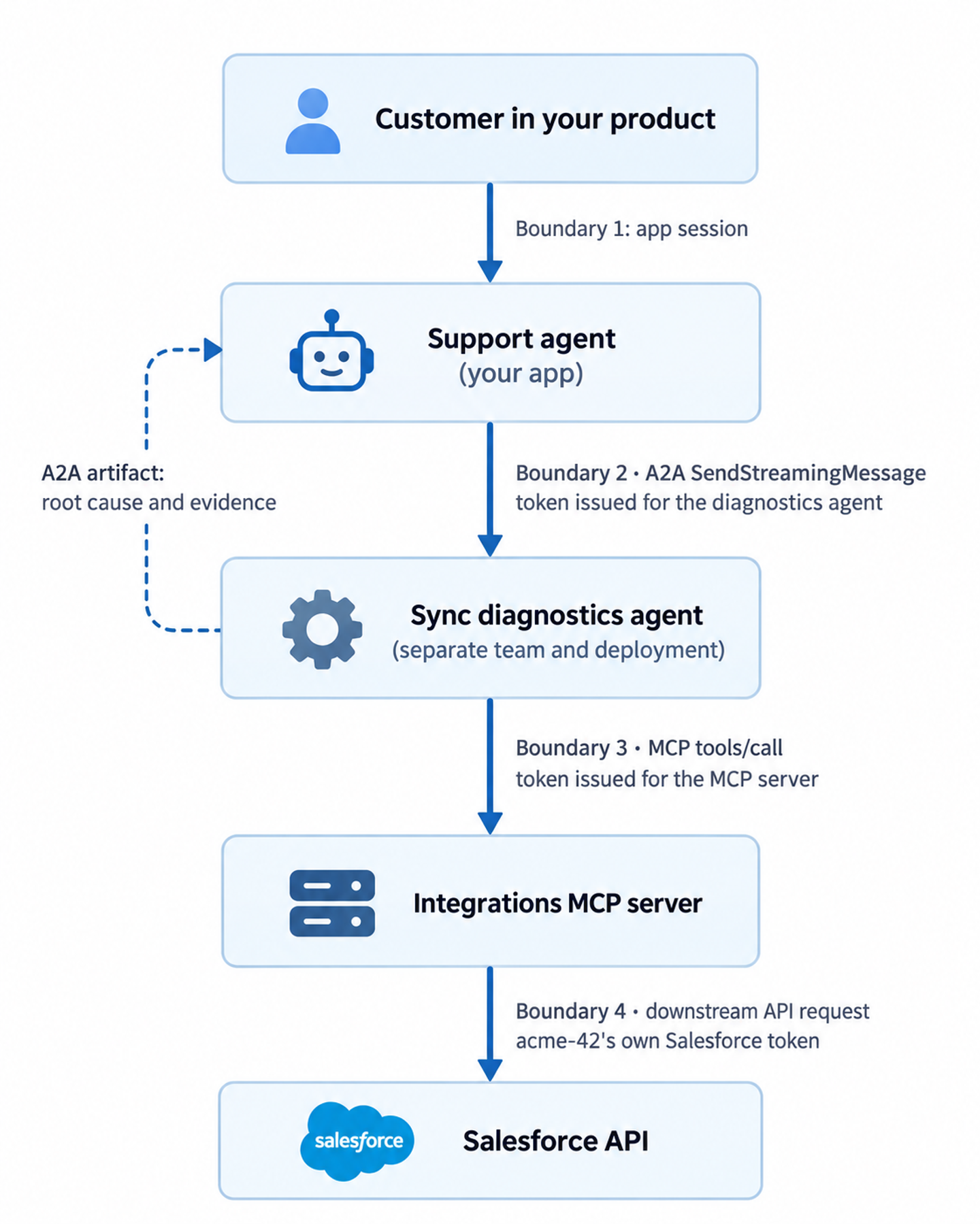
Figure: How MCP and A2A work together in an AI agent workflow.
Each service must authenticate requests and enforce the appropriate permissions. Under the MCP authorization specification, a protected MCP server must only accept access tokens intended for that server. Access to Salesforce requires separate downstream authorization, and the customer’s credentials should remain within the integration layer rather than being exposed to the agents.
Who is using MCP and A2A in production?
Companies such as Block and Eon have shared how they’re using MCP and A2A in production. Their experiences offer practical insights into why they chose these protocols, how they implemented them, and the challenges they encountered along the way.
MCP at Block: Governed Access to Business Data
Block, the company behind Square and Cash App, built two internal MCP servers to support AI-powered analytics.
- The first, Block Data MCP, gives AI agents access to more than 1,100 governed business metrics. Instead of allowing an AI model to generate or modify SQL, the server retrieves pre-approved SQL from Block’s metrics store and executes it to return reliable results.
- The second, Query Expert MCP, helps analysts explore data by generating SQL using existing queries, database schemas, and business context. Both servers use Snowflake’s role-based access controls to restrict access to authorized data.
Block reported an 87% reduction in analyst time in blind experiments comparing workflows with and without its MCP tools. In a separate Finance Copilot pilot, analysts spent 7.6 hours answering 40 recurring business questions through their traditional workflow, compared with less than one hour using Block Data MCP. The pilot also achieved 100% accuracy on questions covered by its governed metrics.
These results depended on more than MCP itself. Block’s governed metrics, validated SQL, and underlying data infrastructure played an important role in making the answers accurate and reliable.
A2A at Eon: Connecting Independently Deployed Specialist Agents
Eon, a cloud data platform, uses a multi-agent AI assistant called Buzz to answer questions using data from cloud infrastructure, CRM systems, support platforms, and call transcripts.
Buzz has around 20 specialist agents running within the same service, where ordinary function calls are sufficient. However, Eon chose A2A for three remotely deployed specialists:
- A triage agent that manages production credentials
- A semantic-layer agent that follows a separate release schedule
- Customer-built agents that run outside Eon’s infrastructure.
A2A allows customers to connect their own agents to Buzz without Eon having to modify or redeploy its application. However, getting A2A working reliably in production required additional development, including around 400 lines of wrapper code.
Eon’s engineering team identified three main challenges:
- User identity: A2A doesn’t provide a standard field for identifying the user making a request. Eon includes the user’s identity in
contextId, allowing the remote agent to retrieve data using that user’s access token. - Data provenance: A2A didn’t provide the metadata Eon needed to verify the source of an answer. The team developed a
DataContextextension that carries the executed query, data lineage, and freshness information alongside the response. - Reliability: The team encountered 60-second gateway timeouts, error messages that weren’t reaching the orchestrator, and remote agents exceeding their context windows. They addressed these issues through streaming, improved error handling, and session management.
Eon reported that it would choose A2A again, particularly because it allows customers to connect independently developed agents. However, its experience shows that developers still need to handle user identity, data provenance, and reliability when deploying A2A-based systems.
What adoption statistics actually tell us
| Organization | Workflow | Protocol | Status | Reported result | Source |
|---|---|---|---|---|---|
| Block | Governed metrics for business users | MCP (Block Data MCP) | Internal production since Q3 2025 | 1,812 quarterly unique users in Q1 2026 | Block, April 29, 2026 |
| Block | Finance Copilot, 40 leadership questions | MCP | Pilot | 7.6 hours to under 1 hour, 100% accuracy on governed metrics | Block, April 29, 2026 |
| Eon | Multi-agent assistant over business data | A2A 0.3 (3 remote specialists), function calls (about 20) | Production | Independent deploys; tenants add agents without code changes | AAIF, August 26, 2026 |
| Huawei | HarmonyOS assistant handing tasks to in-app agents | A2A | Reported in production by AAIF | No metrics published | AAIF, August 17, 2026 |
MCP and A2A have both seen growing adoption, but the reported figures measure different things:
- MCP: In July 2026, MCP maintainers reported nearly 500 million monthly downloads across Tier 1 SDKs. This measures package downloads, not unique users or production deployments.
- A2A: In August 2026, the Agentic AI Foundation reported support from more than 150 organizations. This reflects industry backing rather than the number of companies running A2A in production.
These figures aren’t directly comparable. For developers evaluating either protocol, production examples such as Block and Eon provide more useful insights into how they’re being used and the challenges teams have encountered.
What do you still need to build around MCP and A2A?
Both protocols define how a request crosses a boundary. But, they don’t define how your agent gets permission to act on a specific customer’s data through API integrations with third-party tools.
User identity, permissions, and downstream API authentication
When AI agents access customer data through external APIs, developers need to handle authentication and authorization at several levels:
- Agent and server authentication: MCP and A2A support authentication between communicating components. A2A Agent Cards can declare authentication requirements through
securitySchemesandsecurityRequirements, while protected MCP servers must validate access tokens intended for them. - User identity and permissions: Authenticating an agent doesn’t automatically establish which customer or user it represents. Applications must securely pass or resolve the relevant identity and enforce permissions before allowing access to customer data.
- Downstream API authentication: Agents accessing Salesforce, HubSpot, Gmail, or other external services need credentials authorized for the relevant customer account. These credentials must be managed separately from those used to authenticate MCP or A2A requests.
Managing downstream API authentication involves handling different OAuth implementations and API keys, refreshing expired tokens, and reconnecting accounts when access is revoked. Token refresh also needs to handle concurrent requests to avoid authentication failures.
Customer isolation is equally important. Your backend should resolve API connections using the authenticated customer’s identity and permissions, rather than trusting connection IDs provided by an AI model or remote agent.
When your application and downstream services use the same identity provider, ID-JAG can simplify authorization. It allows supported services to issue scoped access tokens without requiring separate user consent for each connection.
Retries, timeouts, rate limits, and duplicate actions
- Timeouts: Long-running tasks can exceed request timeouts. A2A supports streaming and push notifications, while MCP offers an optional Tasks extension. Use these features where supported, and handle connection failures separately.
- Duplicate actions: If a connection drops after an API write succeeds, the caller may not know whether the action was completed. Retrying could create duplicate records or trigger the same action again. Use idempotency keys where supported, or check the operation’s status before retrying.
- Rate limits: A delegated agent may make several API requests while completing a task, potentially exhausting a customer’s API quota. Handle
429responses and respect theRetry-Afterheader when provided. - Invisible errors: Errors from remote agents don’t always reach the orchestrator. Eon encountered this issue when error events were dropped, causing its orchestrator to answer using existing context. Make sure errors are returned in a form the calling agent can process.
We cover the tool-layer side in how to build reliable tool calls for AI agents.
Tracing tool calls, delegated tasks, and the sources behind answers
One customer question can cross an A2A hop, several MCP calls, and many downstream API requests, each owned by a different team. Propagate one trace ID through all of them (W3C traceparent works over both protocols’ HTTP bindings), and log every tool call with the tenant, the connection, and the downstream response.
Plan for provenance too. If your users act on agent answers, decide early how the sources behind an answer travel back across the A2A hop.
How Nango handles the downstream API layer
MCP and A2A define how agents interact with tools and other agents, but developers still need to build and maintain the integrations that connect those tools to external APIs.
Nango is an API integration platform that connects your product and AI agents to over 1,000 APIs. Coding agents can build and test integrations, while AI agents can use them at runtime. Nango handles authentication, API execution, and monitoring, making it easier to integrate external services into customer-facing AI applications.
Here’s how Nango supports this process:
- Building API integrations: Developers can use Claude Code, Cursor, or Codex with the Nango AI builder skill to create integration functions, test them against real APIs, and deploy them. Nango also provides prebuilt tools, while custom integrations can be generated on demand through just-in-time integrations.
- Managing customer authentication: Nango Auth supports authentication for 1,000+ APIs. Customers can connect their accounts through Nango Connect, while Nango manages credential storage, token refresh, and reconnection flows.
- Providing secure MCP access: With Agent Sessions, your backend can create sessions restricted to specific customer connections, tools, and expiration times. Each session provides an MCP endpoint through which agents can access authorized integrations without seeing the underlying API credentials.
- Monitoring integration activity: Nango provides integration logs and OpenTelemetry export to help developers investigate failed requests, monitor execution, and troubleshoot API errors.
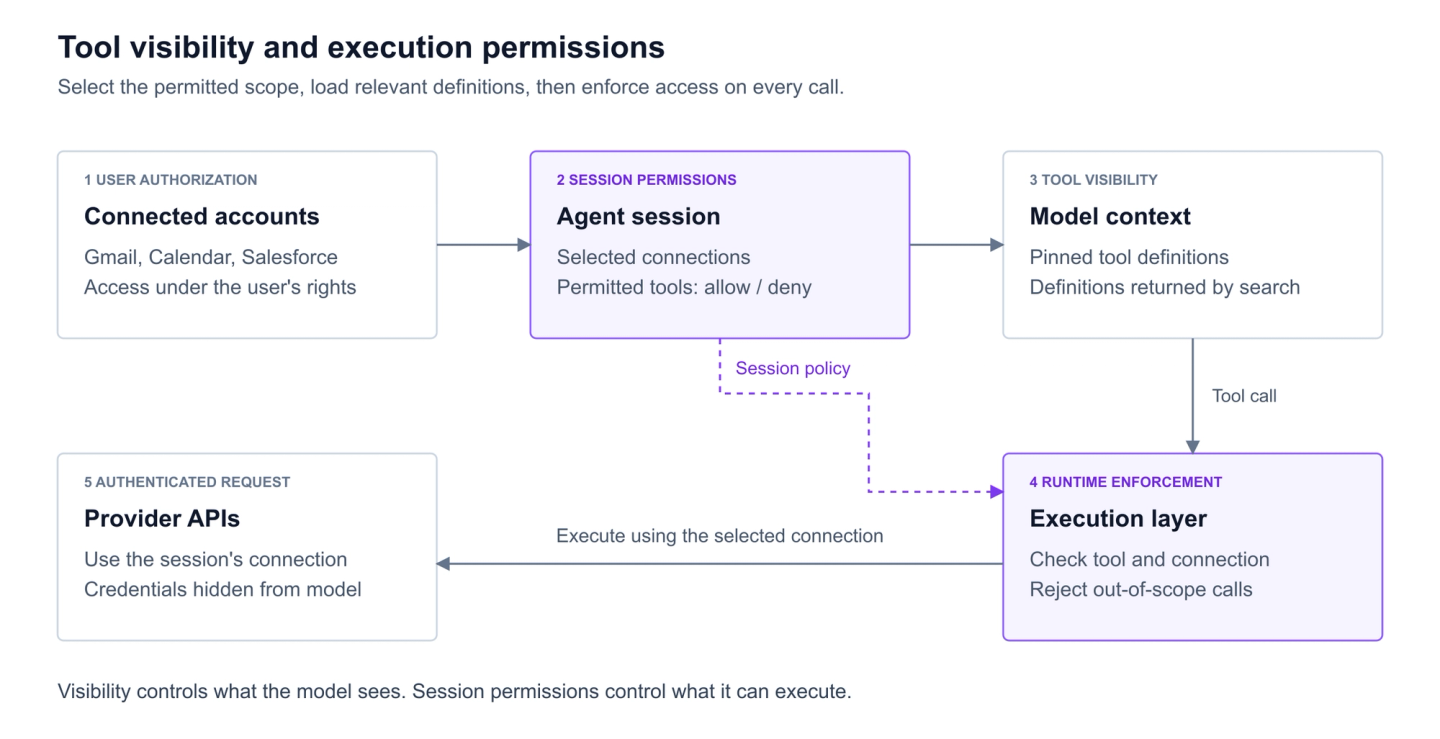
Figure: Nango Agent Sessions architecture for secure API access.
Nango handles the API integration infrastructure, but your application still controls agent orchestration, including which agent handles a request, when to delegate tasks through A2A, and how results are returned to users.
Common questions about MCP and A2A
Does A2A replace MCP?
No. A2A connects agents to other agents, and MCP connects agents to tools and data. Teams like Eon use both in the same system.
Can an MCP server expose an AI agent?
Yes. An MCP tool can wrap an agent, which works when the job fits one request and response, or one MCP Task. You give up Agent Card discovery, multi-turn contextId, and artifacts, which matter most when another team or company runs the agent.
Do all multi-agent systems need A2A?
No. If your agents run in one service and deploy together, function calls are enough. Eon runs about twenty specialists that way and uses A2A only for three deployed independently.
Does choosing MCP or A2A change latency or cost?
Mostly through architecture. Each A2A delegation adds another agent with its own model calls and context, and each connected MCP server adds tool definitions to every request. Anthropic documents a typical five-server setup at about 55,000 tokens of tool definitions. Protocol message overhead is small compared with model inference, so measure your own workload.
Conclusion
MCP and A2A serve different purposes in AI agent architectures. MCP helps agents access tools and data, while A2A allows independently operated agents to communicate and delegate tasks. If your agents run within the same application, ordinary function calls may be all you need.
The production examples from Block and Eon also show that adopting these protocols is only part of the process. Block relied on governed data and access controls to deliver reliable analytics, while Eon had to address user identity, data provenance, and reliability when connecting agents through A2A.
For developers building customer-facing AI products, it’s equally important to consider how agents securely access external APIs. MCP and A2A don’t eliminate the need to manage customer authentication, permissions, API failures, and monitoring.
Related reading:

