
An AI agent that reads a customer’s documents or updates their CRM needs credentials, access to business data, and permission to act. The infrastructure handling those integrations becomes a sensitive part of your application. Where does it store tokens? Where do tool calls execute? Who can access the logs?
If you need that infrastructure to run in your own environment, two options are vendor-managed BYOC (bring your own cloud) and self-hosting. Both can run in your cloud account. The key difference is operational responsibility: with vendor-managed BYOC, the provider operates the deployment; with self-hosting, your team handles deployment, upgrades, monitoring, and recovery.
For agent integrations, the choice affects everything from credential storage and network access to keeping background syncs and tool execution reliable. This article compares the two models, examines what running “in your cloud” actually guarantees, and explains when the additional control of self-hosting is worth the operational work.
What is BYOC for agent integrations?
In a vendor-managed BYOC deployment, the integration platform runs in your cloud account and the vendor operates it. You pay for the cloud resources and grant the access needed to deploy, monitor, and maintain the services.
That gives you control over the hosting account, region, and network configuration. The vendor takes on the agreed platform operations. Your team still owns account policies, application permissions, and the cloud bill.
For example, Nango BYOC places the integration services and their data stores in your account. Nango handles deployment and ongoing operations. The permissions and support arrangement determine what Nango can do inside that account.
What does self-hosting an agent integration platform mean?
Self-hosting means your team deploys and operates the platform on supported cloud or on-premises infrastructure. That includes upgrades, monitoring, scaling, backups, and incident response. The vendor supplies software and any contracted support.
Check which components are included. A local MCP server can still depend on hosted authentication, storage, or execution services. Running the tool server yourself does not necessarily put the full platform in your account.
Arcade, for example, separates full-platform installations from hybrid MCP servers that connect to Arcade Cloud. Installing an SDK or running a tool server locally does not, by itself, move the rest of the platform.
BYOC vs self-hosted: what are the key differences?
For a full-platform deployment, the comparison looks like this:
| Decision | BYOC | Self-hosted |
|---|---|---|
| Where it runs | Your cloud account | Your cloud account or supported on-premises infrastructure |
| Who operates it | The vendor, within the agreed scope | Your team |
| Vendor access | Permissions for deployment and operations | Defined separately for support; hosted dependencies may still require access |
| Data residency | Your cloud account | Your cloud account |
| Incident response | Vendor handles platform incidents | Your team responds, with vendor support as contracted |
| Update control | Vendor runs upgrades under the agreed process | You schedule, test, and apply upgrades |
| Costs | Software, cloud resources, and internal oversight | Software, cloud resources, and engineering operations |
*For a useful cost comparison, estimate the work over a year: upgrades, database maintenance, security patches, restore tests, and on-call coverage. Include staging and any separate customer installations.
*Regional residency requirements can also mean separate installations, with both services and data kept in-region. Confirm the deployment topology before estimating cost or maintenance.
Why does the deployment model matter for AI agent integrations?
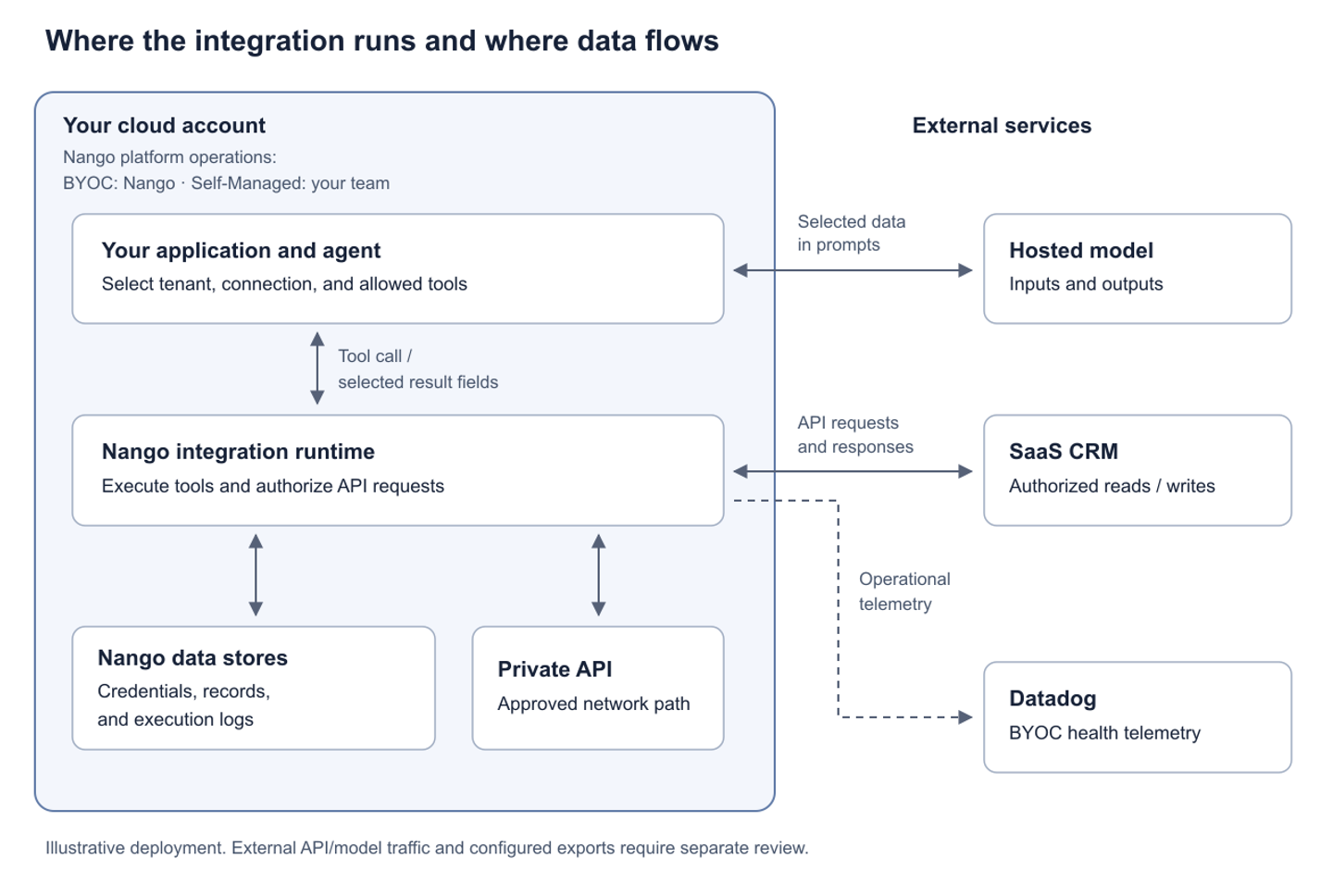
The integration platform holds credentials and executes actions on behalf of users. Its deployment determines who can operate those services and where they process data. Agents also pass API results into model context, creating another data flow to account for.
Where do credentials and tool calls go?
In a full-platform deployment, credentials are stored and tools execute in your infrastructure. For OAuth requests, the runtime still sends the access token to the target API.
Your application must enforce which connections, tools, and records each user can access. Nango agent sessions can restrict connections and tools; application-specific authorization belongs in trusted backend or tool code. Keep credentials and session tokens out of model prompts.
A dedicated cloud account does not establish isolation between your customers. Check whether tenants share encryption keys, storage, or workers, and how access is separated.
Where do API responses and logs go?
API responses return to the integration runtime and application. Any fields sent to an external model provider leave your account. Return only the data the task needs.
Data residency determines where data is stored and processed; retention determines whether it is kept and for how long. Check payloads in logs, cached records, and backups, including temporary storage and monitoring exports. Nango BYOC can export health telemetry to Datadog or any other platform via OpenTelemetry.
How do private systems affect deployment?
The runtime needs an approved network path to each private API, including routing, DNS, firewall rules, and service authentication. Hosting in your company’s VPC does not automatically provide access to a customer’s network.
Account for inbound traffic too. OAuth callbacks and SaaS webhooks may require reachable endpoints, even when the rest of the deployment is private.
Who owns recovery when a tool call fails?
The vendor handles platform recovery under BYOC; your team handles it with self-hosting.
Your application still owns partially completed work. An API timeout does not prove a write failed. Use idempotency where supported and preserve enough task state to check uncertain results before retrying. Background syncs also need recovery checkpoints and a way to identify stale data.
When should you choose BYOC or self-hosting?
Choose BYOC when the platform must run in your account, you can approve vendor operational access, and you want the vendor to maintain it. Check supported environments, telemetry, update policies, and incident coverage.
Choose self-hosting when vendor access is restricted, your environment is unsupported by BYOC, or your team needs direct control over releases and configuration. You need engineering capacity to operate it.
Use standard SaaS hosting when its regions, networking, and access controls already meet your requirements. A dedicated deployment adds operational work for both you and the vendor.
Agent integration platforms that support BYOC
- Nango: Enterprise BYOC places the full integration stack in your account, supporting AWS, Azure, and GCP. You give them limited access to a segregated part of your cloud environment, and Nango handles setup, maintenance, monitoring, upgrades, and scaling. Your team gets the Nango Cloud experience, with Nango running inside your infrastructure, in your chosen region.
- Paragon: Enterprise managed on-premise hosting places the platform in your AWS, Azure, or GCP environment. Paragon manages the installation and retains operational support access.
- Arcade: Offers a vendor-operated full-platform deployment through an Azure-managed application or AWS private offer. No GCP support yet. Custom infrastructure deployments are an Enterprise option.
Agent integration platforms that support self-hosting
- Nango: Enterprise Self-Managed lets you run the full integration platform on your AWS, Azure, GCP, or on-premises infrastructure. Deployment is managed using Helm charts. Nango supplies the software and support; your team operates it.
- Paragon: Enterprise unmanaged hosting lets your team deploy and operate the platform using Helm on AWS, Azure, or GCP. Your team manages configuration and updates.
- Arcade: Supports a full-platform Helm deployment on your Kubernetes cluster as an Enterprise option.
- Composio: Their Enterprise self-hosted configurations. But real customers say the Composio sales team recommends a data agreement for their SaaS, rather than full self-hosting, which is not the same.
How does Nango support both deployment models?
Nango’s Enterprise BYOC and Self-Managed options run the same integration platform, supporting authentication, tool calls, syncs, and triggers. Both place credential storage, execution, and execution logs in your infrastructure. Nango operates BYOC; your team operates Self-Managed.
In either model, you can customize integration code, including API calls, validation, and the fields returned to agents.
The separate free self-hosted edition covers Auth and Proxy. The tool runtime, MCP server, syncs, and triggers require Enterprise when self-hosting.
See the deployment documentation for architecture details, or contact Nango to discuss your environment and access requirements.
The free self-hosted Auth/Proxy edition covers a smaller part of the workflow: authentication and proxied API requests. It does not include the enterprise tool runtime, MCP, syncs, or triggers, so the CRM architecture described above requires the Enterprise edition.
Either Enterprise deployment provides access to 10,000+ prebuilt tools for 1,000+ APIs, with code that your team can extend for customer-specific requirements. If the workflow needs an endpoint a template does not cover, your team can make lower-level native API requests in a custom function. That access lets you extend integrations beyond the catalog as your product adds APIs and use cases. Nango runs the resulting code on infrastructure built for scale and security.
The quickstart lets you get started in 10 minutes using an authorized API and make your first function call. That working example gives the team a concrete workflow around which to plan a production deployment.
For an Enterprise rollout, see the deployment documentation for architecture details, or contact Nango to discuss your environment and access requirements.Frequently asked questions
FAQs
Is BYOC the same as self-hosting?
BYOC is vendor-managed hosting in your cloud account. Self-hosting often means operating the platform yourself, although some vendors use the term for both. The distinction is who owns upgrades, backups, and incident response.
Does self-hosting an MCP server keep credentials in your infrastructure?
Only if the credential service is also deployed there. A local MCP server can depend on cloud-hosted auth, storage, or execution services, so its location alone does not establish where credentials are stored.
Is self-hosting cheaper?
Sometimes. Compare software fees, cloud resources, and engineering time for maintenance and incidents. Include every environment and customer installation you need to operate.
What should you verify about data leaving your cloud?
Check API requests, OAuth exchanges, model inputs, logs, telemetry, backups, and support access. Identify what data reaches each destination and how long it is retained.
Can we start on Cloud and later move to BYOC or self-hosting?
Nango supports this. Your existing connections and credentials move without downtime and without users having to re-authorize. The Nango team can guide you through any OAuth callback URLs or webhook endpoints that need updating.

