
OpenAI brought event subscriptions to ChatGPT with MCP Events. Users can give ChatGPT a standing instruction and have matching events initiate work. SaaS teams can offer the same behavior inside their own products.
Consider a support agent: a ticket arrives in a customer’s helpdesk, and the agent retrieves the conversation, checks their CRM, and prepares a reply for review. Nango provides the customer connections, triggers, and authorized API tools behind that workflow. Your application runs the agent and controls its behavior.
What are MCP Events?
MCP Events is a draft extension that lets applications subscribe to changes in external systems. An MCP server lists supported events, and a compatible client subscribes to the ones it wants to monitor. The application decides which workflow to start, what context to retrieve, and which tools the agent may use, without waiting for a new user message.
OpenAI’s implementation delivers events to ChatGPT through webhooks, with availability depending on host and workspace controls. As of October 2026, the broader proposal remains a draft covering webhook, streaming, and polling delivery. A client that supports MCP tools does not necessarily support event subscriptions.
Can MCP Events power agents inside your SaaS?
Yes, with a server and backend MCP client that implement compatible event support, plus a runtime that turns events into agent work. Exposing your product through an MCP server lets customers use it from an assistant such as ChatGPT. Hosting the agent inside your SaaS puts your application in charge of subscriptions, execution, approvals, and the customer experience.
You can also connect provider events directly to your backend without waiting for MCP Events support. Either approach needs customer connections, change detection, and authorized actions.
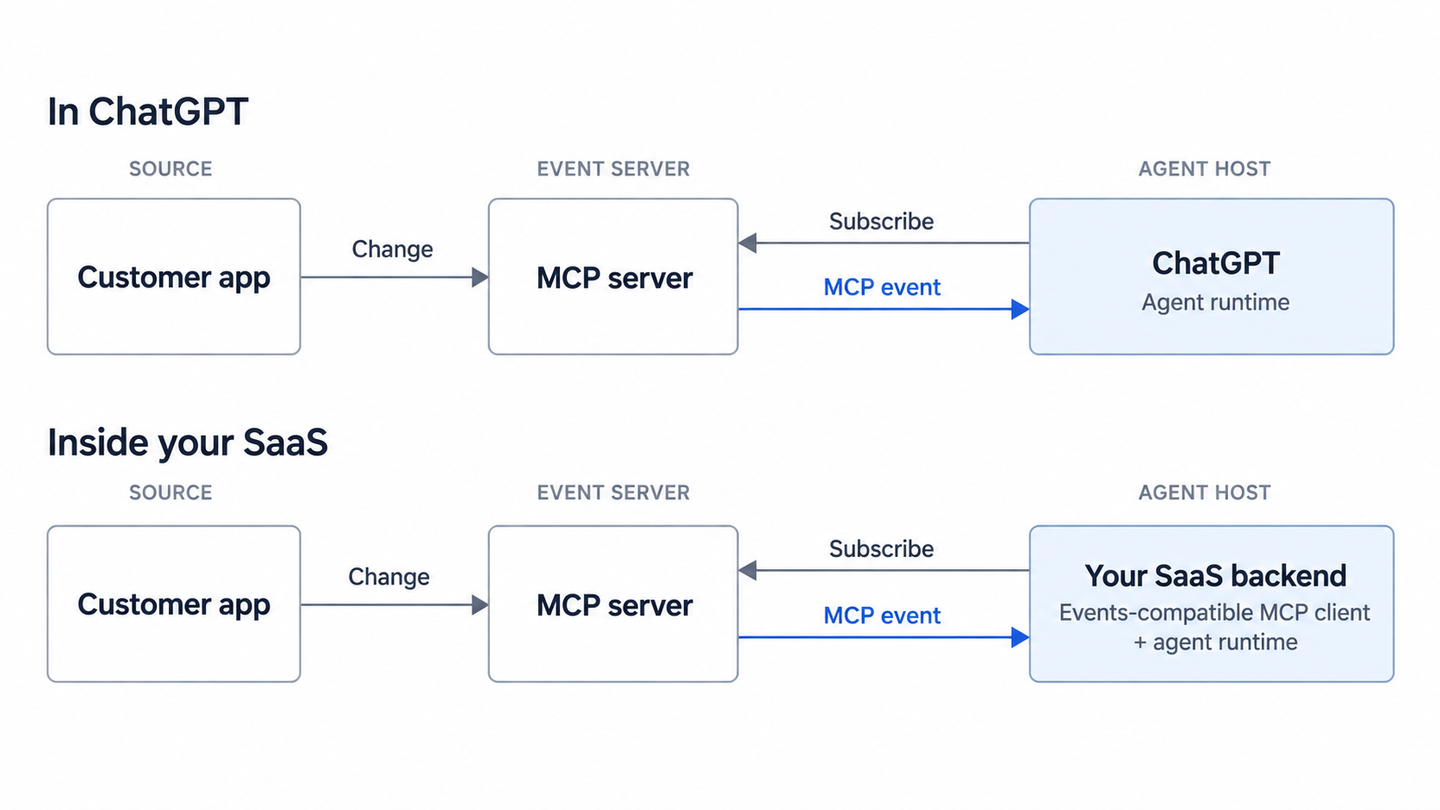
How Nango connects customer events to agent actions
Nango handles the API integration layer: providing prebuilt tools, connecting customer accounts, detecting external changes, and executing the tools an agent needs. Here is how those capabilities fit the support workflow.
Connect each customer’s accounts
Your product needs permission to read customer data and perform the actions its workflows require. Each connection must be associated with its owning customer or workspace so incoming events and subsequent API calls use the correct accounts.
Nango Auth provides the connection flow, credential storage, and token refresh. Your application owns the customer mapping and decides when workflows should pause for reconnection after access is revoked. For the support agent, that mapping ensures a ticket starts a run using the right customer’s helpdesk and CRM connections.
Detect changes through webhooks or polling
Provider webhooks report changes to your integration. When a required webhook is unavailable, polling can detect changes by periodically querying the API. Both operate upstream of MCP Events: they detect the changes that an MCP server delivers to subscribers.
Nango offers webhook forwarding for individual provider events and real-time syncs that can combine webhook processing with polling. Forwarded events include a connection ID when attribution succeeds. With syncs, your backend checks the notification outcome and fetches changed records before deciding whether to start an agent.
Choose based on whether the workflow needs individual events or current records. Nango’s records cache maintains the latest record version, subject to retention limits; preserving every transition requires a source that exposes those events and a system that retains their history.
Give the agent customizable, scoped tools
The support agent needs tools to retrieve conversations, look up CRM accounts, and save drafts. Nango’s function templates provide customizable starting points, so you can adapt the integration logic to customer-specific fields, filters, and write operations.
Nango Agent Sessions expose those tools through MCP without giving the model raw provider credentials. Before starting a run, your backend selects the customer connections, allowed tools, and session expiry. A triage session could allow conversation retrieval, CRM lookup, and draft creation, with reply sending reserved for a separately authorized step after approval.
Set tool restrictions explicitly: the default includes all tools for the tenant’s connected integrations. Keep the optional generic proxy disabled for this workflow because it permits API requests beyond the selected tools. Tool code must enforce narrower record-level access, and event content must never determine permissions.
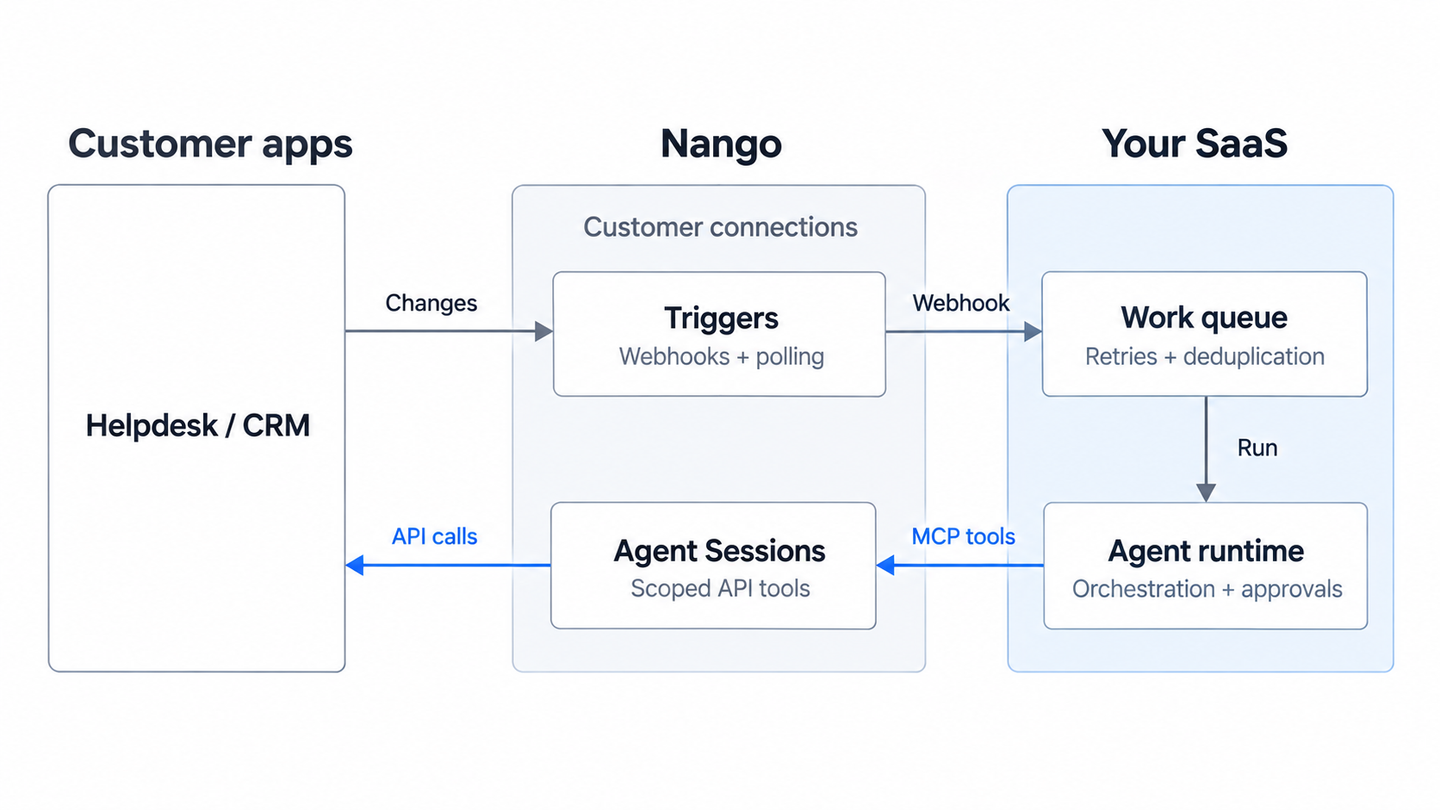
What your application handles
Your backend turns an incoming event into a reliable agent run:
- Verify the source, identify the customer, and select the workflow. Nango’s signature proves delivery through Nango; verification of the original provider depends on the integration’s setup.
- Queue accepted work durably, retry failures, and deduplicate events so the same ticket does not produce two drafts. Prevent the agent’s own updates from repeatedly triggering it.
- Fetch current context before acting and enforce approvals before sending a reply. An event identifies a change; it does not guarantee that the ticket still needs action.
Build the workflow with Nango
This architecture uses Nango webhooks for events and Agent Sessions for MCP tool access; it does not depend on native Nango MCP Events support. Nango maintains the customer connections, detects changes, and executes permitted API tools. Your application chooses when the agent runs and what requires approval.
Start with Nango’s trigger documentation to connect external changes to your backend, then use Agent Sessions to give each run access to the tools it needs.
Related reading:

