
If you’re building AI agent integrations in your customer-facing app, you may want to receive event notifications whenever a record changes in your customer’s Salesforce. In this tutorial, you will set up webhooks in Nango that fire whenever something changes in your users’ Salesforce accounts and trigger your AI agent to perform an action.
By the end of this tutorial, you will have:
- A flow where users connect their Salesforce account to your app through Nango’s hosted Connect UI, with zero setup on their side
- Automatic provisioning: the moment a user authorizes, your backend installs the webhook plumbing (one small Apex class and a trigger per object) in their org through API calls
- A real-time change feed: record changes reach a Nango sync within seconds, with hourly polling to reconcile webhook drops
- Your AI agent, triggered on each change, acting and writing back to Salesforce
The full sample repo is available on GitHub at salesforce-webhooks-for-ai-agents. The README has the setup instructions to get the whole sample app running, and each step below points to its files as a reference implementation.
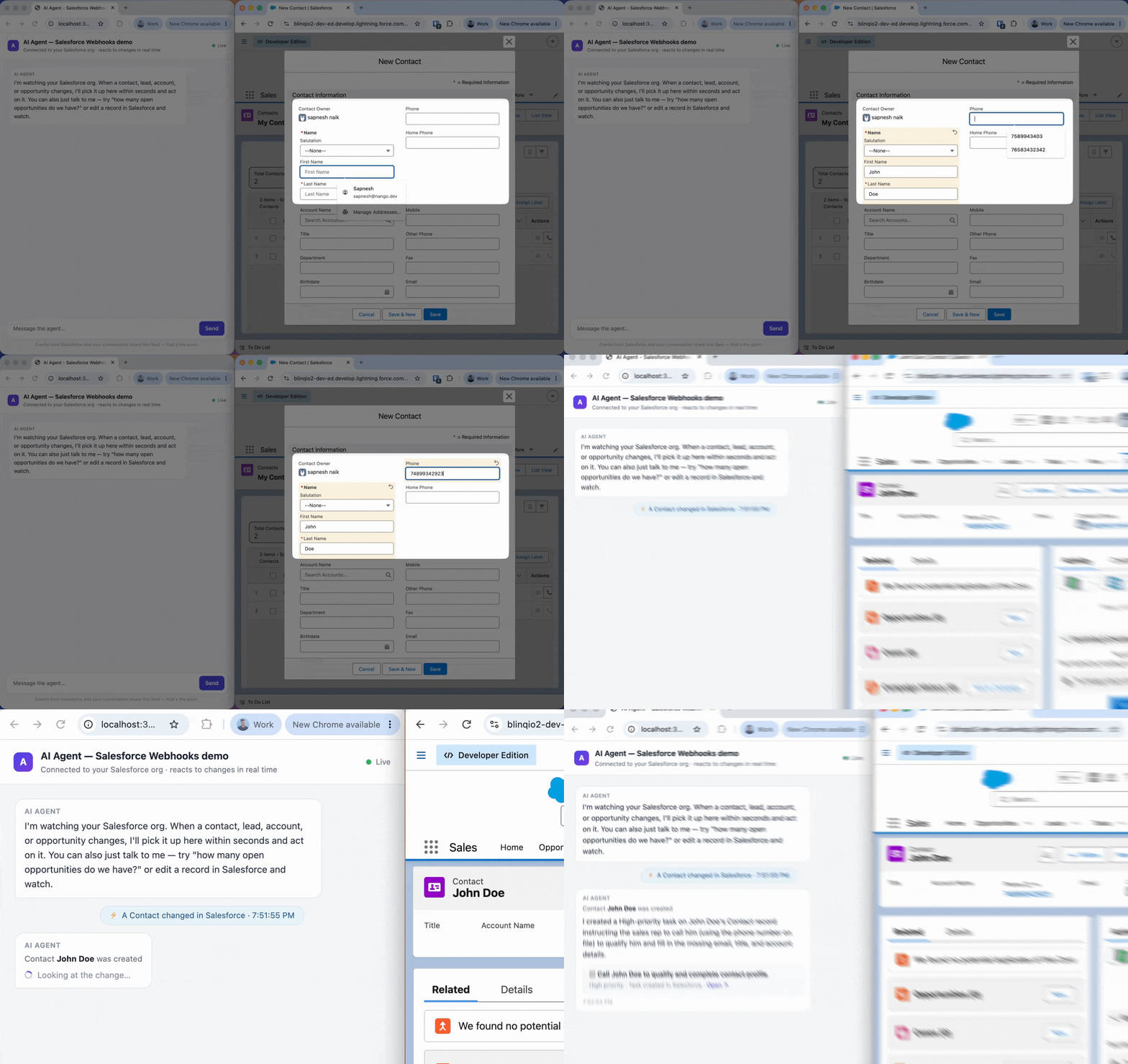
Does Salesforce have webhooks?
No. Salesforce has no built-in webhook feature. What it has instead are six substitutes:
- Apex trigger + HTTP callout: a few lines of Apex code that POST JSON to any URL when records change.
- Change Data Capture (CDC): change events on an internal event bus, but you must run a persistent subscriber (gRPC Pub/Sub API) to consume them. It cannot push to a URL.
- Platform Events: same bus, same subscriber requirement, for custom events you define and publish yourself.
- Outbound Messages: declarative SOAP XML pushes with built-in retries. No JSON, no custom payload shape, and your endpoint must reply with a SOAP ACK.
- Flow HTTP Callout: declarative JSON from a record-triggered Flow. Needs a per-org Named Credential, and never retries.
- Event Relay: forwards platform events to AWS EventBridge, and only EventBridge.
For agent builders: an Apex trigger with an async callout is the only option that delivers arbitrary JSON to your agent backend with no standing infrastructure. Its weakness is fire-and-forget delivery without retries, which a reconciliation Nango sync fixes (set up below).
How the setup works
You could point the Apex trigger straight at your app. But then you own an always-up public endpoint, routing events from many users’ orgs to the right tenant, keeping a queryable copy of the data, and reconciling the events Apex inevitably drops. Nango handles all of that plumbing for you.
Two flows make up the setup. Your users only ever see the first one, and only its first step: they click “Connect Salesforce” and authorize. Everything else is automatic.
When a user authorizes Salesforce in your app
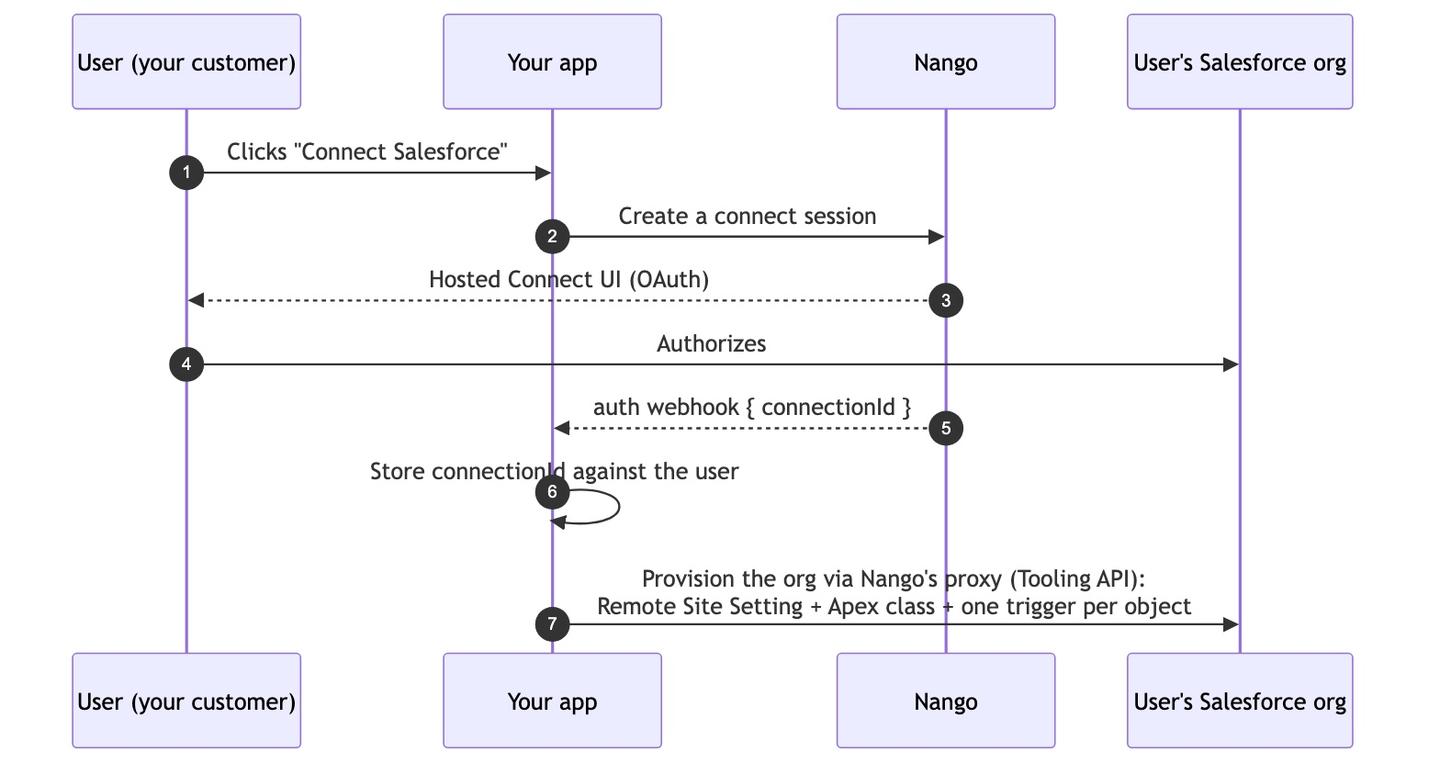
The key move is the last step. Because Nango now holds the user’s OAuth connection, your backend can call the Salesforce Tooling API through Nango’s proxy to deploy everything the webhook path needs into their org:
- A Remote Site Setting (allowlists Nango’s domain for callouts)
- A small Apex class that makes the HTTP callout
- A thin trigger per object you want to watch
By default this tutorial installs triggers for Contacts, Leads, Accounts, and Opportunities. If you want per-user control over which objects fire events, store the selection on the connection as metadata and read it during provisioning.
When a record changes in Salesforce
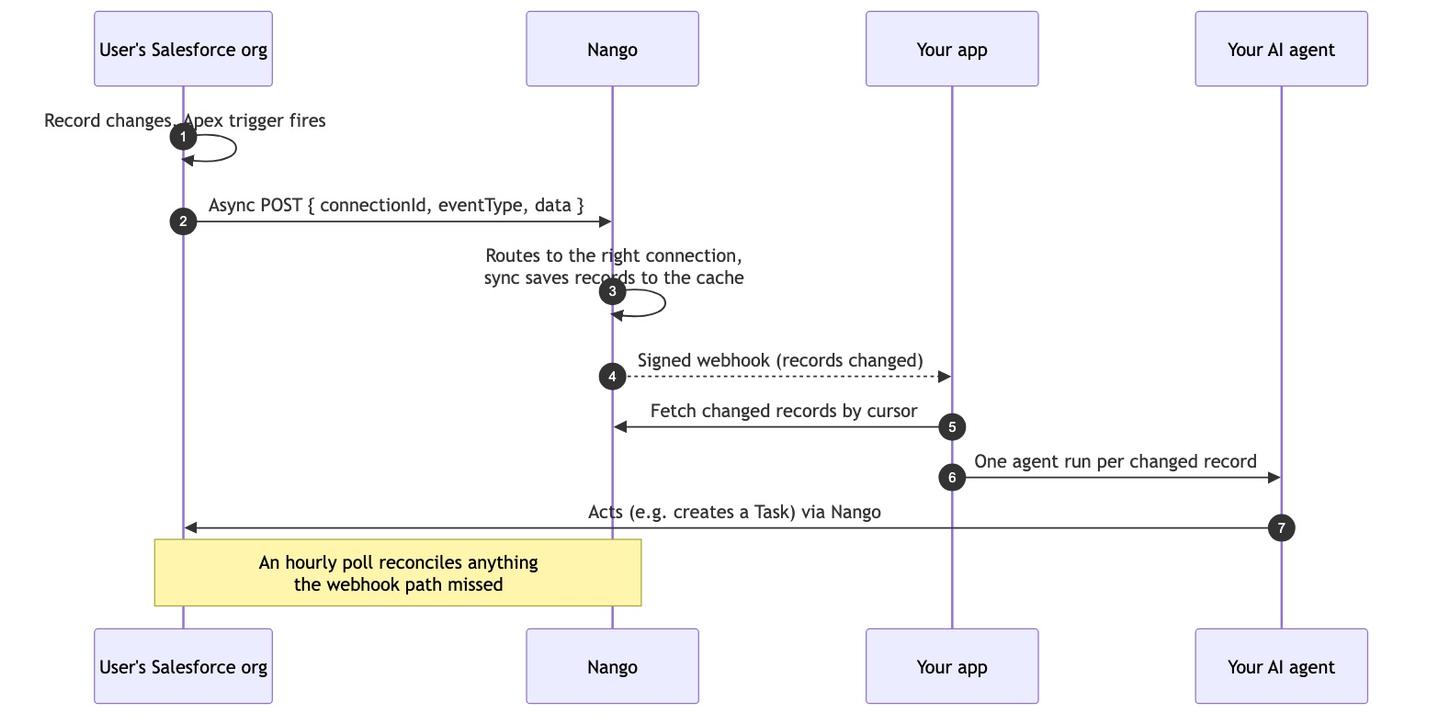
Every org POSTs to the same integration webhook URL. Nango routes each event to the right connection using a small envelope in the payload:
{
  "nango": {
    "connectionId": "<the Nango connection this org belongs to>",
    "eventType": "contact.updated"
  },
  "object": "Contact",
  "data": [{ "Id": "003...", "FirstName": "Rose", "...": "..." }]
}
connectionId identifies the tenant. eventType is a string your Apex chooses, matched against your sync’s webhookSubscriptions to decide which function handles the event.
Once the event reaches Nango, you have two ways to get it into your app:
- A webhook-triggered sync (recommended). A sync subscribes to the events, writes the changed records into Nango’s secure records cache, and Nango notifies your app with a signed webhook. Your app fetches exactly the changed records: normalized, queryable, and durable. The same sync also polls hourly, because Apex callouts are at-most-once: they don’t retry, and Salesforce can’t tell you an event was lost while your app was down. The poll catches anything the webhook path missed.
- Webhook forwarding. Nango forwards the raw event to your app as-is. Simpler, but you own dedupe, ordering, and recovery yourself.
This tutorial implements the sync path and shows forwarding as the lighter alternative.
Prerequisites
To follow this tutorial, you will need:
- A Salesforce Developer Edition org (free) to test with. It plays the role of a user’s org.
- A coding agent with the Nango skill installed:
npx skills add NangoHQ/skills -s building-nango-functions-locally. This works with Claude Code, Cursor, Codex, and other coding agents. Add the Nango docs MCP server alongside it so your agent pulls current API references while it generates code.
Step 1: Creating the Salesforce integration in Nango
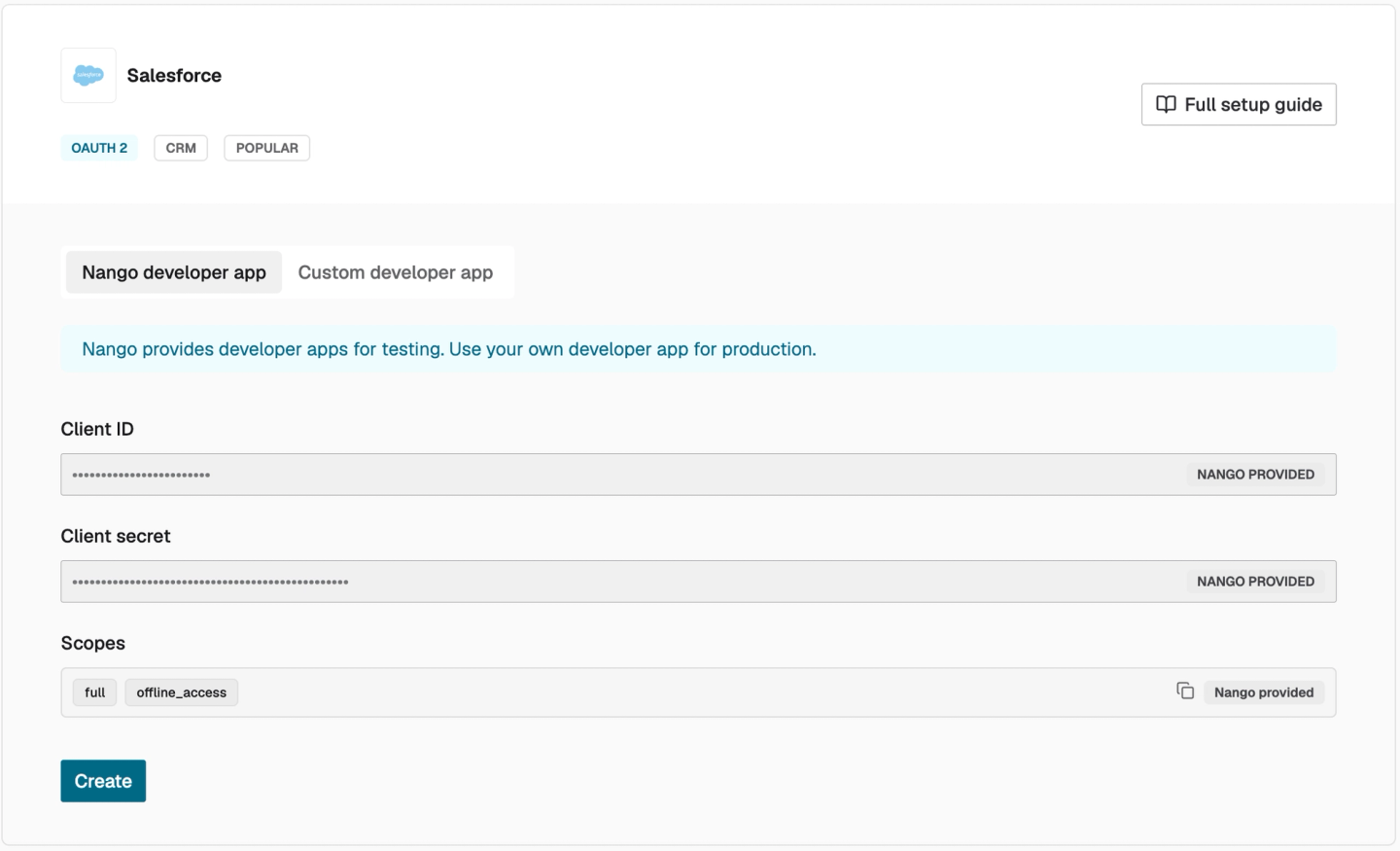
In this step, you’ll create the integration your users will connect through. Create a free Nango account, then in the dashboard go to Integrations → Configure New Integration → Salesforce. Use the base salesforce provider. The salesforce-sandbox variant doesn’t route inbound webhooks (see Common issues).
You don’t need to register a Salesforce OAuth app to start: Nango ships pre-configured developer app credentials for Salesforce, so the integration works immediately. Before going live, register your own OAuth app and add its credentials to the same integration.
Step 2: Configuring webhooks and keys in Nango
This is a one-time setup to enable Nango to send webhooks to your receiving backend.
First, point Nango’s webhooks at your app: in Environment Settings → Webhooks → Webhook URLs, set https://<your-app>/webhooks/nango (an ngrok URL during development). Enable Send New Connection Creation Webhooks: the auth webhook is how your app learns that a user connected.
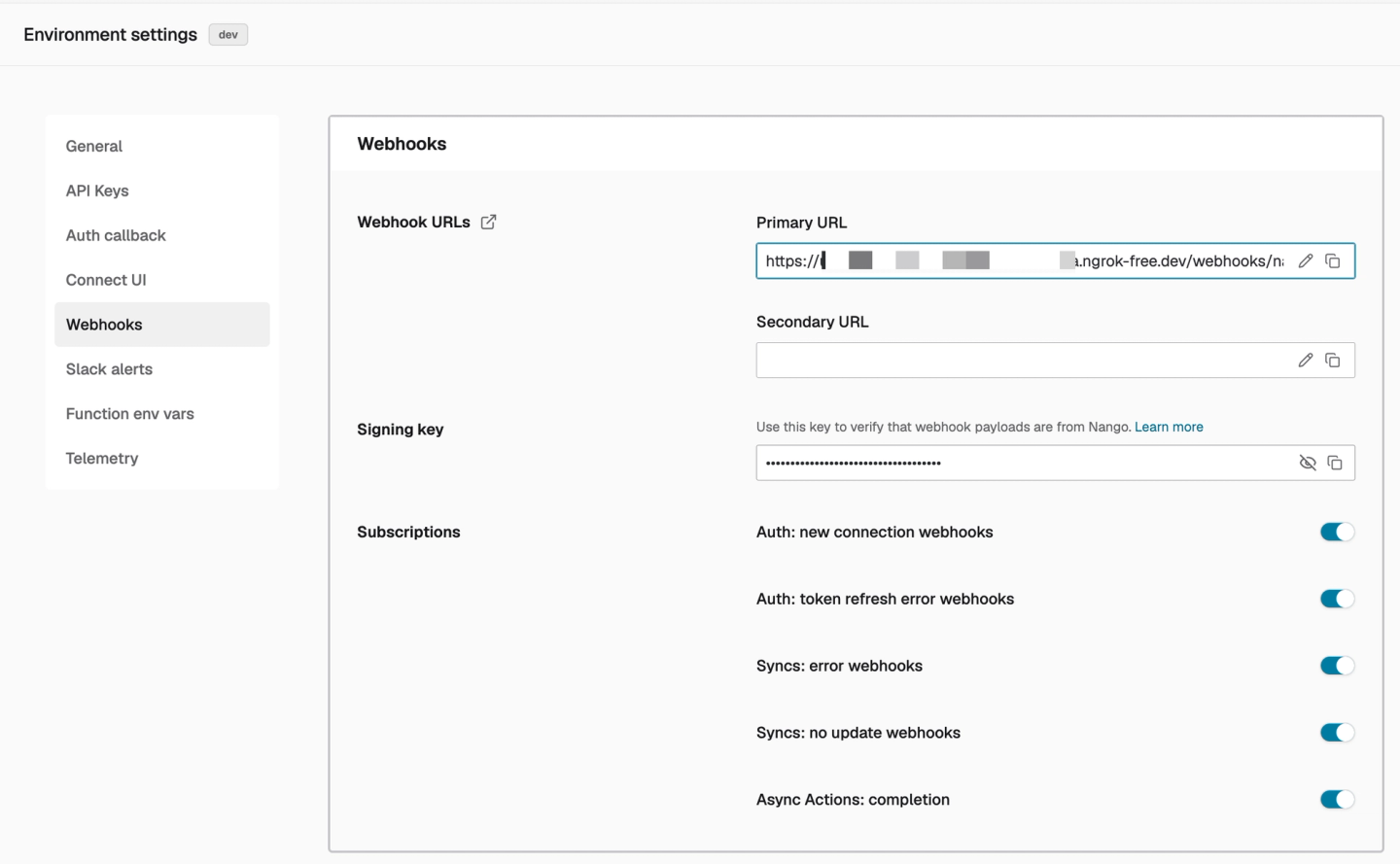
Then collect three values for your app’s .env:
| Variable | Where to find it |
|---|---|
| `NANGO_SECRET_KEY` | Environment Settings → API secret key. Authenticates your backend's Nango SDK calls |
| `NANGO_WEBHOOK_SIGNING_KEY` | Environment Settings → Webhooks → Signing key. Verifies webhooks Nango sends to your app |
| `NANGO_INBOUND_WEBHOOK_URL` | Integrations → Salesforce → Webhook URL. The URL the Apex triggers POST to, like `https://api.nango.dev/webhook/<environment-uuid>/salesforce` |
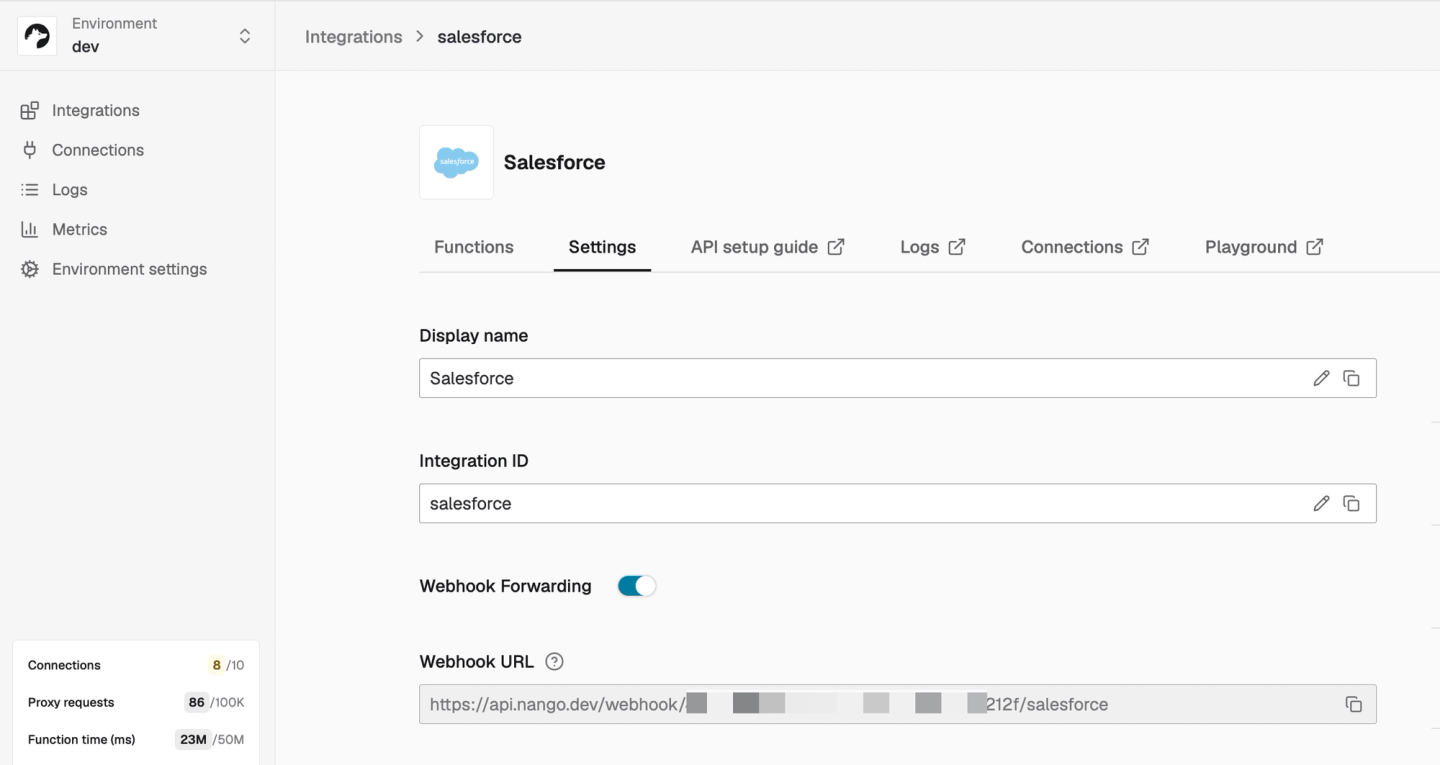
Note: treat the inbound webhook URL as a secret. It is what gates inbound events.
Nango is configured. Now add the one piece your users see: the authorization flow.
Step 3: Adding the Salesforce authorization flow to your app
This is the standard Nango auth flow: your backend creates a connect session, your frontend opens the hosted Connect UI, and Nango sends your app an auth webhook when the user finishes authorizing.
Prompt for your coding agent
/building-nango-functions-locally Using Nango, add Salesforce authorization to my app: a backend endpoint that creates a
Nango connect session for the current user, a "Connect Salesforce" button that opens
Nango's hosted Connect UI, and a handler for Nango's auth webhook that stores the
connectionId against the user.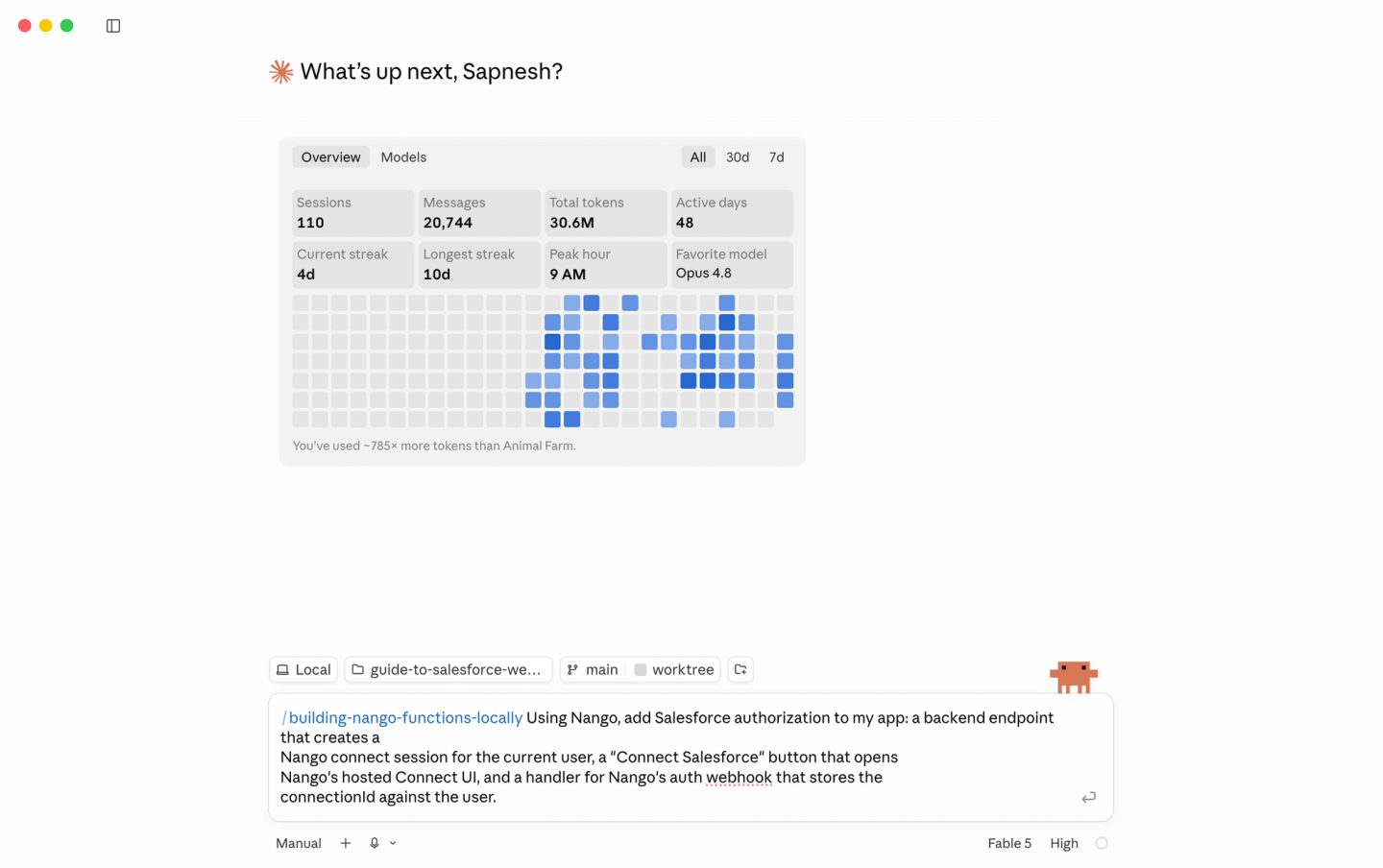
Explanation
Your backend creates a connect session for the logged-in user, your frontend opens Nango’s Connect UI with the session token, and the user authorizes their Salesforce account there. Your app never sees their credentials.
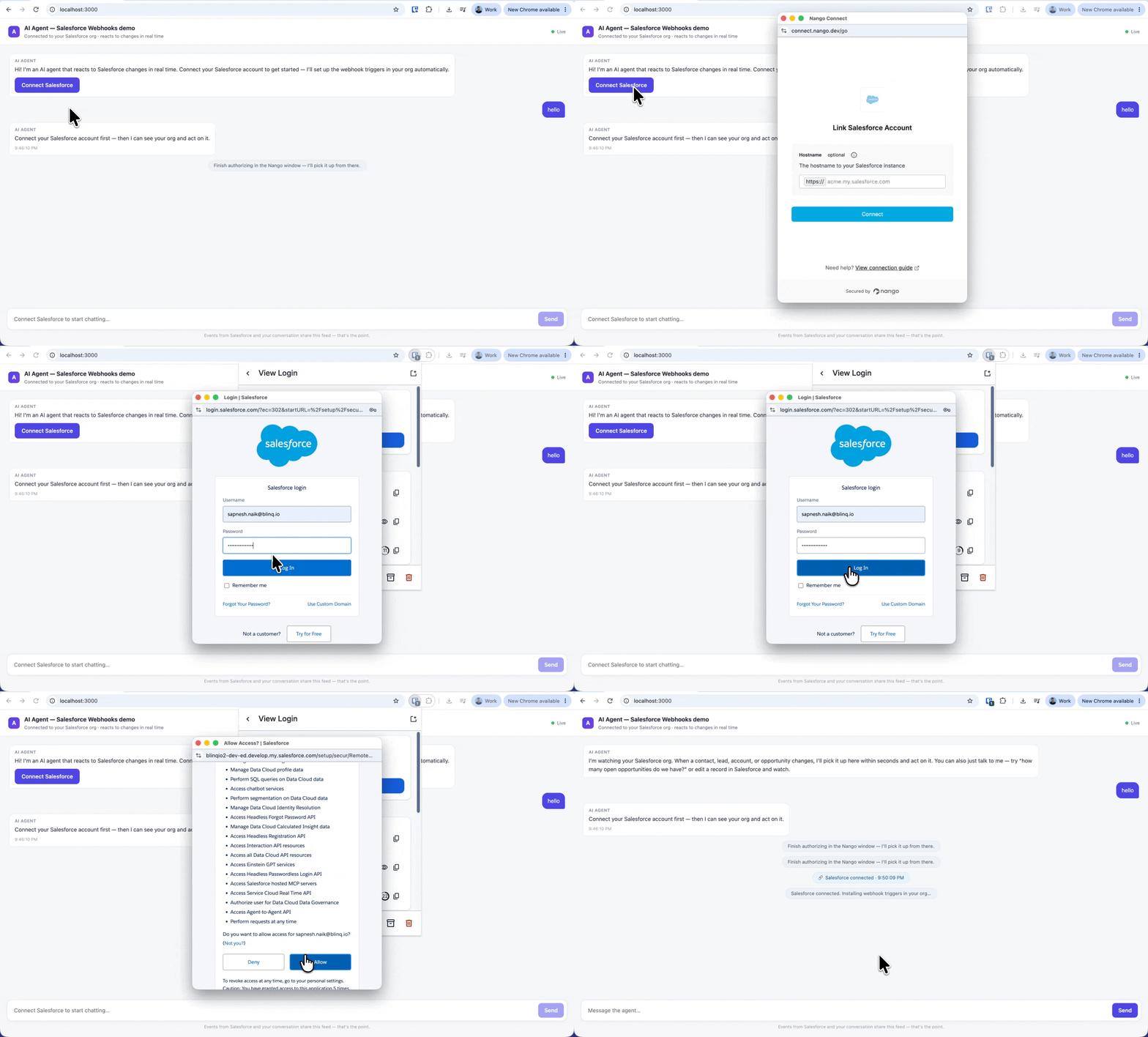
When they finish, Nango sends your webhook endpoint an auth event. Store the connection ID against the user (Nango doesn’t model which of your users owns a connection; that’s your job), then kick off provisioning, which is the next step:
// In your Nango webhook handler (built fully in Step 6)
case 'auth':
    if (payload.operation === 'creation' && payload.success) {
        await saveConnectionForUser(payload.connectionId);
        await provisionSalesforce(payload.connectionId);   // Step 4
    }
    return;
Your app now learns about every new connection the moment it happens. Next, use that signal to set up the user’s org.
Step 4: Provisioning the user’s Salesforce org automatically
The auth webhook is your cue to install the webhook plumbing in the user’s org. Everything goes through Nango’s proxy using the OAuth connection they just created, with no action on their side. Provisioning deploys three things through the Salesforce Tooling API, in order.
Prompt for your coding agent
/building-nango-functions-locally When my app receives Nango's auth webhook for a new Salesforce connection, provision that org through the Nango proxy using the Salesforce Tooling API:
(1) a Remote Site Setting for https://api.nango.dev,
(2) the NangoWebhookNotifier Apex class with my integration webhook URL and this connection's ID substituted in,
(3) one Apex trigger per object in my config (Contact, Lead, Account, Opportunity), generated from a template.
Reference implementation: src/provision.ts and salesforce/ in https://github.com/NangoHQ/salesforce-webhooks-for-ai-agents
Explanation
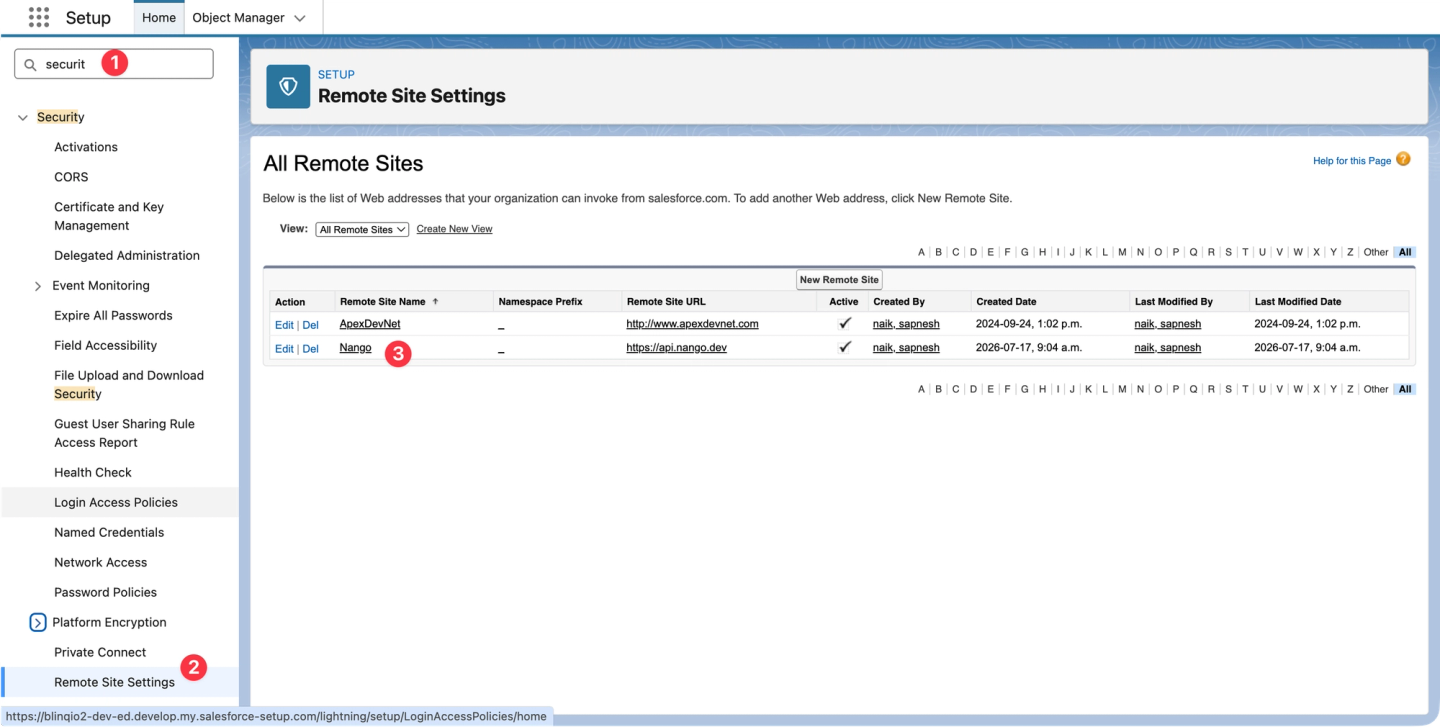
1. A Remote Site Setting. Salesforce blocks outbound HTTP to unregistered hosts, so allowlist Nango’s API host first:
// The Tooling API sobject for Remote Site Settings is RemoteProxy.
// Creation requires the FullName + Metadata shape — flat fields are query-only.
await nango.post({
    endpoint: '/services/data/v61.0/tooling/sobjects/RemoteProxy',
    data: {
        FullName: 'Nango',
        Metadata: { url: 'https://api.nango.dev', isActive: true, disableProtocolSecurity: false }
    },
    providerConfigKey: 'salesforce',
    connectionId: '<CONNECTION-ID>'
});
After a user authorizes Salesforce in your app, the new remote site setting appears in their Salesforce org:
2. The Apex callout class. Triggers can’t make HTTP callouts synchronously, so the callout lives in a @future(callout=true) method. One shared class handles every object: it diffs the tracked fields, batches all changed records of a transaction into one payload, and fires one async callout. Your provisioning code replaces the two placeholders (the integration webhook URL from your config, and this user’s connection ID from the auth webhook) before deploying the following class:
public class NangoWebhookNotifier {
    // Substituted by your provisioning code before deployment
    private static final String WEBHOOK_URL = '{{NANGO_INBOUND_WEBHOOK_URL}}';
    public static final String CONNECTION_ID = '{{NANGO_CONNECTION_ID}}';

    // Shared handler for every object's trigger: diffs tracked fields, batches
    // all changed records of the invocation into ONE payload, fires ONE callout.
    public static void notifyChanges(String objectName, List<SObject> newList, List<SObject> oldList, List<String> trackedFields) {
        // @future can't run from batch/future contexts and its budget is capped:
        // skip instead of breaking the transaction; the polling sync reconciles.
        if (System.isFuture() || System.isBatch()) return;
        if (Limits.getFutureCalls() >= Limits.getLimitFutureCalls()) return;

        // Keep only records whose tracked fields actually changed (loop guard:
        // your agent's own write-backs don't re-fire the webhook)
        List<Map<String, Object>> changes = collectChanges(newList, oldList, trackedFields);
        if (changes.isEmpty()) return;

        notify(JSON.serialize(new Map<String, Object>{
            'nango' => new Map<String, Object>{
                'connectionId' => CONNECTION_ID,
                'eventType' => objectName.toLowerCase() + (oldList == null ? '.created' : '.updated')
            },
            'object' => objectName,
            'data' => changes
        }));
    }

    @future(callout=true)
    public static void notify(String payload) {
        HttpRequest req = new HttpRequest();
        req.setEndpoint(WEBHOOK_URL);
        req.setMethod('POST');
        req.setBody(payload);
        new Http().send(req);
    }
}
This is abridged to the shape that matters: the full class adds the field-diff loop, a case-sensitive compare helper, request headers and timeout, and a try/catch wrapper so a webhook failure can never abort the user’s save.
The connection ID being a constant in the deployed class is what makes multi-tenancy work: every user’s org gets its own copy with its own ID, all POSTing to the same integration webhook URL, and Nango routes each event to the right connection.
Three details in this handler matter in production:
- Bulk-safe: one payload and one
@futurecall per trigger invocation (up to 200 records), not per record. - Loop-safe: the changed-field check means your agent creating a Task, or any automation touching untracked fields, doesn’t re-fire the webhook. Without it, an agent that writes back to the record it was triggered by loops forever.
- Async-safe: calling
@futurefrom a batch or future context throws, and the exception would fail the other automation’s DML. The guard skips instead, and the hourly sync picks up whatever was skipped.
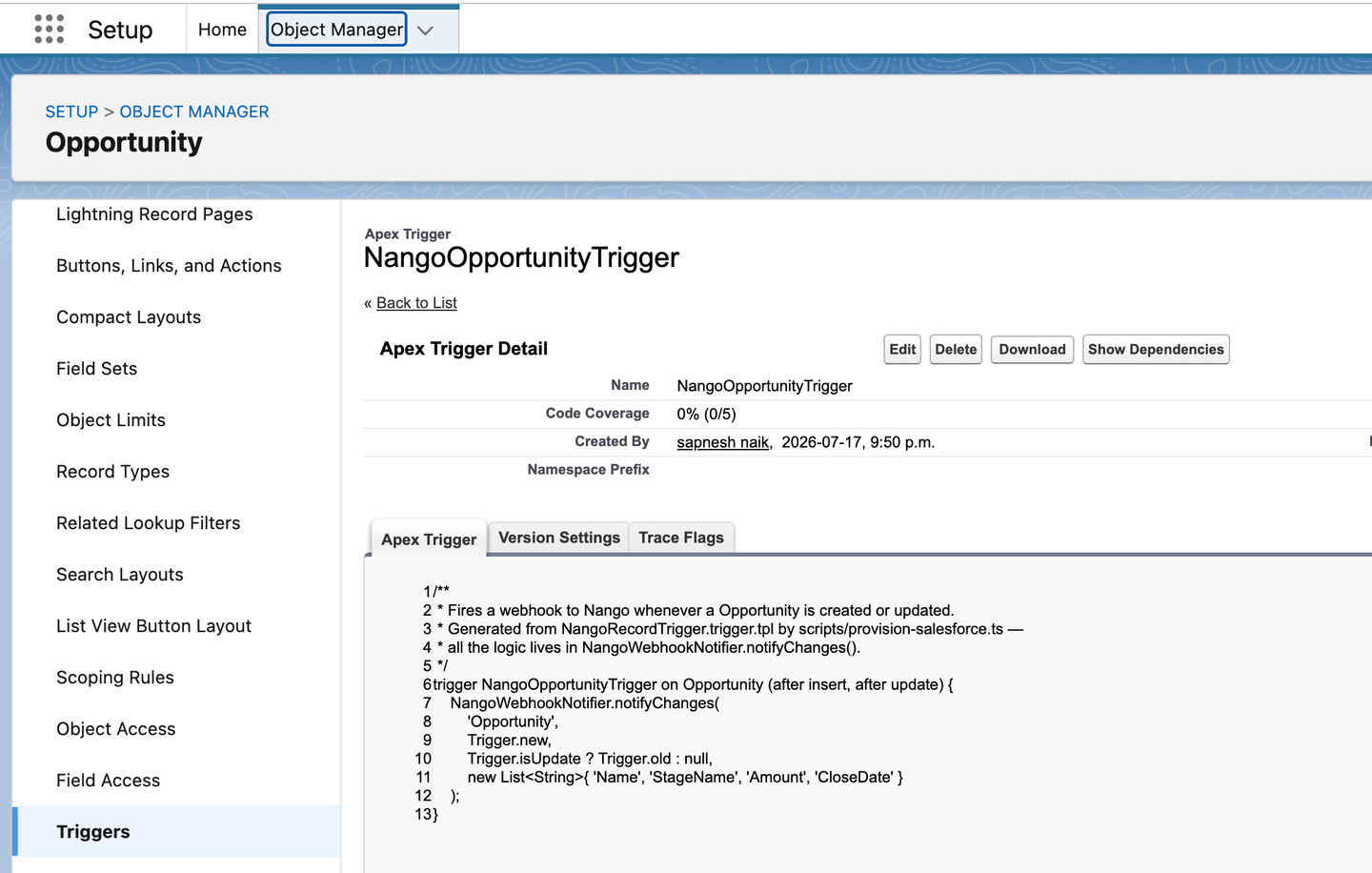
3. One thin trigger per watched object. Generated from a template, with all logic in the shared class:
trigger {{TRIGGER_NAME}} on {{OBJECT}} (after insert, after update) {
    NangoWebhookNotifier.notifyChanges(
        '{{OBJECT}}',
        Trigger.new,
        Trigger.isUpdate ? Trigger.old : null,
        new List<String>{ {{FIELDS}} }
    );
}
Here is one of the generated triggers deployed in a user’s org:
Which objects and fields to watch live in one config that also drives the sync and your app:
// nango-integrations/salesforce/objects.ts — the single config that drives
// the Apex provisioning, the Nango sync, and the app
export const SALESFORCE_OBJECTS = [
    { object: 'Contact',     model: 'SalesforceContact',     fields: ['FirstName', 'LastName', 'Email', 'Title', 'Phone'] },
    { object: 'Lead',        model: 'SalesforceLead',        fields: ['FirstName', 'LastName', 'Email', 'Company', 'Status', 'Title'] },
    { object: 'Account',     model: 'SalesforceAccount',     fields: ['Name', 'Industry', 'Phone', 'Website'] },
    { object: 'Opportunity', model: 'SalesforceOpportunity', fields: ['Name', 'StageName', 'Amount', 'CloseDate'] }
    // Custom objects work the same way: { object: 'Invoice__c', ... }
];
Task is deliberately absent: the agent in this tutorial writes Tasks, and subscribing to the object your agent writes to makes it react to its own output.
Note: creating Apex through the Tooling API works in Developer, sandbox, and scratch orgs. Production orgs require a Metadata API deploy or a package (see Production notes).
Now test it. Connect a Salesforce account, either from your app’s new button or the quick way: Connections → Add Test Connection in the Nango dashboard (the same auth webhook fires either way). Then check the org: Setup → Apex Classes should show NangoWebhookNotifier:
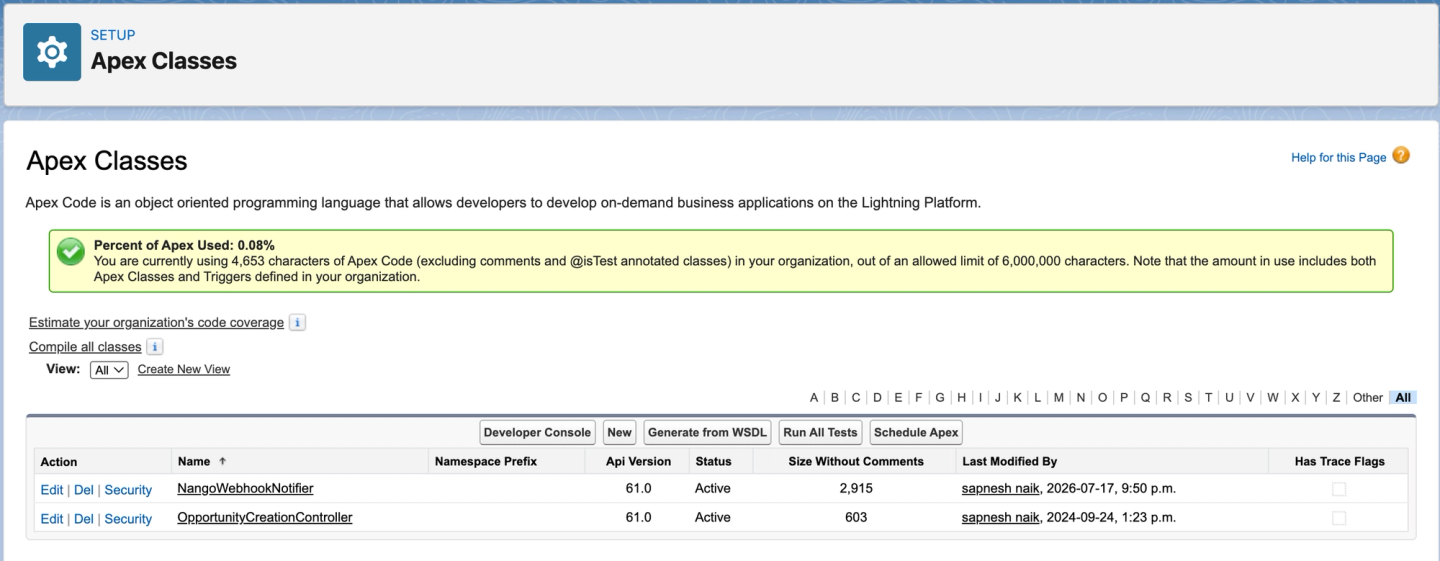
And Setup → Apex Triggers should show the four Nango<Object>Trigger triggers:
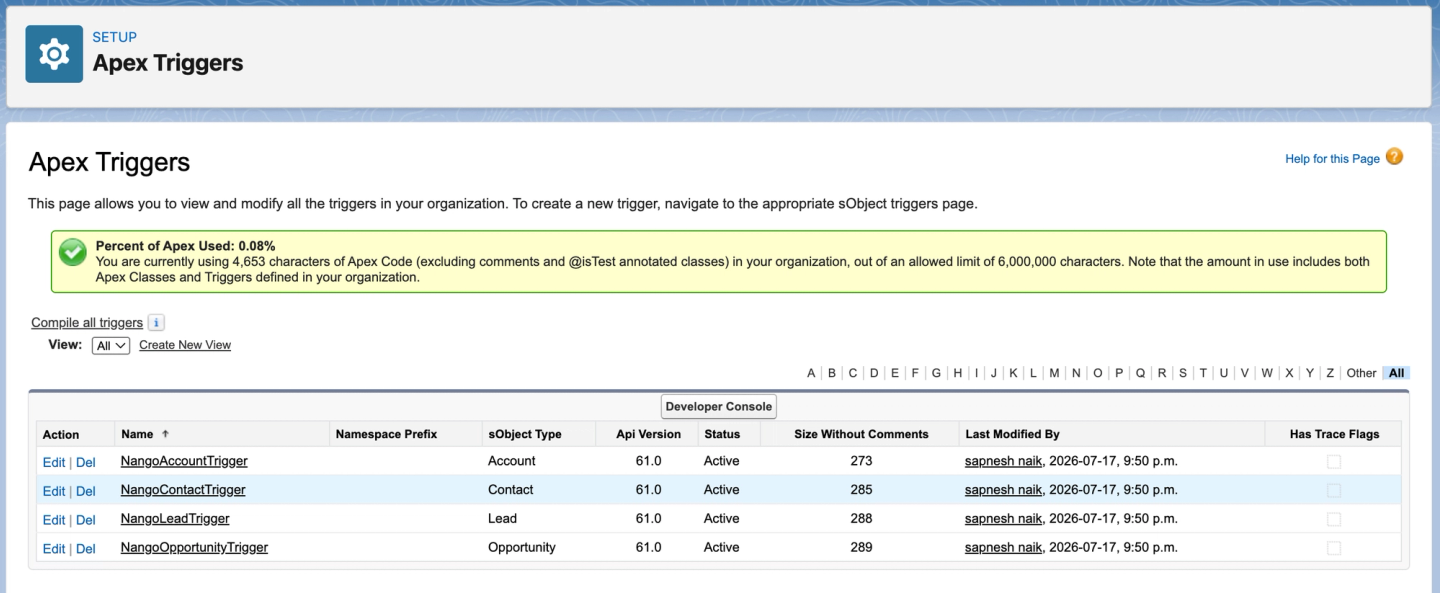
Events now flow from every connected org into Nango. Next, consume them.
Step 5: Handling the events with a Nango sync
The recommended consumer is a sync that does two jobs at once: webhook events for real time, hourly polling for reliability, both writing into the same records cache.
Prompt for your coding agent
/building-nango-functions-locally Build a Nango sync for the salesforce integration that subscribes to the webhook events my Apex triggers send (webhookSubscriptions: ['*'], with an onWebhook handler that routes by the payload's object field), saves records to one model per object, and also polls hourly per object from a per-object checkpoint as reconciliation, using the ignore_if_modified_after merging strategy. Deploy the sync with confirmation.Explanation
const sync = createSync({
    description: 'Salesforce records: real-time Apex webhook events + hourly polling reconciliation',
    frequency: 'every hour',
    autoStart: true,

    // The Apex handler emits '<object>.created' / '<object>.updated';
    // the wildcard routes them all to this sync.
    webhookSubscriptions: ['*'],

    // One model per watched object, one timestamp checkpoint per object
    models: { SalesforceContact: RecordSchema, SalesforceLead: RecordSchema, /* ... */ },
    checkpoint: z.object(/* one timestamp per object */),

    // Hourly reconciliation: incremental SOQL poll per object from its checkpoint.
    exec: async (nango) => {
        for (const cfg of SALESFORCE_OBJECTS) {
            // Don't overwrite records a webhook already wrote fresher versions of
            await nango.setMergingStrategy({ strategy: 'ignore_if_modified_after' }, cfg.model);
            // SELECT <fields> FROM <object> WHERE LastModifiedDate >= <checkpoint>, then batchSave
        }
    },

    // Real time: runs within seconds of the Apex trigger's POST.
    onWebhook: async (nango, payload) => {
        const { object, data } = payload as ApexWebhookPayload;
        await nango.batchSave(data.map(mapRecord), configForObject(object).model);
    }
});
This is the shape; the full sync is nango-integrations/salesforce/syncs/records.ts in the sample repo.
The sync runs for every connection on the integration, current and future. Its first run per connection snapshots the existing records into the cache; your app primes its cursor past that snapshot instead of sending history to the agent (next step).
Why both onWebhook and an hourly exec? Because the Apex callout is at-most-once: @future jobs don’t retry, and Salesforce can’t tell you an event was lost while your app was down. The poll sweeps up anything the webhook missed, and ignore_if_modified_after ensures stale polled data never overwrites a fresher webhook write. That keeps the pipeline both fast and reliable. The real-time syncs docs cover the pattern.
The alternative, raw forwarding: if you’d rather receive the original Apex payload directly, Nango forwards provider webhooks to your app wrapped in a type: "forward" envelope, with no sync involved. You give up the records cache, cursors, and reconciliation, which is reasonable when your agent only needs the event as a signal rather than the data.
The sync is now saving every change and notifying your app. The last piece is what your app does with those notifications.
Step 6: Receiving webhooks and triggering your AI agent
Prompt for your coding agent
Modify this to reflect your backend stack:
/building-nango-functions-locally Add a Nango webhook endpoint to my backend: verify the signature against the raw request body with the webhook signing key, ack immediately, then for sync webhooks fetch the changed records by cursor from Nango's records API and run my AI agent once per changed record, with Salesforce tools that call back through the Nango proxy.Explanation
Every time the sync saves changes, whether webhook-driven or poll-driven, Nango sends your endpoint a signed notification. Your handler does four things: verify, ack, fetch, dispatch. Add the route to your app:
app.post('/webhooks/nango', (req, res) => {
    // 1. Verify the RAW request body with the webhook signing key
    //    (not the API secret key: two different keys!)
    if (!nango.verifyIncomingWebhookRequest(req.rawBody, req.headers)) {
        return res.status(401).send('invalid signature');
    }
    res.status(200).json({ ok: true });  // 2. Ack immediately: Nango times out after 20s

    // 3 + 4. Fetch and dispatch, serialized per connection+model
    enqueue(`${req.body.connectionId}:${req.body.model}`, () => handleSyncWebhook(req.body));
});

async function handleSyncWebhook(payload) {
    const records = await fetchChangedRecords(payload.connectionId, payload.model, payload.modifiedAfter);
    for (const record of records) {
        await runAgentOnRecordChange(payload.connectionId, record);   // ← your agent
        saveCursor(payload.connectionId, payload.model, record._nango_metadata.cursor);
    }
}
Verification needs the raw request body: it hashes the exact bytes Nango sent, so the re-serialized parsed JSON would not match (see the body-capture middleware in src/server.ts).
The changed records come from Nango’s records API by cursor: store the cursor of the last record you processed per connection and model, fetch from it on the next webhook, and you get exactly the changes in between, with no diffing and no timestamp arithmetic. payload.connectionId tells you which user’s org changed, so everything downstream is per-user.
The full server in the repo also guards the three cases that come up fast in production: each connection’s initial sync (prime the cursor past the snapshot instead of sending history to the agent), bulk edits (a Data Loader run is one webhook with hundreds of changes, so cap agent runs per webhook), and concurrent webhooks for the same connection (serialize them, or two handlers read the same cursor and run the agent twice).
Each changed record becomes an agent run, with the fresh data as context and Salesforce write access as tools:
const response = await anthropic.messages.create({
    model: 'claude-sonnet-5',
    system: 'You are a CRM assistant that reacts to Salesforce record changes. ' +
            'Create ONE genuinely useful follow-up task per change.',
    tools: [getSalesforceRecord, querySalesforce, createSalesforceTask],  // implemented via Nango's proxy
    messages: [{ role: 'user', content: `A Salesforce Contact was just updated:\n${JSON.stringify(contact)}` }]
});
The tools write back through the same Nango connection the webhook came from (full agent loop), with OAuth, token refresh, and request logging handled for you. For production agents, expose Nango action functions as typed MCP tools instead of hand-rolling tool implementations. The pattern is identical.
Step 7: Testing the whole loop
Start your app and expose it publicly (in the repo: npm run dev, then ngrok http 3000, with the ngrok URL set as the webhook URL from Step 2). Connect a Salesforce account if you haven’t. Then edit a record in the connected org: change a contact’s title, or move an opportunity’s stage.
Nango dashboard → Logs: within a few seconds (async Apex adds 5 to 30 seconds), the incoming webhook appears, routed to the connection, followed by the sync execution that saved the records.
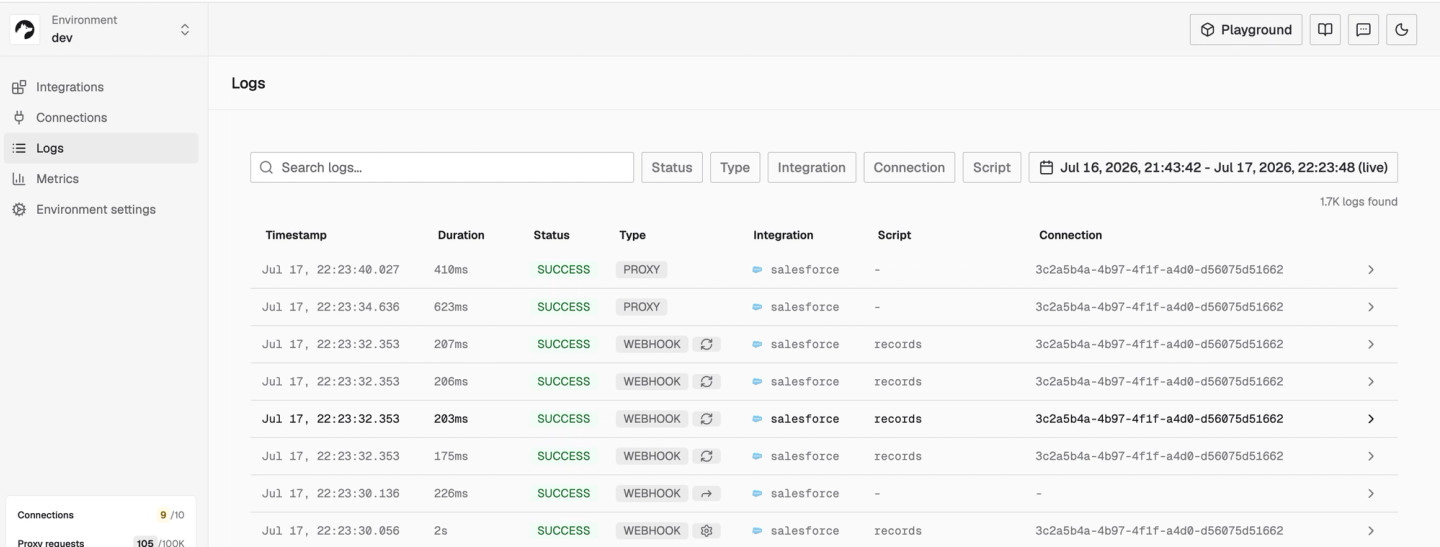
The sample repo also ships a small demo UI at http://localhost:3000: a chat interface where Salesforce events and the agent’s runs share one feed, so you can watch the loop without building a frontend first.
You now have the complete pipeline working: a change in any connected user’s org triggers your AI agent within seconds, and the agent’s action lands back in Salesforce. The remaining sections cover hardening it for production.
Production notes
- Production orgs and Apex. Creating Apex through the Tooling API works in Developer, sandbox, and scratch orgs, but production orgs require a Metadata API deploy or a package (with 75%+ test coverage). For production users, ship the Apex in an unmanaged package or a Metadata API deployment as part of onboarding.
- Nango-hosted provisioning. Instead of provisioning from your app’s
authwebhook handler, the same logic can live in a Nango event function that runs onpost-connection-creation, withnango.getWebhookURL()resolving the inbound URL. Add apre-connection-deletionfunction to remove the Apex when a user disconnects:
export default createOnEvent({
    event: 'post-connection-creation',
    exec: async (nango) => {
        const webhookUrl = await nango.getWebhookURL();
        // Same three Tooling API calls as src/provision.ts,
        // with THIS connection's ID baked into the Apex class
    }
});
Common issues
| Issue | Cause and fix |
|---|---|
| Nothing appears in Nango Logs after a change | Remote Site Setting missing, trigger not deployed, or `@future` lag (check Setup → Apex Jobs). Allow 5 to 30 seconds |
| Webhook logged in Nango, but the sync doesn't run | The sync's `webhookSubscriptions` doesn't match the `eventType` the Apex sends (use `['*']` or list every event), or the integration uses `salesforce-sandbox`, which does not route inbound webhooks (use the base `salesforce` provider) |
| Provisioning fails deploying Apex | The org is a production org: the Tooling API can't create Apex there. Ship a Metadata API deploy or package instead |
| Sync fails after replacing an existing sync | The old sync's checkpoint carries over in a different shape. Validate the checkpoint's fields at runtime before using it |
| App receives nothing | Webhook URL not set in Environment Settings → Webhooks, or the tunnel died |
| `401 invalid signature` on every webhook | Verifying with the API secret key, or verifying the parsed JSON body. Use the webhook signing key against the raw request body |
| `REQUIRED_FIELD_MISSING` creating the Remote Site Setting | The Tooling API needs the `FullName` + `Metadata` payload shape for `RemoteProxy`. Flat fields only work for queries |
| Agent ran on every historical record | The sync's first run per connection snapshots the whole object. Prime your cursor past full-sync runs instead of dispatching them to the agent |
FAQ
Can I use a Salesforce sandbox to test webhooks with Nango?
Not via the salesforce-sandbox provider variant, which doesn’t route inbound webhooks. Instead, test with a free Developer Edition org connected through the base salesforce provider.
Should I use Change Data Capture instead of an Apex trigger?
Use CDC when you control the infrastructure and can run a persistent Pub/Sub API subscriber. It offers replay and captures every change, including ones Apex triggers can miss. Use an Apex trigger when you need push-to-URL semantics, custom JSON, or programmatic setup in your users’ orgs. Pairing the trigger with a polling reconciliation sync closes most of the reliability gap.
Can I get webhooks for any Salesforce object?
Any object that supports Apex triggers, which covers standard objects (Contact, Lead, Account, Opportunity, Case, and more) and all custom objects, can fire this pipeline. You deploy one thin trigger per object and share the callout logic. Don’t subscribe to objects your agent writes to (like Tasks in this guide), or the agent reacts to its own output.
What’s the difference between Salesforce Outbound Messages and webhooks?
Outbound Messages are Salesforce’s closest built-in equivalent to a webhook: a declarative push to a URL when records change. The differences: they send SOAP XML, not JSON; the envelope is fixed, not a payload you shape; and your endpoint must reply with a SOAP ACK. They do retry, for 24 hours, then the event is silently dropped. For custom JSON to an arbitrary endpoint, the modern equivalent is an Apex trigger with an HTTP callout.
What are the limits on Apex webhook callouts?
100 callouts per transaction, 50 @future calls per transaction, 120-second maximum timeout, 250k async Apex executions per 24h, and no automatic retries. Batch all records of a trigger invocation into one callout and reconcile misses with polling.
Is it safe to let the agent write back to Salesforce?
Yes, with two guards against loops: only fire the webhook when fields you track actually change (so the agent’s own writes don’t re-trigger it), and have the agent write to objects the trigger doesn’t watch, like Tasks, for anything advisory. To limit blast radius, have users connect a dedicated integration user whose profile grants only what the agent needs (here: read the watched objects, create Tasks). The connection’s permissions and the tool definitions are the real boundary on what the agent can write.
Conclusion
In this tutorial, you built the full pipeline: your users connect their Salesforce account in one click, your backend installs the webhook plumbing in their org through API calls, Nango turns the Apex callouts into a routed, verified, reconciled change stream, and your AI agent turns that stream into action inside the CRM. In our test, that was ~10 seconds from CRM edit to agent-written follow-up task. The same pattern (provision on authorization, webhooks plus a reconciliation sync, agent tools through a proxy) carries over to your other API integrations.
To see every piece running together, clone and run the sample repo. From here, you can read next:

