
To give AI agents access to hundreds of tools without filling their context window, expose a small working set and let them discover additional tools on demand. Enforce permissions when tools execute, and keep responses compact: tool definitions and returned data both consume context.
A sales assistant connected to Gmail, Google Calendar, and Salesforce may have hundreds of operations available. Preparing for a meeting needs only a handful. Nango Agent Sessions let developers scope permitted tools, pin frequently used tools, and keep the rest searchable. We tested these exposure patterns with 57 tools and a fixed dataset.
Why do large tool catalogs cause problems?
Tool exposure creates three separate costs:
- Definitions: names, descriptions, and argument schemas consume tokens before execution.
- Selection: overlapping operations such as
search_messages,list_threads, andget_threadrequire the agent to distinguish similar choices. Mailbox administration adds choices that meeting preparation does not need. - Results: even three tools can fill context if they return 200 full email threads or every field from 50 opportunities.
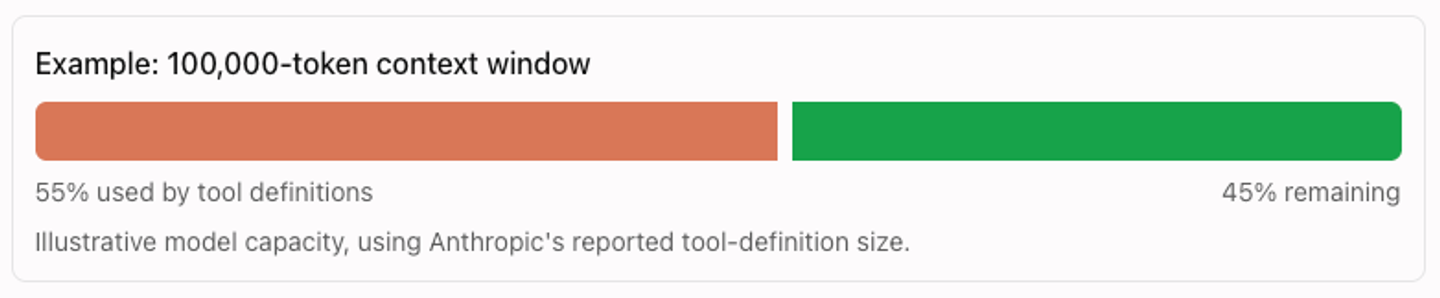
Anthropic’s advanced tool use article (November 2025) describes five MCP servers exposing 58 tools whose definitions consumed approximately 55,000 tokens. Schema complexity matters as well as tool count.
How much input does discovery with pinned tools save?
Discovery with two pinned tools used 69% fewer input tokens per task than loading all 57 tool definitions upfront in our synthetic test.
We ran six tasks twice per configuration. The tasks used three tools returning fixed fictional meeting, account, and email records; the other 54 tool definitions served as distractors. Discovery exposed two meta tools. The pinned configuration also loaded the meeting and account tools upfront.
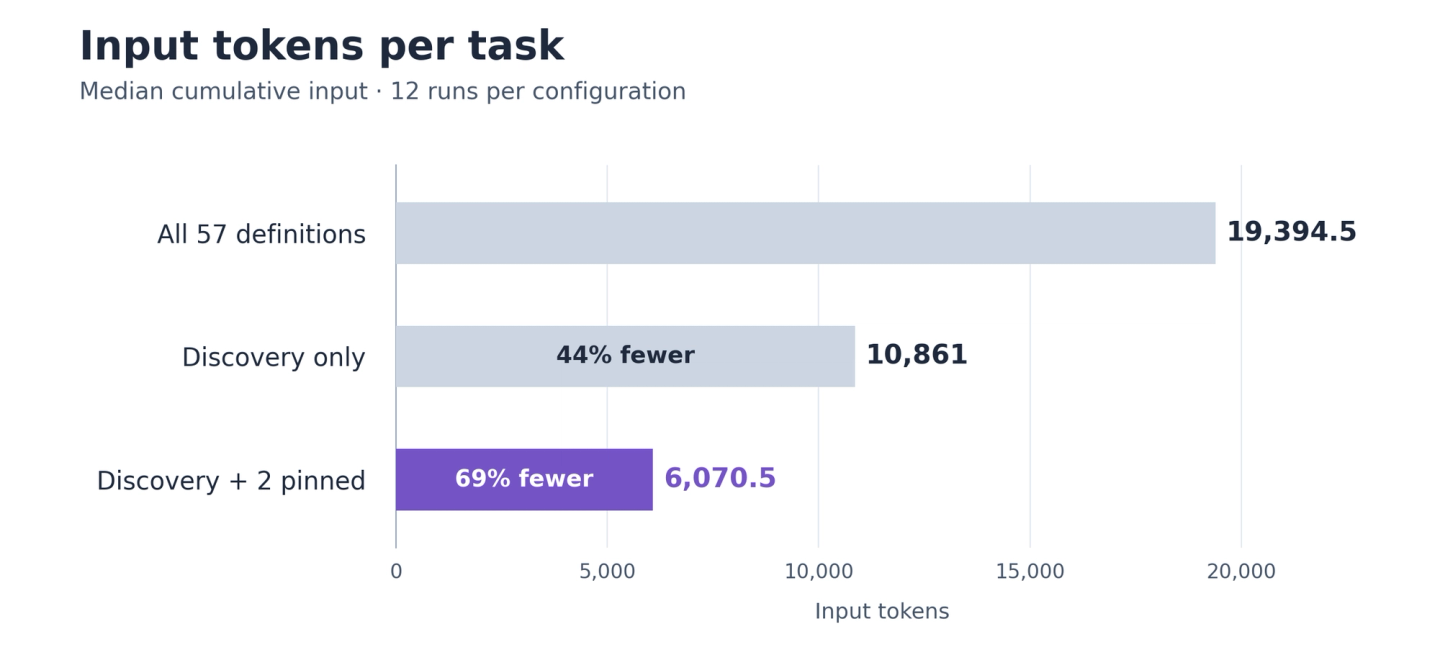
Claude Sonnet 4.6, six synthetic tasks run twice per configuration. All used Agent Sessions with client-supplied typed schemas and passed the task checks. Input is summed across model calls, not peak context size.
| Tool exposure | Median cumulative input tokens per task | Reduction vs full loading |
|---|---|---|
| Baseline: load all 57 definitions | 19,394.5 | Reference |
| Discovery only | 10,861 | 44% |
| Discovery with two pinned tools | 6,070.5 | 69% |
Pinning common tools avoided searches for those tools. Discovery alone started with fewer tokens, but the pinned configuration used less input across complete tasks. Measure the whole task when choosing what to pin.
Separate tool permissions from tool visibility
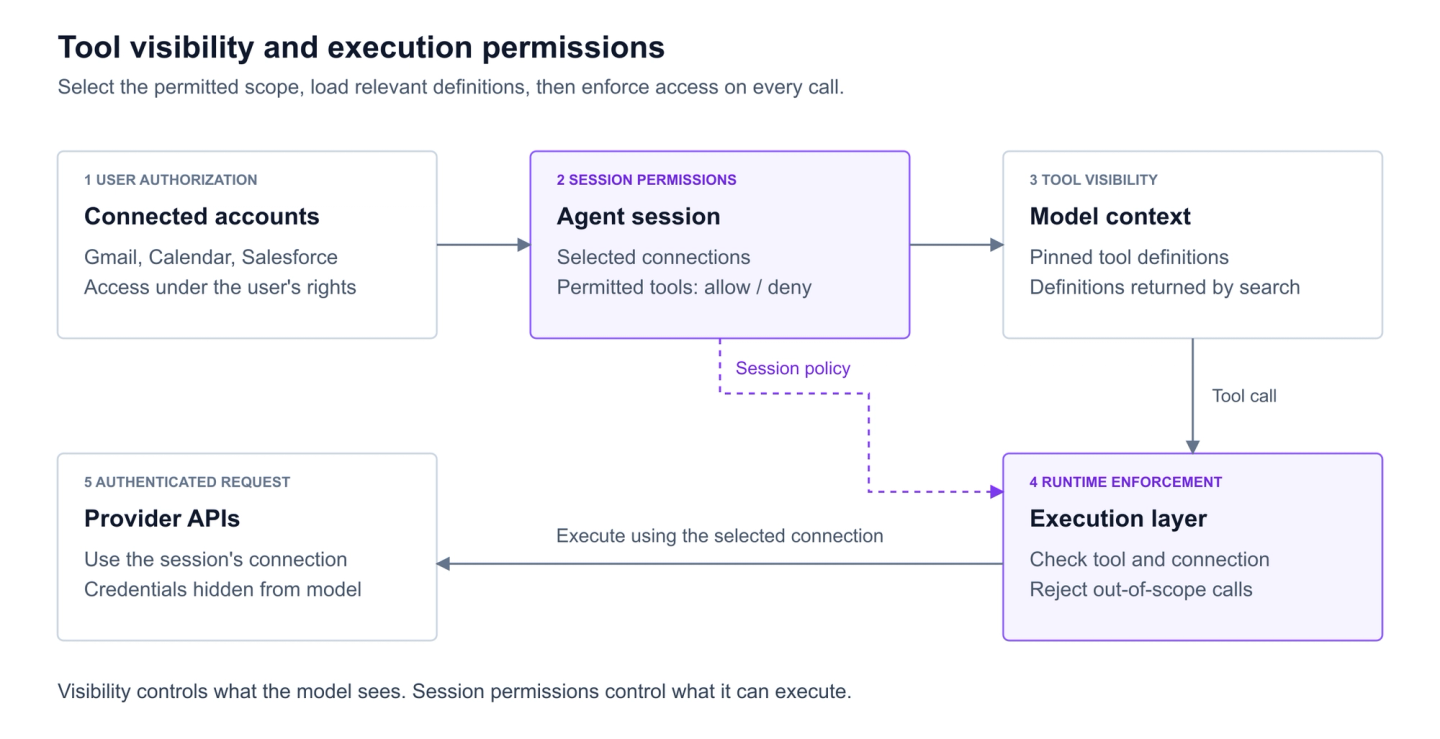
User authorization, session permissions, and tool visibility control different things. Decide what the agent may execute before choosing what the model sees.
| Layer | What it controls | Meeting-preparation example |
|---|---|---|
| User authorization | Access granted through the connected account and OAuth permissions | Salesforce access under the user's existing rights |
| Session permissions | Connections and operations the application permits | CRM reads allowed; writes excluded |
| Tool visibility | Definitions presented to the model | Common tools loaded; others discoverable |
With Nango Agent Sessions, your backend selects connections using tags or specific IDs and defines a toolset with allow and deny rules. Nango executes calls using those connections without exposing provider credentials to the model. The agent cannot broaden its own scope. Configure restrictions explicitly: omitting toolset includes every tool on integrations the tenant has a resolved connection for.
The execution layer must enforce permissions on every call, including guessed tool names or instructions found in retrieved content. See how developers secure AI agent access to APIs.
How should you choose which tools an agent sees?
Use task-specific tools for predictable work, select tool groups from application state, and add discovery for capabilities outside the initial selection.
Curate tools around useful tasks
A tool for every API endpoint forces the agent to assemble low-level calls into a workflow. Preparing a briefing might require finding an account, resolving record IDs, fetching opportunities, and filtering activities.
A custom get_account_briefing tool could accept an account identifier and return its owner, open opportunities, and recent activities in one call. Supply identifiers from application state where possible, or provide a lookup that resolves ambiguous names.
Explain what each tool returns, when to use it, and its limitations. Purpose-built tools reduce repeated decisions but require maintenance and may not cover unusual requests. Anthropic’s tool-design guidance describes similar task-oriented designs.
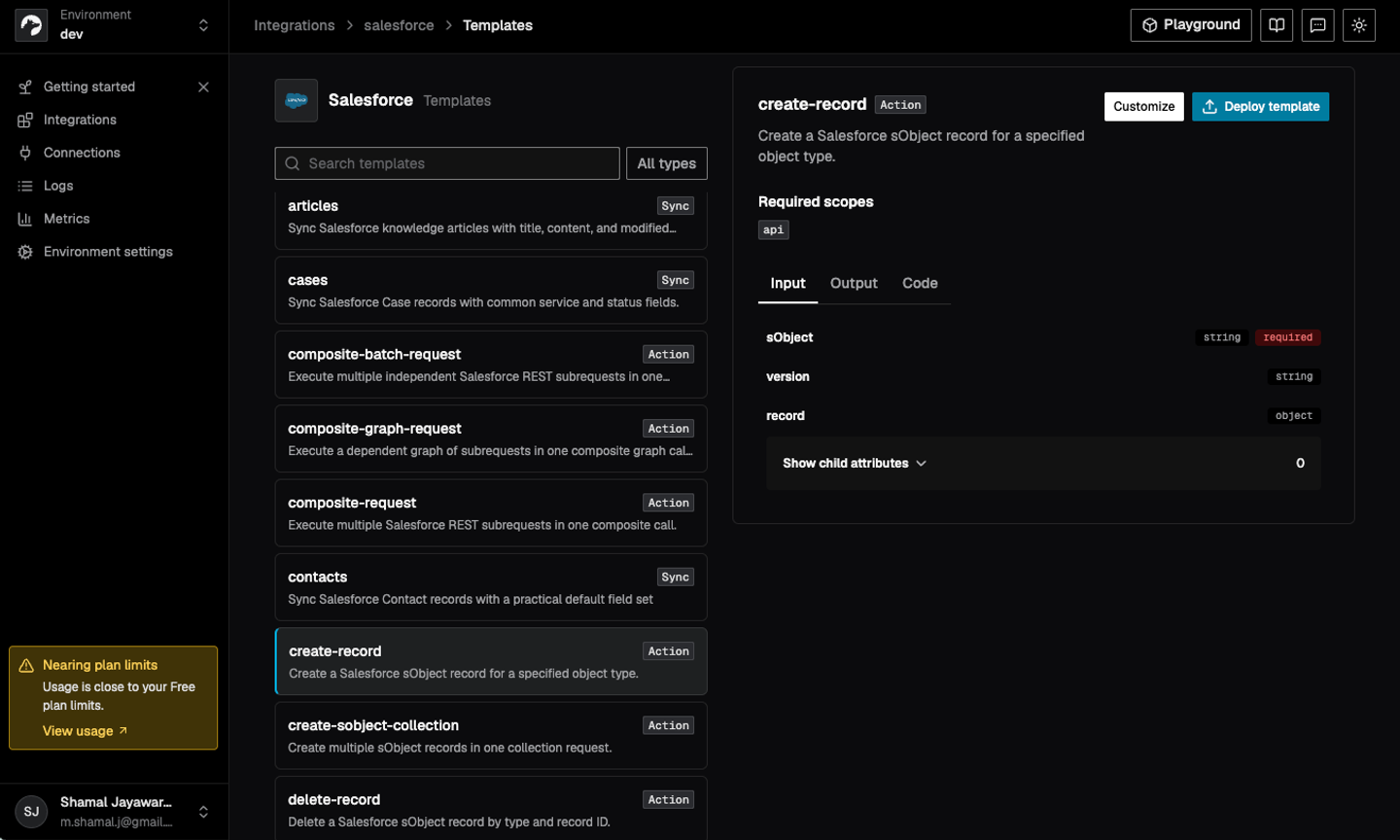
Coding agents such as Claude Code, Cursor, and Codex can use the Nango builder skill to build or customize tools for API integrations. Nango runs those functions using the user’s connected account; see how to build reliable tool calls for AI agents for the broader design pattern.
Select tool groups from the task and application state
Your application can often select tools before calling the model. A “Prepare for meeting” button can expose calendar, email search, and CRM read tools. “Log call notes” can expose CRM write tools if the session permits writes.
Use routing rules for predictable workflows or a classifier for open-ended requests. The tradeoff is omission: if the user adds “also check Acme’s support tickets” and routing selected no ticketing tools, the agent needs a recovery path. Discovery provides one within its permitted scope.
Discover tools on demand and pin frequently used tools
Progressive disclosure loads definitions as the task needs them. The agent searches a catalog of permitted tools, receives matching definitions, and executes a selected tool. Tool discovery searches capabilities: finding an email-search tool returns its definition; executing it returns emails.
Nango Agent Sessions expose two default meta tools:
nango_tool_search: searches by a plain-language query and returns best matches with argument schemas. Related leads appear without schemas.nango_execute: runs a selected tool by name using the connection resolved for its integration.
Other permitted tools stay searchable without appearing individually in tools/list. Use pinned_tools to list the small core needed on most requests, avoiding discovery for common operations. Choose the core from observed usage; no fixed number suits every workflow.
Our pinned core contained the meeting and account fixture actions. One recorded Acme briefing used four calls:
| Call | Observed result |
|---|---|
| Pinned meeting action, company Acme | Meeting mtg_acme_001, starting 2026-10-16T14:00:00Z |
| Pinned account action, company Acme | Owner Mira Stone; opportunity opp_acme_001 in Proposal |
| nango_tool_search, query "latest customer email note benchmark fixture" | Email-summary fixture action with its input schema |
| nango_execute, email-summary action with company Acme | Thread thread_acme_001; "Legal review pending" |
Search adds a step, and names, descriptions, and ranking settings affect retrieval. Allow query refinement when the expected tool appears only as a related lead. Discovery cannot grant access outside the toolset.
The optional nango_proxy meta tool makes authenticated endpoint requests for connected integrations in the toolset. It bypasses tool-level allow and deny restrictions and is disabled by default. Keep it disabled when those restrictions must constrain the agent.
Check the schema on every exposure path
The pilot revealed a difference between listing and discovery. In the tested dev build, pinned action tools appeared in tools/list with a permissive object schema and no declared properties. Searching for the same fixture action returned its deployed schema, including the required company argument.
In one full-catalog pilot briefing, the model sent {"account":"Acme"} to actions requiring company, and the calls failed. A typed function declaration alone did not establish what the model received.
We excluded the pilot from the comparison and supplied input schemas from management MCP metadata client-side for listed integration tools. The controlled results therefore compare exposure strategies with typed input contracts supplied on both paths. Inspect actual tools/list and search responses in your client, and validate arguments before executing function logic.
Does MCP automatically reduce context usage?
MCP does not guarantee selective loading. Its tools/list interface supports pagination, which divides a tool list across responses. A client can still fetch every page and load every definition. The server or client must control which definitions reach the model.
How can you reduce tool-response size?
Return what the next decision requires, with identifiers that let the agent retrieve more detail. A small catalog can still exhaust context through large results.
- Targeted searches: search emails from Acme contacts in the last 30 days instead of listing the inbox.
- Field selection: return opportunity name, stage, amount, close date, and owner instead of every field.
- Pagination: return the first 10 results and a cursor so the agent can request more.
- Retrievable detail: return email excerpts with message IDs for fetching full threads when needed.
Keep source links for verification and IDs for follow-up calls. Make truncation explicit: “10 of 42 opportunities returned” tells the agent whether further retrieval may be necessary.
Nango’s action functions let developers define schemas and choose which provider fields reach the agent. Implement response reduction in function code while preserving a way to retrieve omitted information.
For repeated calls or large intermediate datasets, run loops, filtering, and aggregation in a backend function or code-execution environment. Return relevant records and totals together. Predefined functions suit stable workflows; agent-written code requires a sandbox, resource limits, and monitoring. Retain enough evidence for the model to explain its answer.
Choose the simplest approach that preserves task success
| Situation | Approach |
|---|---|
| Small, predictable workflow | Curated tools exposed directly |
| Distinct product workflows | Tool groups selected from task and application state |
| Large, varied tool catalog | On-demand discovery with a small pinned core |
| Large responses or repetitive processing | Compact outputs and execution outside the conversation |
Evaluate completion quality, wrong-tool calls, discovery misses, input tokens, and latency together. Include follow-up requests and less common capabilities, and compare identical tasks before and after changing exposure. Inspect the schemas as well as the number of visible tools.
To implement this with Nango, create an Agent Session with explicit connection and tool permissions. Keep the permitted catalog searchable, pin common tools, and shape outputs around the agent’s next decision.
Related reading:


