
In June 2026, a customer’s Sage Intacct API integration started losing access every few days. Re-authorizing restored the connection, but only until another connection was authorized for the same Sage Intacct user and company.
API requests failed with this error:
{
  "error": {
    "code": "tokenInvalid",
    "message": "Token is not valid",
    "errorId": "REST-2102",
    "additionalInfo": {
      "messageId": "IA.TOKEN_IS_INVALID",
      "placeholders": {},
      "propertySet": {}
    },
    "supportId": "<redacted>"
  }
}
The connection logs revealed a consistent pattern. Each failure began after a new connection was authorized for the same Sage Intacct user and company. The new connection continued working, while the previous connection could no longer refresh its token.
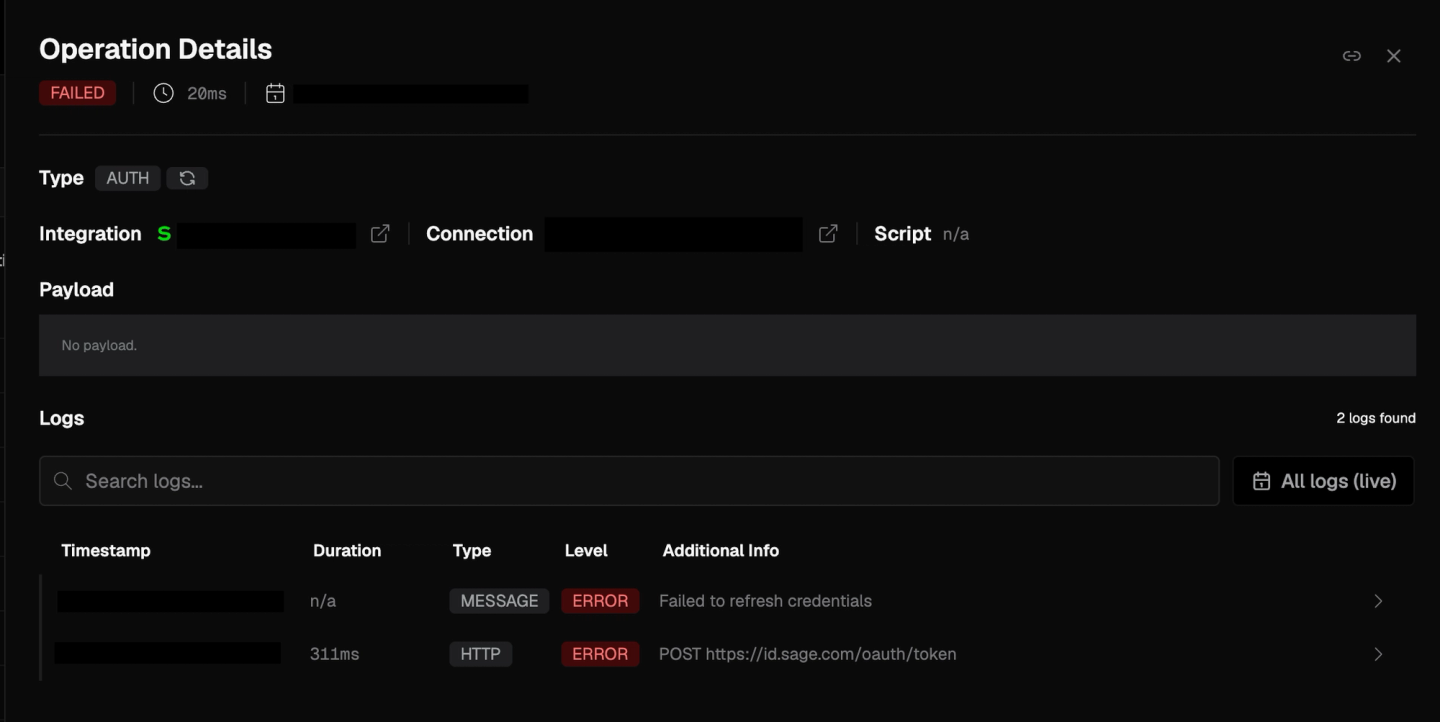
We observed the same sequence across the affected connections, but could not find it in Sage’s OAuth documentation. If a working connection fails after another authorization, check for this pattern first.
If a Sage Intacct connection starts returning REST-2102 after another connection was authorized for the same user and company, re-authorize the failed connection and keep only one authorization-code connection for that pair. Use a separate Sage Intacct user or client credentials when connections must remain independent.
What does Sage Intacct “Token is not valid” mean?
Sage Intacct can report similar token problems through different responses:
| Error | Where it appears | What to check first |
|---|---|---|
Token is not valid (REST-2102) | REST API request | The access token was rejected. Try one token refresh. |
The token is not valid (REST-1206, HTTP 400) | REST API request | The token may be expired or invalid. Try one token refresh. |
Expired token (GW-0040, HTTP 401) | REST API request | Refresh the access token and retry the request once. |
invalid_grant | OAuth token endpoint | The stored refresh token is no longer usable. |
invalid_client | OAuth token endpoint | Test a fresh authorization before rotating credentials. |
The Client ID, Client Secret, and/or 3rd Party Application are incorrect (REST-1216) | OAuth token endpoint | Client credentials, and whether the company has authorized the client application. |
Invalid Request (GW-0011) | Any request | An inactive or invalid sender ID, client ID, or tenant. Ask the admin to check the company's Web Services authorizations. |
Invalid Token (GW-0031), Invalid Authorization Header (GW-0034) | Any request | Request construction, not revocation. Check the Bearer header and endpoint path. |
This is what a rejected access token looks like on an API call:
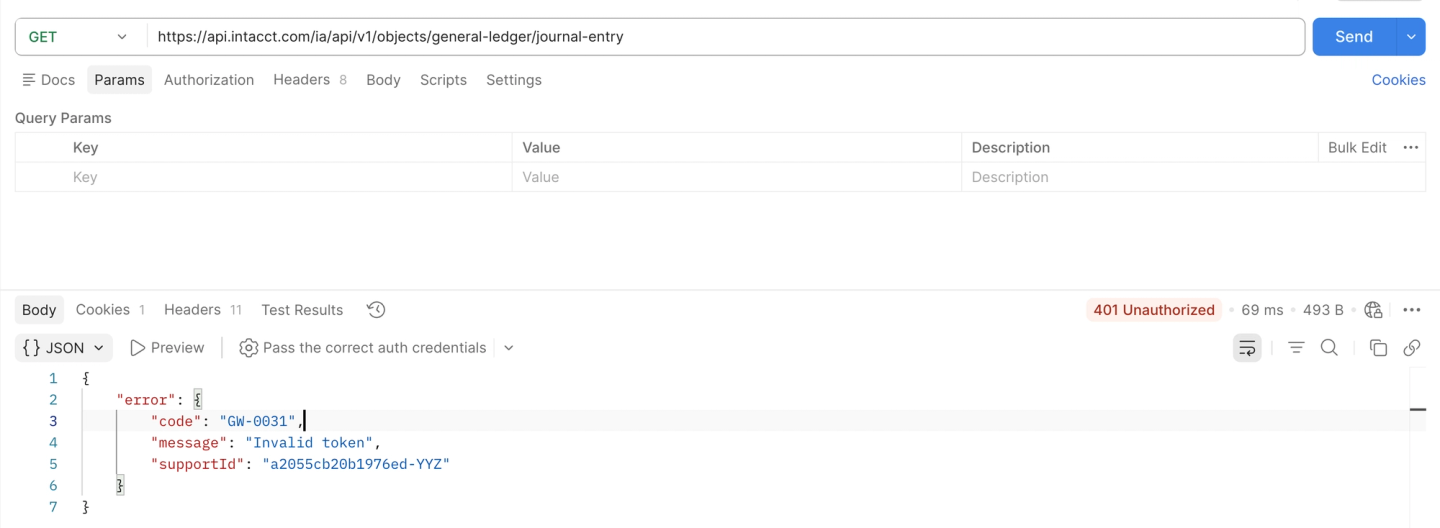
Start with the refresh request to https://api.intacct.com/ia/api/v1/oauth2/token. If it succeeds and the retried API call works, the access token had expired. If the refresh itself fails, inspect the causes below. A dead refresh token fails like this:
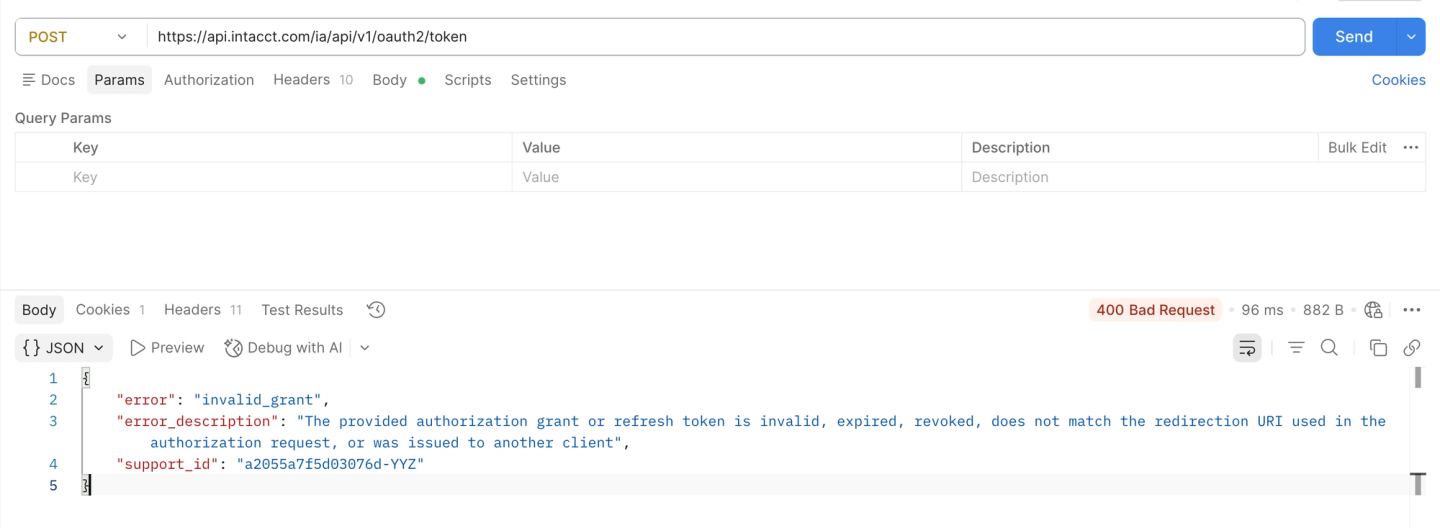
Sage’s error responses are not fully consistent. In July 2025, Sage staff said expired tokens should return 401, while invalid JWTs should return 400. Developers continued to report REST-1206 with HTTP 400 for tokens they believed had expired. Check the error body as well as the status code.
How do you fix Sage Intacct OAuth refresh failures?
1. Another authorization replaced the working grant
In our customer’s case, Sage Intacct appeared to keep one working authorization-code grant for each user and company pair. Authorizing the same user and company again made the previous connection’s refresh token unusable.
This can happen when:
- Development and production use the same Sage Intacct user and company
- A developer repeats the OAuth flow and creates another connection
- A second tool authorizes the same integration user
To confirm it, compare the failed connection’s last successful refresh with the creation time of the next connection for that user and company. In our logs, those times matched for every affected connection.
Re-authorize the failed connection, then prevent another duplicate. Keep one connection for each user and company pair. If you need parallel authorization-code connections, use a separate Sage Intacct user for each environment or tool. For server-to-server access, use client credentials with separate Web Services users. When reconnecting through Nango, update the existing connection instead of creating a second one.
Because Sage does not document this behavior, treat it as an observed limitation rather than a guaranteed platform rule. Contact Sage support if your logs do not show the same sequence.
2. The access token expired
An expired access token does not mean the OAuth connection is broken. Refresh the token, store the new credentials, and retry the API request once.
Use the expires_in value from the token response instead of assuming a fixed lifetime. Refresh before that deadline. Also handle the specific REST-1206 HTTP 400 response as a possible expiry signal, since relying on 401 alone can miss it.
If the refresh succeeds, stop investigating refresh-token revocation. The problem was the access token used for the API call.
3. The application stored a stale refresh state
OAuth token refreshes need to be serialized per connection. Two workers refreshing the same connection can race, leaving one worker with stale credentials.
Sage does not document whether Intacct refresh tokens are single-use. A safe implementation should still:
- allow only one refresh request at a time for each connection
- store the access token, refresh token, and expiry together
- replace the stored refresh token whenever Sage returns a new one
If two refresh requests ran at the time of failure, fix the locking and re-authorize the connection. See how to handle concurrency with OAuth token refreshes for implementation patterns.
4. The authorization omitted offline_access
Sage Intacct only issues a refresh token when the authorization request includes scope=offline_access. Without it, the initial access token works, but there is nothing to refresh when it expires.
Check the original token response. If it never contained a refresh_token, add offline_access to the authorization URL and authorize again. Sage staff confirmed this requirement in September 2025.
5. A revoke request invalidated the shared token pool
Sage Intacct pools tokens for the same user and company. Revoking one token also revokes the other tokens in that pool, according to Sage’s OAuth documentation.
Check whether a cleanup job, staging environment, or another tool called the revoke endpoint. Re-authorize, isolate environments with separate Web Services users, and only revoke a token when you intend to end that user’s API access.
6. The client ID, secret, or company authorization is wrong
Check this cause when a fresh authorization also fails. Common problems include an outdated client secret, the wrong client ID, or API keys created for Non-production and used against a production company. Sage fixes the client scope when the keys are created, so changing environments requires new keys.
The company must also authorize the client application. A Sage Intacct admin can verify that the client ID is active under Company > Security > Authorized client applications. A Web Services user is attached there when using the client credentials grant. The REST-1216 error can indicate bad credentials or a client application that the company has not authorized.
Do not rotate a client secret only because an existing refresh failed with invalid_client. A Sage forum report shows the same client ID and secret working again after a fresh authorization. Test a new authorization before changing shared credentials.
Consider client credentials for server-to-server access
For a backend integration that does not need user-delegated access, Sage Intacct supports the client credentials grant. Your service requests an access token with the client ID, client secret, and Web Services user. There is no browser authorization or refresh token to maintain.
A Sage Intacct admin must add the client ID and Web Services user under Company > Security > Authorized client applications. Nango’s Sage Intacct client credentials integration and connection guide implement this flow.
Client credentials remove refresh-token failures, but revocation still cascades across access tokens for the same user and company. Continue to isolate environments when they need independent credentials.
FAQ
Can I create multiple OAuth connections to the same Sage Intacct company?
Not reliably with the same user. In our observation, only the most recent authorization kept a working refresh token; earlier connections were invalidated without warning. If you need parallel connections, authorize each one with a separate Sage Intacct user, or use the client credentials grant.
Does Sage 200 also invalidate previous OAuth connections?
Yes, in our testing. Creating a new connection for a Sage 200 user invalidated that user’s previous connection. Sage 200 documents an 8-hour access token and refresh tokens of up to 90 days, but does not document the single-connection behavior either.
Handling Sage Intacct authentication with Nango
Nango lets you connect your AI agent and apps to 1,000+ APIs. Its catalog includes 10,000+ pre-built tools that you can customize with code and run on infrastructure built for scale.
For Sage Intacct, Nango supports both OAuth and client credentials. It stores credentials, refreshes OAuth tokens, and marks connections invalid when a permanent refresh failure requires reconnection. In this case, its per-connection auth logs helped us identify the second authorization as the trigger.
Reconnect the affected connection and keep one authorization-code connection per Sage Intacct user and company. Use separate Sage Intacct users for independent authorization-code connections, or use client credentials with separate Web Services users.

