
An MCP gateway is a service that sits between your AI agents (MCP clients) and the MCP servers they call, and applies authentication, authorization, routing, and audit logging to that traffic in one place.
If you’re building API integrations for production AI agents, you’ll quickly run into MCP gateway products. This post explains what an MCP gateway does, how it differs from an MCP proxy and an MCP server, and how to decide whether you need an MCP gateway.
TL;DR
- An MCP gateway is a central entry point for agent-to-tool traffic: agents connect to the gateway, which enforces identity, tool-level policy, routing, and audit across the MCP servers behind it.
- An MCP proxy is thinner: it bridges transports (stdio to Streamable HTTP) or aggregates servers behind one endpoint, without a policy layer.
- Three signals that a gateway is warranted: many MCP servers used by many clients or teams, per-user or per-tenant access isolation, and compliance needs, such as a central audit trail of which identity called which tool.
- One case where it is not: a single team connecting a handful of MCP servers to agents its own engineers supervise. Direct connections or a thin proxy are enough, and a gateway adds latency and operational load without a matching problem.
What is an MCP gateway?
MCP (Model Context Protocol) standardizes how agents discover and call tools: an MCP client connects to an MCP server, lists its tools with tools/list, and invokes them over JSON-RPC. That works cleanly for one client and one server.
However, an organization usually ends up with many MCP servers (internal tools, third-party servers, wrapped APIs) and many clients (product agents, internal agents, coding agents like Claude Code and Cursor). Every client-server pair is a separate connection to authenticate, authorize, monitor, and upgrade. The gateway pattern helps manage this more effectively: clients connect to a single endpoint, and the gateway manages the servers behind it.
There are two planes to an MCP gateway:
- The data plane: the request path. The gateway receives MCP requests, checks identity and policy, routes them to the right backend server, and streams results back.
- The control plane: the management surface. A server registry, tool policies, credential configuration, and dashboards for logs and usage.
Because the MCP specification does not define a gateway, every vendor implements it differently. Some gateways are little more than a registry with logging. Others enforce tool-level authorization on every call.
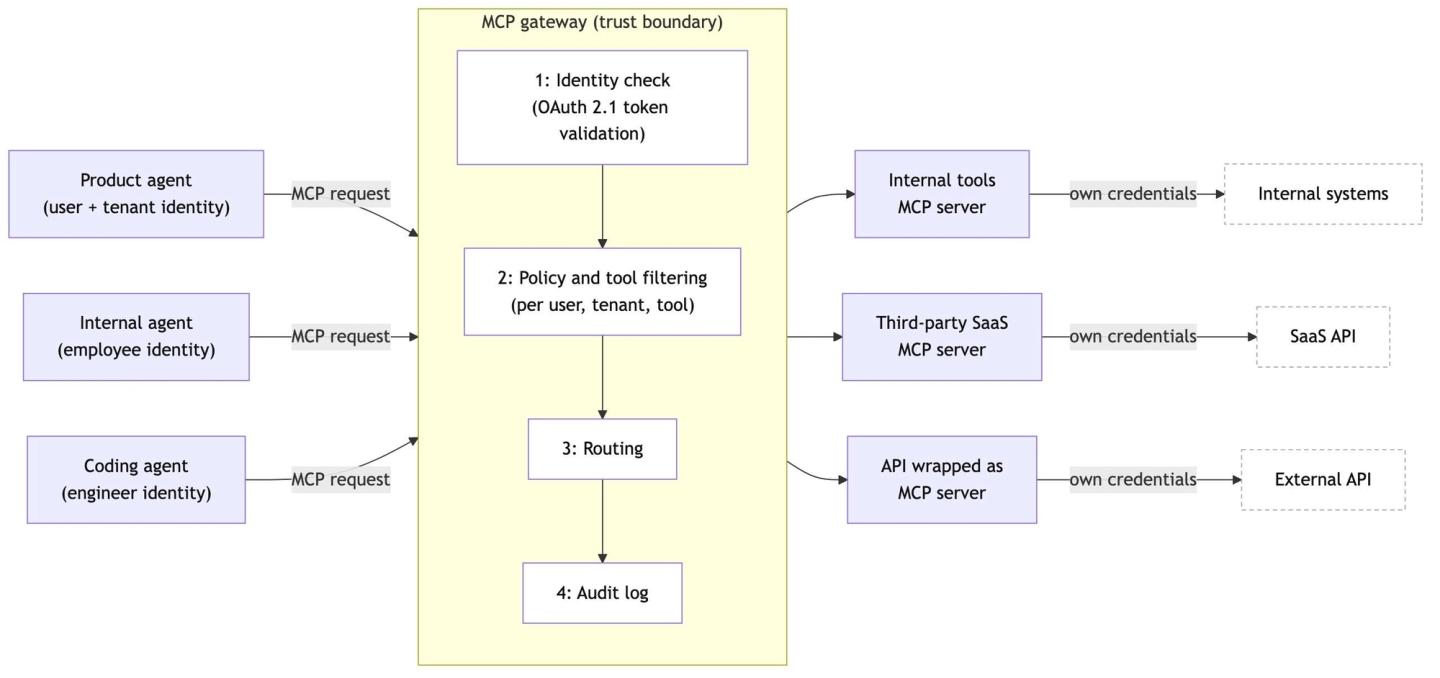
How a tool call flows through an MCP gateway
The gateway does work at each step of a tool request:
- Discovery: The agent calls
tools/listagainst the gateway, which returns a filtered set based on who is asking instead of a server’s full catalog. That matters for LLM token usage and accuracy. - Identity: The gateway can terminate authentication. The MCP authorization spec defines an optional OAuth 2.1 flow for HTTP transports in which the protected MCP server acts as the resource server, and a gateway standing in front handles token validation.
- Authorization and policy: Authentication establishes who is calling; authorization decides what they may do.
- Routing and sessions: The gateway maps the tool call to the backend server that owns it. Until mid-2026, this included sticky-session handling, since the
Mcp-Session-Idheader pinned a client to a server instance. The MCP specification released on July 28, 2026 removes protocol-level sessions and addsMcp-MethodandMcp-Nameheaders so intermediaries can route without parsing request bodies. - Execution: The backend MCP server runs the tool against the underlying API or system, with its own credentials. Managing those backend credentials is separate from validating caller tokens: the spec explicitly forbids token passthrough, so a server must not forward the token it received from the client to upstream APIs. Teams usually use a separate agent integration provider to manage OAuth tokens.
- Audit: The gateway records identity, tenant, tool, arguments, outcome, and latency for every call.
MCP gateway vs MCP proxy vs adjacent components
Product naming in this space is inconsistent. Microsoft’s open-source MCP gateway describes itself as a reverse proxy. IBM’s ContextForge calls itself a gateway, registry, and proxy. Many products marketed as gateways are proxies with a dashboard.
Components that usually get mixed:
| Component | What it does | Traffic it handles | MCP-aware | Policy depth | Best fit |
|---|---|---|---|---|---|
| MCP server | Executes tools against an API or system | MCP (JSON-RPC) | Yes | Its own tools only | Exposing one system's capabilities to agents |
| MCP proxy | Bridges transports or aggregates servers behind one endpoint | MCP | Yes | Typically none; product-dependent | Local dev, stdio-to-HTTP bridging, simple aggregation |
| MCP gateway | Central entry point enforcing identity, policy, routing, audit | MCP | Yes | Tool-level, per user and tenant | Many servers and clients under governance |
What production problems does an MCP gateway solve?
An MCP gateway should have these capabilities. But from our research, no single product provides all of them:
- Tool aggregation and filtered discovery: One endpoint for all servers, with each client seeing only the tools relevant to it. This keeps context small and tool selection accurate, the same problem we covered in MCP vs tool calls for AI agents.
- Authentication and tool-level authorization: The spec defines an optional MCP OAuth flow for validating who the caller is. It does not define which tools the caller may use, with what limits; that policy layer is left to each implementation. A gateway can centralize the policy rather than reimplement it per server, but it does not remove each server’s obligation to authorize requests.
- Per-user and per-tenant isolation: The gateway keeps tenant A’s identity, credentials, and tool access separate from tenant B’s, and makes the isolation auditable.
- Central policy, quotas, and approvals: Rate limits per agent, human approval on destructive tools, allowlists per environment, enforced once rather than in every server.
- Routing, resilience, and versioning: Health checks, retries, failover between server instances, and controlled rollout when a server’s tool catalog changes.
- Audit, observability, and security controls: Logs and traces of agent-to-tool traffic in one place, and a natural point to control which servers are allowed in at all.
Do you need an MCP gateway?
Start small if you’re just getting started with agent integrations. A useful maturity path:
- Start direct: One agent, a few MCP servers, your own engineers supervising. Connect directly.
- Add a proxy when plumbing hurts: You need a stdio server reachable over HTTP, or one endpoint in front of three servers for convenience.
- Add a gateway when governance hurts: Multiple teams or customers share tool access, security asks who called what with whose identity, or policy has to be consistent across servers you do not all control. Signals that you are at step 3:
- Agents connect to several MCP servers
- Different users or tenants must see different tools, or act with different credentials
- You need quotas, approvals, or kill switches that apply across servers
One thing the checklist leaves implicit: a gateway is not free. Every tool call traverses an extra hop, gateway downtime is agent downtime, and someone has to own it as a production service, maintaining server registrations and policies as the catalog changes.
Probably not yet if any of these describe you:
- One team, one product agent, one to three MCP servers: direct connections with per-server auth are simpler and faster.
- Your agents run only in developer tools (Claude Code, Cursor) under engineer supervision, with developer-scoped access to low-sensitivity systems: that risk model does not yet justify a governance layer. Supervised agents that reach production systems or sensitive tools are a different case, and the checklist above applies.
- Your real problem is connecting agents to customer accounts on external APIs: that is an integration and credential problem underneath the MCP layer, and a gateway does not solve it (more below).
Where Nango fits
Nango provides the integration infrastructure beneath an MCP gateway layer: a gateway governs which agents may call which tools, while Nango connects your AI agent to 1,000+ APIs with 7,000+ customizable pre-built tools.
For teams building agents into their products:
- A hosted MCP server: Nango’s MCP server at
https://api.nango.dev/mcpexposes the tools you enable to your agent, scoped to one customer connection per request. The same tools are callable over REST if your stack is not MCP-native. - Customizable with code: When a pre-built tool does not match your product’s intent, adjust it or add a new one as a code function, written by you or by coding agents like Claude Code, Cursor, and Codex. The platform is open source.
- MCP authentication to external servers: MCP Auth lets your users authorize official MCP servers (Notion MCP, Linear MCP, HubSpot MCP) through your app. Nango runs the MCP OAuth flow, including client registration and PKCE, stores and refreshes the tokens, and proxies your MCP calls with the right user’s credentials attached.
- Credential isolation by default: Each customer’s tokens stay server-side and are attached per request, so your agent only ever holds a connection ID.
- Execution logs for every call: Each tool execution produces full request and response logs with OpenTelemetry export, so the audit trail extends below the MCP layer into the actual API calls.
FAQ
What is an MCP gateway?
An MCP gateway is a service that sits between MCP clients (AI agents) and one or more MCP servers, and centralizes authentication, tool-level authorization, routing, and audit logging for agent-to-tool traffic. It is an architectural pattern that teams add for governance and operations, not a component of the MCP protocol: the specification defines hosts, clients, and servers, and no gateway.
What is the difference between an MCP proxy and an MCP gateway?
An MCP proxy moves traffic; an MCP gateway governs it. Proxies handle transport bridging (stdio to Streamable HTTP) and simple aggregation of servers behind one endpoint, typically without per-user policy. A gateway authenticates callers and enforces per-user, per-tenant, and per-tool rules, with audit logs. Vendors use the labels loosely, so evaluate capabilities rather than names.
Is an MCP gateway the same as an API gateway or an AI gateway?
No. An API gateway fronts HTTP APIs for client applications, an AI gateway fronts LLM providers for cost and key management, and an MCP gateway fronts MCP servers for agent tool calls. They govern different traffic, and a production agent stack can use all three. Some API gateway vendors now ship MCP features on their existing products.
Do I need an MCP gateway for one MCP server?
No. With one server (or a small handful used by one team), connect directly and let each server’s own auth handle access. A gateway pays off when many clients and servers need consistent policy, isolation, and audit, and it costs an extra network hop plus a service to operate.
Are there open-source MCP gateways?
Yes. Docker’s MCP Gateway, IBM’s ContextForge, Microsoft’s MCP Gateway, and Lasso Security’s mcp-gateway are open-source projects, each with a different emphasis (container isolation, federation, session-aware Kubernetes routing, and security guardrails). Expect to operate whichever one you choose as a production service.
Related reading:

