

- BYOC — Nango deploys and operates your instance inside your own AWS account, GCP project or Azure subscription. Recommended for most Enterprise self-hosting customers.
- Self-Managed — you deploy and operate Nango yourself, on your own infrastructure, using our Helm chart.
Choose your path
Both paths require an Enterprise plan subscription and are intended for large and/or regulated organizations. Pricing is a fixed annual license and maintenance fee, plus a fraction of the Cloud usage-based fees, since infrastructure runs on your side either way. Talk to us at nango.dev/contact to get started with either — or read the BYOC and Self-Managed pages for the details of each.
Architecture overview
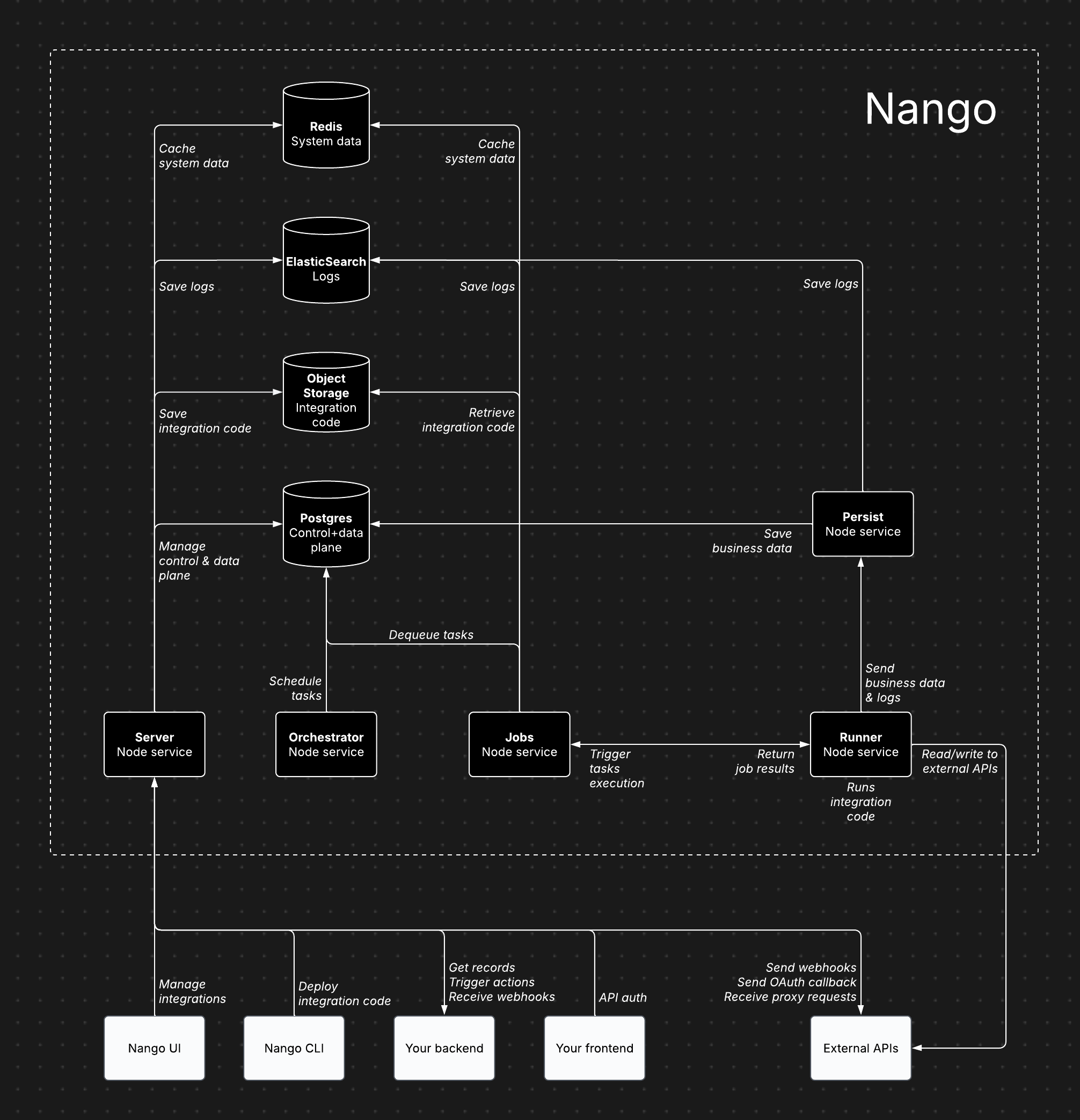
Nango's infrastructure components
Architecture components
Nango consists of several core services, each handling specific responsibilities:- Server (Node service): Powers the dashboard, API, proxy requests, and incoming/outgoing webhooks.
- Orchestrator (Node service): Manages task scheduling and state tracking.
- Jobs (Node service): Processes tasks and dispatches them to the Runner.
- Runner (Node service): Executes integration code and interacts with external APIs.
- Persist (Node service): Stores synced records and logs.
- Postgres: Stores data for the control plane, API credentials, scheduled tasks, and synced records.
- Object storage (S3, GCS, or Azure): Stores compiled integration code for execution by the Runner.
- ElasticSearch: Stores customer-facing observability.
- Redis: Caches system data, including socket information, token refresh locks, and rate limits.
Cloud vs. self-hosted architecture
The Nango architecture is largely the same for both Cloud and Enterprise self-hosting (BYOC or Self-Managed). This ensures self-hosted instances benefit from continuous dogfooding and load testing.Features
All paid features available on Nango Cloud are also included in both BYOC and Self-Managed.Recommended configuration
- 5 Node services (Server, Persist, Runner, Jobs, Orchestrator): 1 CPU, 2GB RAM per service
- Postgres database: 2 CPU, 8GB RAM, 128GB storage
- Redis data store: 128MB
- ElasticSearch data store: 2 vCPU, 1GB RAM, 30GB storage
- Object storage (S3, GCS, or Azure): less than 500MB of storage
Scaling
The default configuration supports 1M+ sync/action executions per day (assuming ~2s execution time per action/sync). Bottlenecks mostly depend on:- Action/sync execution time: solved by scaling the Runner service vertically, then horizontally.
- Cached records & size (for sync functions only): solved by scaling Postgres vertically.
Data storage
- Postgres: Stores data for the control plane, API credentials, scheduled tasks, and synced records.
- Object storage (S3, GCS, or Azure): Stores compiled integration code for execution by the Runner.
- ElasticSearch: Stores customer-facing observability.
- Redis: Caches system data, including socket information, token refresh locks, and rate limits.
Using existing data stores
Yes, Nango is flexible with data store setups. However, we recommend a separate instance for independent scaling.Internet access requirements
- Server: Required for proxy requests, credential management, and incoming/outgoing webhooks.
- Runner: Required for reading/writing data from external APIs during sync and action executions.
Exporting metrics & logs
Metrics and logs can be exported to any monitoring tool you own using our OpenTelemetry Export add-on. Additional metrics and logs can be added upon request.Email service
Nango uses emails for account verification, password reset, and sending invitations, etc. Any SMTP server can be configured to be used by Nango for these email communications.Free self-hosting
A limited free self-hosting option is available for hobby projects, separate from BYOC and Self-Managed. It is intended for lightweight deployments that need Auth and Proxy, without the managed features and support included with Enterprise self-hosting (BYOC or Self-Managed) or Nango Cloud.Trust model
A self-hosted Nango instance is intended for a single organization. Accounts on the same instance keep their own data separate in normal use, but they are not designed or hardened as a security boundary between users who don’t trust each other. Only give dashboard access to people you trust. Instance-level configuration is shared across all accounts. In particular,NANGO_SECRET_KEY_<ENV> and NANGO_PUBLIC_KEY_<ENV> apply to environments by name, in any account on the instance.
Signup is enabled by default. If your dashboard is reachable by anyone you don’t fully trust, disable signup and protect the dashboard with basic auth (below), or keep it on a private network.
For more details, see the pricing page or schedule a call to discuss BYOC or Self-Managed.
Feature availability
Run and update Nango
To install the free self-hosted version on a VM:Related guides
- BYOC - deployment, access model, and FAQ.
- Self-Managed - quickstart, configuration reference, and FAQ.
- Security - review data, encryption, and access controls.
- Environments - organize dev, staging, and production setups.
- Changelog - track changes that affect self-hosted upgrades.