
The GitHub API can return 404 Not Found for a repository your users can open in their browsers. This can stop your integration from syncing issues, fetching pull requests, or reading repository code.
Use the checks below to identify the cause and fix the failing request with curl or a coding agent.
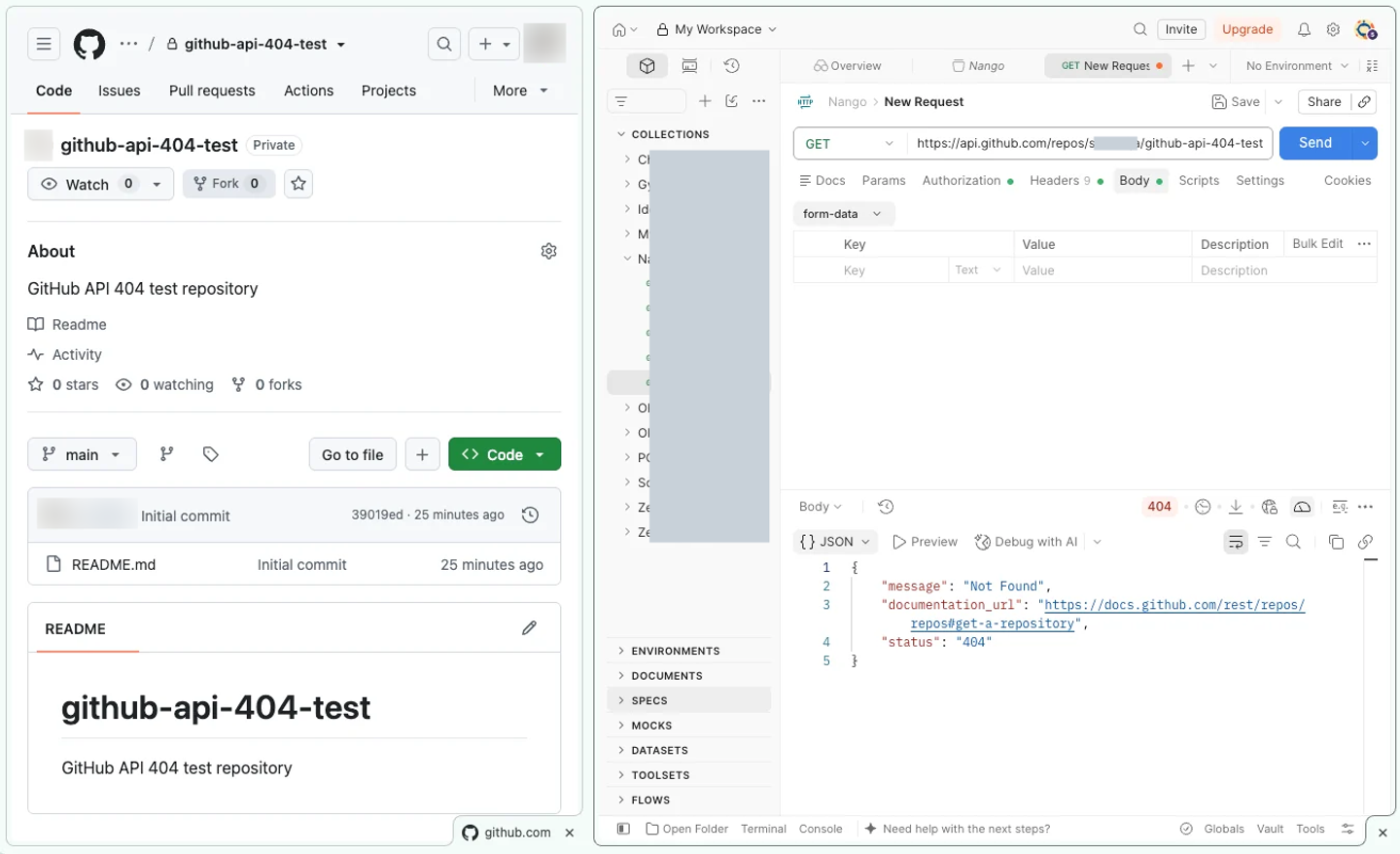
1. Reproduce the error with curl
For private repositories, GitHub uses 404 to avoid revealing that the repository exists when the request lacks access. Start by checking what your integration’s token can see.
Set GH_API_TOKEN in your local environment to the token used by the failing integration. Replace OWNER and REPO, then request the repository’s metadata:
curl -sS -i "https://api.github.com/repos/OWNER/REPO" \
  -H "Authorization: Bearer $GH_API_TOKEN" \
  -H "Accept: application/vnd.github+json" \
  -H "X-GitHub-Api-Version: 2026-03-10"
The -i flag includes response headers. Use the result to choose your next step:
- 200: The token can read repository metadata. Check the original failing endpoint’s resource path and required permissions.
- 301: Follow
Locationfor a renamed or transferred repository and update the stored URL. - 401: Fix the invalid or expired credentials before checking repository access.
- 403: Read the response body. It may identify a missing permission or organization restriction.
- 404: Continue with the request and access checks below.
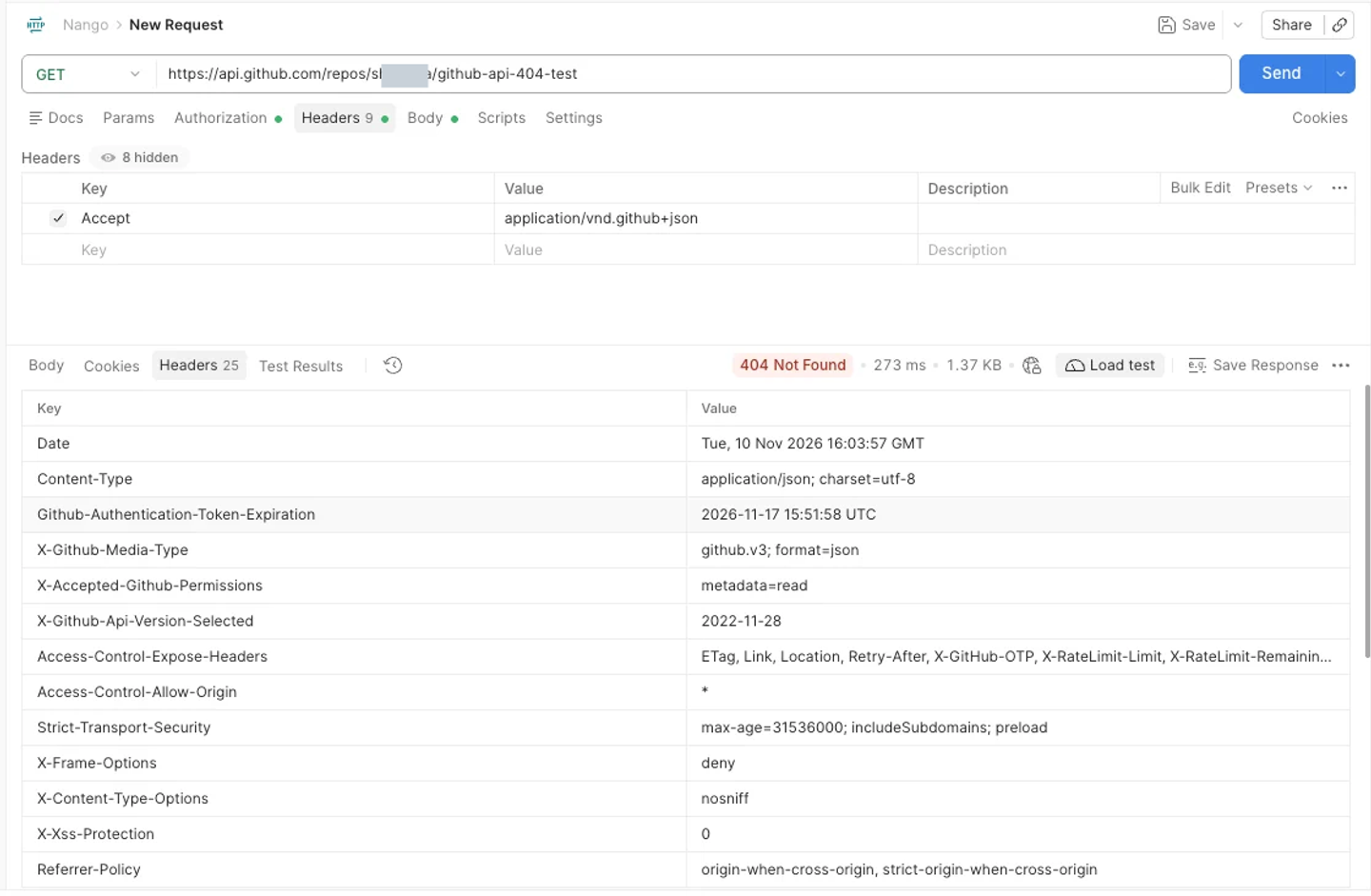
Look for X-OAuth-Scopes and X-Accepted-OAuth-Scopes for classic PATs and OAuth tokens. For fine-grained PATs and GitHub Apps, X-Accepted-GitHub-Permissions can identify the endpoint’s required permissions. X-GitHub-SSO can point to an SSO authorization issue. These headers aren’t present on every response.
You can also ask Claude Code, Cursor, or Codex to run these checks in your project:
Debug this GitHub API 404 using the integration's existing credentials.
Check the request URL and method, token type, authenticated identity,
repository access, and response headers. Explain the likely cause
and the specific fix. Do not print tokens or Authorization headers.
2. Rule out a request error
Before changing permissions, check:
- URL and method: Verify the owner, repository name, and HTTP method against the endpoint reference. Remove a trailing slash. GitHub can return 404 for an unsupported method.
- Path parameters: URL-encode values where the endpoint requires it, including slashes inside a single path parameter.
- Account type:
/orgs/OWNER/reposexpects an organization. It returns 404 for a personal account. For installation tokens, use/installation/repositoriesto discover accessible repositories across either account type.
GitHub documents the URL and method checks in its REST API troubleshooting guide.
3. Apply the fix for your token type
Identify the token locally by its prefix:
| Prefix | Token type | Start here |
|---|---|---|
ghp_ | Personal access token (classic) | Classic PAT or OAuth scopes |
gho_ | OAuth app access token | Scopes, then OAuth app restrictions |
github_pat_ | Fine-grained personal access token | Resource owner, repositories, and permissions |
ghs_ | GitHub App installation access token | Installation access |
ghu_ | GitHub App user access token | Installation and user access |
For user-based tokens, confirm the account with:
curl -sS "https://api.github.com/user" \
  -H "Authorization: Bearer $GH_API_TOKEN" \
  -H "Accept: application/vnd.github+json"
Check the login field. That account must have access to the repository. Adding token permissions cannot restore access the user has lost. Installation tokens (ghs_) use the repository-listing check below instead.
Classic PAT or OAuth token: missing repo scope
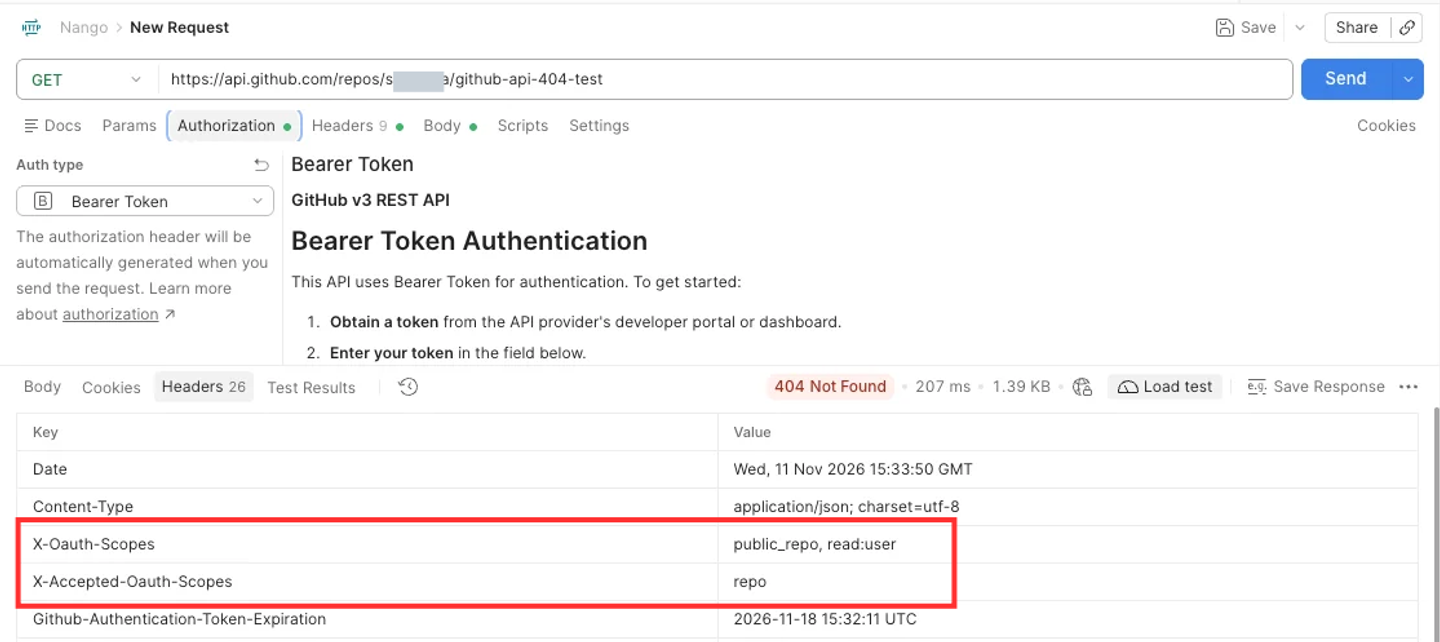
Check: In the response from step 1, compare X-OAuth-Scopes with X-Accepted-OAuth-Scopes. For example:
HTTP/2 404
x-oauth-scopes: public_repo, read:user
x-accepted-oauth-scopes: repo
The public_repo scope doesn’t grant access to private repositories. General private repository access requires repo, which includes read and write access.
Fix: For a classic PAT, open Settings > Developer settings > Personal access tokens > Tokens (classic) and enable repo. For an OAuth app, request repo in your authorization flow and have the user authorize again.
If the organization enforces SAML SSO, also check the token’s SSO authorization after changing scopes.
Fine-grained PAT: wrong owner, repository, or permissions
Check: Open Settings > Developer settings > Personal access tokens > Fine-grained tokens and inspect these settings:
| Setting | Fix |
|---|---|
| Resource owner | It must match the repository's owner. Create a new token if you selected your personal account instead of the organization. |
| Repository access | Add the required repository to the selected list. |
| Permissions | Grant the permissions required by the failing endpoint, such as Pull requests: read. |
| Organization approval | If the token is pending, an organization owner must approve it. Pending tokens can only read public resources. |
These are separate restrictions in GitHub’s fine-grained PAT configuration. Fine-grained tokens don’t use OAuth scopes, so an absent X-OAuth-Scopes header is expected.
If the response says Resource not accessible by personal access token, check X-Accepted-GitHub-Permissions and the endpoint reference for the required permission.
GitHub App: repository missing from the installation
Check: With an installation access token (ghs_), list the repositories that token can access:
curl -sS -i "https://api.github.com/installation/repositories?per_page=100" \
  -H "Authorization: Bearer $GH_API_TOKEN" \
  -H "Accept: application/vnd.github+json"
Find OWNER/REPO in repositories[].full_name. Follow the next-page URL in the Link response header before concluding that it’s missing. This endpoint accepts installation tokens.
With a GitHub App user token (ghu_), list installations first, then use the relevant installation ID:
curl -sS -i "https://api.github.com/user/installations?per_page=100" \
  -H "Authorization: Bearer $GH_API_TOKEN" \
  -H "Accept: application/vnd.github+json"

curl -sS -i "https://api.github.com/user/installations/INSTALLATION_ID/repositories?per_page=100" \
  -H "Authorization: Bearer $GH_API_TOKEN" \
  -H "Accept: application/vnd.github+json"
The user-token endpoint only returns repositories accessible to both the user and the installation. Check additional pages for both requests.
Fix: Open the app’s installation settings on the account that owns the repository. Add the missing repository, or install the app on that account if it was installed elsewhere.
If the repository appears but the original endpoint still fails, compare its required permissions with those granted to the app. Ask the customer to approve updated permissions when needed.
Also check your token-generation code: repository_ids, repositories, or permissions can narrow an installation token’s access. Generate a fresh token with the intended repository and permissions after correcting those parameters.
SAML SSO: token not authorized for the organization
Check: A classic PAT needs separate authorization for organizations that enforce SAML SSO. GitHub may return 403 or 404. A 403 can include an authorization URL:
x-github-sso: required; url=https://github.com/orgs/ORG/sso?authorization_request=...A 404 may omit that header, so check the organization’s SSO requirements even if no URL appears.
Fix: Go to Settings > Developer settings > Personal access tokens > Tokens (classic) > Configure SSO and authorize the token for the organization. The user must first sign in through the organization’s identity provider.
For OAuth apps and GitHub App user authorization, sign in through the organization’s SSO before authorizing the app. Fine-grained PATs receive SSO authorization during creation; installation tokens don’t need separate user SSO authorization.
OAuth app: blocked by the organization
Check: Your gho_ token has repo, the user can open the private repository, and organization repositories still fail. Check whether the organization has approved the OAuth app. A successful personal authorization doesn’t grant organization approval.
Fix: Open Settings > Applications > Authorized OAuth Apps, select the app, and request access next to the organization. An organization owner must approve the request.
4. Retry the original request
After correcting access, rerun both the metadata request and the original failing request with the updated credentials. For GET /repos/OWNER/REPO, expect 200 OK with repository metadata. Other endpoints also need their own resource paths and permissions to be correct.
If metadata still returns 404, revisit the repository name, token identity, repository selection, and organization restrictions. A token can have more than one access issue.
Troubleshoot a GitHub connection through Nango
Nango lets coding agents such as Claude Code, Cursor, and Codex build API integrations, while its runtime manages authentication, credentials, and execution.
For an existing GitHub connection, use Nango’s Request Proxy to reproduce the request without retrieving the GitHub token:
curl -sS -i "https://api.nango.dev/proxy/repos/OWNER/REPO" \
  -H "Authorization: Bearer $NANGO_API_KEY" \
  -H "Provider-Config-Key: GITHUB_INTEGRATION_ID" \
  -H "Connection-Id: GITHUB_CONNECTION_ID" \
  -H "Accept: application/vnd.github+json"
Set NANGO_API_KEY to your environment API key with proxy access and replace the integration and connection IDs. Nango adds the connection’s GitHub credentials and passes back GitHub’s response status, headers, and body. Use the same checks above, then inspect the failed request in Nango Logs.
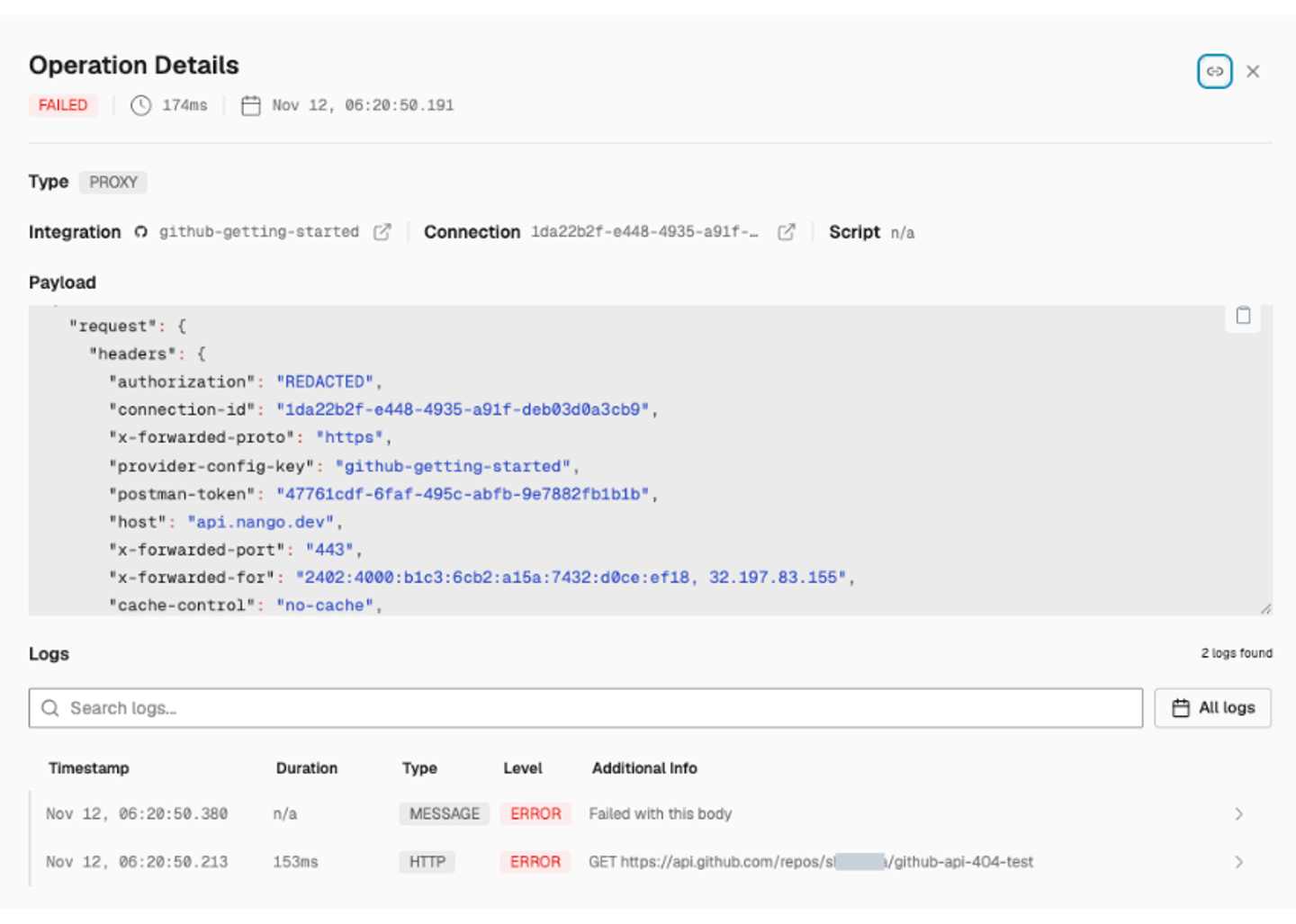
Repository selection, app approval, and SSO authorization still need to be corrected in GitHub. For a complete integration build, see Build a GitHub API integration for AI agents using Nango.

