
Your AI agents need a well-built integrations layer that works with each customer’s accounts and permissions. Your team has to decide whether to build those integrations in-house or use a platform like Nango.
Building in-house often starts with tools generated by coding agents or supplied by vendor MCP servers. If you take that route, your team also has to keep those tools up to date, run them reliably, enforce permissions, and record what the agent did. That work grows as you add providers and customers run more tasks.
Those responsibilities become annual engineering costs, in addition to the tokens and infrastructure required to run each task. Well-designed tools can also lower the bill by using fewer tokens per task. Together, these costs explain why Nango can cost less than building and running an equivalent system for a product with many integrations.
| Work | Building in-house | What Nango provides |
|---|---|---|
| Adding a new API | Your team integrates the provider’s auth flow and builds the first operations your agent needs. | Preconfigured auth for 1,000+ APIs and catalog tools where available. Your team can add missing operations. |
| Creating OAuth apps | Your team registers an app with each provider and completes any required review before launch. | Nango registers and maintains pre-approved OAuth apps for 75+ APIs. You can bring your own app for branded consent or additional scopes. |
| Maintaining API integrations | Your team tracks provider changes and updates affected endpoints, scopes, and request formats. | Nango maintains supported auth integrations and shared catalog code. Your team owns provider calls in its custom code. |
| Building tools | Your engineers design the inputs and outputs, implement the API calls, and test each tool. | 10,000+ prebuilt tools for common operations and a runtime for custom tools. |
| Maintaining tools | Your team handles bug reports, API quirks, and regressions across the catalog. | Nango maintains shared tools. Your team controls updates and tests for tools it copies or customizes. |
| Community and peer review | Not possible when building in-house. | Nango is open-source, so you or others can inspect the code, flag API quirks, and propose fixes that benefit other teams. |
| Exposing tools securely | Your backend maps users to credentials and enforces which operations each agent can run. | Agent Sessions scope calls to the connections and tools your backend authorizes. Provider credentials stay outside the model. |
| Reducing token usage | Your team pays for extra model turns and large API responses until it optimizes each workflow. | On-demand tool discovery and functions that can return selected fields or combine calls before results reach the model. |
| Handling auth changes | Your team maintains token refresh and adapts to provider OAuth changes. | Managed credential refresh and updates to supported auth flows. Customers may still need to reconnect when a provider requires consent. |
| Running tools | Your team operates the compute for tool calls and handles failures as volume grows. | A functions runtime for integration code. Custom tools can run against a specific customer connection. |
| Handling personal data (PII) and protected health information (PHI) | Your team builds access controls and limits which sensitive fields reach the model or logs. For HIPAA workloads, it also manages agreements with vendors that handle PHI. | Nango offers a Business Associate Agreement for HIPAA workloads. Your team still controls which fields its tools return to the model and what its custom functions log. |
| Hosting in the EU for data residency | Your team deploys the integration runtime and storage in the required EU region and owns upgrades, scaling, and on-call support. | With Enterprise BYOC, Nango deploys and operates the instance in your own AWS, Google Cloud, or Azure account in your chosen EU region. |
| Keeping audit logs | Your team records who changed configuration, which agent acted, and who authorized it. | The Enterprise audit trail retains account changes for 1 year by default. Execution traces can be linked to approval records in your app. |
| Investigating failures | Your engineers instrument calls and trace errors back to a provider, tool, or customer account. | Searchable operation logs, with request and error details by integration, connection, and status. |
| Measuring performance and cost | Your team collects call volume, error rate, and latency, then joins those metrics to model spend. | OpenTelemetry traces cover 4 operation types (tool runs, syncs, incoming webhooks, and proxied requests) for custom metrics in your monitoring stack. Token costs come from your model usage data. |
To compare buying vs. building in-house, divide work into three areas: auth and the tool catalog; the execution engine; and observability, security, and audit.
Keeping auth and tools up to date
Building agent integrations starts with choosing which operations to expose from each API. Coding agents can help research and implement them, but someone still needs to review the code and test it against real accounts. At tens of thousands of tools, you need a pipeline that manages the whole process, from choosing operations to maintaining them after release.
At Nango, building and maintaining that pipeline takes a team of full-time engineers. Token costs for research, code generation, and pull-request reviews can add tens of thousands of dollars. Together, these costs can reach hundreds of thousands of dollars to build even 50,000–60,000 tools. Engineering and tokens to maintain a catalog at that scale can also run into hundreds of thousands of dollars a year.
Handling auth and API changes (API drift)
Auth is one reason that maintenance continues after a tool ships. GitHub Apps, Stripe Apps, and Slack OAuth each handle installation, permissions, and credentials differently. As providers invest in their developer ecosystems, they introduce more custom flows. Your integrations have to keep up.
Token refresh is one example. A GitHub App installation token expires after one hour. With Slack token rotation, access tokens expire after 12 hours and refresh tokens are designed for a single use. If several requests try to refresh the same token at once, they can enter a race condition, resulting in lost connections. With in-house auth, your team owns that failure across every connected Slack account. With Nango, token refresh is part of the managed connection.
Provider requirements also change after you ship. Google introduced an OAuth-client requirement for Workspace MCP access, enforced from November, 2026: clients must be marked for use by an AI agent. Your team has to track these changes, update the auth code, and help affected customers reconnect.
We covered more such auth issues in What we learned operating auth for 1,000+ APIs.
The same tool can behave differently across customer accounts
An agent updating a CRM contact may know the new job title and have no information about the phone number. Some APIs leave the existing number alone when the request omits that field, but clear it when the request includes an empty value. If your tool fills every optional field with an empty string, a routine title change can erase a customer’s phone number.
In Asana, the customer’s plan can change how the agent finds a task. Workspace-wide task search requires paid access. If a customer asks about a task in a known project, the agent can list that project’s tasks instead. A team that tests only with a paid workspace can easily ship a tool that assumes every customer has search. Asana task search
With an in-house catalog, your team maintains those provider-specific behaviors for every tool it ships. With a managed catalog, the platform maintains the shared tools. Your team still owns any behavior specific to your product.
Vendor MCP servers cover only part of the work
Using an official MCP server can reduce this catalog work by supplying tools you would otherwise implement. How much it saves depends on coverage. Long-tail APIs often have no suitable server, and existing servers may expose only a small part of the API.
Take Gmail for example: Google’s Gmail MCP tools cover common mailbox tasks but not the full functionality exposed by its REST API. We also found that when you drafted a message through the official Gmail MCP server, Google wrapped any links in a redirect. Clicking a link took the recipient to a confirmation page. Sending through the REST API preserved the direct link.
Even when a server has the tools you need, its support for delegated access determines whether it can act on behalf of your customers. Most official MCP servers are meant for individual/personal use, where a user connects the MCP to their Claude/Codex to automate personal tasks. They’re not built to integrate with agents that embed in your product.
Across a mix of MCP servers, you still need a consistent way to select accounts, enforce rules, and trace calls. Nango’s Agent Sessions can make vendor MCP tools available alongside Nango tools, with the same access control and governance rules applied.
Running tools reliably and efficiently
Whether a tool comes from your own catalog or a vendor MCP server, it needs execution controls. The execution engine has to choose the right credentials, check permissions, handle the provider’s response, and return what the agent needs. Mistakes here can cause failed calls or higher costs.
Who enforces permissions at execution time?
A sales agent may use a person’s mailbox and an organization-wide CRM connection in the same task. The CRM token might allow much more than the agent should do. Your backend needs to know which user the agent is acting for and which connections and operations that agent can use. If that user has connected two Slack workspaces, the backend also needs to scope a write to the workspace the user intended.
With an in-house runtime, your team owns the permission check on every call as well as isolation between tenants. A tool hidden from the model can still be reachable at execution time.
Nango’s Agent Sessions let your backend select customer connections and permitted tools while keeping provider credentials outside the model. If you build in-house, your team owns both the user-to-connection mapping and the code that enforces access.
Optimizing for token usage & reducing context bloat
Once you have defined what an agent can call, consider how much work it takes to complete a task with those tools. As customers run more tasks, the tokens used for tool calls can become your fastest-growing operating cost. Using fewer tokens is often where you can save the most. Nango’s optimizations reduce tool-related token consumption by up to 10–20× compared with unoptimized execution.
These costs add up across a workflow. Consider an agent that updates the CRM after a sales call. It needs to identify the contact and opportunity, record the agreed next step, and attach a recording link. Generic tools can force it to retrieve full records, resolve IDs through several calls, and decide how to handle an existing contact. A custom tool on the Nango platform can perform the predictable lookups and updates in code, then return the changed record IDs and the outcome.
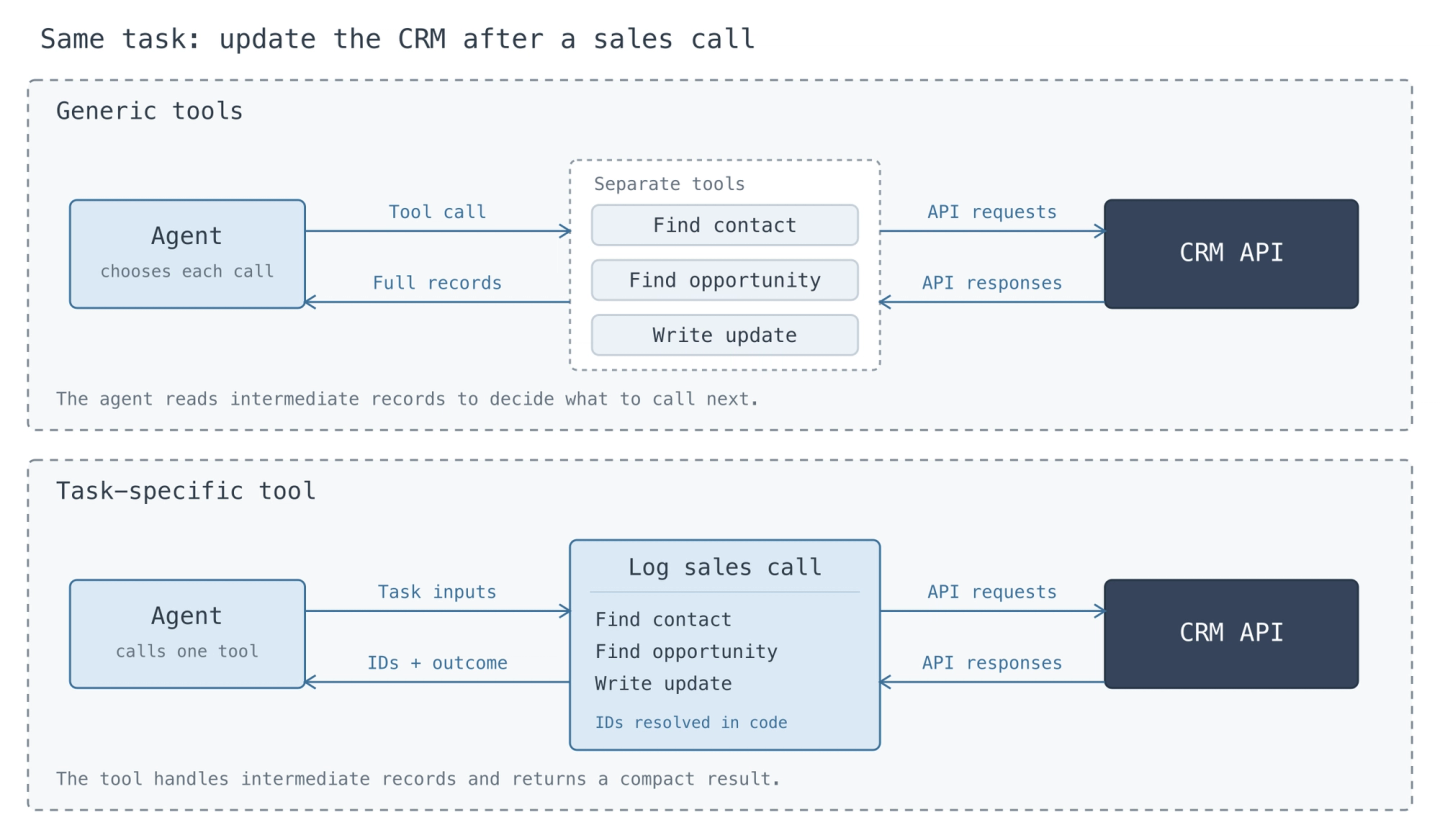
When building in-house, your team owns the engineering time it takes to get each workflow down to fewer calls and smaller responses. A maintained tool can spread that work across customers. A sales workflow built around your own CRM fields may still need a custom tool, and the cost of maintaining it belongs on both sides of the comparison.
The benefit extends beyond token costs. Smaller inputs leave more room in context, while fewer turns reduce latency and give the agent fewer chances to make a wrong decision. The dollar savings depend on your workload and what the model charges for input, output, and cached tokens.
Handling retries safely (idempotency)
Idempotency requires provider support or custom logic inside tools. Handling this for multiple APIs requires deep API understanding and ongoing maintenance. This adds another layer of complexity to your tools when you try to build them in-house.
Retries also have to respect rate limits, which vary by API and endpoint and can apply to an account or an entire app. Batch jobs need scheduling and backoff that respect those limits. Long-running tasks need asynchronous execution and a way to report when they’re done. One tenant’s large job shouldn’t use up the resources everyone else needs.
What else does your runtime need to handle?
The same engine may need to transfer binary files, query SQL databases, work with S3 buckets and other cloud services, or call legacy SOAP APIs. Some industries still exchange text files over FTP. Your runtime has to handle the credentials, data formats, timeouts, and partial failures for each.
Multi-tenant safe tool executions (sandboxing)
Tenant safe tool executions require some form of sandboxing. Starting a general-purpose sandbox for each tool call adds compute cost and latency. It also creates another failure point: the API may be available while the sandbox fails to start or has no capacity. Repeating that setup just to filter a response wastes resources as call volume grows.
Nango’s functions runtime executes integration logic and reduces results without requiring you to provision a fresh sandbox for each call. Each function runs for a specific integration and customer connection. Agent Sessions also restrict which tools the agent can use. Your backend sets that access, and the agent can’t expand its own session’s scope.
Avoiding repeated sandbox setup removes a step that can fail before the API call starts and can save more on infrastructure as call volume grows.
Observing, securing, and auditing agent actions
To know whether this execution system is working, you need more than a record of successful API calls. A call can succeed even if the agent updates the wrong CRM record. Understanding what happened requires the request, its result, and the context in which the agent made it.
Who investigates a successful call that changed the wrong field?
If a customer reports that a phone number disappeared after a job title update, the CRM may show a successful write. The person investigating needs to know whether the agent supplied an empty number or the integration added it. With an in-house stack, your team owns the instrumentation on both sides of that boundary. With Nango, execution traces cover the integration call. Your application still supplies the context for what the user asked the agent to do.
Who owns the security controls?
An agent reading an email can encounter malicious instructions. An agent writing a CRM note can send sensitive customer information to the wrong account. In-house, your platform engineers own the controls on both paths, including permission enforcement, sensitive-data handling, and the ongoing work of detecting prompt injection.
Buying shifts some of that work. A scoped Agent Session can limit the connections and tools available to the agent. Your product still determines which customer data may leave your system, where it may go, and which actions require a person’s approval. Those responsibilities remain in the budget even with a managed runtime.
What can you explain a year after an incident?
If a customer disputes a CRM update a year later, they may want to know which agent made the change, whose connection it used, what it wrote, and who approved it. With an in-house runtime, your team owns the evidence from request through execution, along with the cost and privacy implications of retaining it.
Nango’s OpenTelemetry export supplies execution traces that your team can correlate with the user, policy, and approval records in your application. Your team owns retention and access to that combined record. Nango’s account audit trail covers configuration changes.
Compare annual costs
The comparison depends on which tools your customers actually use. A team maintaining twelve CRM operations has a different build budget from a team planning a catalog of thousands of tools.
The table illustrates the upper end of what buying could save in a large deployment. It assumes the platform takes over the equivalent of four full-time roles and that completing the same tasks costs 90% less in model tokens. Both are assumptions about this workload.
| Potentially avoidable cost (50,000 tools) | Annual basis | Difference |
|---|---|---|
| Catalog engineering | 2 engineers at $200,000 fully loaded | $400,000 |
| Catalog tokens | Research, generation, and review | $50,000 |
| Platform engineering | 2 engineers at $200,000 fully loaded | $400,000 |
| Agent tokens | $500,000 for tool-related model usage falls to $50,000 | $450,000 |
| Gross annual savings under these assumptions | $1,300,000 |
The break-even platform fee is the annual cost difference between running the same workflows in-house and running them on the platform, before its fee. If your in-house tools are already as token-efficient, the $450,000 token saving drops out. That leaves $850,000 in this example if buying replaces all four roles and the catalog token spend. Any engineering time still needed for custom tools reduces that figure. Infrastructure counts only to the extent that your compute bill actually falls. In year one, migration and setup also reduce the fee at which buying breaks even.
If the engineers stay on your payroll, the engineering portion buys time for other work. For a team with customers waiting on a new integration, that can be the deciding factor.
So, build or buy?
When you build agent integrations in-house, your team does all the work - keeps auth and tools working as APIs change, manages the cost of each tool call, and accounts for what the agent did on a customer’s behalf.
Nango handles auth, maintains prebuilt tools, and runs the integration infrastructure. Your team still owns the workflows and permissions that make the agent useful to your customers. Buying makes sense when the ongoing work the platform takes off your hands is worth more than it costs.


