

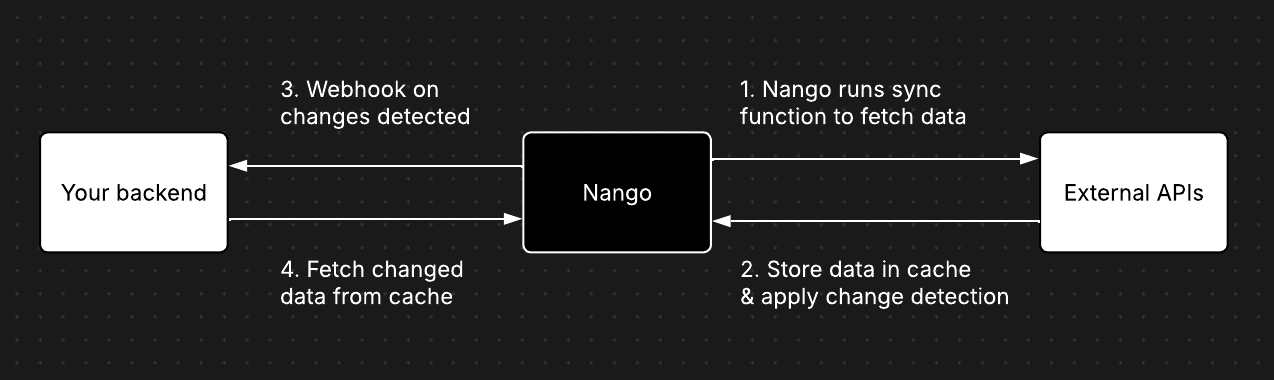
nango.batchSave() or nango.batchDelete() in a sync function, you are writing to this cache. Your application then reads from the cache using the GET /records endpoint or the Node SDK.
What the cache does
The records cache fulfils three roles: Change detection — By tracking every record that has been synced, Nango can tell you which records are new, which have been updated, and which have been deleted. Your application only needs to fetch the delta, reducing bandwidth and processing on your side. Reliable data availability — Fetching from external APIs is inherently unreliable: rate limits, timeouts, and transient errors are common. The cache decouples this unreliable step from your application. Once data lands in the cache, you can fetch it quickly and reliably. Observability — The cache gives you visibility into the state of synced data directly from the Nango dashboard and API, including record counts, last sync times, and change history.How records are identified and compared
Each record in the cache is uniquely identified by two things:- Record ID — The
idfield you set on each record in your sync function. This should match the unique identifier of the record in the external system (e.g. the external API’s primary key). - Payload hash — Nango computes a hash of the full record payload. When a record with the same ID is saved again, Nango compares hashes to determine whether the record has actually changed.
Be careful with fields that change on every fetch but don’t represent a meaningful change to the record, such as a
fetched_at timestamp. Including such fields in the payload will cause Nango to report spurious updates on every sync run. If possible, exclude or normalize these fields before calling batchSave().How records are stored
The cache only keeps the latest version of each record — there is no versioning or history of payloads. When you callbatchSave() with an existing ID, the previous payload is overwritten.
When you call batchDelete(), you only need to pass the record’s id. This does not remove the record from the cache. Instead, it marks the record as deleted (a soft delete), so your application can react to the deletion event. The last-known payload is preserved.
Fetching records: the change stream
The GET /records endpoint returns a chronologically ordered stream of record changes. Each entry in the stream includes:- The full record payload
- Metadata indicating whether the record was
ADDED,UPDATED, orDELETED - A cursor for tracking your sync progress
last_action (added, updated, or deleted) using the filter query parameter.
Cursors and sync progress
Every record change in the cache has a cursor attached to it. Cursors are opaque, ordered strings that let you:- Track how far you’ve synced — After fetching records, persist the cursor of the last record you processed. On the next fetch, pass it back to only receive changes that happened after that point.
- Paginate through large result sets — The same cursor is used for pagination when there are more records than the page
limit.
- Node
- cURL
Re-syncing: preserve vs. clear the cache
When you trigger a sync run manually (from the UI or API), you can control two options:| Option | Default | What it does |
|---|---|---|
reset | false | When true, resets the current checkpoint and lastSyncDate, resulting in re-fetching all the full dataset from the external API. The cache is preserved, so Nango can still detect which records are new vs. updated. |
emptyCache | false | When true, deletes all cached records before the sync runs. The sync starts completely fresh, all synced records are reported as new. |
reset: true when you want to re-fetch everything from the external API but still preserve the cache for accurate change detection.
Use reset: true, emptyCache: true when you need to start from scratch, for example after a breaking change to your data model. Be aware of the implications:
Data retention
The records cache is designed as a transfer layer, not a long-term data store. It has built-in retention policies: Payload pruning (30 days) — Record payloads that haven’t been updated for 30 days are automatically emptied. The record metadata (ID, payload hash) is preserved, so Nango can still detect changes on future sync runs. However, you can no longer retrieve the payload from the cache after pruning. Hard deletion (60 days) — If a sync has not executed for 60 days, all records belonging to that sync are permanently deleted, including metadata and hashes. The sync itself remains configured but starts completely fresh on the next execution.Best practice: fetch records from Nango promptly after receiving webhook notifications and store them in your own system. Don’t rely on the records cache as your primary data store.
On the Growth plan and above, retention policies can be customized. Reach out to us to discuss your needs.
Summary
| Concept | Details |
|---|---|
| Writing to the cache | nango.batchSave() and nango.batchDelete() in sync functions |
| Reading from the cache | GET /records endpoint or nango.listRecords() SDK method |
| Record identity | Determined by the id field you set on each record |
| Change detection | Based on comparing payload hashes for the same id |
| Versioning | None — only the latest payload is kept |
| Deletions | Soft delete — record is marked as deleted, payload is preserved |
| Cursor | Opaque ordered string for tracking sync progress and pagination |
| Payload TTL | 30 days without update → payload pruned |
| Full record TTL | 60 days without sync execution → all records hard-deleted |