

Documentation Index
Fetch the complete documentation index at: https://nango.dev/docs/llms.txt
Use this file to discover all available pages before exploring further.
Overview
Nango Auth lets your users connect 700+ external APIs to your product. You embed a Nango-managed auth flow in your application, and Nango handles authorization, credential storage, refresh, and validation. A Connection is created after each successful authorization. It stores one user’s credentials for one external API and keeps them valid over time. Credentials can be retrieved at scale or used directly by other Nango primitives — without ever passing through your codebase.How it works
The end-to-end flow has four steps:- Backend — your server asks Nango for a short-lived session token.
- Frontend — your app opens the Nango Connect UI with that token.
- User — authorizes the API. Nango stores the credentials.
- Backend — Nango sends an auth webhook with the connection ID. You persist it alongside your user/org/project.
- TypeScript
- cURL
Capabilities
- Auth schemes — OAuth 2.0, OAuth 1.0a, API keys, basic auth, custom. 700+ APIs supported; new ones added on demand within days, by request or self-contributed.
- Pre-built UI — Embedded Connect UI with API-specific guidance, input validation, and your branding. Or build a custom UI.
- Credential management — Encrypted storage, automatic refresh, retrieval at scale. Combine with Proxy or Functions to avoid handling credentials directly.
- Observability — Failure detection, reconnect flow, and per-connection logs.
Guide
Create a Nango account
Sign up for free (no credit card): 
🤖 For agents
🤖 For agents
Signup cannot be automated. Ask the user to sign up at app.nango.dev/signup and provide their Nango secret API key — the default key created on signup has full access and is the simplest option.If the user creates a scoped key instead, this guide needs
environment:integrations:write (step 2) and environment:connect_sessions:write (step 4). See API keys.Create an integration
In the dashboard, open the Integrations tab, click Configure New Integration, and pick the API.
⚠️ OAuth developer apps
⚠️ OAuth developer apps
OAuth APIs require an OAuth developer app registered with the provider. Register one on the provider’s developer portal, use the
Callback URL shown in your Nango integration settings, then paste the Client ID and Client Secret back into Nango. Register any required scopes too.For OAuth 2.0 providers, Nango shows suggested scopes — auto-discovered and refreshed at least monthly. They’re suggestions; you can use any scope the provider supports.For popular APIs, Nango ships a built-in shared developer app so you can test connections with zero setup. Do not use it in production — it violates most providers’ terms of service and is rate-limited and unreliable. Always register your own OAuth app before going live.
🤖 For agents
🤖 For agents
Create the integration via Update credentials later with
POST /integrations (requires the environment:integrations:write scope).Find the <PROVIDER> slug by calling GET /providers — the name field of each entry is a valid slug.For OAuth providers, walk the user through registering an OAuth developer app on the provider’s portal: link them to the provider’s OAuth-app creation page, tell them which Callback URL to paste (visible in the Nango integration settings after creation), and ask them to send back the client_id and client_secret so you can pass them in the request body.- cURL (OAuth2)
- cURL (API key / basic)
PATCH /integrations/{uniqueKey}.Test the authorization
In the Connections tab, click Add Test Connection, pick your integration, and authorize using a test account. The new connection’s credentials appear in its Authorization tab — securely stored and automatically refreshed.
🤖 For agents
🤖 For agents
Skip the dashboard. Create a connect session and share the returned The response contains a
connect_link with the user — they authorize using their test account in the browser, no UI needed on your side:connect_link (valid 30 minutes). Send it to the user; once they complete authorization, confirm with GET /connections. See Share a connect link.Generate a session token (backend)
Set up a backend endpoint that your frontend will call before each authorization attempt to retrieve a session token from Nango (API / Node SDK).You’ll need an API key with the
environment:connect_sessions:write scope (find it in Environment Settings > API Keys).- Node
- cURL
ℹ️ Tags
ℹ️ Tags
allowed_integrations controls what the user sees:- Multiple integrations — Connect UI shows a picker.
- Single integration — Connect UI sends the user straight to its auth flow.
Trigger the auth flow (frontend)
Load the Nango frontend SDK, fetch the session token from your backend, and open Connect UI: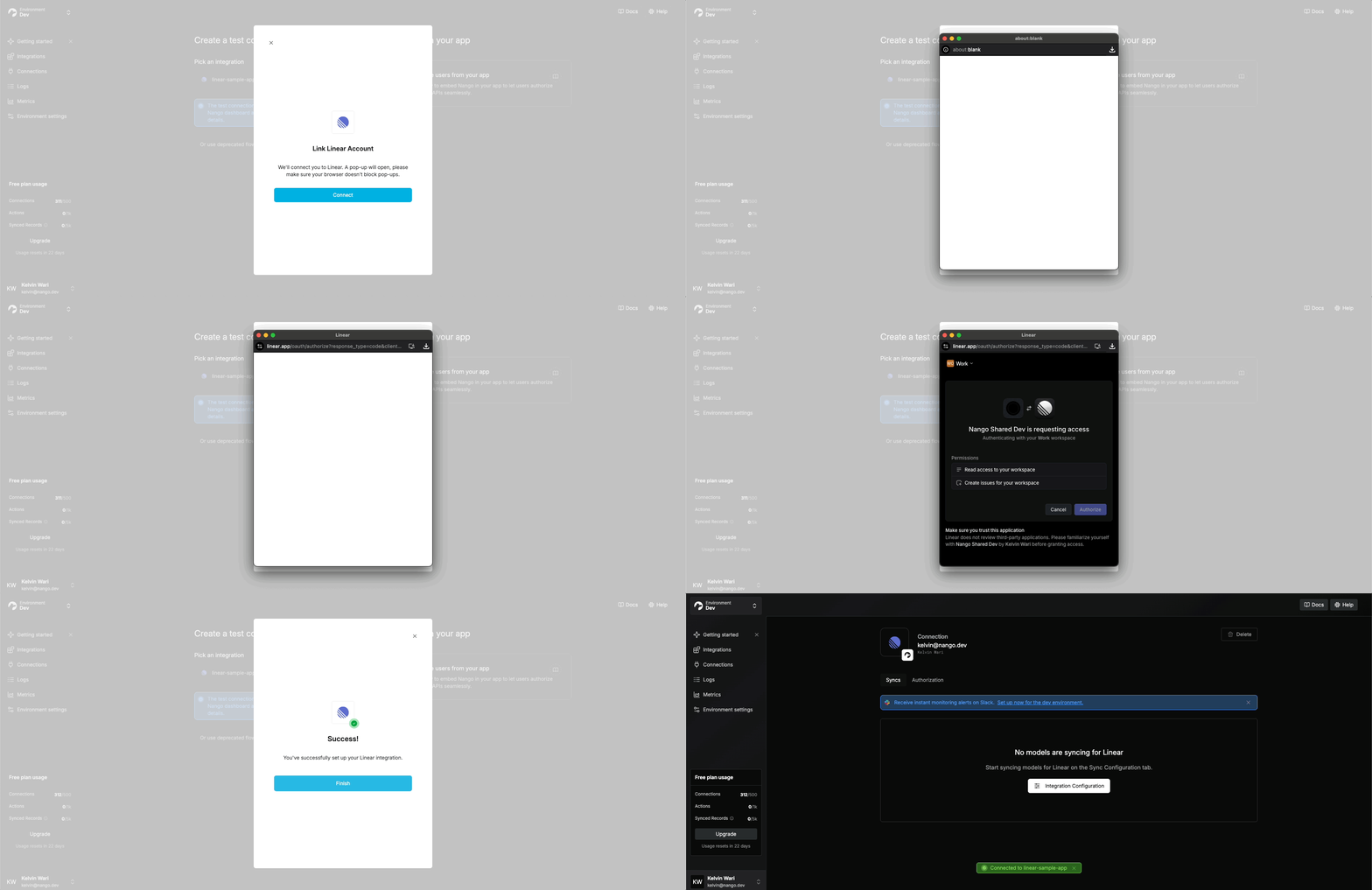
Listen for webhooks & save the connection ID (backend)
When authorization succeeds, Nango generates a unique connection ID. You use this ID to manage the connection and retrieve its credentials. You must store it on your side, attached to the user/org/project that owns the connection — Nango doesn’t model that ownership.Set up the webhook in Environment Settings:
Webhook payload:Persist
- Specify a Webhook URL in the Nango UI.
- Enable Send New Connection Creation Webhooks.
- Handle
POSTrequests on that route in your backend.
🤖 For agents
🤖 For agents
Webhook URL configuration is dashboard-only — there is no public API for environment settings. Ask the user to paste the webhook URL into Environment Settings and enable Send New Connection Creation Webhooks.
connectionId against whichever entity owns the connection in your app.Run the flow
Test the auth flow from your app and verify a connection appears in the Connections tab. Failed attempts are inspectable in the Logs tab.
🎉 You are connected! Next:
🤖 For agents
🤖 For agents
After the user runs the flow, confirm the connection was created with Auth logs are dashboard-only — if the call returns no connection, ask the user to check the Logs tab for the failure reason.
GET /connections — filter by the tags you set in step 4:- View connections and credentials in the Connections tab.
- Retrieve credentials via the API or Node SDK.
- Build with sync functions, Action functions, webhook functions, or any other Nango function type.
Custom OAuth callback URL (optional)
By default, Nango’s OAuth callback domain isapi.nango.dev. Some APIs (Google, Zoom, …) require domain verification or display the callback domain to users — in which case you’ll want a callback under your own domain like https://yourdomain.com/oauth-callback.
- Add an endpoint on your domain (e.g.
https://example.com/oauth-callback) that 308-redirects tohttps://api.nango.dev/oauth/callback, preserving all query parameters. - Update the registered callback URL with each API provider — otherwise they’ll reject new authorization flows.
- After confirming steps 1 and 2, update the callback URL in Nango’s Environment Settings. Settings are per-environment, so repeat for every environment.
Re-authorize an existing connection
Credentials can become invalid (revoked, scope changes, etc.). Re-authorization updates an existing connection’s credentials while preserving its data and config. Deleting and re-creating the connection wipes that data — prefer re-authorization. Implement re-authorization before going to production.Detect invalid connections
Before showing integration settings, check the connection withGET /connection:
- Node
- cURL
Trigger re-authorization
Same flow as a new connection, but using a reconnect session token. Pass the returned token to the Frontend SDK exactly like a normal session token. On success you’ll receive anauth webhook with operation = override.
- Node
- cURL
Related guides
- Share a connect link - send authorization links by email, support tools, or cross-device flows.
- Connection tags - attribute connections to users, orgs, and other entities.
- Customize Connect UI - build your own authorization UI.
- Token refreshing and validity - handle revoked or expired credentials.