> ## Documentation Index
> Fetch the complete documentation index at: https://nango.dev/docs/llms.txt
> Use this file to discover all available pages before exploring further.
# Netsuite
## Overview
## Pre-built tooling
| Tools | Status |
| ------------------------------- | ------ |
| Pre-built authorization (OAuth) | ✅ |
| Credentials auto-refresh | ✅ |
| Auth parameters validation | ✅ |
| Pre-built authorization UI | ✅ |
| Custom authorization UI | ✅ |
| Expired credentials detection | ✅ |
| Tools | Status |
| ----------------------------------------- | ------------------------------ |
| Pre-built integrations | 🚫 (time to contribute: \<48h) |
| API unification | ✅ |
| 2-way sync | ✅ |
| Webhooks from Nango on data modifications | ✅ |
| Real-time webhooks from 3rd-party API | 🚫 (time to contribute: \<48h) |
| Proxy requests | ✅ |
| Tools | Status |
| ----------------------- | ------ |
| HTTP request logging | ✅ |
| End-to-end type safety | ✅ |
| Data runtime validation | ✅ |
| OpenTelemetry export | ✅ |
| Slack alerts on errors | ✅ |
| Integration status API | ✅ |
| Tools | Status |
| ---------------------------------- | ------------------------------ |
| Create or customize use-cases | ✅ |
| Pre-configured pagination | 🚫 (time to contribute: \<48h) |
| Pre-configured rate-limit handling | 🚫 (time to contribute: \<48h) |
| Per-customer configurations | ✅ |
*No pre-built syncs or actions available yet.*
Not seeing the integration you need? [Build your own](/guides/functions/functions-guide) independently.
## Access requirements
| Pre-Requisites | Status | Comment |
| ----------------- | ------ | ------- |
| Paid dev account | ❓ | |
| Paid test account | ❓ | |
| Partnership | ❓ | |
| App review | ❓ | |
| Security audit | ❓ | |
## Setup guide
*No setup guide yet.*
Need help getting started? Get help in the [community](https://nango.dev/slack).
Contribute improvements to the setup guide by [editing this page](https://github.com/nangohq/nango/tree/master/docs/integrations/all/netsuite.mdx)
## Useful links
* [How to register an Application](https://docs.oracle.com/en/cloud/saas/netsuite/ns-online-help/section_157771482304.html#Enable-the-OAuth-2.0-Feature)
* [OAuth-related docs](https://docs.oracle.com/en/cloud/saas/netsuite/ns-online-help/section_158081944642.html#Step-One-GET-Request-to-the-Authorization-Endpoint)
* [Scopes](https://docs.oracle.com/en/cloud/saas/netsuite/ns-online-help/section_158081944642.html#subsect_158091028094) (`restlets`, `rest_webservices` and/or `suite_analytics`)
* [API endpoints](https://system.netsuite.com/help/helpcenter/en_US/APIs/REST_API_Browser/record/v1/2023.1/index.html)
Contribute useful links by [editing this page](https://github.com/nangohq/nango/tree/master/docs/integrations/all/netsuite.mdx)
## Connection configuration in Nango
* Netsuite requires a user specific account id to run OAuth.
## API gotchas
* There doesn't seem to be a way to create a Netsuite account without scheduling a call.
* The `netsuite` integration which uses OAuth 2.0 has a refresh token that has a fixed expiration of 7 days. After which point the refresh token becomes invalid and a new access token must be obtained by making users go through the authorization code flow again.
To avoid this we recommend using the machine to machine flow which is called the `netsuite-tba` integration in Nango
Contribute API gotchas by [editing this page](https://github.com/nangohq/nango/tree/master/docs/integrations/all/netsuite.mdx)
## Admin Setup for `netsuite-tba`
* Ensure you have admin privileges and login to your Netsuite account and navigate to **Setup** > **Company** > **Enable Features**
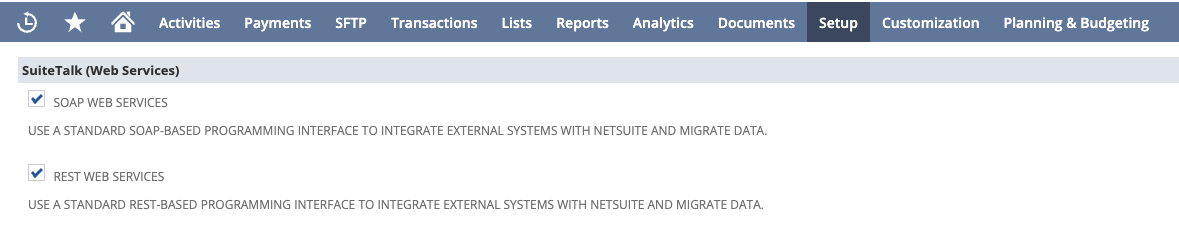
* Under the "**SuiteTalk**" header make sure the *SOAP WEB SERVICES* and *REST WEB SERVICES* checkboxes are checked
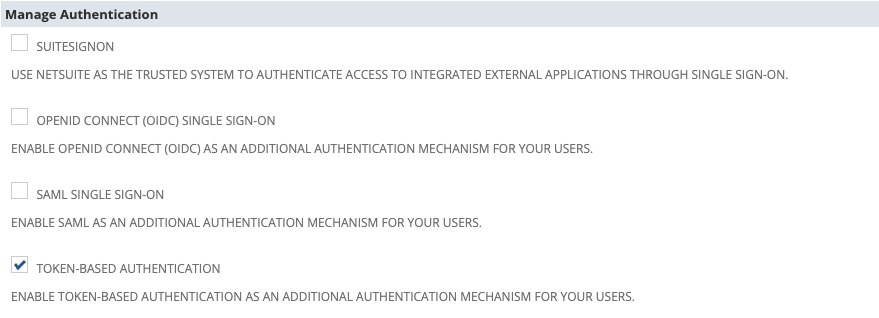
 * Under the "**Manage Authentication**" header make sure the *TOKEN-BASED AUTHENTICATION* checkbox is checked
 * Click the save button
* Navigate to **Setup** > **Integration** > **Manage Integrations** > **New**
* Set the desired name of this integration
* Enable *TOKEN-BASED AUTHENTICATION* and disable *TBA: AUTHORIZATION FLOW* and *AUTHORIZATION CODE GRANT*
* Click the save button
* Navigate to **Setup** > **Integration** > **Manage Integrations** > **New**
* Set the desired name of this integration
* Enable *TOKEN-BASED AUTHENTICATION* and disable *TBA: AUTHORIZATION FLOW* and *AUTHORIZATION CODE GRANT*
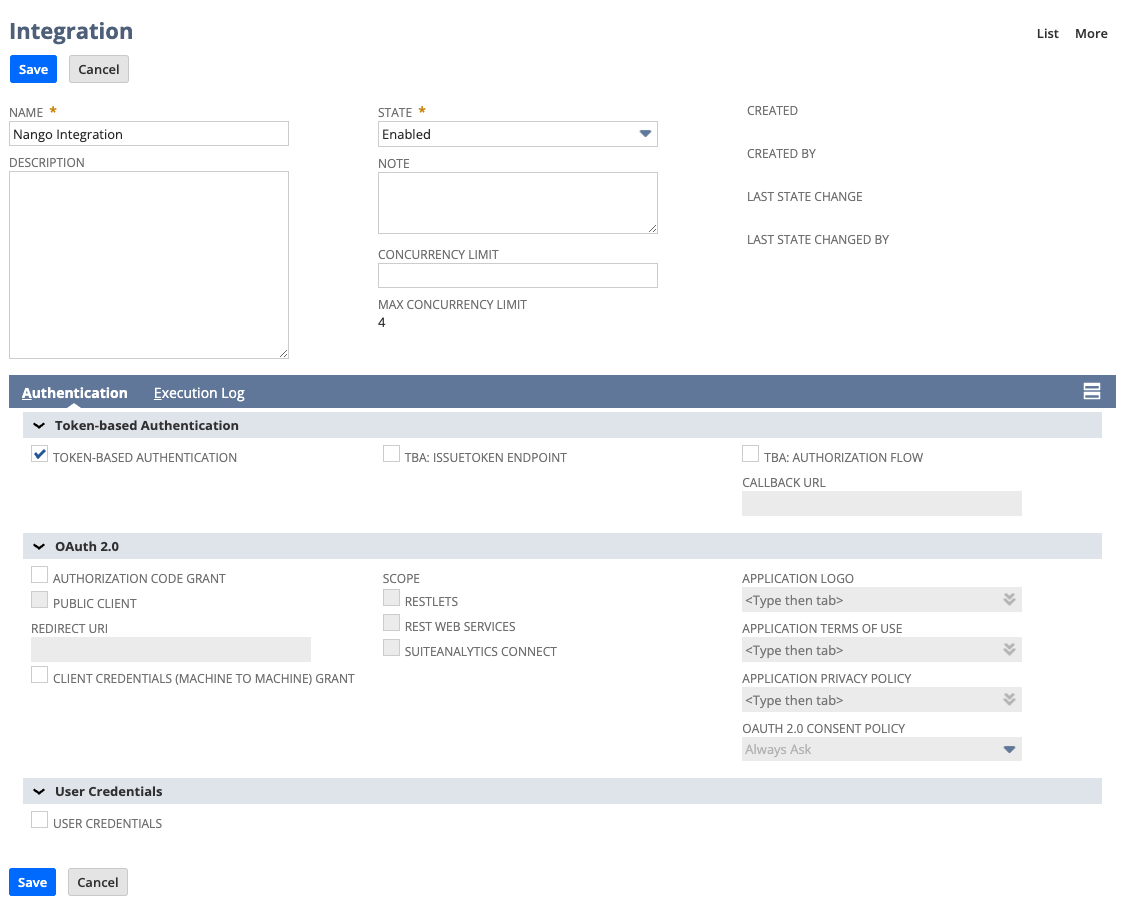 * Click the save button
* The client credentials will now be displayed and be sure to copy the **Consumer Key**, **Client ID**, **Consumer Secret**, and **Client Secret**
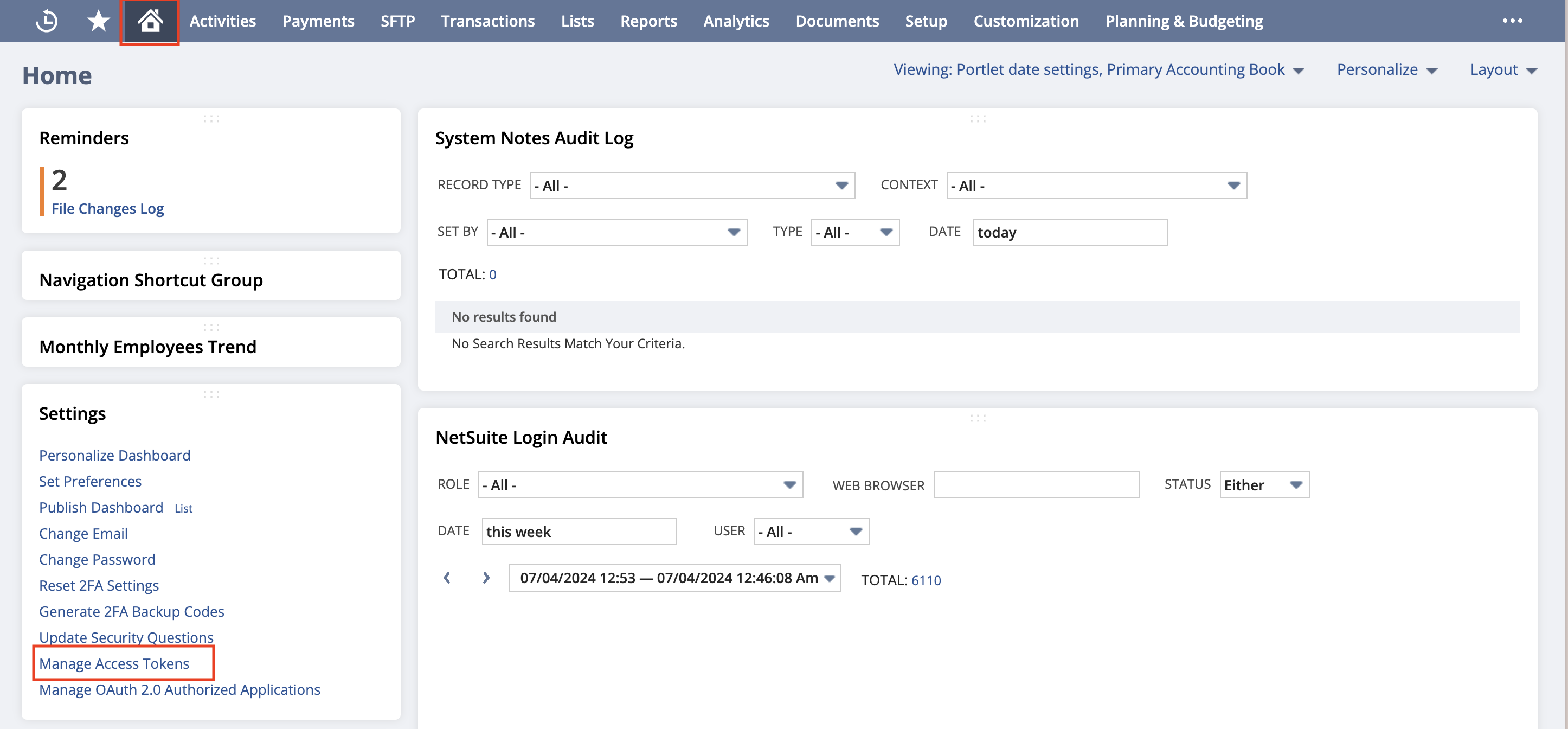
* Navigate to the homepage by clicking the home icon
* At the button left corner click the **Manage Access Tokens** button
* Click the save button
* The client credentials will now be displayed and be sure to copy the **Consumer Key**, **Client ID**, **Consumer Secret**, and **Client Secret**
* Navigate to the homepage by clicking the home icon
* At the button left corner click the **Manage Access Tokens** button
 * Select the **Application Name** you created for this integration
* Enter a "**Token Name**"
* Save your new access token
* The token credentials will now be displayed. Copy the "**Token ID**" & "**Token Secret**"
* In Nango create a new integration using the `netsuite-tba` and leave the "Client Id" and "Client Secret" values empty.
* Create a new connection and for the "**OAuth Client Id Override**" value paste in the
value you received from Netsuite called "**Client ID**" and for the "**OAuth Client Secret**" value paste in the value you received
from Netsuite called "**Client Secret**". For "**Token ID**" & "**Token Secret**" paste in the values you received from Netsuite
from the access token step. The account ID value can be found from your [Netsuite URL instance](https://docs.oracle.com/en/cloud/saas/netsuite/ns-online-help/section_1498754928.html)
* Select the **Application Name** you created for this integration
* Enter a "**Token Name**"
* Save your new access token
* The token credentials will now be displayed. Copy the "**Token ID**" & "**Token Secret**"
* In Nango create a new integration using the `netsuite-tba` and leave the "Client Id" and "Client Secret" values empty.
* Create a new connection and for the "**OAuth Client Id Override**" value paste in the
value you received from Netsuite called "**Client ID**" and for the "**OAuth Client Secret**" value paste in the value you received
from Netsuite called "**Client Secret**". For "**Token ID**" & "**Token Secret**" paste in the values you received from Netsuite
from the access token step. The account ID value can be found from your [Netsuite URL instance](https://docs.oracle.com/en/cloud/saas/netsuite/ns-online-help/section_1498754928.html)