> ## Documentation Index
> Fetch the complete documentation index at: https://nango.dev/docs/llms.txt
> Use this file to discover all available pages before exploring further.
# Make - How do I link my account?
# Overview
To authenticate with Make, you need the following information:
1. **API Key** - A unique key that provides secure access to your Make account.
2. **Domain** - The domain of your Make account, typically your Make workspace URL.
This guide will walk you through finding or generating these credentials within Make.
***
### Prerequisites:
* You must have a Make account.
* You should have administrative access to generate an API Key.
* Confirm the domain of your Make workspace.
***
## Step 1: Generating an API Key
1. Log into your **Make** account.
2. Navigate to **Account Settings** by clicking on your profile icon in the bottom-left corner and selecting **Profile**.
3. Under the **API Access** tab, click **Add Token**.
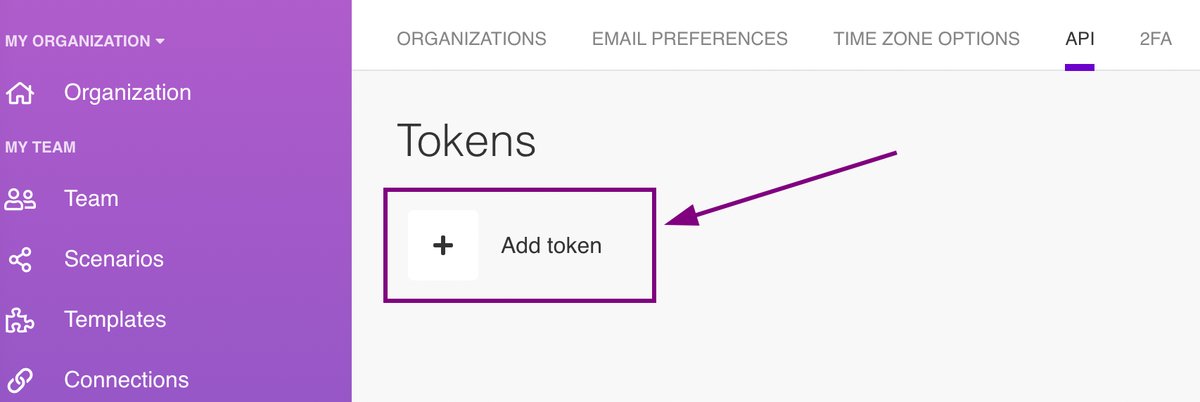 4. In the Add token dialog, do the following:
Label: type a custom name for your token that will help you recognize what the token is used for
Scopes: select the scopes you need for working with API resources.
5. Click Save.
6 Make generates your token. **Copy and securely store this key**. Once you leave the Profile section, parts of your token will be hidden for security reasons. You won't be able to see or copy your token again.
***
## Step 2: Finding Your Domain
1. Identify your Make workspace domain. It typically appears as the subdomain of your account URL, for example:
[https://your-workspace-name.make.com](https://your-workspace-name.make.com) , **`your-workspace-name`** is the domain of your Make account.
2. Copy this domain name for use during the authentication process.
***
## Step 3: Connecting Your Make Account
To link your Make account:
1. Navigate to the Make authentication form in your application.
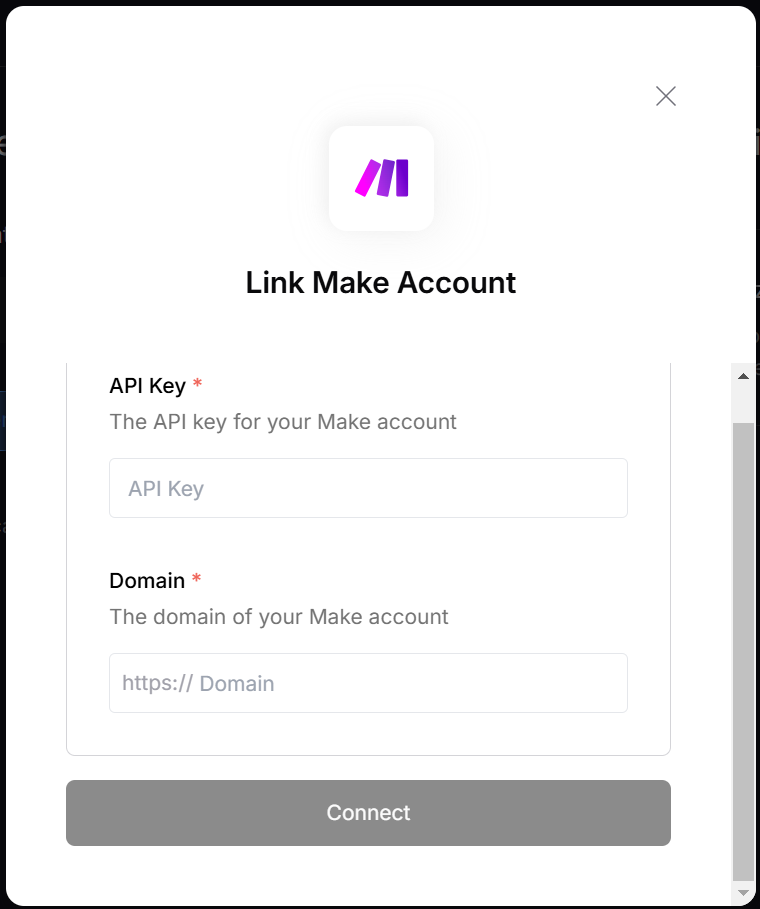
2. Enter the following details:
* **API Key**: Paste the key you generated in Step 1.
* **Domain**: Enter the domain of your Make account from Step 2.
3. Click **Connect** to complete the authentication process.
4. In the Add token dialog, do the following:
Label: type a custom name for your token that will help you recognize what the token is used for
Scopes: select the scopes you need for working with API resources.
5. Click Save.
6 Make generates your token. **Copy and securely store this key**. Once you leave the Profile section, parts of your token will be hidden for security reasons. You won't be able to see or copy your token again.
***
## Step 2: Finding Your Domain
1. Identify your Make workspace domain. It typically appears as the subdomain of your account URL, for example:
[https://your-workspace-name.make.com](https://your-workspace-name.make.com) , **`your-workspace-name`** is the domain of your Make account.
2. Copy this domain name for use during the authentication process.
***
## Step 3: Connecting Your Make Account
To link your Make account:
1. Navigate to the Make authentication form in your application.
2. Enter the following details:
* **API Key**: Paste the key you generated in Step 1.
* **Domain**: Enter the domain of your Make account from Step 2.
3. Click **Connect** to complete the authentication process.
 ***
### Notes:
* **API Key**: Ensure you handle your API Key securely, as it provides full access to your Make account.
* **Domain**: Double-check the domain for accuracy to avoid connection errors.
* For troubleshooting or additional support, refer to the [Make Help Center](https://www.make.com/help).
***
### Notes:
* **API Key**: Ensure you handle your API Key securely, as it provides full access to your Make account.
* **Domain**: Double-check the domain for accuracy to avoid connection errors.
* For troubleshooting or additional support, refer to the [Make Help Center](https://www.make.com/help).