> ## Documentation Index
> Fetch the complete documentation index at: https://nango.dev/docs/llms.txt
> Use this file to discover all available pages before exploring further.
# Lattice - How do I link my account?
# Overview
To authenticate with both Lattice, you need one key piece of information:
1. **API Key** - Your Lattice API Key
This guide will walk you through generating your API key within Lattice.
### Prerequisites:
* You need to have an admin account to access Lattice API Key. If you don't, you can sign up [here](https://lattice.zendesk.com/auth/v2/login/registration?auth_origin=360005592414%2Ctrue%2Ctrue\&brand_id=360005592414\&return_to=https%3A%2F%2Fhelp.lattice.com%2Fhc%2Fen-us%2Farticles%2F360059449534-Lattice-s-Public-API\&theme=hc)
* If it's your first time accessing the API key, you will need to request API access from Lattice by writting them an [email](mailto:request-api-access@lattice.com) answering this questions:
* What is your intended use case with the API?
* Will it be used with a third-party software tool? If yes, please specify the tool.
* Once approved, you can create or revoke API keys without needing to request additional approval.
#### Step 1: How to Generate Lattice API Keys for Public and SCIM APIs
1. Log in to your Lattice account.
2. From your dashboard, click on the `Admin` icon on the left bottom corner.
3. Select `Settings` then click on `API Keys`.
4. On the API Keys page you can generate the API key by clicking the `Generate API Key` button in the top right corner.
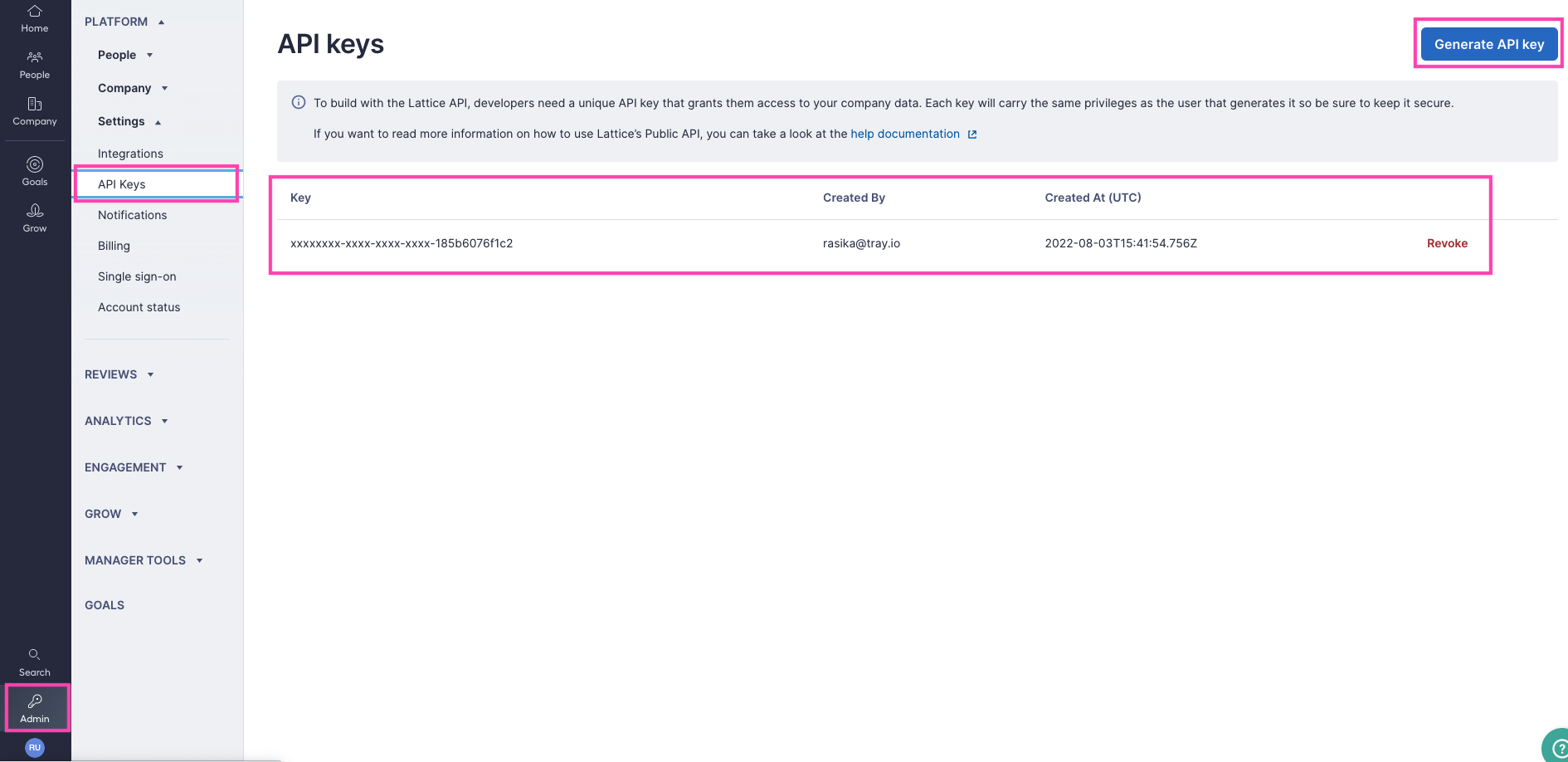 5. After the key is generated, click `Copy`.
The generated API key will only be shown to you in full once, so be sure to copy it before closing the window.
The SCIM API can be enabled on the Lattice integrations page by navigating to Admin > Settings > Platform > Integrations > Enable SCIM.
#### Step 2: Connect Your Lattice Account
To authenticate using your API credentials, navigate to the Lattice authentication form.
Enter your credentials as follows:
* API Key: Your API key
Click "Connect" to complete the authentication.
5. After the key is generated, click `Copy`.
The generated API key will only be shown to you in full once, so be sure to copy it before closing the window.
The SCIM API can be enabled on the Lattice integrations page by navigating to Admin > Settings > Platform > Integrations > Enable SCIM.
#### Step 2: Connect Your Lattice Account
To authenticate using your API credentials, navigate to the Lattice authentication form.
Enter your credentials as follows:
* API Key: Your API key
Click "Connect" to complete the authentication.