> ## Documentation Index
> Fetch the complete documentation index at: https://nango.dev/docs/llms.txt
> Use this file to discover all available pages before exploring further.
# bitdefender - How do I link my account?
# Overview
To authenticate with bitdefender, you need two key pieces of information:
1. **API Key** - A unique identifier for your application on bitdefender.
2. **Access Url** - API URL provided by bitdefender
This guide will walk you through finding or creating those credentials within bitdefender.
### Prerequisites:
* You must set up an administrator account with bitdefender with the following rights: **Manage Networks**, **Manage Users**, **Manage Company**, and **View and analyze data**.
#### Step 1: Finding Your API Key
1. Log into `https://gravityzone.bitdefender.com/` with your bitdefender administrator account and navigate and select **My Account**
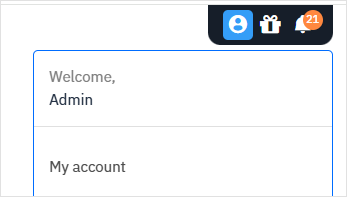 2. To find the **Access Url**, click your username in the upper-right corner of the console and choose **My Account**. Go to the **Control Center API section**.
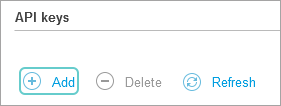
 3. Similarily, to generate an API key, navigate to the **API keys** and click **Add** button.
 4. Create a description for this key and select the APIs you want to enable with this key. Finally, click **Generate**.
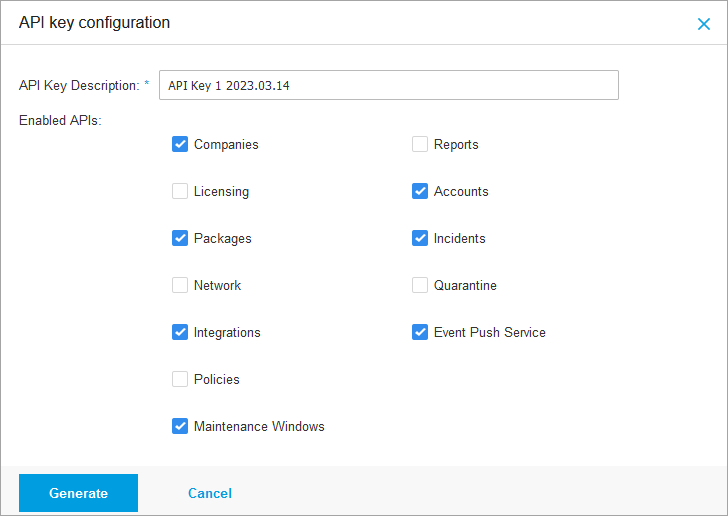 Important: Copy and store your API Key securely. It will not be available when the modal closes.
#### Step 2: Connect Your bitdefender Account
Important: Copy and store your API Key securely. It will not be available when the modal closes.
#### Step 2: Connect Your bitdefender Account
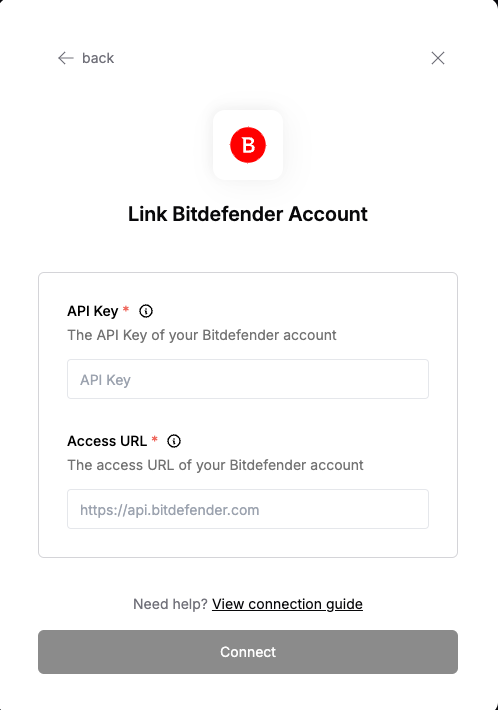 To authenticate using your API credentials, navigate to the bitdefender authentication form.
Enter your credentials as follows:
* API Key: Your API Key
* Access URL: Your access url
Click "Connect" to complete the authentication.
To authenticate using your API credentials, navigate to the bitdefender authentication form.
Enter your credentials as follows:
* API Key: Your API Key
* Access URL: Your access url
Click "Connect" to complete the authentication.