> ## Documentation Index
> Fetch the complete documentation index at: https://nango.dev/docs/llms.txt
> Use this file to discover all available pages before exploring further.
# Asana - How do I link my account?
# Overview
To authenticate with Asana, you need one piece of information:
1. **API Key** - Your Asana API Key
This guide will walk you through finding or creating those credentials within Asana.
### Prerequisites:
* You must set up an Enterprise account with Asana (Asana Enterprise or Enterprise+).
#### Step 1: Finding Asana API Key
1. Login to a super admin account on Asana, and navigate to the admin console menu by clicking on your profile picture in the top right,
and clicking **Admin console**. Navigate to the **Apps** tab and click **Add service account**.
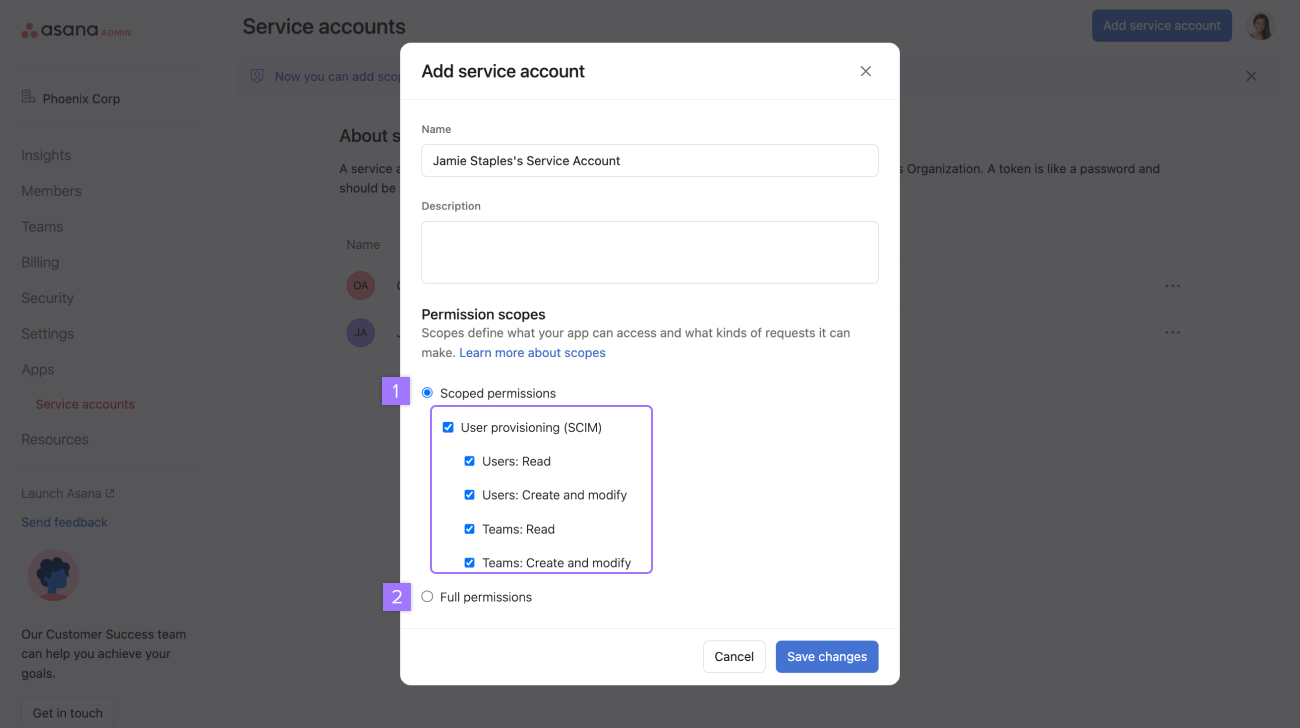
 2. Create a service account
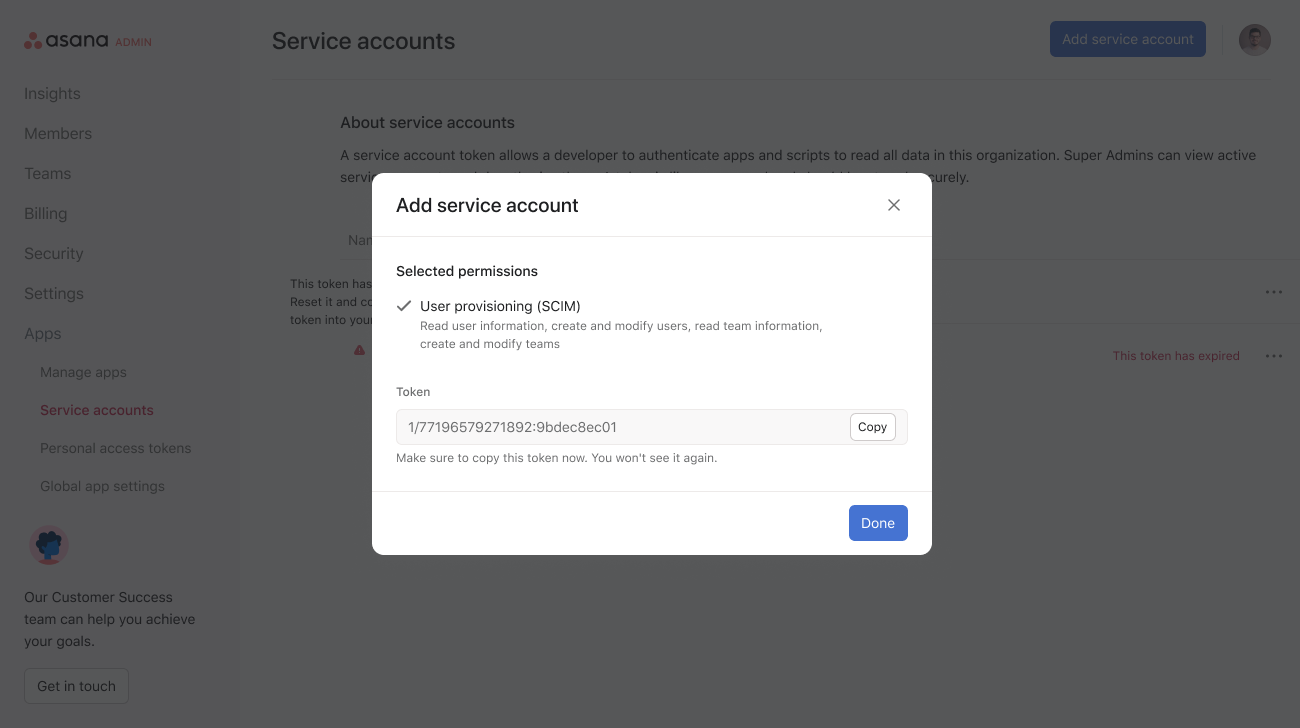
Note: Adding a service account will generate an API token
3. After generating a new token, securely copy your API Key.
Note: you must configure the new token in your Identity provider.
4. Configure your Identity Provider
The setup will depend on the Identity Provider you use.
Asana supports Okta, OneLogin, Google Workspace and Microsoft Entra ID
* OKTA setup **[https://help.asana.com/s/article/provisioning-and-deprovisioning-users-with-scim?language=en\_US](https://help.asana.com/s/article/provisioning-and-deprovisioning-users-with-scim?language=en_US)**
* Entra ID setup **[https://azuremarketplace.microsoft.com/en-us/marketplace/apps/aad.asana?tab=Overview](https://azuremarketplace.microsoft.com/en-us/marketplace/apps/aad.asana?tab=Overview)**
* Google Workspace **[https://asana.com/apps/google-security](https://asana.com/apps/google-security)**
* OneLogin **[https://help.asana.com/s/article/provisioning-and-deprovisioning-users-with-scim?language=en\_US](https://help.asana.com/s/article/provisioning-and-deprovisioning-users-with-scim?language=en_US)**
#### Step 2: Connect Your Asana Account
2. Create a service account
Note: Adding a service account will generate an API token
3. After generating a new token, securely copy your API Key.
Note: you must configure the new token in your Identity provider.
4. Configure your Identity Provider
The setup will depend on the Identity Provider you use.
Asana supports Okta, OneLogin, Google Workspace and Microsoft Entra ID
* OKTA setup **[https://help.asana.com/s/article/provisioning-and-deprovisioning-users-with-scim?language=en\_US](https://help.asana.com/s/article/provisioning-and-deprovisioning-users-with-scim?language=en_US)**
* Entra ID setup **[https://azuremarketplace.microsoft.com/en-us/marketplace/apps/aad.asana?tab=Overview](https://azuremarketplace.microsoft.com/en-us/marketplace/apps/aad.asana?tab=Overview)**
* Google Workspace **[https://asana.com/apps/google-security](https://asana.com/apps/google-security)**
* OneLogin **[https://help.asana.com/s/article/provisioning-and-deprovisioning-users-with-scim?language=en\_US](https://help.asana.com/s/article/provisioning-and-deprovisioning-users-with-scim?language=en_US)**
#### Step 2: Connect Your Asana Account
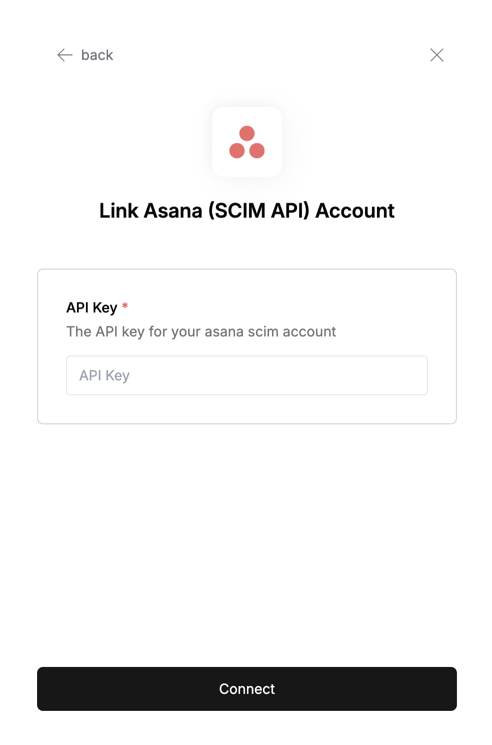 To authenticate using your API credentials, navigate to the Asana authentication form.
Enter your credentials as follows:
* API Key: Your API key
Click "Connect" to complete the authentication.
To authenticate using your API credentials, navigate to the Asana authentication form.
Enter your credentials as follows:
* API Key: Your API key
Click "Connect" to complete the authentication.