> ## Documentation Index
> Fetch the complete documentation index at: https://nango.dev/docs/llms.txt
> Use this file to discover all available pages before exploring further.
# Self-host Nango
> Run Nango outside our cloud: BYOC or Self-Managed.
Nango offers two ways to run outside of Nango Cloud, both on the Enterprise plan:
* **[BYOC](/docs/guides/platform/self-hosting/byoc)** — Nango deploys and operates your instance inside your own AWS account or GCP project. Recommended for most Enterprise self-hosting customers.
* **[Self-Managed](/docs/guides/platform/self-hosting/self-managed)** — you deploy and operate Nango yourself, on your own infrastructure, using our Helm chart.
Both run the same Nango codebase you get on Cloud, with all paid Cloud features included.
## Choose your path
| | **BYOC** (recommended) | **Self-Managed** |
| - | - | - |
| Runs in | Your AWS account or GCP project | Your infrastructure — any cloud or on-prem |
| Deployed by | Nango, via Terraform + GitOps | You, via the [Helm chart](https://github.com/NangoHQ/nango-helm-charts) |
| Operated day-to-day by | Nango — upgrades, scaling, incident response | You |
| What leaves your account | Only Datadog telemetry, for Nango to monitor instance health | Nothing |
| Clouds supported today | AWS, GCP (Azure coming soon) | AWS, GCP, Azure, on-prem Kubernetes |
| Operational overhead | Low | High |
| Best fit | Teams that want infrastructure ownership and data residency without operating Nango themselves | Teams with the platform capacity to run it, or infrastructure constraints BYOC doesn't fit yet |
Both paths require an [Enterprise plan](https://www.nango.dev/pricing) subscription and are intended for large and/or regulated organizations. Pricing is a fixed annual license and maintenance fee, plus a fraction of the Cloud usage-based fees, since infrastructure runs on your side either way. Talk to us at [nango.dev/contact](https://nango.dev/contact) to get started with either — or read the [BYOC](/docs/guides/platform/self-hosting/byoc) and [Self-Managed](/docs/guides/platform/self-hosting/self-managed) pages for the details of each.
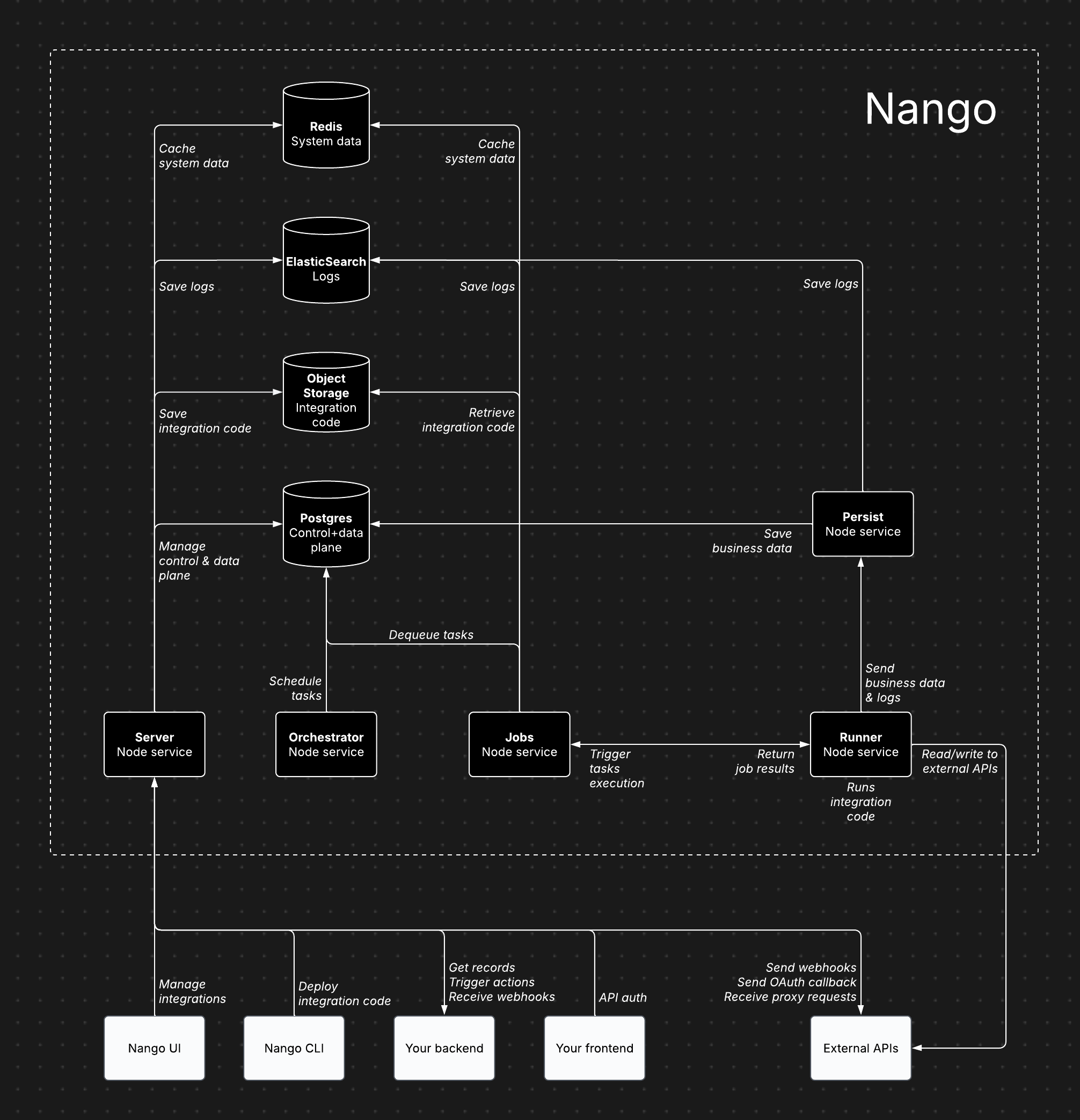
## Architecture overview
 ## Architecture components
Nango consists of several core services, each handling specific responsibilities:
* **Server (Node service)**: Powers the dashboard, API, proxy requests, and incoming/outgoing webhooks.
* **Orchestrator (Node service)**: Manages task scheduling and state tracking.
* **Jobs (Node service)**: Processes tasks and dispatches them to the Runner.
* **Runner (Node service)**: Executes integration code and interacts with external APIs.
* **Persist (Node service)**: Stores synced records and logs.
* **Postgres**: Stores data for the control plane, API credentials, scheduled tasks, and synced records.
* **Object storage (S3, GCS, or Azure)**: Stores compiled integration code for execution by the Runner.
* **ElasticSearch**: Stores customer-facing observability.
* **Redis**: Caches system data, including socket information, token refresh locks, and rate limits.
This architecture, and everything below it on this page, is identical whether you run BYOC or Self-Managed — it's the same Nango either way. What differs between the two paths is *who* deploys and operates it, and that's covered on their own pages.
## Cloud vs. self-hosted architecture
The Nango architecture is largely the same for both Cloud and Enterprise self-hosting (BYOC or Self-Managed). This ensures self-hosted instances benefit from continuous dogfooding and load testing.
## Features
All paid features available on Nango Cloud are also included in both BYOC and Self-Managed.
## Recommended configuration
* **5 Node services** (Server, Persist, Runner, Jobs, Orchestrator): 1 CPU, 2GB RAM per service
* **Postgres database**: 2 CPU, 8GB RAM, 128GB storage
* **Redis data store**: 128MB
* **ElasticSearch data store**: 2 vCPU, 1GB RAM, 30GB storage
* **Object storage (S3, GCS, or Azure)**: less than 500MB of storage
## Scaling
The default configuration supports 1M+ sync/action executions per day (assuming \~2s execution time per action/sync).
Bottlenecks mostly depend on:
* **Action/sync execution time**: solved by scaling the Runner service vertically, then horizontally.
* **Cached records & size (for sync functions only)**: solved by scaling Postgres vertically.
## Data storage
* **Postgres**: Stores data for the control plane, API credentials, scheduled tasks, and synced records.
* **Object storage (S3, GCS, or Azure)**: Stores compiled integration code for execution by the Runner.
* **ElasticSearch**: Stores customer-facing observability.
* **Redis**: Caches system data, including socket information, token refresh locks, and rate limits.
All four of these run inside your own environment on both paths — see [What leaves your account](/docs/guides/platform/self-hosting/byoc#what-leaves-your-account) (BYOC) or [Self-Managed](/docs/guides/platform/self-hosting/self-managed#what-leaves-your-account) for exactly what does and doesn't.
## Using existing data stores
Yes, Nango is flexible with data store setups. However, we recommend a separate instance for independent scaling.
## Internet access requirements
* **Server:** Required for proxy requests, credential management, and incoming/outgoing webhooks.
* **Runner:** Required for reading/writing data from external APIs during sync and action executions.
## Exporting metrics & logs
Metrics and logs can be exported to any monitoring tool you own using our OpenTelemetry Export add-on. Additional metrics and logs can be added upon request.
## Email service
Nango uses emails for account verification, password reset, and sending invitations, etc. Any SMTP server can be configured to be used by Nango for these email communications.
## Free self-hosting
A limited free self-hosting option is available for hobby projects, separate from BYOC and Self-Managed. It is intended for lightweight deployments that need Auth and Proxy, without the managed features and support included with Enterprise self-hosting (BYOC or Self-Managed) or Nango Cloud.
For more details, see the [pricing page](https://nango.dev/pricing) or [schedule a call](https://nango.dev/contact) to discuss BYOC or Self-Managed.
### Feature availability
| Feature | Free self-hosted | Enterprise (BYOC / Self-Managed) / Nango Cloud |
| - | - | - |
| API Auth | Yes | Yes |
| Proxy | Yes | Yes |
| Observability | Auth + proxy only | Full |
| OpenTelemetry export | No | Yes |
| Pre-built syncs, tools & triggers | No | Yes |
| Syncs | No | Yes |
| Tool calls | No | Yes |
| Webhooks | No | Yes |
| Triggers | No | Yes |
| MCP server | No | Yes |
| Customize auth branding | No | Yes |
| RBAC | No | Yes |
| MFA | No | Yes |
| SAML SSO | No | Nango Cloud and BYOC |
| Audit trail | No | Yes |
### Run and update Nango
To install the free self-hosted version on a VM:
```bash theme={null}
mkdir nango && cd nango
wget https://raw.githubusercontent.com/NangoHQ/nango/master/docker-compose.yaml
docker-compose up -d
```
To update it:
```bash theme={null}
docker-compose stop
docker-compose rm -f
docker-compose pull
docker-compose up -d
```
The full configuration reference below (encryption, logs, Redis, hardening, and so on) also applies to a free self-hosted instance — see the [Self-Managed configuration reference](/docs/guides/platform/self-hosting/self-managed#configuration-reference).
If you are interested in BYOC or Self-Managed for Enterprise self-hosting, get in touch with us in the [community](https://nango.dev/slack) or [book a call](https://nango.dev/contact).
## Related guides
* [BYOC](/docs/guides/platform/self-hosting/byoc) - deployment, access model, and FAQ.
* [Self-Managed](/docs/guides/platform/self-hosting/self-managed) - quickstart, configuration reference, and FAQ.
* [Security](/docs/guides/platform/security) - review data, encryption, and access controls.
* [Environments](/docs/guides/platform/environments) - organize dev, staging, and production setups.
* [Changelog](/docs/updates/changelog) - track changes that affect self-hosted upgrades.
## Architecture components
Nango consists of several core services, each handling specific responsibilities:
* **Server (Node service)**: Powers the dashboard, API, proxy requests, and incoming/outgoing webhooks.
* **Orchestrator (Node service)**: Manages task scheduling and state tracking.
* **Jobs (Node service)**: Processes tasks and dispatches them to the Runner.
* **Runner (Node service)**: Executes integration code and interacts with external APIs.
* **Persist (Node service)**: Stores synced records and logs.
* **Postgres**: Stores data for the control plane, API credentials, scheduled tasks, and synced records.
* **Object storage (S3, GCS, or Azure)**: Stores compiled integration code for execution by the Runner.
* **ElasticSearch**: Stores customer-facing observability.
* **Redis**: Caches system data, including socket information, token refresh locks, and rate limits.
This architecture, and everything below it on this page, is identical whether you run BYOC or Self-Managed — it's the same Nango either way. What differs between the two paths is *who* deploys and operates it, and that's covered on their own pages.
## Cloud vs. self-hosted architecture
The Nango architecture is largely the same for both Cloud and Enterprise self-hosting (BYOC or Self-Managed). This ensures self-hosted instances benefit from continuous dogfooding and load testing.
## Features
All paid features available on Nango Cloud are also included in both BYOC and Self-Managed.
## Recommended configuration
* **5 Node services** (Server, Persist, Runner, Jobs, Orchestrator): 1 CPU, 2GB RAM per service
* **Postgres database**: 2 CPU, 8GB RAM, 128GB storage
* **Redis data store**: 128MB
* **ElasticSearch data store**: 2 vCPU, 1GB RAM, 30GB storage
* **Object storage (S3, GCS, or Azure)**: less than 500MB of storage
## Scaling
The default configuration supports 1M+ sync/action executions per day (assuming \~2s execution time per action/sync).
Bottlenecks mostly depend on:
* **Action/sync execution time**: solved by scaling the Runner service vertically, then horizontally.
* **Cached records & size (for sync functions only)**: solved by scaling Postgres vertically.
## Data storage
* **Postgres**: Stores data for the control plane, API credentials, scheduled tasks, and synced records.
* **Object storage (S3, GCS, or Azure)**: Stores compiled integration code for execution by the Runner.
* **ElasticSearch**: Stores customer-facing observability.
* **Redis**: Caches system data, including socket information, token refresh locks, and rate limits.
All four of these run inside your own environment on both paths — see [What leaves your account](/docs/guides/platform/self-hosting/byoc#what-leaves-your-account) (BYOC) or [Self-Managed](/docs/guides/platform/self-hosting/self-managed#what-leaves-your-account) for exactly what does and doesn't.
## Using existing data stores
Yes, Nango is flexible with data store setups. However, we recommend a separate instance for independent scaling.
## Internet access requirements
* **Server:** Required for proxy requests, credential management, and incoming/outgoing webhooks.
* **Runner:** Required for reading/writing data from external APIs during sync and action executions.
## Exporting metrics & logs
Metrics and logs can be exported to any monitoring tool you own using our OpenTelemetry Export add-on. Additional metrics and logs can be added upon request.
## Email service
Nango uses emails for account verification, password reset, and sending invitations, etc. Any SMTP server can be configured to be used by Nango for these email communications.
## Free self-hosting
A limited free self-hosting option is available for hobby projects, separate from BYOC and Self-Managed. It is intended for lightweight deployments that need Auth and Proxy, without the managed features and support included with Enterprise self-hosting (BYOC or Self-Managed) or Nango Cloud.
For more details, see the [pricing page](https://nango.dev/pricing) or [schedule a call](https://nango.dev/contact) to discuss BYOC or Self-Managed.
### Feature availability
| Feature | Free self-hosted | Enterprise (BYOC / Self-Managed) / Nango Cloud |
| - | - | - |
| API Auth | Yes | Yes |
| Proxy | Yes | Yes |
| Observability | Auth + proxy only | Full |
| OpenTelemetry export | No | Yes |
| Pre-built syncs, tools & triggers | No | Yes |
| Syncs | No | Yes |
| Tool calls | No | Yes |
| Webhooks | No | Yes |
| Triggers | No | Yes |
| MCP server | No | Yes |
| Customize auth branding | No | Yes |
| RBAC | No | Yes |
| MFA | No | Yes |
| SAML SSO | No | Nango Cloud and BYOC |
| Audit trail | No | Yes |
### Run and update Nango
To install the free self-hosted version on a VM:
```bash theme={null}
mkdir nango && cd nango
wget https://raw.githubusercontent.com/NangoHQ/nango/master/docker-compose.yaml
docker-compose up -d
```
To update it:
```bash theme={null}
docker-compose stop
docker-compose rm -f
docker-compose pull
docker-compose up -d
```
The full configuration reference below (encryption, logs, Redis, hardening, and so on) also applies to a free self-hosted instance — see the [Self-Managed configuration reference](/docs/guides/platform/self-hosting/self-managed#configuration-reference).
If you are interested in BYOC or Self-Managed for Enterprise self-hosting, get in touch with us in the [community](https://nango.dev/slack) or [book a call](https://nango.dev/contact).
## Related guides
* [BYOC](/docs/guides/platform/self-hosting/byoc) - deployment, access model, and FAQ.
* [Self-Managed](/docs/guides/platform/self-hosting/self-managed) - quickstart, configuration reference, and FAQ.
* [Security](/docs/guides/platform/security) - review data, encryption, and access controls.
* [Environments](/docs/guides/platform/environments) - organize dev, staging, and production setups.
* [Changelog](/docs/updates/changelog) - track changes that affect self-hosted upgrades.