> ## Documentation Index
> Fetch the complete documentation index at: https://nango.dev/docs/llms.txt
> Use this file to discover all available pages before exploring further.
# Trigger.dev - How do I link my account?
# Overview
To authenticate with the Trigger.dev API, you will need:
1. **Secret Key or Personal Access Token** — A key to authenticate your requests
2. **Project Ref** — Your Trigger.dev project identifier (required when using a PAT)
3. **Environment** — The target environment (required for some PAT operations)
4. **Base URL** — The API base URL (`api.trigger.dev` for cloud, or your self-hosted hostname)
5. **Preview Branch** — The preview branch to target (optional, preview environment only)
This guide walks you through finding each of these values.
### Prerequisites
* A Trigger.dev account.
### Instructions
#### Step 1: Get your secret key or personal access token
Trigger.dev supports two key types. Choose based on your use case:
| Type | Prefix | When to use |
| --------------------------- | ---------------------- | -------------------------------------------------------------------------------------------------- |
| Secret key | `tr_dev_` / `tr_prod_` | Scoped to one project environment. No `projectRef` needed on API calls. |
| Personal access token (PAT) | `tr_pat_` | User-scoped, spans all projects. Requires `projectRef` (and sometimes `environment`) on API calls. |
**To get a secret key:**
1. Select your project from the top-right corner, then select the environment from the dropdown.
2. Go to **Manage** → **API Keys**.
3. Copy the key for the environment you selected.
 **To get a personal access token:**
1. Click the dropdown in the top-left corner and select your account.
**To get a personal access token:**
1. Click the dropdown in the top-left corner and select your account.
 2. Select **Personal Access Tokens**.
3. Click **Create new token**, give it a name, and copy the generated token (`tr_pat_…`).
2. Select **Personal Access Tokens**.
3. Click **Create new token**, give it a name, and copy the generated token (`tr_pat_…`).
 #### Step 2: Find your project ref
Your project ref is the unique identifier for your project. To locate it:
1. Go to **Project settings** → **General**.
2. Copy the value under **Project ref** (e.g. `proj_1234567890`).
#### Step 2: Find your project ref
Your project ref is the unique identifier for your project. To locate it:
1. Go to **Project settings** → **General**.
2. Copy the value under **Project ref** (e.g. `proj_1234567890`).
 #### Step 3: Find your environment
The environment identifies which environment to target. Valid values are `dev`, `staging`, `prod`, and `preview`. This is only required when using a PAT for environment-specific operations such as managing environment variables.
#### Step 4: Set your base URL
Enter the hostname for your Trigger.dev instance:
* **Cloud**: `api.trigger.dev`
* **Self-hosted**: your own hostname (e.g. `trigger.example.com`)
#### Step 5: Set your preview branch
If you are targeting the `preview` environment and need to scope operations to a specific branch, enter the branch name (e.g. `feature-xyz`). This field is optional and has no effect outside the preview environment.
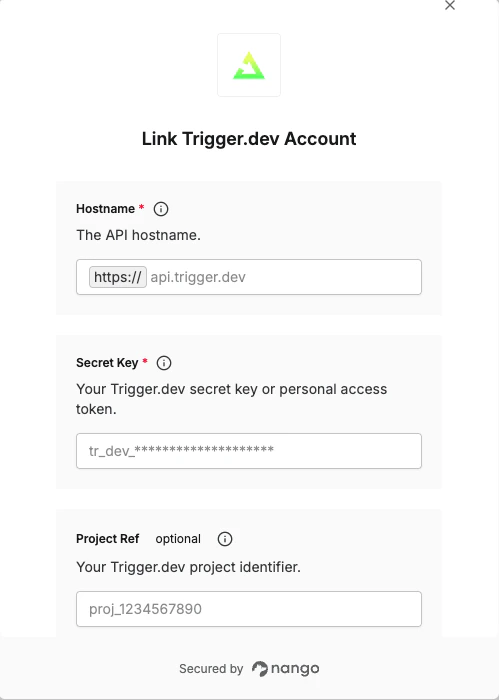
#### Step 6: Enter credentials in the Connect UI
1. Open the form where you need to authenticate with Trigger.dev.
2. Enter your **Secret Key or PAT**, and optionally your **Project Ref**, **Environment**, **Base URL**, and **Preview Branch**.
3. Submit the form to connect your account.
#### Step 3: Find your environment
The environment identifies which environment to target. Valid values are `dev`, `staging`, `prod`, and `preview`. This is only required when using a PAT for environment-specific operations such as managing environment variables.
#### Step 4: Set your base URL
Enter the hostname for your Trigger.dev instance:
* **Cloud**: `api.trigger.dev`
* **Self-hosted**: your own hostname (e.g. `trigger.example.com`)
#### Step 5: Set your preview branch
If you are targeting the `preview` environment and need to scope operations to a specific branch, enter the branch name (e.g. `feature-xyz`). This field is optional and has no effect outside the preview environment.
#### Step 6: Enter credentials in the Connect UI
1. Open the form where you need to authenticate with Trigger.dev.
2. Enter your **Secret Key or PAT**, and optionally your **Project Ref**, **Environment**, **Base URL**, and **Preview Branch**.
3. Submit the form to connect your account.
 You are now connected to Trigger.dev.
***
You are now connected to Trigger.dev.
***