> ## Documentation Index
> Fetch the complete documentation index at: https://nango.dev/docs/llms.txt
> Use this file to discover all available pages before exploring further.
# Agentcard - How do I link my account?
> Create an OAuth client in the Agentcard dashboard and connect it to Nango
# Overview
To authenticate with the Agentcard API, you need:
1. **Client ID** - The OAuth client ID for your Agentcard organization
2. **Client Secret** - The OAuth client secret paired with that ID
This guide walks you through finding both in the Agentcard dashboard and connecting them to Nango. There is no user redirect: Agentcard uses OAuth 2.0 client credentials, and the credential decides whether you reach sandbox or production. The API base URL is always `https://api.agentcard.sh`.
### Prerequisites
* An Agentcard account with an organization ([sign up](https://agentcard.sh))
### Instructions
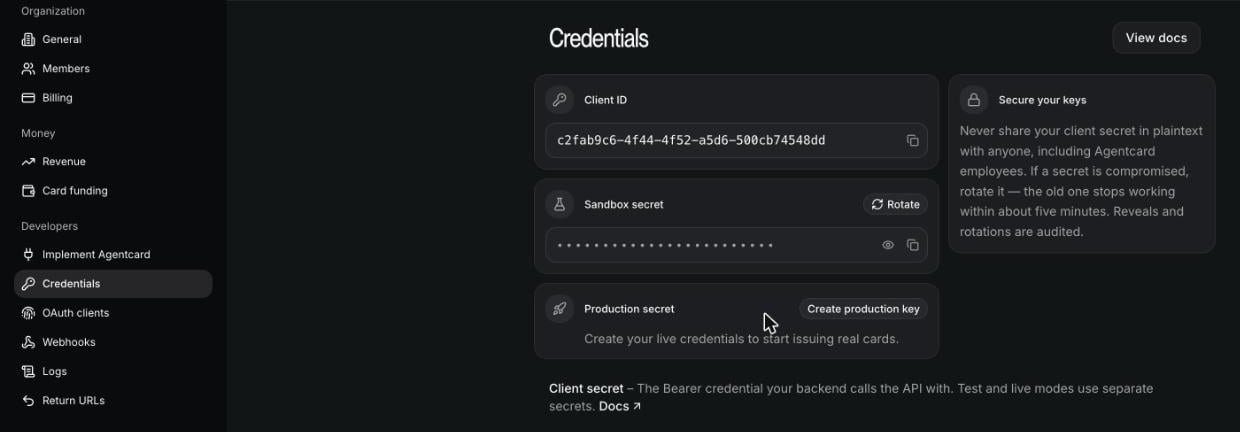
#### Step 1: Open the Credentials page
1. Sign in to the Agentcard dashboard.
2. Select your organization.
3. Go to **Settings** -> **Developers** -> **Credentials**.
#### Step 2: Copy your Client ID and Client Secret
1. Your **Client ID** is shown on the Credentials page.
2. Reveal and copy the **secret** for the environment you want: sandbox to test without moving money, or production for live cards (production requires an active subscription). Secrets start with `acs_`.
Prefer the terminal? Install the CLI with `npm i -g agent-cards`, then run `agent-cards companies login` and `agent-cards companies credentials create`. It prints a Client ID and Client Secret; the secret is shown once.
 #### Step 3: Enter credentials in the Connect UI
1. Open the form where you need to authenticate with Agentcard.
2. Enter your **Client ID** and **Client Secret** in their respective fields.
3. Submit the form, and you should be successfully authenticated.
You are now connected to Agentcard.
#### Step 3: Enter credentials in the Connect UI
1. Open the form where you need to authenticate with Agentcard.
2. Enter your **Client ID** and **Client Secret** in their respective fields.
3. Submit the form, and you should be successfully authenticated.
You are now connected to Agentcard.