
TL;DR
A unified API provides a single interface to build integrations with many third-party APIs. For example, instead of building separate integrations for Salesforce, HubSpot, and Pipedrive from scratch, a unified API handles the heavy lifting (auth, data syncs, webhooks, API calls, tool-calls, rate limits, and retries) so you can ship integrations faster with less maintenance.
There are two distinct implementations:
- Unified integration infrastructure (Nango): Provides a unified interface for auth, data syncs, webhooks, and tool calls, while letting you write custom integration code per provider. You control the data model. You can consume each API’s data as-is or build your own normalized models on top of it.
- Pre-built unified data models (Merge, Apideck, Unified.to): Normalize data from different providers into a single standardized schema. Faster initial setup with very little per-provider code, but the normalized schemas are inherently limiting. You lose access to custom fields, niche endpoints, and provider-specific capabilities. In practice, nullable fields and inconsistent enum mappings still require provider-specific handling. You may also not be able to submit your app to a provider marketplace like Salesforce AppExchange or NetSuite SuiteApp.
With AI coding agents, the unified infrastructure approach is now the better choice regardless of your use case. Coding agents can generate custom integration code, create universal data schemas, and map each provider’s data to your model in minutes. The “more setup work” argument for custom integrations no longer applies. And if you’re building an AI product, coding agents already understand different API schemas natively, so a pre-built data model adds unnecessary overhead.
What is a unified API?
A unified API provides a single interface for building and running integrations across multiple third-party APIs. Rather than building separate infrastructure for every provider your customers use, a unified API handles the common hard problems (authentication, data syncing, webhook management, rate limits, retries, observability) across all of them.
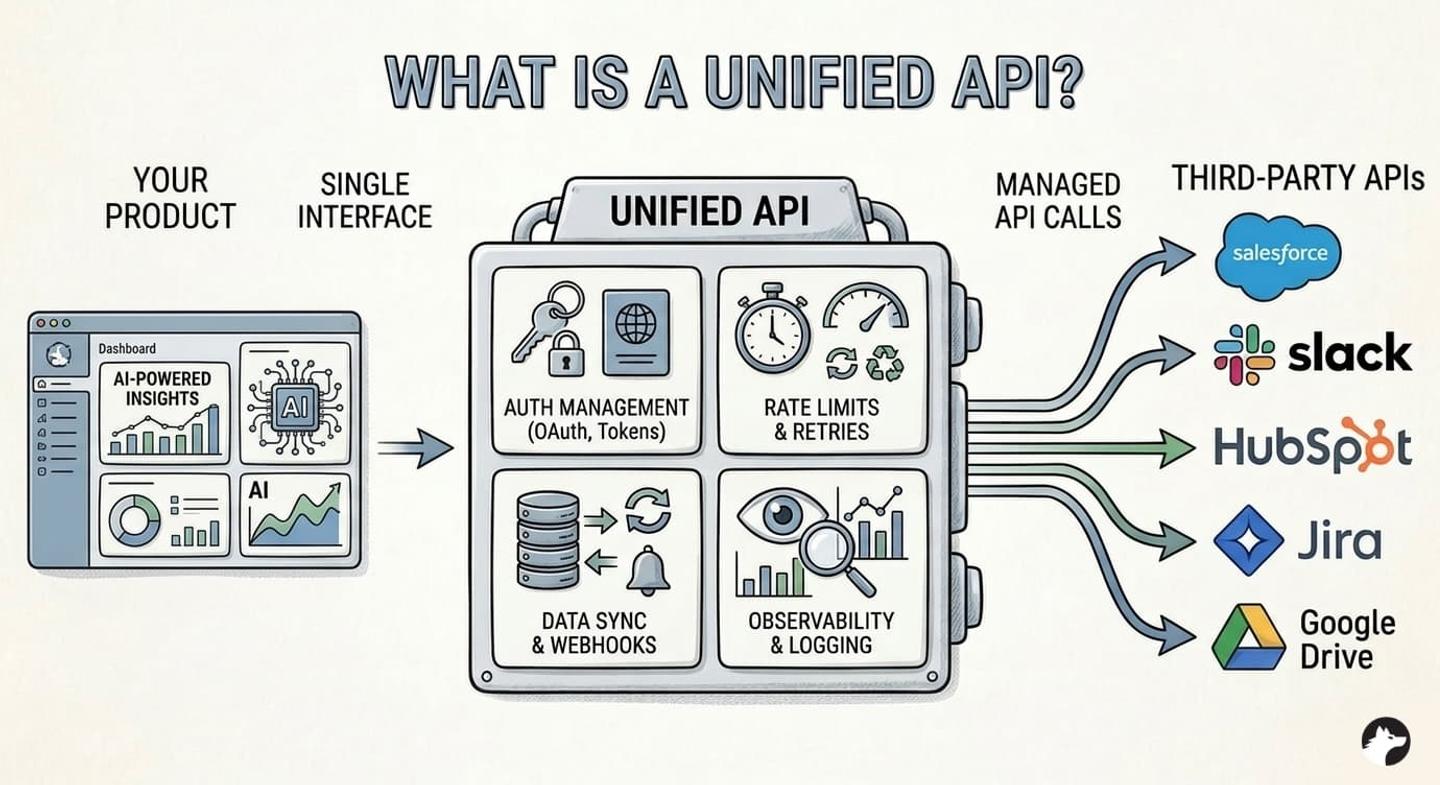
The definitions and implementations of unified API differ between providers:
The first approach, used by platforms like Nango, provides a unified interface for API auth, data syncs, tool calls, and webhooks, while letting you write custom integration code per provider. You control the data model and sync logic. You can either consume each API’s data as-is or build your own normalized models on top. In practice, AI coding agents handle most of this work: they generate the integration code, create data mappings, and write test suites, so the per-provider effort is minimal.
The second approach, used by platforms like Merge and Apideck, normalizes data across multiple providers into a single common schema. A contact is a contact, whether it comes from Salesforce or HubSpot, with the same field names and data types. This works well for basic use cases, but even standard data models across CRMs are surprisingly diverse. Salesforce and HubSpot contacts share only about 5 fields. Custom fields, custom objects, and provider-specific features cannot be represented in the normalized schema.
Why use a unified API?
The alternative to a unified API is building and maintaining individual integrations yourself. For a typical B2B SaaS product, that means handling OAuth flows, token refresh logic, pagination quirks, rate limits, webhook management, and data syncing for every API integration you build.
Pros and cons of using a unified API
Pros
- Faster time-to-market: Adding a new provider takes hours instead of weeks. The authentication, data fetching, and error handling infrastructure is already in place.
- Lower maintenance burden: When a provider changes their API (and they will), the unified API handles the update. You don’t maintain dozens of individual API clients.
- Simplified auth management: OAuth alone is surprisingly hard to get right. A unified API handles token refresh, concurrency issues, and provider-specific auth quirks across all integrations.
- Full API access (infrastructure approach): With a code-first platform like Nango, you get full access to every provider’s API. Custom fields, custom objects, and niche endpoints are all available. You can also build your own normalized data models on top if needed.
- Consistent data access: A unified API gives you a predictable interface for reading and writing data across multiple API providers.
- AI-agent ready: Infrastructure platforms like Nango support custom tool calls, MCP servers, and per-customer auth, which are the building blocks AI agents need.
Cons
The main drawbacks apply to pre-built unified data model platforms (Merge, Apideck, Unified.to):
- Lowest-common-denominator data: Normalized schemas only cover fields shared across providers. Custom fields, custom objects, and provider-specific features are left out.
- Implementation gaps: A platform may claim to support 10 entities across 50 APIs, but a specific API might only have implementations for half of those entities. “100+ integrations” often means surface-level connectivity where many endpoints and data types are missing for any given provider.
- Vendor lock-in: Your integration logic lives on their platform, and you don’t control how it works. If the vendor’s sync logic handles edge cases differently than your product requires, you can’t fix it. Migrating away means rebuilding from scratch.
- Not suited for AI agents: LLMs can interpret different API schemas natively. A normalization layer adds unnecessary overhead between the agent and the data it needs.
- No Marketplace presence: Most large vendors have app marketplaces and partner programs. Getting listed in the Salesforce AppExchange or NetSuite SuiteApp marketplace can drive distribution. Pre-built unified APIs typically don’t allow you to maintain a direct relationship with the vendor. However, this would not be an issue if you use a code-first integration platform (like Nango).
For infrastructure platforms like Nango, the traditional con is that you write integration logic per provider. In practice, today’s AI coding agents make this a non-issue. Nango’s API integrations builder skill lets engineers use Claude Code, Cursor, or any coding agent to generate, test, and deploy integrations in minutes.
Unified API vs. universal API
“Universal API” and “unified API” are used interchangeably across the industry. Both describe the same concept: a single API interface that abstracts multiple third-party APIs.
Some vendors use “universal API” in their marketing to suggest broader coverage (any API, not just those in a specific category). In practice, the distinction is not meaningful. Whether a platform calls itself a unified API or a universal API, evaluate it on the same criteria: how many providers it supports, how deep the integration goes, and how much flexibility you retain.
A brief history of unified APIs
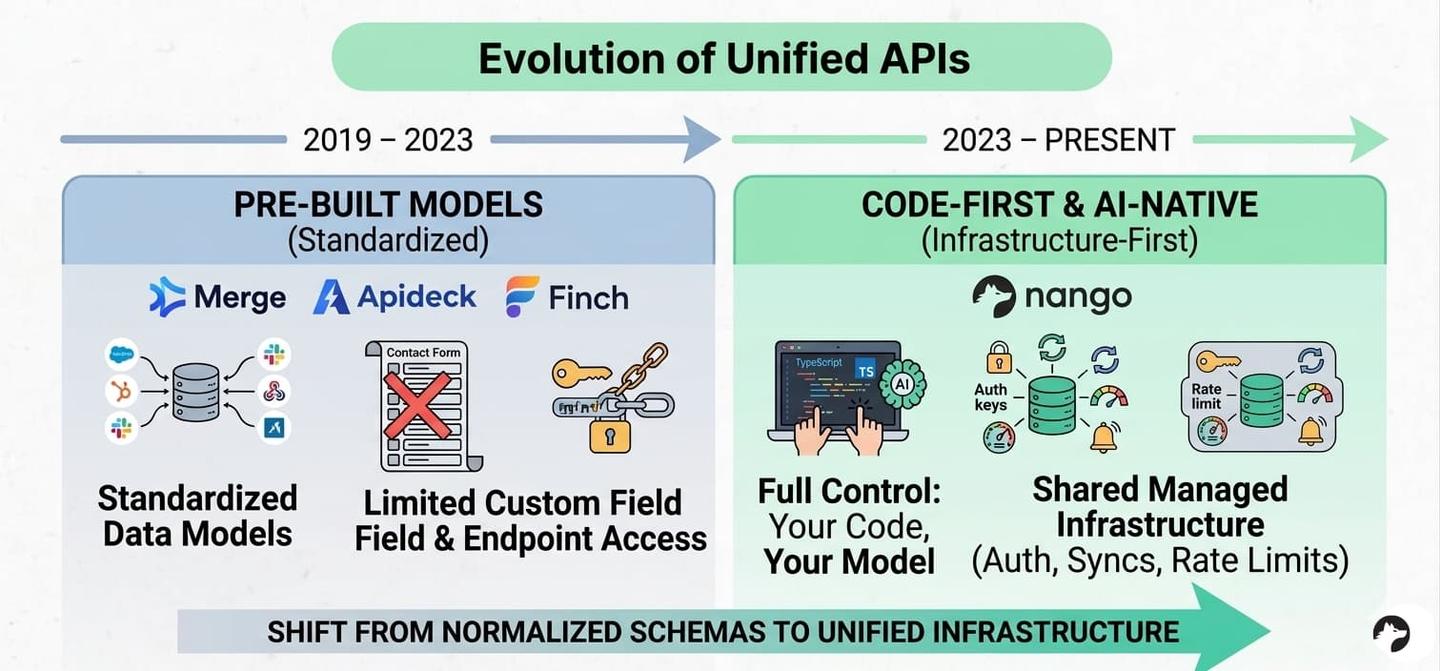
First generation: Pre-built unified data models (2019-2023)
The first wave of unified API platforms arrived around 2019-2020 with companies like Merge, Apideck, and Finch. Their approach: define standardized data models for common software categories (CRM, HRIS, ATS, accounting) and normalize every provider’s data into those models.
This worked well for a specific use case: early-stage B2B SaaS companies that needed to offer 10-20 integrations quickly without dedicating engineering resources to each one. If your product needed basic contact syncing across CRM providers, a pre-built unified API could deliver that in a day.
But the approach had inherent limitations that became more apparent as you scaled. Custom fields were not supported. Niche or regional APIs were missing. The normalized data models covered only a fraction of what most APIs actually offer (surface-level connectivity). And when the unified API didn’t support the endpoint you needed, the escape hatch (passthrough requests) required you to learn each provider’s API, defeating the original value proposition.
Current generation: Code-first and AI-native (2023-present)
A newer approach emerged: provide the hard infrastructure (auth, syncs, tool calls, webhooks, scheduling, observability) as a unified platform, while letting engineers write custom integration code per provider.
Nango pioneered this approach. Instead of pre-built data models, Nango gives you a TypeScript runtime where you write integration scripts that run on managed infrastructure. You define your own data models, control exactly which fields to sync, and access every endpoint each provider offers.
Two things make this approach compelling:
- AI coding agents can write integrations: Tools like Claude Code, Cursor, and OpenCode can generate, test, and iterate on integration code directly. The “more setup work” argument against custom integrations has weakened dramatically. For example, Nango’s API integrations builder skill lets AI coding agents build complete integrations in minutes.
- LLMs don’t need normalized schemas: AI agents can interpret what an external API returns, even when field names differ or have slightly different meanings across providers. Normalized schemas are less relevant for AI agents because LLMs are good at interpolating context. Pre-built unified APIs add an unnecessary abstraction layer between the agent and the data it needs.
With code-first platforms like Nango, you can still build your own version of pre-built unified data models if you want to. The infrastructure handles the hard parts (auth, rate limits, syncing, retries), and you control the data model layer. This gives you the best of both worlds: the speed of shared infrastructure with the flexibility to normalize data on your own terms. See the best practices for building a unified API for a practical guide on this approach.
Unified API for AI products and agents
When we say “unified” for AI agents, we mean unified auth, tool calls, data syncs, webhooks, and observability through a single interface. Not a traditional unified API that normalizes data across similar providers into a single schema.
If you’re building an AI product (agents, RAG pipelines, AI-powered SaaS), these are the features that matter most:
| Feature | Why it matters for AI Agents |
|---|---|
| Managed auth (OAuth, API keys) | Agents need to authenticate users across multiple providers without handling token refreshes or OAuth flows. |
| Custom tool calls / MCP servers | Agents need to call provider-specific endpoints, not just read normalized data. |
| Data syncs with webhooks | RAG pipelines need fresh data; webhook-triggered syncs keep vector stores current |
| Real-time vs. cached data | Some agent actions need live data (e.g., checking calendar availability), others can use synced snapshots. |
| Custom data models | Your agent's tool schema should match your product's domain, not a generic unified model. |
| Per-customer configuration | Each customer connects different providers with different scopes and field mappings. |
| Observability | When an agent's API call fails, you need logs and traces to quickly debug it. |
| Token-free execution | Agents can make API requests and execute integrations without direct access to user credentials. The platform injects auth at runtime, so sensitive tokens never reach the agent layer. |
| Self-hosting option | Enterprise customers often require data to stay within their infrastructure. |
How Nango covers unified API features
Nango is an open-source, code-first integration platform that covers all of the above:
- Auth: Managed OAuth and API key handling for 1,000+ APIs, with automatic token refresh and concurrency-safe credential management.
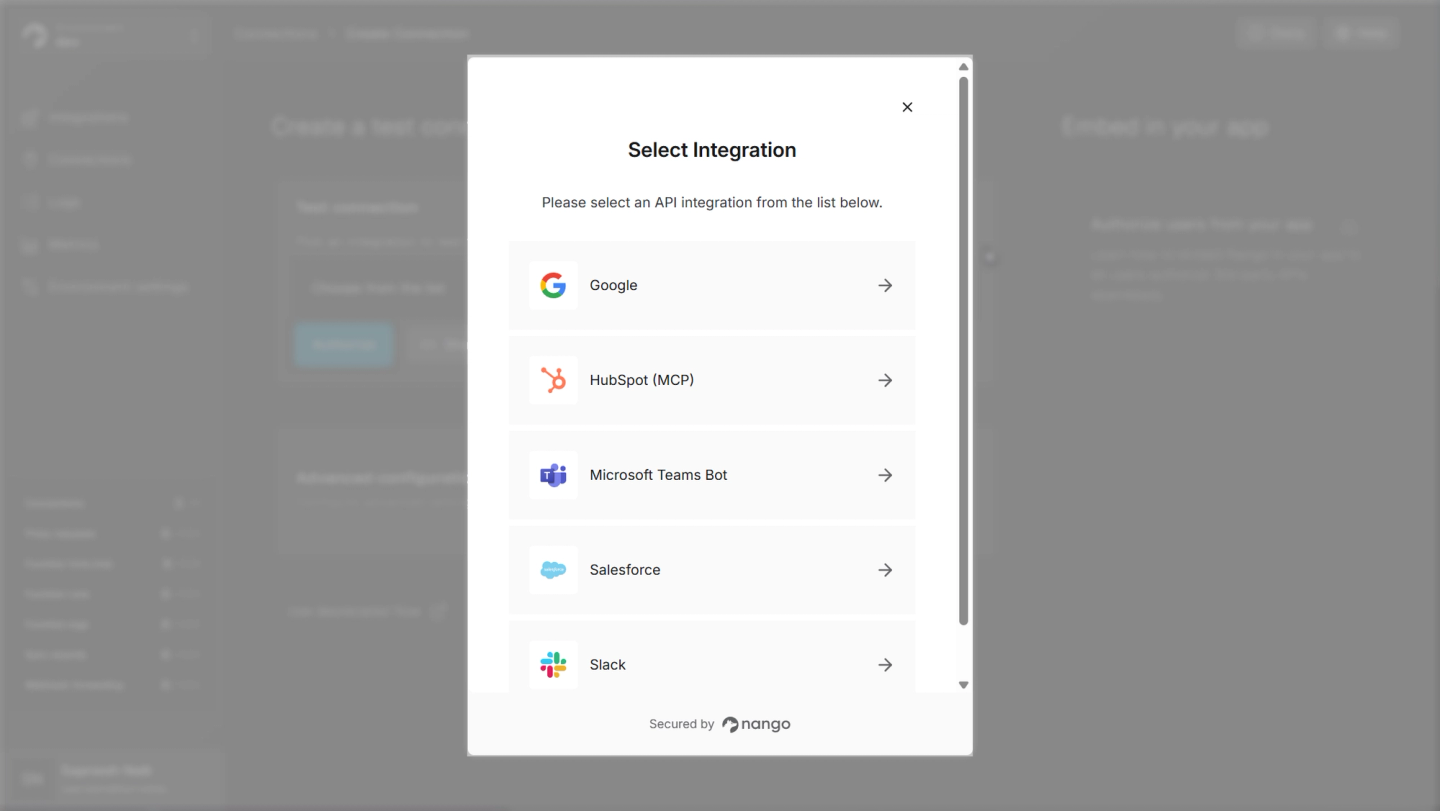
- Tool calls: Write custom functions that become API tools for your AI agents. Nango handles auth injection, rate limiting, retries, and error handling. Native MCP server support for agent frameworks.
export default createAction({
  description: 'Fetch the current user profile from HubSpot',
  input: z.void(),
  output: z.object({
    id: z.string(),
    email: z.string(),
    name: z.string(),
  }),
  exec: async (nango) => {
    // Auth, rate limiting, retries & error handling are automatic
    const response = await nango.get({ endpoint: '/account-info/v3/details' });
    return {
      id: response.data.portalId,
      email: response.data.email,
      name: response.data.name,
    };
  },
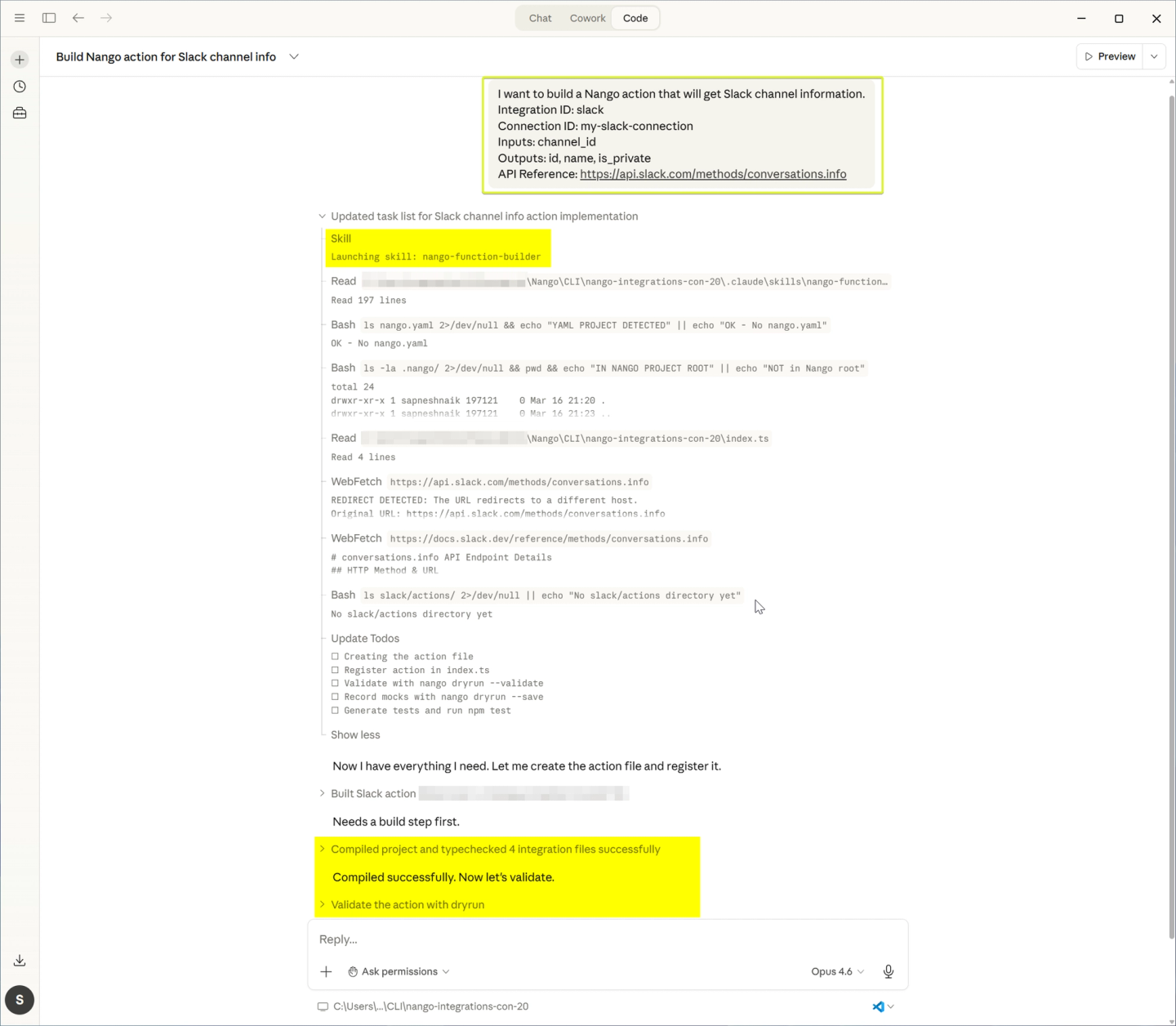
}); - AI coding agent skills: Engineers can use Claude Code, Cursor, or any AI coding agent to build custom tool calls, syncs, and webhook actions without learning Nango-specific SDKs. Nango’s API integrations builder skill generates the function code, creates a full test suite, validates with
nango dryrun, and iterates on failures. You can deploy custom integrations in minutes.
- Data syncs: Incremental syncs with configurable frequency, webhook-triggered updates, and full control over what data gets synced and how it’s transformed.
// Simplified example
export default createSync({
  frequency: 'every hour',
  checkpoint: z.object({ lastModifiedISO: z.string() }),
  models: { ... },
  exec: async (nango) => {
    const checkpoint = await nango.getCheckpoint();
    const contacts = await fetchContacts({ since: checkpoint?.lastModifiedISO });
    await nango.batchSave(contacts, 'Contact');
    await nango.saveCheckpoint({
      lastModifiedISO: contacts.at(-1).lastModifiedISO
    });
  }
});
- Custom models: You define the data models in TypeScript. Map each provider’s fields to your schema exactly how you want.
// models.ts — Define your unified model once
import * as z from 'zod';

export const Contact = z.object({
  id: z.string(),
  name: z.string(),
  email: z.string().email(),
  company: z.string().optional(),
});

// Salesforce → your model
export default createSync({
  output: Contact,
  exec: async (nango) => {
    const res = await nango.get({ endpoint: '/sobjects/Contact' });
    return res.data.records.map((c) => ({
      id: c.Id,
      name: c.Name,
      email: c.Email,
      company: c.Account?.Name,
    }));
  },
});

// HubSpot → same model
export default createSync({
  output: Contact,
  exec: async (nango) => {
    const res = await nango.get({ endpoint: '/crm/v3/objects/contacts' });
    return res.data.results.map((c) => ({
      id: c.id,
      name: `${c.properties.firstname} ${c.properties.lastname}`,
      email: c.properties.email,
      company: c.properties.company,
    }));
  },
});
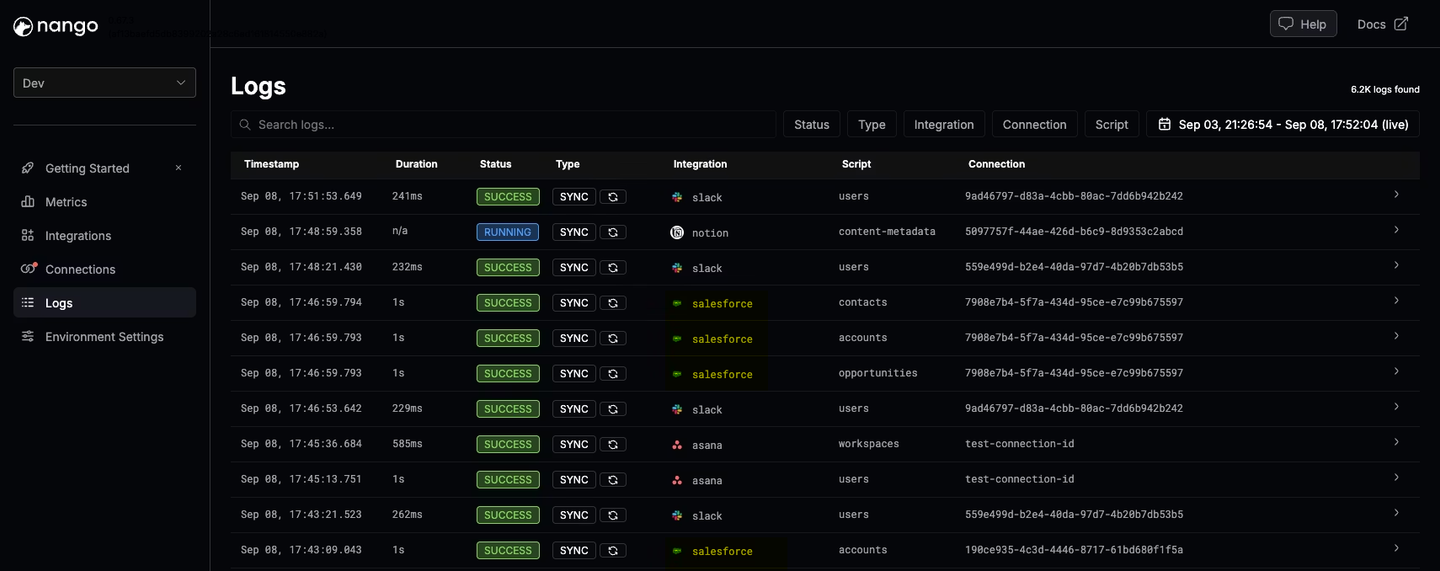
- Observability: Real-time logs, OpenTelemetry support, and per-request traces across all integrations.
For a detailed comparison of how Nango stacks up against other platforms for AI use cases, see Best unified API platform for AI agents and RAG in 2026.
Best unified API platforms
Here’s how the major players compare:
| Platform | Approach | Integrations | Best for |
|---|---|---|---|
| Nango | Unified infrastructure (code-first) | 1,000+ APIs | Teams building integrations as a core product capability requiring flexibility to implement integrations as per their requirements with managed auth, custom tool-calls, data syncs, webhooks, MCP, and AI coding agent support. |
| Merge | Pre-built data models | 200+ connectors across 6 categories | Teams needing pre-built CRM integrations with a normalized schema and don't need deep custom object support or per-customer field configuration. |
| Apideck | Pre-built data models | 25+ API categories | Teams needing quick CRM integrations with basic field mapping, without needing deep custom object support. |
| Unified.to | Pre-built data models + MCP | 424 sources across 25 categories | Teams wanting real-time CRM data access with no data storage, data syncs, or broad category coverage, and can work with pre-built connectors. |
For an in-depth comparison with pros and cons, see Best unified API platforms to consider in 2026.
Unified API pricing
Unified API pricing varies significantly, and the wrong model can create issues as you scale.
The legacy pricing problem: Pre-built unified API platforms like Merge and Apideck charge per connection (or “linked account”). If you have 500 customers each connecting to 3 providers, you’re paying for 1,500 connections. Merge charges per linked account with annual commitments. Apideck uses a similar per-connection model. Additional fees for features like field mapping, advanced syncing, or observability add up quickly. This means costs grow linearly with your customer base, not with actual usage.
Usage-based pricing: Modern unified API platforms use usage-based pricing. You pay for what you use (connections, syncs, API calls) with no platform fees or annual commitments.
Nango’s pricing is fully transparent and usage-based:
- Free tier for development and testing, with no time limits
- Paid plans starting at $50/month with included usage
- Monthly terms (upgrade, downgrade, or cancel anytime)
- Volume discounts at scale
This lets you test the platform thoroughly, launch integrations incrementally, and scale costs predictably as your product grows.
For a detailed pricing breakdown, see our analysis of Merge pricing.
Unified API vs. other integration approaches
| Unified API (infrastructure) | Unified API (pre-built models) | Embedded iPaaS | Direct API integration | |
|---|---|---|---|---|
| Setup speed | Fast | Fast | Medium | Slow |
| Flexibility | High | Low | Medium | Highest |
| Custom fields | Yes | No | Varies | Yes |
| AI agent support | Strong | Limited | Varies | Manual |
| Maintenance | Low (infrastructure-managed) | Low (vendor-managed) | Medium | High |
| Cost at scale | Moderate (usage-based) | High (per-connection) | High | Engineering time |
| Control | High | Low | Medium | Full |
For a broader comparison of integration approaches, see Four ways to build in-app integrations and What is an embedded iPaaS?.
FAQ
How fast can I build integrations with a unified API?
With Nango, you can go from zero to a working integration in minutes. The fastest path is pre-built integration templates, which give you a working starting point for common use cases. From there, Nango’s AI coding agent skills let engineers use Claude Code, Cursor, or any coding agent to customize, test, and deploy integration code. The platform handles auth, syncing, retries, and infrastructure, so your team focuses on the integration logic. Pre-built data model platforms (Merge, Apideck) also offer fast setup for basic use cases, but you trade speed for flexibility.
Can a unified API handle custom fields and custom objects?
Nango gives you full control over data models in code, so custom fields, custom objects, and provider-specific data are fully supported. This matters as you move upmarket. Enterprise customers rely on custom CRM fields, custom pipeline stages, and proprietary objects. Pre-built unified APIs generally cannot handle these. They use fixed schemas that cover only standard fields, leaving custom data inaccessible.
Is a unified API the same as an API gateway?
No. An API gateway manages access to your own APIs (rate limiting, authentication, routing). A unified API provides a single interface to interact with other companies’ APIs. They solve different problems at different layers of the stack.
Which unified API is best for AI agents?
We recommend a code-first, infrastructure-based platform like Nango. AI agents need custom tool calls, provider-specific data, data-syncs, and real-time auth, not normalized data models. LLMs can already interpret different API schemas natively, so pre-built model-style APIs add unnecessary overhead. Nango’s code-first approach lets you define exactly the tools your agent needs, with managed auth, an MCP server, and infrastructure underneath. See why AI agents need an integrations platform for a deeper analysis.
How does a unified API handle security and data residency?
Security requirements vary by platform. Nango offers SOC 2 compliance, a self-hosting option for full data residency control, and scoped OAuth with per-customer credential management. If you use Nango’s data syncs, you can also manually prune cached data at any time for tighter data lifecycle control. For enterprises that require data to stay within their infrastructure, self-hosting is a critical differentiator.
Pre-built unified API platforms typically store and cache customer data on their own servers. This creates compliance and security risks, especially for regulated industries or customers with strict data residency requirements. Data residency options on these platforms are usually limited to higher pricing tiers.
What happens when a provider changes their API?
With a unified API platform, the vendor handles provider-side API changes. Nango’s open-source integration templates are community-maintained and updated regularly. If a provider deprecates an endpoint or changes their data format, the platform absorbs the update so your team does not need to scramble. This is one of the strongest arguments for using a unified API over building integrations in-house.
Conclusion
A unified API simplifies how you connect your product to third-party services. The right approach depends on what you’re building.
If you need basic integrations quickly and don’t anticipate complex requirements, pre-built unified data models can get you started fast.
If you’re building an AI product, need custom field support, or want full control over your integrations without building infrastructure from scratch, a code-first unified integration platform like Nango is the stronger long-term choice. You get managed auth, syncs, webhooks, and tool calls across 1,000+ APIs, with full flexibility to write custom integration logic per provider.
Related reading
- Best practices for building a unified API
- How to build a unified API for your product integrations
- Best unified API platforms to consider in 2026
- Best unified API platform for AI agents and RAG in 2026
- Best unified API for CRM and ERP integrations
- Finding the best unified API in 2026
- Why B2B SaaS outgrow pre-built unified APIs
- How is Nango different from embedded iPaaS or other unified APIs?
- Best iPaaS for API unification

